

Running a successful online store isn’t just about displaying beautiful products - it’s about providing customers with a seamless and secure way to pay. Choosing the right payment solution can dramatically affect conversion rates, customer trust, and overall revenue. For WooCommerce store owners, Square emerges as one of the most efficient and reliable payment gateways available today.
By connecting Square to WooCommerce, you can manage payments both online and offline, sync inventory, and keep everything centralized in one system. The integration is not only straightforward but also incredibly powerful, helping merchants of all sizes run their businesses with confidence. Let’s take a closer look at what Square is, why it matters, and how you can maximize its potential inside your WooCommerce store.

What Is Square?
Square is a leading payment processing solution designed to empower businesses of all sizes. Initially popular for its mobile point-of-sale devices, Square has evolved into a full-featured platform that supports online payments, inventory management, invoicing, and even payroll. Its user-friendly tools and transparent pricing make it a trusted choice for small businesses and enterprise-level companies alike.
When you decide to use Square with WooCommerce, you unlock the best of both worlds: WooCommerce’s flexibility and Square’s robust payment capabilities. Whether you sell physical goods, digital downloads, or subscription services, Square enables you to accept payments securely and efficiently.
Moreover, Square simplifies compliance and security. It’s PCI-compliant, which means your store benefits from top-level data protection. You don’t have to worry about handling sensitive credit card information directly because Square ensures secure tokenization of transactions.
Why Use Square with WooCommerce?
WooCommerce is an excellent platform for building online stores, but on its own, it doesn’t process payments. That’s where Square comes in. Integrating Square means you can instantly accept credit cards, debit cards, Apple Pay, and Google Pay, both online and in person. This flexibility helps you serve customers where they shop most.
Another reason to use Square with WooCommerce is its inventory synchronization. If you also operate a physical retail location using Square’s POS system, your product data and stock levels will automatically sync with your WooCommerce store. This reduces the risk of overselling and keeps your operations consistent across multiple sales channels.
Additionally, Square’s analytics provide valuable insights. By analyzing customer behavior, transaction trends, and sales performance, you gain actionable data to optimize your business strategy. When paired with WooCommerce, this data can inform marketing campaigns, product launches, and pricing adjustments.
How to Use Square with WooCommerce
The process of connecting Square to your WooCommerce store is easier than you might think. With the WooCommerce Square plugin, you can quickly integrate both systems and begin accepting payments in minutes.
Here’s how it works step by step:
Step 1: Install and Activate the WooCommerce Square Plugin
- Log into your WordPress admin dashboard.
- Navigate to Plugins > Add New.
- Upload the WooCommerce Square plugin (downloaded from WooCommerce.com).
- Click Install Now and then Activate.

Step 2: Connect Square to WooCommerce
- Go to WooCommerce > Settings > Payments.
- Select Square as your payment method.
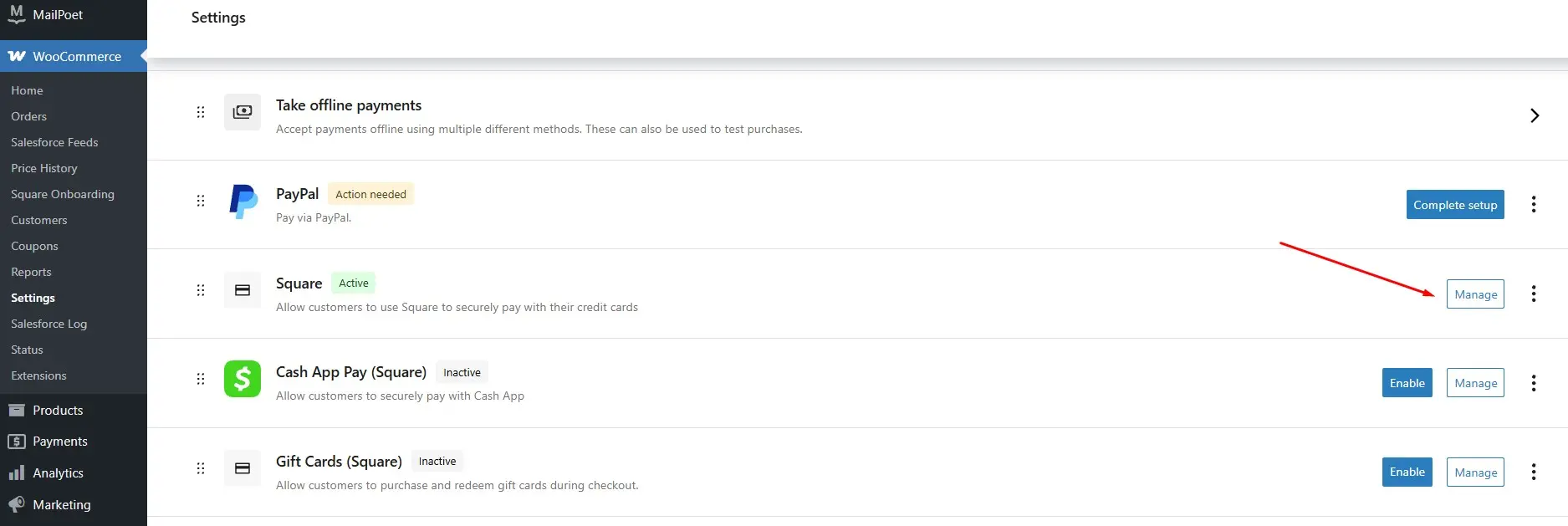
- Click Connect with Square and log into your Square account.
- Authorize WooCommerce to access your Square data.
Step 3: Configure Square Settings
- Choose which Square location you want to sync with your WooCommerce store.
- Enable payment methods such as Apple Pay or Google Pay if you’d like.
- Set Square as your default payment option if desired.

Step 4: Sync Products and Inventory
- Enable product synchronization so that Square and WooCommerce share inventory data.
- Decide whether to use WooCommerce as the system of record (main inventory source) or Square.
- Run a manual sync initially to ensure products match correctly.
Step 5: Test Transactions
- Place a test order to confirm that Square payments process smoothly.
- Check that inventory updates automatically between systems.
- Ensure confirmation emails and receipts are sent properly.
By completing these steps, you’ll be ready to use Square with WooCommerce effectively in your store.
Benefits of Using Square with WooCommerce
When you integrate Square into WooCommerce, you gain a host of advantages that simplify both store management and customer experiences.
1. Unified Inventory Management
If you sell online and in person, keeping inventory synced can be a headache. Square solves this by ensuring WooCommerce and your POS system always show the same product counts.
2. Faster Checkout Experiences
Customers expect quick and easy payment options. Square supports all major credit cards, digital wallets, and even recurring billing for subscriptions.
3. Security and Trust
With built-in PCI compliance and tokenization, Square ensures sensitive payment information never touches your servers. Customers can feel safe completing transactions.
4. Comprehensive Insights
Square provides detailed reporting tools. By combining these with WooCommerce analytics, you gain a clear view of your entire business performance.
5. Streamlined Refunds and Disputes
Handling refunds or disputes is easier because Square integrates directly into WooCommerce’s order system.
Advanced Features to Explore
Beyond standard payment processing, there are advanced capabilities you can unlock when you use Square with WooCommerce:
- Subscription Billing: Manage recurring payments for memberships or digital products.
- Mobile Payments: Accept in-person payments with Square POS while keeping your WooCommerce store updated.
- Custom Checkout Options: Offer localized payment methods depending on your target market.
- Gift Cards: Allow customers to purchase and redeem Square gift cards online and offline.
- Customer Profiles: Build detailed buyer histories to support loyalty programs or personalized offers.
These features expand the flexibility of WooCommerce and provide greater opportunities to scale your business.
Common Challenges and How to Solve Them
Even though integrating Square is relatively simple, you might encounter a few hurdles. Luckily, they can be resolved with ease.
- Duplicate Product Listings: Sometimes syncing can create duplicates. Ensure you’ve chosen either WooCommerce or Square as the master system for inventory.
- Payment Declines: Check that your SSL certificate is installed correctly and that your Square account is active.
- Slow Syncing: Manually run a sync in the plugin settings if automatic updates lag.
- Plugin Conflicts: Disable other payment gateway plugins temporarily to identify conflicts.
By addressing these issues, you ensure your Square-WooCommerce connection runs smoothly.
How Square Strengthens the WooCommerce Ecosystem
WooCommerce is powerful on its own, but its strength lies in integrations. By adding Square, you gain a fully operational payments and POS solution. This allows you to merge offline and online operations, turning WooCommerce into more than just an online store - it becomes a central hub for your entire business.
Ultimately, when you use Square with WooCommerce, you reduce complexity, increase sales efficiency, and provide a frictionless experience for your customers.

Final Thoughts
Choosing the right payment gateway can make or break your WooCommerce store’s success. By integrating Square, you don’t just process payments - you create a more seamless, secure, and connected ecosystem for your business. From syncing inventory to offering multiple payment options, the advantages are clear.
If you’re ready to simplify your payment process and build customer trust, it’s time to use Square with WooCommerce. This integration empowers your store with everything you need to sell smarter, faster, and more efficiently.
Interesting Reads:
How NetSuite Integrates with WooCommerce