

Every eCommerce store owner dreams of increasing the average order value while offering customers meaningful deals. One of the most effective strategies to achieve this is through product bundling. By grouping products together, you can provide irresistible offers, showcase product variety, and improve overall customer satisfaction. In WooCommerce, the Product Bundles for WooCommerce plugin offers an intuitive way to create, customize, and manage bundles that align perfectly with your business goals.
We will explore what product bundles are, why they matter, and how you can set them up step by step using the official WooCommerce plugin. We will also cover customization tips, best practices, and ways to optimize your bundles for conversions.

What Are Product Bundles in WooCommerce?
Product bundles are curated groups of products sold together at a single price. These bundles often provide value to customers by offering complementary items in one convenient package. For instance, a laptop bundle may include the laptop itself, a protective sleeve, and a wireless mouse.
When you use Product Bundles for WooCommerce, you gain the flexibility to create bundles that suit your store’s unique requirements. Whether it’s mixing physical products, downloadable content, or variable items, the plugin ensures you have complete control. Customers can view bundles, add them to their carts, and purchase them with ease, all while enjoying a streamlined shopping experience.
Why Should You Use Product Bundles for WooCommerce?
Bundling products is more than just a sales tactic; it’s a proven strategy to enhance customer engagement and drive higher revenue. When done strategically, bundles can simplify purchasing decisions, increase perceived value, and reduce cart abandonment.
With the Product Bundles for WooCommerce plugin, you also gain access to additional benefits:
- Higher Average Order Value (AOV): Customers often spend more when they see a bundled offer that feels like a deal.
- Upselling Made Easy: Instead of suggesting items individually, bundles introduce customers to a group of products they might not have considered.
- Simplified Marketing: Bundles can be used in promotions, email campaigns, or seasonal offers.
- Personalized Shopping: By creating bundles based on customer behavior, you improve satisfaction and build loyalty.
By leveraging these benefits, you can stand out from competitors and give your audience reasons to buy more with less effort.
The Power of Product Bundles in Action
To illustrate the power of bundling, let’s consider two common use cases:
- Gift Packages: During holidays or special events, a pre-designed gift bundle saves customers time and effort.
- Starter Kits: A “Beginner Photographer Kit” could include a camera, memory card, and tripod - all essential items for a new hobbyist.
These examples highlight how bundles create convenience and value. With the Product Bundles for WooCommerce plugin, building such creative packages is not only possible but also straightforward.
Step-by-Step Guide: How to Set Up Product Bundles in WooCommerce
Step 1: Install and Activate the Plugin
Start by purchasing the Product Bundles for WooCommerce plugin. After downloading the plugin file:
- Go to your WordPress dashboard.
- Navigate to Plugins > Add New > Upload Plugin.
- Upload the plugin’s .zip file.
- Click Install Now, then Activate.

Once activated, the plugin integrates seamlessly into your WooCommerce store.
Step 2: Create a New Product Bundle
After activation:
- Go to Products > Add New.
- Enter a name for your bundle, such as “Office Starter Pack.”
- Scroll down to the Product Data section.
- From the dropdown menu, select Product Bundle.
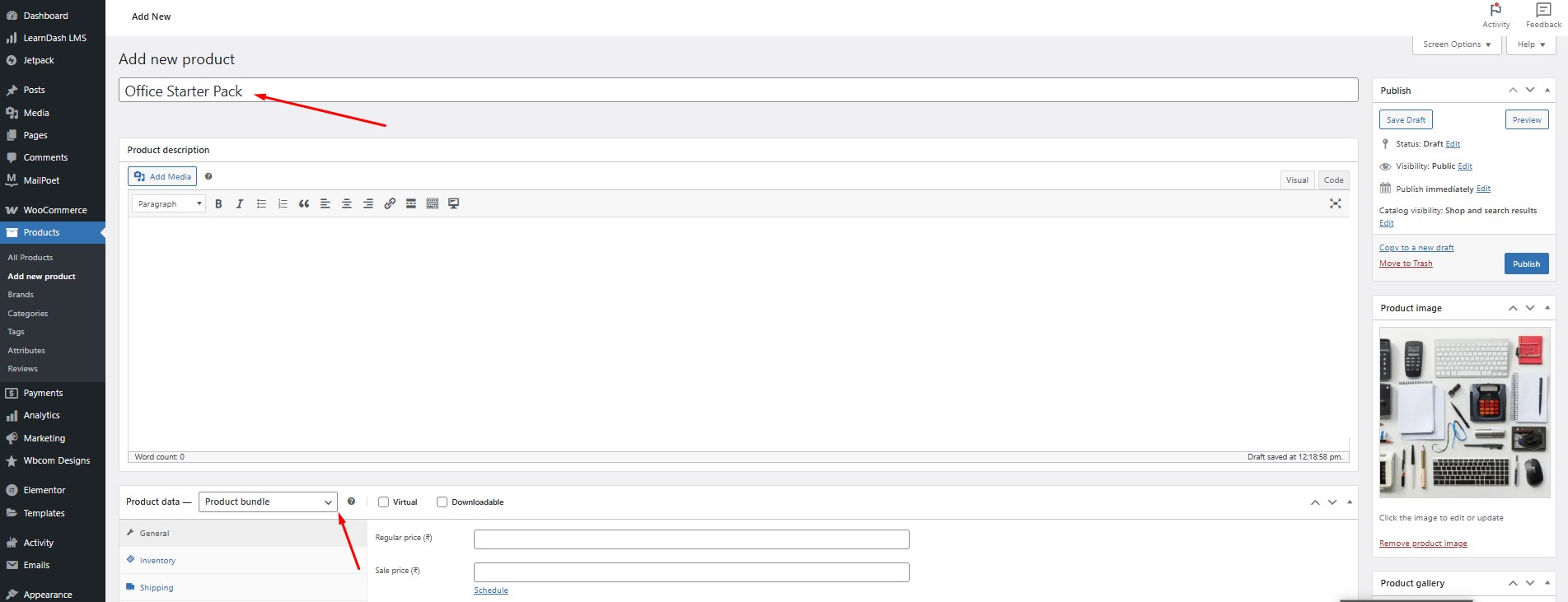
This is where the customization magic begins.
Step 3: Add Products to the Bundle
Inside the Bundle Settings panel:
- Use the Add Products button to search and include items.
- For example, if creating a coffee bundle, add a coffee maker, coffee beans, and mugs.
- Adjust the quantity for each item.
This ensures that every customer gets the right combination in one click.
Step 4: Configure Pricing Options
You have two pricing methods with Product Bundles for WooCommerce:
- Fixed Price: Set a single price for the bundle.
- Per-Item Pricing: Allow the price to reflect the sum of the bundled products.
If you want to create promotional deals, fixed pricing works well. For customizable bundles, per-item pricing provides flexibility.
Step 5: Set Up Shipping Options
Shipping is critical when bundling products:
- Choose whether the bundle ships as a single package or individual items.
- Configure weight and dimensions if shipping as one unit.
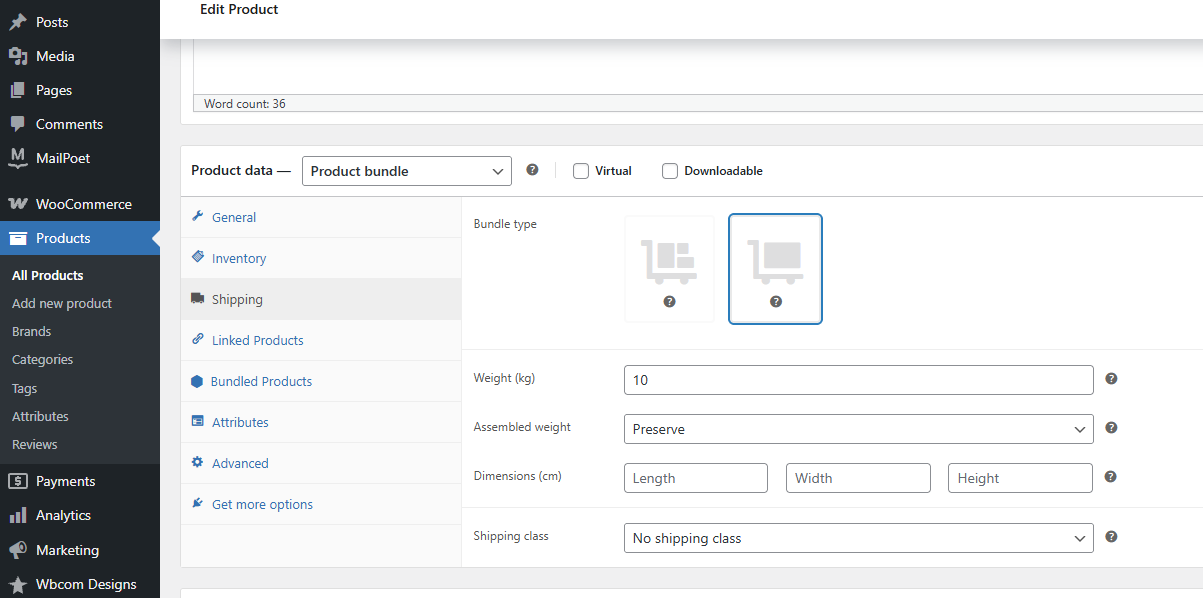
This step ensures accurate shipping costs and reduces potential errors.
Step 6: Customize Bundle Layouts and Visibility
The plugin allows you to choose how bundles appear on product pages:
- Show bundled items individually with images and descriptions.
- Display bundles as a single grouped product.
You can also set rules such as:
- Allowing customers to remove items from bundles.
- Requiring certain products to remain mandatory.
Step 7: Publish and Test Your Bundle
Finally, click Publish to make your bundle live. Test the customer experience by adding the bundle to your cart, checking pricing, and verifying the checkout process.
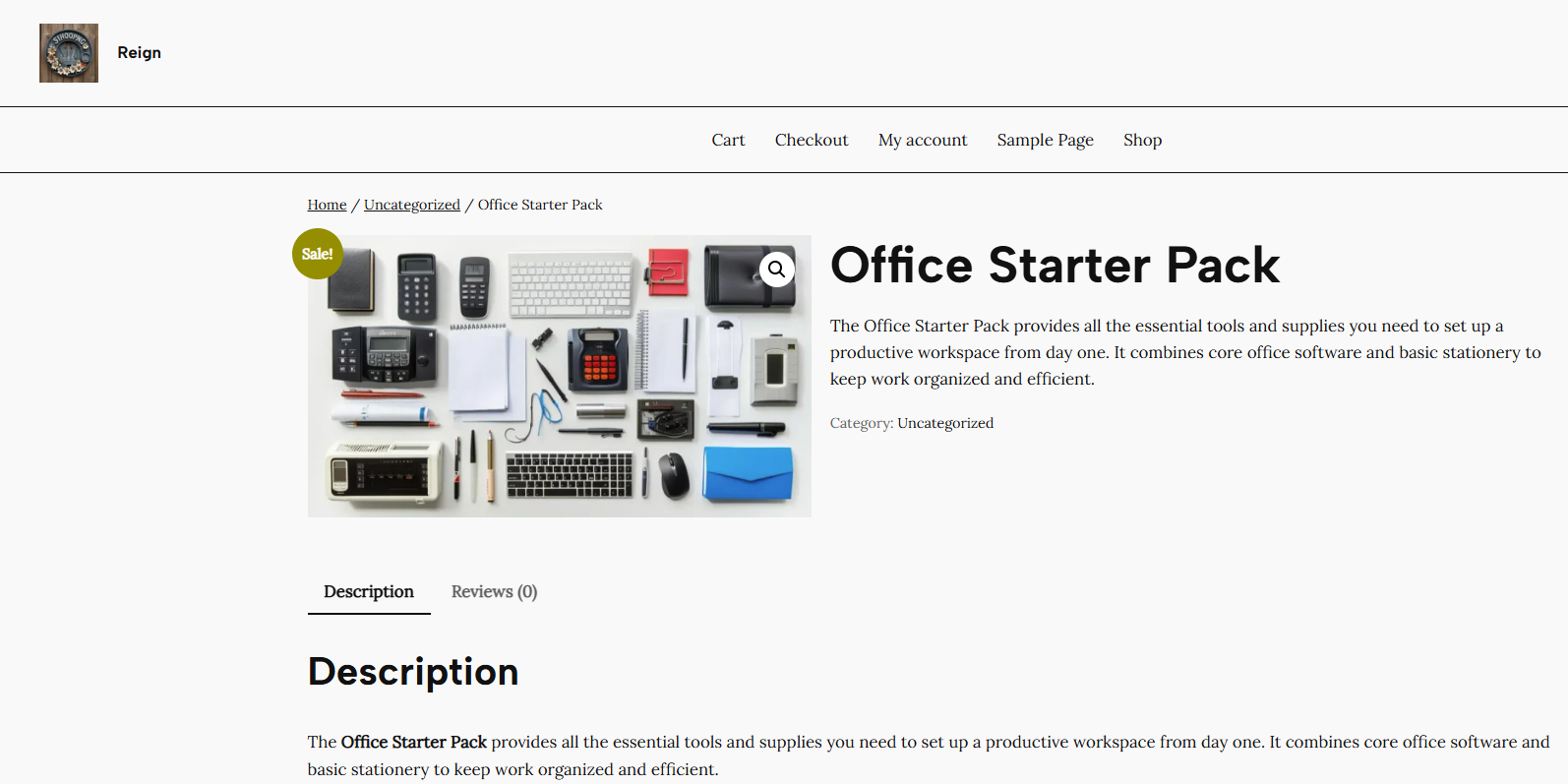
Creative Ways to Customize Product Bundles
Seasonal Bundles
Create bundles for holidays, such as “Christmas Family Feast Bundle” or “Back-to-School Essentials.” With Product Bundles for WooCommerce, these bundles can be featured prominently in your store to attract seasonal buyers.
Personalized Bundles
Allow customers to choose from a list of items to create their own bundle. This interactive approach increases engagement and gives shoppers a sense of control.
Discounted Bundles
Offer a discount when customers purchase items together. For example, buy a printer and paper at 15% off. These types of bundles can boost conversions significantly.
Best Practices for Using Product Bundles for WooCommerce
When setting up bundles, consider these best practices:
- Keep It Simple: Avoid overwhelming customers with too many choices.
- Use Visuals: High-quality images make bundles more appealing.
- Highlight Savings: Show how much customers save by choosing a bundle.
- Test Pricing Strategies: Experiment with fixed vs. per-item pricing.
- Promote Smartly: Use email campaigns and homepage banners to advertise bundles.
By applying these strategies, you make your bundles not only functional but also highly attractive.
How to Market Product Bundles Effectively
Simply creating bundles won’t guarantee success. You must actively promote them:
- Email Marketing: Send dedicated campaigns featuring new bundles.
- Social Media Promotions: Highlight seasonal or limited-time bundles.
- Upselling on Product Pages: Suggest bundles as an upgrade option.
- Homepage Features: Display bundles in your hero banners for maximum visibility.
These marketing tactics ensure your Product Bundles for WooCommerce are discovered and purchased by the right audience.
Troubleshooting Common Issues with Product Bundles
While the plugin is user-friendly, issues can arise:
- Pricing Errors: Double-check whether you’ve set fixed or per-item pricing correctly.
- Shipping Confusion: Ensure shipping options are configured properly to avoid inflated costs.
- Theme Compatibility: Test bundles on your theme to confirm design consistency.
Addressing these common issues quickly ensures smooth operation and a positive customer experience.
Advanced Customization Tips
For advanced users, customization options are endless:
- Dynamic Pricing Rules: Offer discounts for larger quantities.
- Integration with Subscriptions: Sell bundled products as a recurring subscription.
- Cross-Selling Opportunities: Suggest additional bundles at checkout.
These advanced strategies maximize the power of Product Bundles for WooCommerce and open the door to recurring revenue streams.

Final Reflection
Product bundling is not just about selling more products - it’s about delivering value, creating convenience, and fostering long-term customer relationships. With Product Bundles for WooCommerce, you can easily set up and customize bundles that reflect your store’s vision while boosting profitability.
By following the step-by-step guide and implementing creative strategies, your WooCommerce store can transform bundles into one of the most powerful tools in your eCommerce toolkit. Start experimenting today, and you’ll quickly see how bundles can elevate your brand’s sales performance.
Interesting Reads:
How to Show Price History on WooCommerce Products
How to Speed Up Checkout with Wallet-Style Payments in WooCommerce