

Why Most Popups Destroy Community Engagement
There is a painful irony in how most community site owners approach popup advertising. They spend months building an engaged BuddyPress community on Reign, carefully nurturing discussions and member connections, and then they slap an aggressive popup across the screen the moment someone arrives. The result is predictable: bounce rates spike, members complain, and the very engagement that makes the community valuable starts to erode.
The problem is not popups themselves. Popups remain one of the highest-converting ad formats available, with average conversion rates between 3% and 11% depending on implementation. The problem is how most site owners deploy them, with zero consideration for the community context they are interrupting.
A general content site can get away with an immediate entry popup because visitors have a transactional relationship with the content. They arrived from Google, they will read one article, and they will leave. A community site is fundamentally different. Your members log in daily. They check notifications, participate in group discussions, respond to messages, and browse activity feeds. Hitting them with a popup every single session is not marketing, it is harassment.
WB Ad Manager Pro was built specifically for BuddyPress and Reign-powered communities, and its popup and sticky ad features reflect that understanding. Instead of treating every visitor the same way, it gives you the tools to deliver popup and sticky ad experiences that respect user context while still driving real revenue.
If you are still evaluating which community platform works best for your needs, understanding the advertising ecosystem is an important part of the decision.
Let us walk through how to do this right.

Understanding the Three Overlay Ad Formats
Before diving into strategy, let us clarify the three overlay ad formats that WB Ad Manager Pro supports and when each one makes sense for community sites.
Modal Popups
Modal popups are the classic overlay that appears centered on screen with a dimmed background. They demand full attention and temporarily block interaction with the page content. On community sites, modals work best for high-value announcements: new premium membership tiers, limited-time offers, or major feature launches. They should be used sparingly because they completely interrupt the user flow.
WB Ad Manager Pro lets you configure modals with customizable dimensions, animation styles, and close button placement. Critically, it also lets you set frequency caps so that a member who dismisses a modal does not see it again for a defined period, something most generic popup plugins fail to handle properly in a BuddyPress context.
Sticky Footer Bars
Sticky footer bars anchor to the bottom of the viewport and remain visible as the user scrolls. They occupy a relatively small amount of screen real estate and do not block content interaction. This makes them ideal for persistent, low-friction promotions: affiliate offers, event announcements, or calls to upgrade.
The key advantage of sticky footer bars on community sites is that they are visible without being disruptive. A member can scroll through their activity feed, read group discussions, and respond to messages while the footer bar remains quietly present. When the offer is relevant, they will click. When it is not, it fades into the background.
Floating Sidebar Ads
Floating sidebar ads stick to the sidebar as the user scrolls, remaining in view even when the user moves past the original sidebar position. They work particularly well on pages with long content, forum threads, extended group discussions, or member profile pages where the main content extends well beyond the sidebar length.
WB Ad Manager Pro handles the tricky part of floating sidebars: ensuring they do not overlap with the footer, maintaining proper spacing, and degrading gracefully on narrower viewports where the sidebar collapses.
Timing Strategies That Respect Community Context
The single most important factor in popup success on community sites is timing. Show an ad too early and you irritate members who have not even started their session. Show it too late and most members have already left. The sweet spot depends on understanding community browsing patterns.
Scroll-Based Triggers
Scroll-based triggers show the popup after the user has scrolled a defined percentage of the page. This approach works well because it indicates genuine engagement, someone who has scrolled 50% of a forum thread is clearly reading and invested in the content.
For community sites, a scroll trigger of 40-60% tends to perform best. This catches users who are genuinely engaged without waiting so long that you miss a significant portion of your audience. WB Ad Manager Pro lets you set the scroll percentage precisely and can even vary it by page type, a lower threshold for long activity feeds and a higher one for shorter profile pages.
Time-Delay Triggers
Time-delay triggers show the popup after a user has been on the page for a defined number of seconds. The advantage here is simplicity and predictability. A 15-second delay ensures the user has had time to orient themselves and start engaging with content before seeing an ad.
On community sites, time delays between 10 and 20 seconds work well for most scenarios. Members who are actively browsing will typically spend at least this long on any given page. Shorter delays of 5-8 seconds can work for sticky footer bars since they are less disruptive. Longer delays of 30+ seconds are appropriate for high-value modal popups that you want to reserve for deeply engaged sessions.
WB Ad Manager Pro allows you to combine time delays with other conditions. For instance, you can show a modal only after 20 seconds AND only if the user is on a group page AND only if they are not a premium member. This kind of layered targeting is what separates community-aware advertising from generic popup spam.
Exit-Intent Triggers
Exit-intent technology detects when a user’s mouse moves toward the browser’s close button or address bar, triggering a popup at the moment they are about to leave. On desktop, this is a powerful last-chance mechanism that does not disrupt the user’s active session at all, it only fires when they are already leaving.
For community sites, exit-intent popups work exceptionally well for two purposes. First, re-engagement offers for members who visited but did not interact: “Before you go, check out the new discussions in your groups.” Second, conversion offers for anonymous visitors: “Join our community of 10,000+ members, sign up free today.”
The limitation is that exit-intent does not work reliably on mobile devices, where there is no mouse cursor to track. WB Ad Manager Pro handles this by automatically substituting a scroll-up trigger on mobile, when a user scrolls back up after scrolling down, it indicates potential disengagement and serves as a mobile-friendly exit-intent proxy.
Mobile Popup Rules You Cannot Afford to Ignore
Google’s interstitial penalty, first introduced in 2017 and strengthened multiple times since, specifically targets mobile popups that cover a significant portion of the screen. If your community site shows intrusive popups on mobile, you risk a ranking penalty that can devastate your organic traffic.
The rules are straightforward but frequently misunderstood:
- Popups covering more than a small portion of the screen on mobile page load are penalized. This includes modal popups, full-screen overlays, and large banner ads that appear immediately.
- Sticky footer bars are generally safe as long as they use a reasonable amount of screen height. Google has indicated that banners similar to the app install banners provided by browsers are acceptable. Keep footer bars under 15% of viewport height.
- Time-delayed popups are not exempt. Even if your popup shows after 30 seconds, if it covers a significant portion of the mobile screen, it can trigger the penalty.
- Legal requirement popups are exempt. Cookie consent notices, age verification gates, and login walls for gated content are not penalized.
WB Ad Manager Pro addresses mobile compliance in several ways. It allows you to create separate ad configurations for mobile and desktop, so you can run a full modal popup on desktop while showing only a sticky footer bar on mobile. It also provides viewport-aware sizing that automatically adjusts popup dimensions based on screen size, and it includes a mobile compliance check that warns you if your configuration might trigger Google’s penalty.
The practical recommendation for community sites: on mobile, stick to sticky footer bars and small slide-in notifications. Reserve modal popups for desktop only. Your mobile members are typically checking the community app-style, quick sessions to check notifications and respond to messages, and a popup disrupts that flow far more than it does on desktop.
A/B Testing Your Ad Variants
Running popup and sticky ads without A/B testing is like driving with your eyes closed. You might get where you are going, but you are far more likely to crash. Every assumption you have about what works, the timing, the copy, the offer, the design, needs to be validated with real data from your specific community.
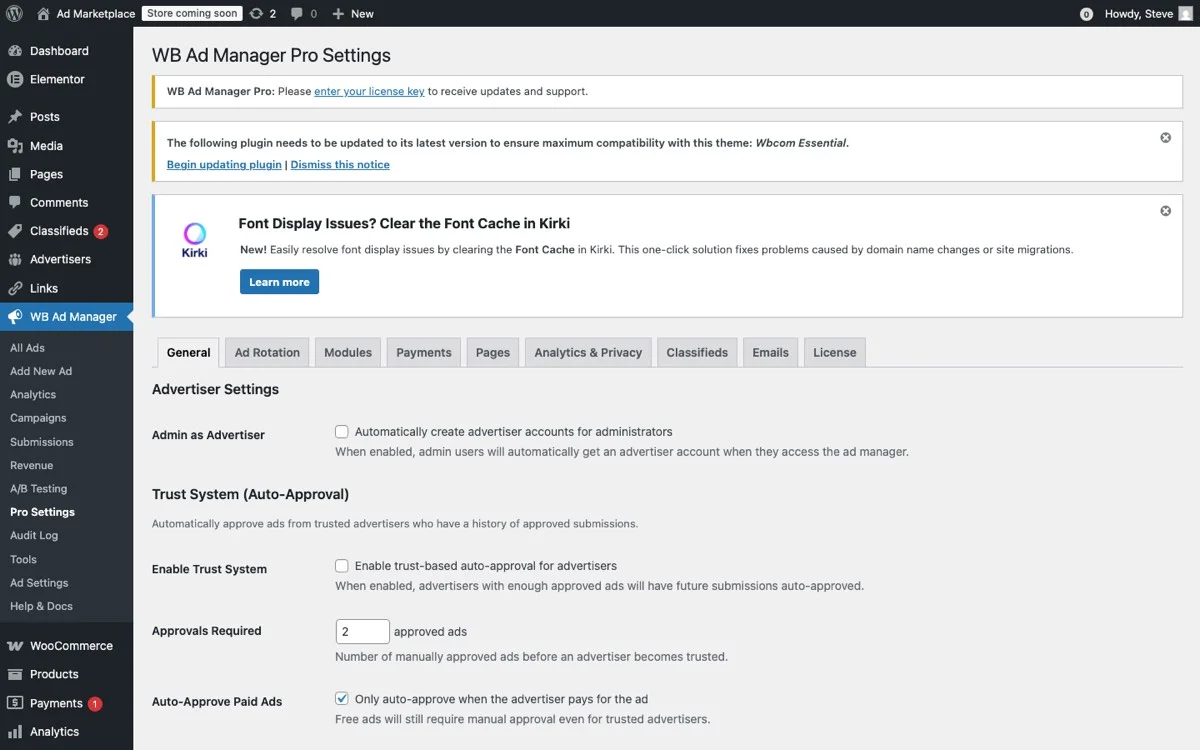
The Pro Settings panel lets you configure A/B test parameters, popup timing rules, and variant traffic splits for optimizing your community ad performance.
What to Test First
Start with timing. The difference between a 10-second and 20-second delay can mean a 30-50% swing in conversion rate. Test at least three timing variants before you test anything else.
Then test the offer itself. Community members respond differently to different value propositions. A discount on premium membership might convert well, but a free exclusive group membership might convert even better. You will not know until you test. This is especially important if you are building a paid membership community where the upsell path needs to be optimized.
After timing and offer, test the format. Does a modal popup outperform a slide-in notification for the same offer? Does a sticky footer bar drive more clicks than a floating sidebar ad? WB Ad Manager Pro lets you run these comparisons with proper traffic splitting so you get statistically valid results.
Testing Methodology for Community Sites
Community sites have a unique testing challenge: your audience is largely the same people returning daily. This means you need longer testing windows to reach statistical significance and you need to account for the fact that members will see multiple variants over time.
A good rule of thumb is to run each A/B test for at least two weeks, even if you have enough traffic for significance sooner. This accounts for weekly browsing patterns, community engagement often varies significantly between weekdays and weekends.
WB Ad Manager Pro tracks impressions, clicks, and conversions per variant and provides a clear comparison dashboard. It also handles the traffic splitting at the user level rather than the session level, which means a returning member sees the same variant consistently rather than bouncing between options.
Key Metrics to Track
Do not optimize solely for click-through rate. On community sites, you need to balance conversion performance against engagement impact. Track these metrics together:
- Click-through rate (CTR): The percentage of impressions that result in clicks.
- Conversion rate: The percentage of clicks that result in the desired action.
- Dismiss rate: How quickly users close the ad. A high dismiss rate suggests the timing or targeting is wrong.
- Session depth after ad: Do users continue browsing after seeing the ad, or do they leave? If session depth drops, the ad is too aggressive.
- Member complaint rate: Track support tickets and feedback mentioning ads. This is the canary in the coal mine for UX damage.
Matching Popups to the Reign Design System
One of the most common mistakes with popup advertising is treating the popup as a separate design element divorced from the rest of the site. On a Reign-powered community, where the theme provides a cohesive design language with consistent typography, colors, spacing, and component styles, a generic-looking popup sticks out like a sore thumb and triggers instant dismissal.
WB Ad Manager Pro is built to work with Reign’s design system. The popup and sticky ad templates inherit Reign’s typography and color variables, so your ads automatically look like they belong on the site. You can customize colors, fonts, and spacing, but the defaults are already aligned with Reign’s visual language.
Design Best Practices for Community Popups
- Use Reign’s primary color for CTA buttons. Members have already been trained to associate that color with action, so your popup CTA will feel natural rather than foreign.
- Match the border radius. Reign uses consistent border radius values across its components. A popup with sharp corners on a site with rounded UI elements looks disconnected.
- Keep typography consistent. Use the same heading and body fonts as the rest of your Reign site. Do not introduce a new font just for ads.
- Respect spacing patterns. Reign has a defined spacing scale. Your popup’s internal padding and margins should follow the same rhythm.
- Include a clear, accessible close button. Make the dismiss option obvious and easy to tap on mobile. Hiding or minimizing the close button might seem like a clever retention trick, but on community sites it generates resentment.
Advanced Targeting for Community Context
Generic popup plugins show the same ad to everyone. WB Ad Manager Pro lets you target based on the context that matters for BuddyPress communities.

The admin ads list gives you a bird’s-eye view of all your popup and sticky ad campaigns, including their targeting rules and current performance metrics.
User Role Targeting
Show different popups to different user roles. Anonymous visitors get a membership signup popup. Free members get an upgrade-to-premium popup. Premium members see no popups at all, or see a referral incentive popup. This layered approach respects the relationship you have with each user segment.
Page Context Targeting
The popup on your homepage should be different from the popup on a group discussion page. WB Ad Manager Pro lets you target by BuddyPress component, activity feeds, groups, member profiles, forums, so you can match the ad message to what the user is currently doing.
For instance, a user browsing groups might see a popup promoting a premium group. A user on the activity feed might see a sticky bar promoting an upcoming community event. A user on a member profile might see a floating sidebar ad for a related product. If your community includes event management features, event-specific ad targeting becomes especially powerful.
Engagement-Based Targeting
Target based on how engaged the user is. New visitors who have only visited once get a different experience than regulars who visit daily. WB Ad Manager Pro tracks visit frequency and lets you set rules like “show this popup only to users who have visited at least 3 times” or “show this popup only on the user’s first visit.”
This is particularly powerful for conversion funnels. First visit: no popup, let them explore. Second visit: subtle sticky footer mentioning membership benefits. Third visit: modal popup with a limited-time signup discount. Each touchpoint builds on the last without overwhelming the user.
Frequency Capping: The Non-Negotiable Setting
If you take away one thing from this guide, let it be this: always set frequency caps on your popups and sticky ads. Always.
Frequency capping controls how often a user sees a particular ad. Without it, a member who visits your community daily will see the same popup every single day, generating the kind of fatigue and irritation that drives members away permanently.
WB Ad Manager Pro supports frequency capping at multiple levels:
- Per-ad frequency: Show this specific ad no more than once per week per user.
- Per-format frequency: Show no more than one modal popup per session, regardless of which ad it is.
- Global frequency: Show no more than two overlay ads per session across all formats and campaigns.
Recommended starting caps for community sites: one modal popup per user per week, one sticky footer bar per session, and a global cap of two overlay impressions per session. You can adjust from there based on your A/B testing data.
Revenue Optimization Without UX Sacrifice
The ultimate goal is to find the sweet spot where ad revenue is maximized and user experience remains strong. This is not a theoretical exercise, it requires ongoing measurement and adjustment.
Start conservative. Launch with frequency caps on the tighter side, longer time delays, and less aggressive formats. Measure your baseline engagement metrics, session duration, pages per session, return visit rate, and active member count. Then gradually experiment with more aggressive settings, watching those engagement metrics closely.
If engagement metrics dip, pull back immediately. Revenue from popup ads is worthless if it costs you the community engagement that makes your site valuable in the first place. The members are the product, both for the community and for the advertisers. Losing them to save a few dollars in popup revenue is a catastrophic miscalculation. This is especially true for communities focused on member retention and return visits.
WB Ad Manager Pro’s reporting dashboard shows ad performance and engagement metrics side by side, making it straightforward to spot the point where ads start hurting more than they help.
Implementation Checklist
Here is a practical checklist for launching popups and sticky ads on your Reign community site with WB Ad Manager Pro:
- Define your goal. Are you promoting premium memberships, driving affiliate revenue, or capturing email subscribers? The goal determines the format, timing, and targeting.
- Choose the right format. Modal popups for high-value, low-frequency offers. Sticky footer bars for persistent, low-friction promotions. Floating sidebars for long-content pages.
- Set timing triggers. Start with a 15-second time delay or 50% scroll trigger. Avoid immediate entry popups on community pages.
- Configure mobile separately. Sticky footer bars only on mobile. No modal popups on mobile devices.
- Set frequency caps. One modal per week, one sticky bar per session, two total overlays per session maximum.
- Target by user role. Different ads for anonymous visitors, free members, and premium members.
- Match the Reign design. Use the theme’s colors, typography, and spacing for a native look.
- Launch an A/B test. Test timing first, then the offer, then the format.
- Monitor engagement metrics. Track session depth and return visit rate alongside ad conversion metrics.
- Iterate based on data. Adjust every two weeks based on test results.
Ready to Add Smart Popups to Your Community?
WB Ad Manager Pro gives you all the tools described in this guide, modal popups, sticky footer bars, floating sidebar ads, timing triggers, mobile-specific configurations, frequency capping, user role targeting, A/B testing, and Reign-native design templates. It was built from the ground up for BuddyPress communities on Reign, so every feature respects the community context that generic ad plugins ignore.
Stop guessing and start converting with ads that work with your community, not against it.