

Research can be both exciting and challenging, especially when it comes to managing citations, bibliographies, and references. Noodle Tools has been a popular choice for many students and researchers, providing an organized platform for creating citations, taking notes, and managing projects. However, it is not the only tool available, and some users may look for alternatives that better fit their workflow, budget, or platform preferences.
The top 10 NoodleTools alternatives for students and researchers, helping you find the most effective tools for organizing sources, creating bibliographies, and streamlining your research process.

What is Noodle Tools?
Noodle Tools is a web-based platform designed to assist students and researchers with citation management, note-taking, and project organization. Its primary focus is on helping users create accurate bibliographies and follow proper citation formats such as MLA, APA, and Chicago.
This tool also allows users to organize their research notes, collaborate with peers, and maintain a structured approach to complex research projects. Its integration of project management and citation tools makes it a comprehensive solution for academic research.
Despite its popularity, Noodle Tools may not meet every user’s needs. Some students seek more affordable options, others want offline functionality, or prefer tools with more flexible citation styles. This is why exploring NoodleTools alternatives is essential for efficient research.
Why Look for NoodleTools Alternatives?
There are several reasons students and researchers might seek alternatives to Noodle Tools:
- Cost: Noodle Tools requires a subscription, which can be expensive for individual students or small institutions.
- Limited integration: Some users may require software that integrates with more word processors, browsers, or learning management systems.
- Feature preferences: While Noodle Tools excels at citation management, some alternatives offer more robust project management, cloud storage, or collaboration tools.
- User experience: Some students find the interface complex or less intuitive compared to other modern reference management tools.
By exploring other options, users can find tools that better match their research workflow, learning style, and budget.
How to Choose the Best NoodleTools Alternative
Selecting the right tool depends on your specific needs:
- Citation support - Ensure the tool supports the citation style you use most often.
- Collaboration features - If you work in groups, choose a platform that allows shared projects.
- Accessibility - Consider web-based vs. offline access, mobile apps, or browser extensions.
- Cost - Free or subscription-based options may affect your choice depending on your budget.
- Additional features - Tools offering note-taking, project management, or research organization may provide extra value.
Carefully evaluating these aspects will help you choose a Noodle Tools alternative that truly supports your research process.
Top 10 NoodleTools Alternatives
1. Zotero
Zotero is an open-source research tool that simplifies citation management, note-taking, and organizing research materials. Its integration with browsers and word processors makes it a flexible choice for students and researchers.

Key Features:
- Automatic citation capture from websites and databases
- Supports MLA, APA, Chicago, and other formats
- Cloud synchronization and collaboration features
- Integration with Microsoft Word and Google Docs
- Tagging and note-taking for organizing sources
2. Mendeley
Mendeley is a reference manager and academic social network. Beyond citations, it offers PDF annotation, collaboration tools, and a library to store research materials.
Key Features:
- PDF organization and annotation
- Citation management in multiple styles
- Group collaboration for shared projects
- Desktop and mobile apps
- Integration with Word and LibreOffice
3. EndNote
EndNote is a premium tool widely used in academic research for creating bibliographies and managing references efficiently.
Key Features:
- Supports thousands of citation styles
- Online and desktop versions available
- Collaborate with teams on shared libraries
- Advanced search and sorting features
- Integration with Word for seamless citation insertion
4. RefWorks
RefWorks provides cloud-based reference management for students and institutions. It emphasizes collaboration and cross-platform access.
Key Features:
- Web-based reference management
- Citation generation in multiple formats
- Shared folders for team projects
- Browser integration for quick source import
- Cloud access across devices
5. Citavi
Citavi combines reference management with task planning, making it useful for both citations and project organization.
Key Features:
- Task and knowledge management
- Supports various citation styles
- Note-taking and PDF annotation
- Collaboration through Citavi Cloud
- Integration with Word and LaTeX
6. Paperpile
Paperpile is a cloud-based tool focusing on citation management for Google Docs users, making it ideal for students and researchers working in a Google ecosystem.
Key Features:
- Google Docs integration
- Automatic reference extraction from websites
- Cloud storage for PDFs
- Citation management in multiple styles
- Collaboration with shared libraries
7. RefMe (now part of CiteThisForMe)
RefMe, now integrated into CiteThisForMe, is a quick citation generator that automates bibliography creation.
Key Features:
- Fast citation generation for web sources
- Multiple citation styles supported
- Browser and mobile app access
- Simple bibliography and reference export
- Easy for students needing quick citations
8. CiteThisForMe
CiteThisForMe provides a user-friendly platform to create accurate citations quickly, making it ideal for students who want simplicity.
Key Features:
- Automatic bibliography creation
- Supports APA, MLA, Chicago, and Harvard
- Browser extension for quick source capture
- Export to Word, PDF, or Google Docs
- Free basic version available
9. Ref-N-Write
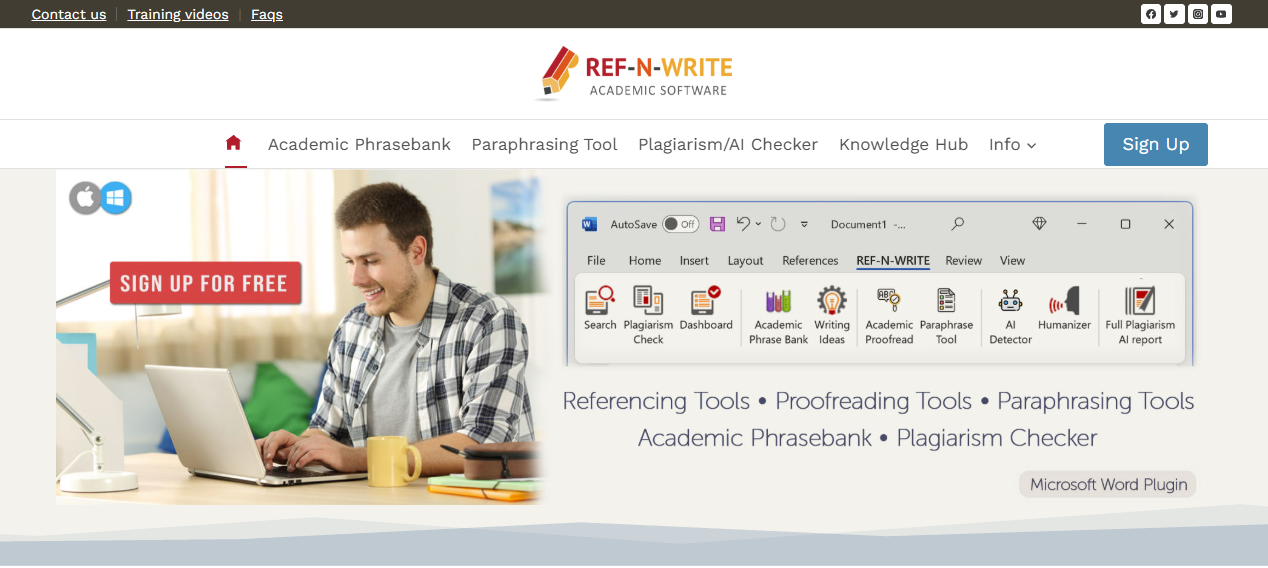
Ref-N-Write is tailored for academic writing support, offering citation suggestions and phrase templates.
Key Features:
- Academic phrase templates
- Citation suggestions and reference tracking
- Integration with Word
- Writing style guidance
- Useful for non-native English speakers
10. Paperpile for Teams
While Paperpile was mentioned individually, Paperpile for Teams offers collaborative project management and reference sharing across groups, enhancing its usefulness for research teams.
Key Features:
- Shared libraries for teams
- Real-time collaboration
- Cloud-based citation management
- Seamless Google Docs integration
- Multiple citation style support
Comparison Table of NoodleTools Alternatives
| Tool | Best For | Citation Styles Supported | Collaboration | Platform | Price |
|---|---|---|---|---|---|
| Zotero | Open-source flexibility | MLA, APA, Chicago, others | Yes | Web, Desktop | Free |
| Mendeley | PDF-heavy research | MLA, APA, Chicago, others | Yes | Web, Desktop, Mobile | Free/Premium |
| EndNote | Professional research | Thousands of styles | Yes | Web, Desktop | Paid |
| RefWorks | Institutions and teams | MLA, APA, Chicago, others | Yes | Web | Paid |
| Citavi | Task and project management | MLA, APA, Chicago, others | Yes | Desktop, Web | Free/Premium |
| Paperpile | Google Docs users | APA, MLA, Chicago, others | Yes | Web | Paid |
| CiteThisForMe | Quick student citations | APA, MLA, Chicago, Harvard | Limited | Web | Free/Premium |
| RefMe | Fast citation generation | APA, MLA, Chicago, Harvard | Limited | Web, Mobile | Free |
| Ref-N-Write | Academic writing support | Multiple | No | Desktop | Paid |
| Paperpile Teams | Collaborative research teams | APA, MLA, Chicago, others | Yes | Web | Paid |
Tips to Choose the Best Alternative
- Evaluate your citation needs: basic vs. advanced formatting
- Consider collaboration: individual vs. group projects
- Check platform compatibility: offline, online, or mobile
- Explore additional features: note-taking, project management, and PDF annotation
By analyzing these factors, you can pick the most efficient NoodleTools alternative that fits your academic or research workflow.

Final Reflection
While Noodle Tools has helped many students and researchers manage citations and bibliographies, these alternatives offer a range of options suited to different workflows, budgets, and research needs. Whether you prefer open-source tools like Zotero, cloud-based solutions like Paperpile, or academic writing support with Ref-N-Write, there is an alternative for every type of researcher.
Choosing the right tool ensures accurate citations, streamlined research, and a more organized approach to academic writing. Exploring these NoodleTools alternatives can ultimately save time, reduce errors, and enhance the research experience.
Interesting Reads:
Pinterest Review 2025: Is It Still Worth Using
10 Goblin Tools Alternatives for Better Productivity in 2025