

Short answer: yes, BuddyPress supports WordPress Multisite, and WordPress.org’s own listing describes three ways to run it: activated on a single site, activated network-wide (described as “the most common multisite installation type”), or in multiblog mode so one community’s data shows up across every site in the network. What is not settled for you automatically is whether your theme and your licence terms are ready for that setup. Reign’s own documentation has no multisite-specific guidance as of this writing, and its pricing counts separate WordPress installs as separate sites, so test the whole stack on staging before you commit an organisation to a network.
This guide is for the person deciding whether a WordPress Multisite network is the right architecture for a community that spans several sites, a university with departmental communities, a franchise with one group per location, an association with national and chapter-level sites. We will walk through what multisite actually is, how BuddyPress behaves on one, what Reign does and does not confirm about it, when multisite is worth the complexity, and when a single site with BuddyPress spaces or groups solves the same problem more simply.
Key takeaways
- A WordPress Multisite network is one WordPress installation serving several sites that share core files, themes and plugins but keep separate database tables and separate media directories.
- BuddyPress has three multisite modes: site-level activation, network-level activation (the most common), and multiblog mode for one shared community across every site.
- Reign’s documentation does not mention multisite, and its licence is sold by number of production sites. A single multisite network is technically one WordPress install, but confirm with Reign support how your licence applies before you build on that assumption.
- Most community projects that think they need multisite actually need spaces or groups inside one site. Multisite earns its complexity when sites genuinely need separate domains, separate branding or separate site admins.
- Network-wide plugin activation, network-wide backups and a single point of failure for the whole network are the real operational costs. Weigh them against what you are solving before you build.
What is WordPress Multisite, in plain terms?
WordPress Multisite turns one WordPress installation into a network of sites that share the same core files. The official WordPress.org developer documentation defines it directly: “A multisite network is a collection of sites that all share the same WordPress installation core files. They can also share plugins and themes. The individual sites in the network are virtual sites in the sense that they do not have their own directories on your server, although they do have separate directories for media uploads within the shared installation, and they do have separate tables in the database.”

That single sentence explains both why multisite is attractive for a community network and why it is not a free win. One codebase to update is genuinely simpler than ten. Separate database tables per site means member data, by default, does not automatically appear on every site, which is exactly the problem BuddyPress’s multiblog mode exists to solve.
How does BuddyPress work on a multisite network?
BuddyPress’s own WordPress.org FAQ confirms multisite support directly: “Yes! If your WordPress installation has multisite enabled, BuddyPress will support the global tracking of blogs, posts, comments, and even custom post types with a little bit of custom code.” It then lays out three ways to deploy it.
- Site-level activation. “Activate at the site level to only load BuddyPress on that site.” Here, BuddyPress behaves exactly like a single-site install; the rest of the network does not see it.
- Network-level activation. “Activate at the network level for full integration with all sites in your network.” BuddyPress itself calls this “the most common multisite installation type,” which matches what most organisations actually want: one community layer available everywhere.
- Multiblog mode. BuddyPress documentation describes enabling multiblog mode “to allow your BuddyPress content to be displayed on any site in your WordPress Multisite network, using the same central data.” This is the setting that makes one member directory, one activity stream and one set of groups appear consistently no matter which subsite a member is looking at.
There is a fourth option for a different problem: if you want several genuinely separate communities on one network rather than one shared community, BuddyPress’s listing notes you can “extend BuddyPress with a third-party multi-network plugin to allow each site or network to have an isolated and dedicated community.” That is the opposite goal from multiblog mode, so be clear with yourself about which one you actually want before you configure anything.
What actually happens to groups, profiles and the activity feed across subsites?
With network-level activation and multiblog mode turned on, a member’s profile, their group memberships and the activity feed are shared across the network, because that data lives in central database tables rather than per-site ones. A member who joins a group on your university’s main community site sees that same group and that same activity feed if they log into a departmental subsite, because BuddyPress is reading from the same central data rather than a separate copy per site.
What does not automatically travel with that member data is page design. Each subsite can run its own active theme, and WordPress Multisite explicitly allows that per the official documentation’s description of sites sharing “plugins and themes” from a shared pool while each site chooses what it activates. A subsite with a different theme than your main community site can end up presenting the same shared BuddyPress data very differently, which is worth testing deliberately rather than discovering after launch.
Does Reign support WordPress Multisite?
Honestly: we could not find multisite-specific documentation on Reign’s own docs site as of this writing. That does not mean Reign fails outright on a multisite network, themes generally activate and render the same way regardless of single-site or multisite, but it does mean there is no written guidance from us covering network activation, per-site Customizer settings across subsites, or how Reign’s own settings behave when network-activated versus activated per subsite. Test that combination on staging before you rely on it, and check Reign’s documentation directly, since it is the kind of detail that gets added as more site owners ask about it.
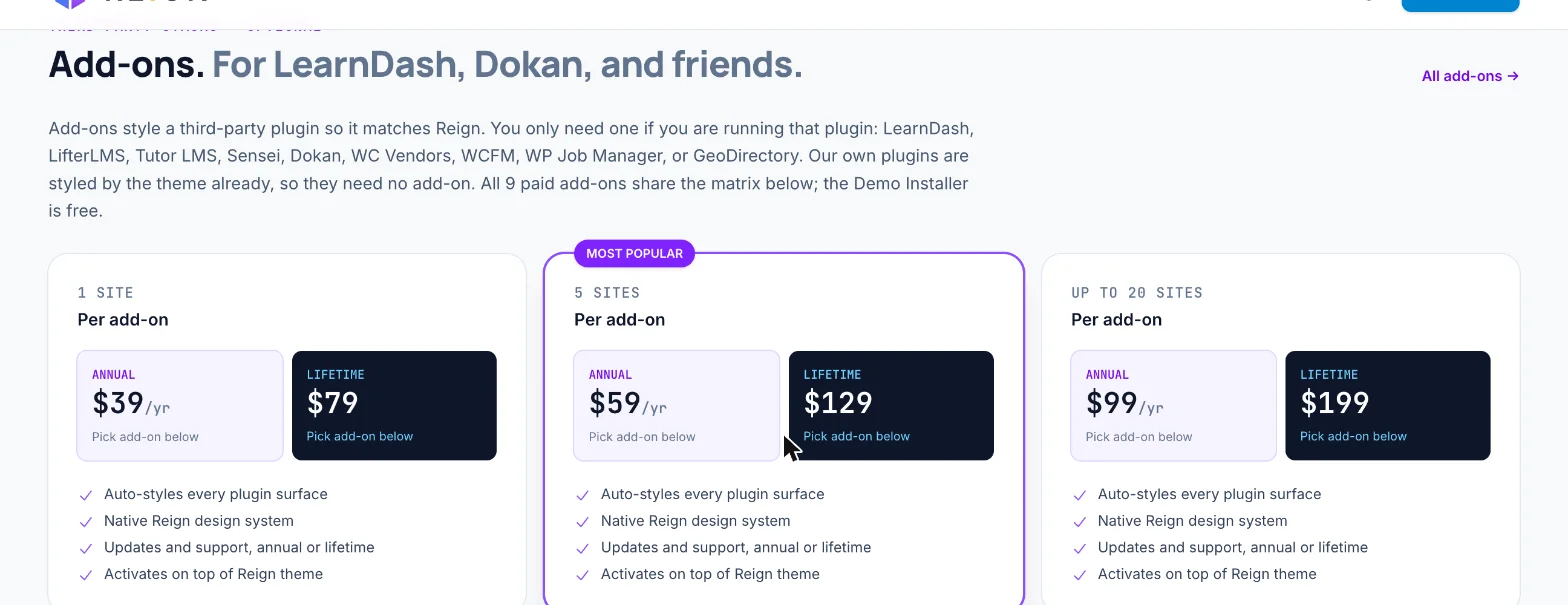
Licensing is the other open question. Reign’s theme and its add-ons are sold in tiers by number of sites, 1 site, 5 sites, or up to 20 sites, per the current pricing page. WordPress’s own documentation defines a multisite network as one WordPress installation, which suggests a network might reasonably count as a single licensed site, but we are not going to assert that on your behalf. Ask Reign support directly how a multisite network with, say, six subsites counts against a licence before you build a budget or a proposal around an assumption either way.
When does multisite genuinely make sense for a community network?
Multisite earns its operational cost when the sites in question need to be genuinely separate in ways a single site cannot fake: different domains or subdomains, different public branding, different site administrators who should not see each other’s dashboards, or different front-end audiences who should never be shown another chapter’s public pages by mistake. A multi-campus university where each campus has its own domain and its own communications team is a reasonable multisite case. So is a franchise network where each location needs to look and feel locally branded while members move freely between locations as one shared base.
Our guide to building a company intranet with BuddyPress and our guide to building a professional association or alumni network both cover organisations with this kind of structure, chapters, departments, regional groups, and both default to a single BuddyPress site using groups or spaces rather than a network. That is not an accident. Most of what people reach for multisite to solve, separate spaces for separate groups of people, is what groups and spaces are for.
When should you avoid multisite and use one site instead?
If every “site” you are picturing would share the same domain, the same visual branding and the same administrators, you do not need multisite. A single WordPress install with BuddyPress groups, each with its own cover image, its own discussion and its own membership, solves “separate space per department or chapter” without any of multisite’s operational overhead. Our guide to church, school and association directories with BuddyPress shows this pattern for organisations that look, on paper, like they need several sites but in practice run well as one.
| Question | Single site with groups/spaces | Multisite network |
|---|---|---|
| Need separate domains or subdomains per group | No | Yes |
| Need separate public branding per group | Limited, same theme and header | Yes, per-site theme and settings |
| Need separate site administrators with no cross-visibility | No, all admins share one dashboard | Yes |
| Shared member login across all groups | Yes, by default | Yes, with network-level activation and multiblog mode |
| Plugin and theme updates | One site to update | One install to update, but behaviour must be tested per subsite |
| Backup and restore complexity | Lower | Higher; a restore affects every site on the network |
| Setup and ongoing admin effort | Lower | Higher |
What happens to SEO and URLs across a multisite network?
Each subsite on a WordPress Multisite network gets its own URL structure, either a subdomain (chapter.example.com), a subdirectory (example.com/chapter), or in some setups a fully separate mapped domain. Search engines treat each of those as a distinct site to crawl and index, which is actually closer to what most multisite organisations want: a chapter’s content should rank for that chapter’s local searches, not compete with the main network site for the same keywords.
Where this needs active planning is shared BuddyPress content. A member’s profile and a group’s activity, because they live in central data under multiblog mode, can be reachable from more than one subsite URL depending on configuration. Duplicate-looking content across subsite URLs is worth checking with your SEO tooling once the network is live, since the fix (canonical tags pointing to one authoritative URL per shared piece of content) is a one-time setup rather than an ongoing problem, but it is easy to miss if nobody is looking for it specifically.
What does a multisite network cost beyond the theme licence?
The theme and plugin licence questions above are only part of the real cost. Hosting for a multisite network generally needs to be sized for the combined traffic and storage of every subsite together, not for the busiest one alone, since they share the same server resources and the same database. Backup services often price by site count or by total storage, and a network backup is typically a single larger job rather than several small ones, so check how your specific host or backup plugin handles multisite before you assume your current single-site backup budget scales evenly.
The cost that is easiest to underestimate is admin time. Someone has to decide which plugins get network-activated, keep an eye on what each subsite’s local administrator changes, and own the one WordPress core and PHP version the whole network runs on. On a single site, a bad update affects that site. On a network, the same update, since it touches shared core files, is a decision that affects every community on it at once. Budget a real person’s ongoing attention for that role, not just a one-time setup fee, before you commit.
How do you set up BuddyPress on a multisite network, step by step?
- Enable Multisite on a staging copy first. This is a server-level change defined in wp-config.php and is not easily reversible, so never do this on a live, un-backed-up site. To confirm it worked, you should see a new Network Admin option under My Sites.
- Decide your activation mode before installing BuddyPress. Choose network-level activation if you want one shared community, or site-level if you genuinely want isolated communities per subsite. Changing your mind later means reconfiguring, not just flipping a toggle.
- Network-activate BuddyPress from the Network Admin plugins screen, then enable multiblog mode if your goal is one shared community visible from every subsite. To confirm it worked, create a test member on your main site and check their profile is visible and editable from a subsite.
- Network-activate Reign and then check its settings on at least two different subsites. Reign’s Customizer options may be global, per-site, or a mix; verify which before you assume a change on one subsite applies everywhere.
- Create one group and one activity post as a cross-network test. Log in as that same test member on a second subsite and confirm the group and the post both appear. To confirm it worked, the group membership count and the post timestamp should match exactly on both subsites, since they are reading the same central data.
- Test your backup and restore process on the whole network, not on a single subsite, before you launch. A multisite backup restores everything together; know what that means for your specific host before you need it in an emergency.
What breaks or needs extra care on multisite?
- Every BuddyPress-dependent plugin needs network activation too. A plugin active on only one subsite will not extend BuddyPress functionality network-wide, which can produce confusing, inconsistent behaviour between subsites if you forget one.
- Uploads live in a shared structure with separate folders per site, per WordPress’s own documentation. Media-heavy BuddyPress features, profile photos, group cover images, should be tested for storage and permission behaviour specific to multisite rather than assumed identical to a single site.
- Backups are heavier and restore as a unit. You cannot usually restore one subsite’s community data without restoring the whole network’s database at the same point in time, which matters a great deal if one subsite has a problem and the others do not.
- A security issue on the network affects every site on it. One compromised plugin or theme file is a network-wide incident, not a single-site one, because the installation is shared.
- Moving away from multisite later is a real migration, not a setting change. If a network outgrows the need for separation, or an organisation restructures into one site, be aware that reversing the decision is closer in effort to the original setup than to flipping a switch.
Questions people ask
Does BuddyPress require multisite?
No. BuddyPress runs as a standard single-site plugin for the overwhelming majority of installs and does not require Multisite at all. Multisite is only relevant if you specifically need several related sites sharing one WordPress installation.
Can each subsite have a different theme on a BuddyPress multisite network?
Yes. WordPress Multisite lets each site in the network choose its own active theme from the network’s shared theme pool. With BuddyPress network-activated and multiblog mode on, the underlying community data is shared even if the visual theme differs per subsite, so test that combination deliberately rather than assuming a consistent look.
Do members need a separate account for each subsite?
With BuddyPress activated at the network level, no. A member logs in once and that login, along with their BuddyPress profile and group memberships in multiblog mode, is available across the network, which is the whole point of choosing network-level activation over site-level activation.
Can you convert a multisite network back to separate single sites later?
It is possible but involved. Each subsite’s content and database tables need to be exported and set up as an independent WordPress installation, and shared member accounts need a plan for where they live afterward. Treat it as a migration project with its own testing phase, not a quick reversal.
Does multisite slow a community site down?
Multisite itself is not inherently slower; it is the same WordPress core serving multiple sites from shared tables. What affects performance is the same thing that affects any WordPress community site at scale: unindexed queries, an activity feed or member directory that was never tested at real volume, and a host sized for the traffic of one site rather than several combined. Seed a staging network with a realistic number of members and groups and test the busiest screens before launch, the same discipline our community hosting guide recommends for a single site.
Is multisite required to run multiple related communities under one brand?
No, and for most organisations it is not even the simpler path. A single BuddyPress site with a group or space per chapter, department or region shares one login, one theme and one admin dashboard, with far less to configure and maintain than a network. Reach for multisite only when separate domains, separate public branding or separate local administrators are a real requirement, not a nice-to-have.
What is the difference between multiblog mode and network-wide activation?
Network-wide activation determines whether BuddyPress is switched on across every subsite at all. Multiblog mode, which sits on top of that, determines whether BuddyPress shows the same shared community data, the same member directory, the same activity feed, the same groups, from any subsite a member visits, rather than treating each subsite as if it had its own separate, empty community. Most organisations that want “one community, several branded sites” need both turned on together.
Where to start
Before you commit an organisation to a multisite network, build the smaller version first. Set up a single BuddyPress site with one group standing in for what you picture as a separate subsite, and see how far that gets you. If you genuinely hit the wall only multisite can solve, separate domains or separate administrators with no shared visibility, enable Multisite on a staging copy, network-activate Reign and BuddyPress together, and work through the setup steps above before a single real member logs in. Our guides to building an association or alumni network and building a company intranet are good next reads if a single site with groups turns out to be the simpler answer, which for most organisations, it is.