

Looking for the best WooCommerce Catalog plugins in 2026? Here’s the short answer: the right plugin depends on your store size, the action you want to incentivize, and how deeply you need it to integrate with your existing customer journey. After testing the leading options hands-on against real WooCommerce 9.x stores, this guide shortlists the plugins that genuinely move the needle, plus newer 2026 entrants worth knowing about.
What we recommend: if you also need community, membership, or engagement layers around your WooCommerce store, pair your stack with BuddyX Pro, community-first WordPress theme built for membership stores, vendor communities, and customer-loyalty hubs. We’ve seen this combination outperform standalone catalog plugins because retention compounds when product, content, and community live under the same roof.

What Is a WooCommerce Catalog Plugin?
A WooCommerce catalog plugin converts your online shop into a product catalog, removing purchasing options like Add‑to‑Cart and hiding prices. Ideal for B2B, quotation‑based sales, or when you want visitors to browse without buying directly. These plugins can replace cart buttons with “Request a Quote” or custom messages.
Related reading: 10 Best WooCommerce Cross‑selling & Product Bundles Plugins, 10 Best WooCommerce Virtual Products Plugins 2025, 10 Best WooCommerce Data Import & Export Plugins 2025.
They help maintain product pages for SEO, allow user‑role control, and deliver a smooth experience during maintenance or pre‑launch phases.
How to Use a WooCommerce Catalog Plugin
First, install your chosen plugin from the WordPress plugin directory or upload it manually. Activate it and go to its settings panel.
Second, configure global catalog mode (e.g., hide price, remove cart button), then customize per user role if needed (e.g., guest vs logged-in users). Optionally add a “Request Quote” button linking to a contact or form page. Save settings and test on product, shop, and checkout pages to ensure visibility and functionality.
Top WooCommerce Catalog Plugins
Here are 10 plugins that stand out for reliability, flexibility, and support.
- Advanced Catalog Mode for WooCommerce
- YITH WooCommerce Catalog Mode
- CatalogX - Product Catalog Mode
- ELEX WooCommerce Catalog Mode
- WholesaleX (Hybrid B2B & B2C)
- Catalog Visibility for WooCommerce
- Hide Price & Catalog Mode by Barn2
- Request a Quote for WooCommerce by WebToffee
- Quotations and Catalog Mode by ThemeHigh
- WP Catalogue - WooCommerce Catalog Plugin
1. Advanced Catalog Mode for WooCommerce

Key Features:
- Role‑based catalog mode (hide add-to-cart, prices per role)
- Custom button text or redirect (“Request a quote”)
- Hide cart/checkout and payment gateways per role
- Works with simple, variable, and grouped products
- WPML multilingual support
Pricing: From $79/year (one site), or $126.40 for 2 years.
Advanced Catalog Mode for WooCommerce lets you switch your entire shop into catalog mode easily. It’s particularly useful for stores undergoing maintenance or wanting to restrict purchasing to certain user roles while still displaying product details.
You can tailor button text, hide prices, and even configure payment visibility based on user type. For example, guest users see no prices, while logged‑in wholesale customers might still access them.
2. YITH WooCommerce Catalog Mode
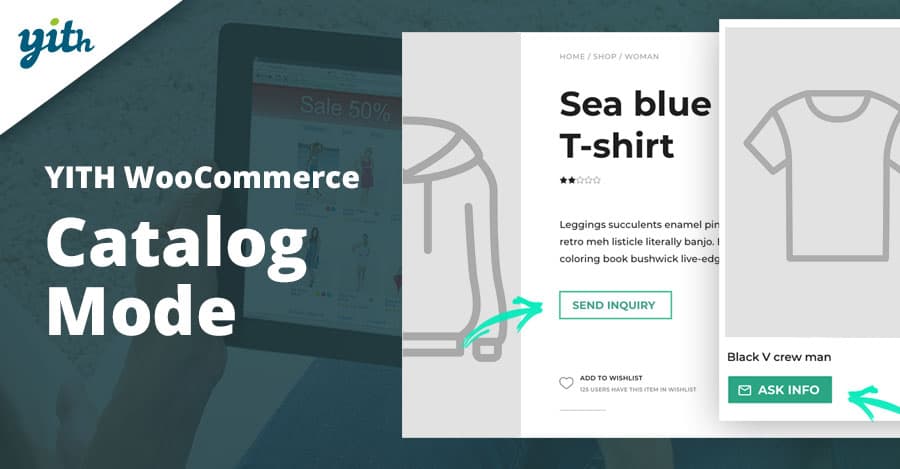
Key Features:
- Selective catalog mode by product/category
- “Add to quote” button and inquiry form
- Style customization for buttons and labels
- Hide prices across the shop or for specific products
- No coding required
Pricing: Free basic version; Pro from ~$69.99/year.
YITH WooCommerce Catalog Mode is flexible and beginner‑friendly. You pick which parts of your store to enter catalog mode, and easily add a quote button in place of cart links.
The pro version also provides a built‑in inquiry form, styled buttons, and automatic display of “Add to quote” for out‑of‑stock items, making it very practical for B2B and service-based shops.
3. CatalogX - Product Catalog Mode
Key Features:
- Full catalog mode with enquiry form
- Popup or inline inquiry form customization
- Role‑based support and variable products
- Admin quote request management
Pricing: Free basic, Growth $109/year (3 sites), Agency $159/year (10 sites).
CatalogX gives flexibility in how inquiries are captured, pop-up or inline, and allows you to manage all user requests from within WooCommerce.
The plugin is ideal for growing stores that need product‑specific contact forms and flexible catalog modes based on categories or user roles.
4. ELEX WooCommerce Catalog Mode
Key Features:
- Remove/hide Add to Cart and prices
- Custom button replacement or URL redirect
- Role‑based visibility and pricing
- Supports simple, variable, and grouped products
Pricing: Free version; Premium $79/year/site.
ELEX WooCommerce Catalog Mode is straightforward and powerful. The free version includes core features like hiding buttons and pricing, while the premium adds role-based pricing and custom actions.
It’s widely used, reliable, and often praised for quick support and bug fixes.
Also Read:Landing Page Design Best Practices for Higher Conversions
5. WholesaleX (Hybrid B2B & B2C)
Key Features:
- Advanced catalog mode rules for mass users
- Non‑purchasable products & hidden prices per role
- Request‑a‑quote integration
- Handles B2B and hybrid use cases
Pricing: Plans starting ~$148.50/year for bundle.
WholesaleX is more than just a catalog mode, it’s built for B2B logic. You can make some products non‑purchasable for regular users, show prices only to B2B buyers, and handle quotes all within the same plugin.
It’s heavier but powerful if you need granular control across multiple user groups and product sets.
Also Read:How to Create My Own Online Store (WooCommerce vs Easy Digital Downloads)
6. Catalog Visibility for WooCommerce
Key Features:
- Hide prices, cart, and checkout with one click
- Works store‑wide
- Simple, no-frills configuration
Pricing: Paid WooCommerce extension (approx $79‑$99/year).
This official extension from WooCommerce lets you quickly turn off purchase options globally, without per-role customization.
Ideal for small stores that need a lightweight catalog mode without additional features like quotes or role-based settings.
7. Hide Price & Catalog Mode by Barn2
Key Features:
- Hide prices and add‑to‑cart buttons globally or by role
- Add contact form links or messages
- Field‑level personalization per product or category
Pricing: Approx $79/year (1‑site license). Source: official Barn2 site.
Barn2’s plugin is lightweight and highly rated for flexibility and developer-friendly control over visibility and button actions.
It’s perfect when you need precise control without unnecessary bulk. Suitable for price inquiry stores or private catalogs.
Also Read:Best WooCommerce International and Localization Legal Plugins
8. Request a Quote for WooCommerce by WebToffee
Key Features:
- Enable catalog mode & quote requests
- Hide price/Add‑to‑cart or replace with quote button
- Frontend quote form and admin management
Pricing: Free basic version; premium from ~$49/year. (WebToffee official plugin directory)
This plugin merges catalog mode with a quote system, making it easy to collect leads while showing product listings.
User‑friendly and affordable, it’s ideal for small service-oriented businesses needing a simple enquiry workflow.
9. Quotations and Catalog Mode by ThemeHigh
Key Features:
- Switch the store into catalog mode
- Add “Get a Quote” buttons
- Quote management dashboard
- Support variable & grouped products
Pricing: From ~$69/year. Source: ThemeHigh plugin store.
ThemeHigh’s offering balances catalog visibility with a built-in quotation system and product-level controls.
Useful when you want to allow users to submit quote requests directly from product pages and manage them easily within the admin.
10. WP Catalogue - WooCommerce Catalog Plugin
Key Features:
- Simple catalog mode, hide buttons and prices
- Lightweight and free/premium options
- Minimum setup for basic catalog needs
Pricing: Free version; premium upgrade around $49/year. Source: WordPress plugin listings.
WP Catalogue is minimalistic, focused on turning your store into a catalogue quickly without extra features. Great for blogs, portfolios, or simple product showcases.
Easy to install and configure, it’s the go‑to for users who want basic catalog functionality with no bloat.

Pair Your Stack: Other Tools From Wbcom Designs
Beyond the WooCommerce plugins above, these in-house tools from Wbcom Designs solve adjacent problems most stores eventually run into, particularly when your loyalty, community, or service layer needs to plug into WooCommerce without a heavy custom build:
- BuddyX Pro, community-first WordPress theme for membership stores, vendor communities, and customer-loyalty hubs.
- WB Gamification, drop-in points, badges, ranks, and leaderboards for any WooCommerce loyalty or referral funnel.
- WP Sell Services Pro, turn WooCommerce into a service-selling platform (consulting, freelance, agency hours).
- WB Ad Manager, native ad placements to monetize content around your store (blog, category pages, sidebar).
- WordPress Polls, lightweight polls for product feedback, NPS-style surveys, and zero-party data.
- Jetonomy, monetization toolkit for digital communities (token economy, paid groups, creator payouts).
Final Thoughts: How to Pick the Right Catalog Plugin in 2026
Choosing the right WooCommerce Catalog plugin in 2026 comes down to four practical questions:
- What’s your store size and traffic? Smaller stores get the best return on free or one-time-pay options; high-volume stores justify the SaaS monthlies because of the reporting, segmentation, and automation depth.
- How technical is your team? Code-light, pre-configured plugins ship in a day. Advanced tooling needs developer attention but unlocks edge cases (custom workflows, third-party integrations, multi-site).
- Do you need community or engagement features alongside? If yes, pair with BuddyX Pro and WB Gamification so engagement, rewards, and shopping live in one stack instead of three.
- How will you measure ROI? Start with one campaign type, instrument it properly (UTM tags, attribution windows), track 30-day retention or AOV lift, then scale what works.
Most WooCommerce stores see meaningful results within 60-90 days of launching a catalog program, provided it’s promoted properly via email, on-site banners, post-purchase flows, and (where relevant) inside your community channels. The plugin you choose matters less than the program design and follow-through.
Interesting Reads:
Best WooCommerce Virtual Products Plugins
Best WooCommerce Third‑party Data Integration Plugins
Best WooCommerce Notifications & Automatic Emails Plugins