

Brainstorming is the bedrock of creativity, but without the right tools, it can feel chaotic. Gone are the days when brainstorming meant scribbling on notepads or whiteboards alone. Today’s 10 best brainstorming tools transform the creative process, allowing individuals and teams to organize ideas, collaborate in real-time, and visualize concepts like never before. Whether you’re tackling a big project or planning a new venture, these tools can help you capture inspiration, improve clarity, and boost productivity.

Brainstorming Tools Are Essential for Creative Success
1. Miro: A Virtual Whiteboard for All Your Ideas

Miro is a powerful online whiteboard designed to simplify brainstorming sessions and remote collaboration. Known for its endless canvas, Miro provides ample space for teams to jot down thoughts, map out projects, and work together creatively.
Key Features:
- Real-time collaboration
- Templates for brainstorming, mind mapping, and more
- Integrates with popular apps like Slack and Microsoft Teams
Pros:
- Great for remote teams
- Easy-to-use, versatile interface
- Supports numerous brainstorming techniques
Cons:
- May feel overwhelming for new users
- Some advanced features are behind a paywall
With Miro, you’ll have a digital space to explore ideas without limits, making it a favorite for teams needing a flexible and visually intuitive tool.
2. MindMeister: Mind Mapping Made Simple
MindMeister is a top choice if you’re looking to brainstorm using mind maps. The platform allows users to start with a core idea and expand it with branches, making it perfect for visually organizing ideas in a structured way.
Key Features:
- Mind mapping with customizable layouts
- Collaboration features for team brainstorming
- Syncs with MeisterTask for task management
Pros:
- User-friendly and intuitive
- Great for both individuals and teams
- Allows easy visualization of complex ideas
Cons:
- Limited features on the free plan
- Primarily focuses on mind mapping
MindMeister is ideal for users who think visually and want to organize thoughts or complex ideas with ease.
3. Stormboard: Turning Ideas into Action
Stormboard brings brainstorming and project management together. This tool offers virtual sticky notes on a digital whiteboard, allowing teams to brainstorm ideas, organize them, and then turn them into actionable tasks.
Key Features:
- Digital sticky notes with flexible layouts
- Real-time brainstorming with a focus on action
- Templates for different brainstorming styles
Pros:
- Focus on turning ideas into actionable steps
- Great for team collaboration
- Easy to categorize and prioritize ideas
Cons:
- Requires a subscription for premium features
- Limited customization for personal layouts
If your brainstorming sessions need to quickly lead into project management, Stormboard provides a seamless transition from ideas to actions.
4. Lucidchart: Visualize Your Ideas Clearly
Lucidchart is a diagramming tool that also shines for brainstorming. It allows users to create flowcharts, mind maps, and organizational charts to visually represent ideas, making it perfect for both creative and technical brainstorming.
Key Features:
- Intuitive diagramming and chart-building tools
- Real-time collaboration and feedback
- Integrates with Google Workspace and Slack
Pros:
- Excellent for visual thinkers
- Ideal for brainstorming workflows or processes
- Highly collaborative
Cons:
- Limited free version
- May require a learning curve for non-tech users
Lucidchart’s visual approach makes it a strong tool for anyone who needs to map out complex ideas or brainstorm within structured formats.
5. Ayoa: Combining Mind Mapping with Task Management
Ayoa takes mind mapping to the next level by integrating it with task management. This tool is designed for brainstorming and then converting ideas into tasks, all within the same platform.
Key Features:
- Mind mapping and task tracking
- Visual layout for easy brainstorming
- Real-time collaboration tools
Pros:
- Great for teams who need brainstorming and task management
- Visually engaging layout
- Good for tracking brainstorming outcomes
Cons:
- Premium version needed for full features
- Can be a bit complex to navigate
Ayoa is perfect for users who need a tool that can help them brainstorm ideas and then stay organized in executing those ideas.
6. Google Keep: Simple Yet Effective for Quick Brainstorms
Google Keep is a lightweight, flexible app ideal for capturing ideas on the go. It lets you create notes, lists, and reminders, making it a great tool for quick brainstorming sessions.
Key Features:
- Simple note-taking and list-making features
- Syncs with Google Workspace
- Color-coding and reminders for easy organization
Pros:
- Easy to use and always accessible
- Free to use with a Google account
- Great for quick notes and lists
Cons:
- Limited in advanced brainstorming features
- Lacks collaborative tools
Google Keep is perfect if you need a simple way to capture ideas without the complexity of a full brainstorming tool.
7. Trello: Turning Brainstorming into a Kanban Flow
Trello isn’t traditionally a brainstorming tool, but it works wonders for organizing ideas into actionable steps. With Trello’s Kanban boards, you can easily move ideas through stages, making it great for brainstorming with a purpose.
Key Features:
- Kanban board setup for organizing ideas
- Collaborative task management
- Customizable with labels, checklists, and due dates
Pros:
- Easy to track ideas and progress
- Highly collaborative
- Flexible with various brainstorming workflows
Cons:
- Lacks visual brainstorming tools
- Requires creativity for brainstorming setups
For users who like structured brainstorming, Trello’s flexibility lets you customize boards for any ideation process.
8. Coggle: A Simple Yet Effective Mind Mapping Tool
Coggle is designed to make mind mapping simple and effective. It’s great for teams or individuals looking to expand ideas around a central concept and visualize their thought processes in a clean layout.
Key Features:
- Simple mind mapping interface
- Real-time collaboration
- Revision history for tracking changes
Pros:
- Very user-friendly for beginners
- Great for brainstorming around central themes
- Free plan available with core features
Cons:
- Limited customization
- Best suited for basic mind mapping
Coggle is ideal if you need a straightforward, collaborative mind mapping tool to organize your thoughts.
9. Notion: Organize Ideas, Notes, and Tasks in One Place
Notion is an all-in-one tool that combines note-taking, task management, and database capabilities. While it’s not specifically a brainstorming tool, its flexibility makes it great for ideation and planning.
Key Features:
- Customizable templates for brainstorming
- Integrates with task management and notes
- Great for both personal and team use
Pros:
- Highly flexible and customizable
- All-in-one solution for brainstorming and organizing
- Excellent for detailed, structured brainstorms
Cons:
- Learning curve for new users
- Can be overwhelming with too many features
For structured thinkers who want everything in one place, Notion offers unmatched customization and versatility.
10. Milanote: A Visual Workspace for Creatives
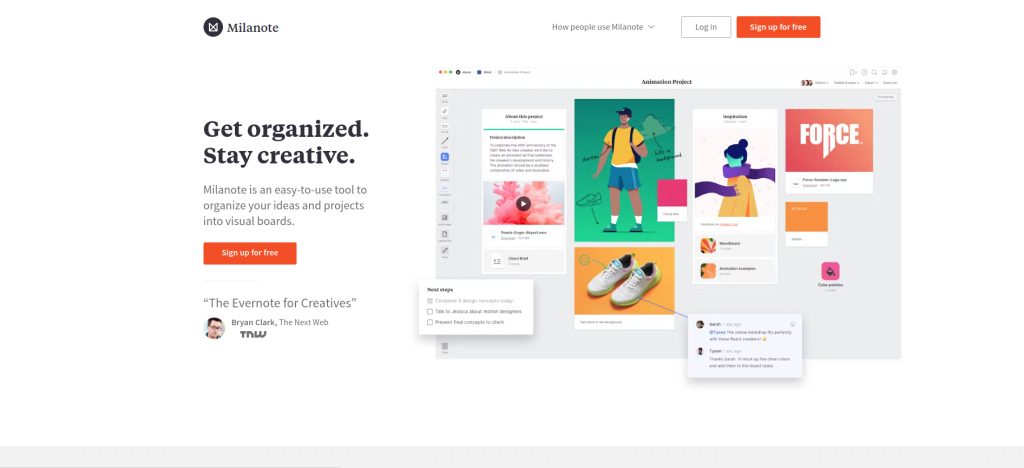
Milanote is designed for creatives, offering a visual workspace where users can organize ideas, images, links, and notes in one place. It’s perfect for brainstorming sessions that need to go beyond text.
Key Features:
- Visual canvas for organizing ideas
- Supports images, text, and links
- Ideal for mood boards and creative brainstorming
Pros:
- Excellent for visually-oriented brainstorming
- Beautiful interface
- Great for mood boards and visual projects
Cons:
- Limited features on the free plan
- Requires a subscription for advanced features
Milanote provides a visually rich environment perfect for creatives looking to brainstorm with images and mood boards.
Comparison Table: 10 Best Brainstorming Tools
| Tool | Key Features | Pros | Cons |
|---|---|---|---|
| Miro | Real-time collaboration, templates | Versatile and user-friendly | Overwhelming for new users |
| MindMeister | Mind mapping, collaboration | Great for visual thinkers | Limited on free plan |
| Stormboard | Digital sticky notes, action-oriented | Turns ideas into actions | Subscription required for premium features |
| Lucidchart | Diagramming, workflow brainstorming | Ideal for workflows and structured brainstorms | Limited free version |
| Ayoa | Mind mapping, task management integration | Ideal for brainstorming and project tracking | Complex interface |
| Google Keep | Note-taking, color coding | Simple and accessible | Basic in features |
| Trello | Kanban boards, collaboration | Easy to track ideas and organize | Not visually focused |
| Coggle | Simple mind mapping, real-time collaboration | User-friendly and free option available | Limited customization |
| Notion | Templates, task and database integration | Highly customizable | High learning curve |
| Milanote | Visual canvas, supports images and links | Great for mood boards and visual brainstorming | Limited on free plan |

Wrapping Up : Choosing the Right Brainstorming Tool for Your Needs
Each of these 10 best brainstorming tools brings something unique to the table, whether it’s real-time collaboration, visual organization, or mind mapping. Finding the right fit depends on your specific needs, whether you’re working solo or in a team. With the right tool, you can elevate your brainstorming sessions from chaotic to cohesive, transforming ideas into actions and sparking innovation.
Interesting Reads:
The Differences Between HTML, CSS, and PHP