

Finding the right booking plugin for your WordPress site can make scheduling and managing appointments a breeze. Whether you’re running a hotel, a clinic, a restaurant, or a yoga studio, the right plugin can automate bookings, manage customer communications, and improve user experience. With so many plugins available, it’s essential to choose one that suits your needs and offers reliable support. Let’s explore the 10 best booking plugin wordpress to streamline your scheduling process.

Why You Need a Booking Plugin for WordPress
Booking plugins can handle appointments, reservations, event registrations, and more without requiring constant manual management. They allow you to set availability, manage cancellations, and even collect payments. For businesses that rely on scheduled appointments or reservations, booking plugins are invaluable for improving efficiency and customer satisfaction.
1. Amelia

Key Features:
- Fully customizable booking forms
- Integrates with Google Calendar
- Email and SMS notifications
Amelia is a powerful booking plugin that’s suitable for a wide range of businesses. With customizable booking forms, real-time availability updates, and integrations with Google Calendar, Amelia provides everything you need to manage appointments effectively. Its SMS and email notifications keep your customers informed, reducing the chances of no-shows.
Pros:
Easy to use and well-designed interface
Notifications help reduce no-shows
Cons:
Paid plugin with no free version available
2. Bookly
Key Features:
- Multi-service booking capabilities
- Payment integrations (PayPal, Stripe)
- Responsive design for mobile booking
Bookly is a robust plugin with various booking options for businesses offering multiple services. With payment integrations and responsive design, Bookly provides a streamlined booking experience. Customers can select services, and staff members, and even set recurring appointments.
Pros:
Great for multi-service businesses
Supports a wide range of payment options
Cons:
Advanced features require the paid version
3. WooCommerce Bookings
Key Features:
- Integrates with WooCommerce for online stores
- Flexible booking rules
- Excellent for product-based bookings
WooCommerce Bookings is ideal for eCommerce businesses already using WooCommerce. This plugin allows customers to book services or rent products directly from your online store, making it a great choice for businesses like rental shops or service providers.
Pros:
Seamlessly integrates with WooCommerce
Customizable booking rules
Cons:
Requires WooCommerce setup
4. WP Simple Booking Calendar
Key Features:
- Simple, easy-to-use booking calendar
- Supports daily or hourly bookings
- Ideal for rental properties and accommodations
For users seeking a straightforward calendar-based booking system, WP Simple Booking Calendar is a great choice. It’s particularly suited for rental properties, allowing users to book specific days or times. The clean calendar interface is easy for customers to navigate.
Pros:
User-friendly interface
Great for property rentals
Cons:
Limited features for complex booking needs
5. Booking Calendar
Key Features:
- Customizable calendars and booking forms
- Handles unlimited bookings
- Supports both free and premium options
Booking Calendar is one of the oldest and most popular WordPress booking plugins. It’s incredibly flexible, supporting a range of booking needs from rentals to appointments. The plugin offers a free version with essential features and premium options for more customization.
Pros:
Versatile and reliable with a long history
Supports a range of business types
Cons:
The free version lacks advanced features
6. WPForms with Addons
Key Features:
- Drag-and-drop form builder
- Integrates with calendar and payment systems
- Customizable booking forms
With WPForms, users can create custom booking forms for almost any purpose. While it’s primarily a form builder, WPForms supports calendar integration, making it a flexible option for businesses that want control over their booking process.
Pros:
Versatile form builder with booking capabilities
Easy drag-and-drop interface
Cons:
Requires multiple add-ons for booking features
7. MotoPress Hotel Booking
Key Features:
- Specifically designed for hotel bookings
- Real-time room availability
- Seasonal pricing and discounts
MotoPress Hotel Booking is a dedicated hotel booking plugin that’s perfect for hotels, vacation rentals, and bed and breakfasts. With real-time room availability, seasonal pricing, and discount options, it’s a specialized solution for hospitality businesses looking to streamline their booking process.
Pros:
Tailored to the hospitality industry
Offers seasonal pricing features
Cons:
Limited to accommodation bookings
8. Simply Schedule Appointments
Key Features:
- Drag-and-drop scheduling interface
- Integrates with popular calendars
- Allows online payments with ease
Simply Schedule Appointments is a highly intuitive booking plugin that offers a straightforward interface for setting up appointments. With integrations to popular calendar apps and payment processors, it’s ideal for small businesses, freelancers, and consultants who need a simple solution.
Pros:
Easy setup and intuitive design
Works well for consultants and freelancers
Cons:
Advanced features only available in the premium version
9. Calendarista
Key Features:
- Customizable booking and reservation forms
- Integration with Google Maps
- Email notifications for confirmations
Calendarista provides a range of booking options, from single appointments to complex reservation forms. It integrates with Google Maps, which is particularly useful for businesses with multiple locations. The plugin’s email notification feature ensures customers are kept in the loop about their bookings.
Pros:
Highly customizable forms
Ideal for businesses with multiple locations
Cons:
Not as beginner-friendly
10. HBook
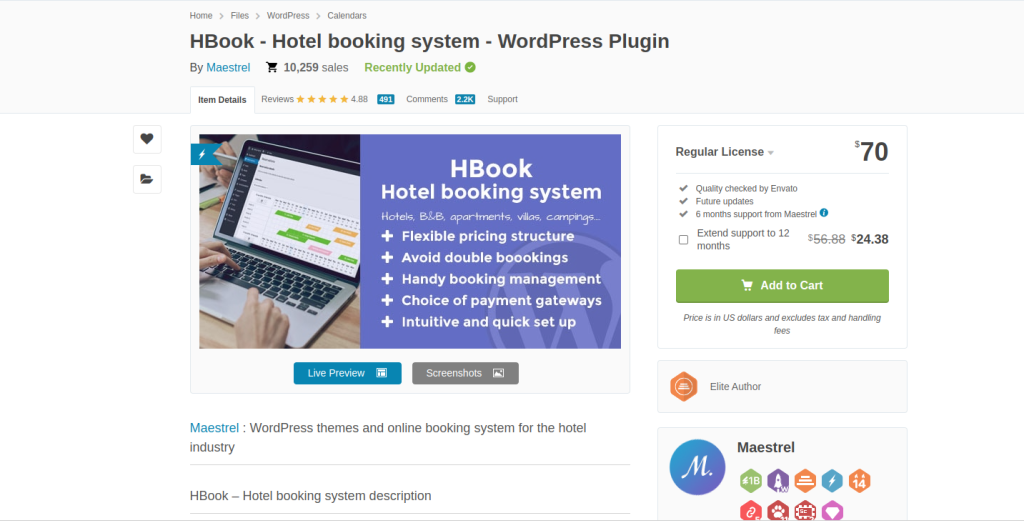
Key Features:
- Tailored for hotel and accommodation bookings
- Supports seasonal pricing and special rates
- Integration with PayPal and Stripe
HBook is another excellent option for hospitality businesses. It allows for the management of seasonal rates, special discounts, and real-time availability. With integrations for PayPal and Stripe, HBook offers a seamless booking experience for both business owners and customers.
Pros:
Tailored to the hospitality industry
Comprehensive pricing and availability options
Cons:
Limited functionality for non-hospitality businesses
Comparison Table: 10 Best Booking Plugin WordPress
| Plugin Name | Key Features | Pros | Cons |
|---|---|---|---|
| Amelia | Customizable forms, Google Calendar integration | User-friendly, SMS notifications | No free version |
| Bookly | Multi-service support, payment integrations | Responsive, multiple payment options | Premium features require payment |
| WooCommerce Bookings | WooCommerce integration, flexible rules | Ideal for eCommerce, customizable | Requires WooCommerce |
| WP Simple Booking Calendar | Daily/hourly booking, user-friendly calendar | Great for rentals, simple to use | Limited features |
| Booking Calendar | Unlimited bookings, customizable forms | Flexible, supports different booking types | Free version lacks premium features |
| WPForms + Addons | Customizable forms, calendar integration | Versatile, drag-and-drop interface | Requires multiple add-ons |
| MotoPress Hotel Booking | Real-time room availability, discounts | Great for hotels, seasonal pricing | Limited to hospitality |
| Simply Schedule Appointments | Drag-and-drop scheduling, payment integration | Easy to use, ideal for small businesses | Advanced features are premium-only |
| Calendarista | Google Maps integration, customizable forms | Good for multiple locations | Complex for beginners |
| HBook | Seasonal pricing, PayPal/Stripe integration | Great for hospitality, comprehensive options | Limited for non-hospitality |

Closing Remarks
Each of these 10 best booking plugins for WordPress offers unique features to enhance your site’s functionality and streamline bookings. From the beginner-friendly Simply Schedule Appointments to the highly customizable Amelia, you can find the right plugin to suit your needs and budget. By adding a booking plugin, you’re investing in a tool that will not only improve your customer experience but also reduce your workload.
Interesting Reads
10 Best Plugins for Backup WordPress