

Associations and alumni offices keep asking the same question in a different wrapper: how do we make membership worth renewing for someone who already has the diploma or the certification on their wall? The directory answers “who is in this network.” The chapter structure answers “where do I belong.” Neither answers the question that actually moves a renewal decision for a working professional: can this membership help my career this year.
A members-only job board, built around alumni-owned and alumni-friendly employers, answers that question directly. It is also one of the few benefits with a number attached to it. Higher Logic’s 2026 Association Community Benchmarks report, built from anonymized community data across roughly 1,200 associations and nonprofits between June 2025 and May 2026, found that communities running a job board averaged 103% more monthly unique logins than communities without one. That is not a benefit members politely appreciate. It is a benefit they come back for, repeatedly, which is the entire economics of a renewal-funded organization.
This guide is not about building a general job board, and it is not about building a general alumni network. Both of those are covered elsewhere. Build a Professional Association or Alumni Network with Reign covers the membership layer: member states, chapters, dues and the directory as the product. This guide picks up where that one stops and covers the layer most association sites skip entirely: a career-services job board that is exclusive to members, fed by employers who are often alumni themselves, with employer accounts that can post a role without ever being able to browse your member list.
That last constraint is the one most WordPress job board tutorials never address, and it is the one that matters most to an association. A generic community job board lets anyone register as an employer and, once logged in, see the same directory everyone else sees. For a professional association or a university alumni office, that is a privacy problem waiting to happen. Your members did not join to have their profile mined by a recruiter who signed up with a company email this morning. The architecture in this guide keeps those two populations, members and employers, on separate access rails from the first page they land on.
In this guide
- Why career services outperforms a generic job board as an association benefit
- The member/alumni layer you need before the job board makes sense
- Adding WP Career Board as the job-board layer, and what its free plugin actually includes
- Configuring employer accounts that can post but cannot browse your directory
- Gating alumni-only postings against public postings on the same site
- Two real-world scenarios: a university alumni association and a trade association
- Pricing for Reign plus WP Career Board together
- Common mistakes associations make when they add a career board
- Questions people ask
Why career services, and why now
Every association benefits survey of the last decade lands on some version of the same ranking: networking at the top, career advancement close behind, with the gap between them narrowing every year as membership skews younger. A career board is the one place those two benefits physically overlap. It is networking with a transaction attached. A member does not just see that a fellow alumnus works at a growing company; they see that the company is hiring, and they can apply from inside the same session where they just read the chapter newsletter.
The Higher Logic figure above is the clearest evidence that this is not theoretical. A job board does not just sit on the site waiting to be useful during a layoff. It pulls members back on a schedule no newsletter can match, because “check if anything new was posted” is a habit in a way “read the quarterly update” never becomes. For an alumni office specifically, there is a second effect worth naming: a career board gives you a legitimate, high-value reason to email lapsed alumni who have ignored every renewal reminder. “Three new roles posted by fellow alumni this week” gets opened in a way “your membership has expired” does not.
None of this works, though, if the job board looks and feels like a bolt-on. It has to read as part of the membership benefit, gated the same way the directory and the resource library are gated, built on the same Reign foundation your members already recognize.
Start with the member layer, not the job board
If you have not already built the member structure this guide assumes, stop here and build it first. Build a Professional Association or Alumni Network with Reign walks through the full sequence: member types (active, lapsed, honorary, staff), chapters and cohorts as BuddyPress group types, the directory as the primary product, dues and the lapse cycle, and the public/private split using Wbcom’s free Private Community for BuddyPress plugin. That sequence is a prerequisite, not optional background reading, because the career board you are about to add hooks directly into the member type system that guide builds.
The one addition this guide makes to that structure is a new, narrow member type: Employer. It is not a tier of membership. It does not pay dues, does not appear in the alumni directory, and does not get a chapter assignment. It exists for exactly one purpose: to let a company post a job without becoming, or appearing to be, a member of your association. Keep this distinction sharp from the start. Every mistake associations make with career boards traces back to blurring the line between “member” and “employer account.”
Add WP Career Board as the job-board layer
WP Career Board is Wbcom Designs’ job board plugin, built on Gutenberg blocks and the WordPress Interactivity API rather than shortcodes bolted onto a generic custom post type. For an association site already running Reign and BuddyPress, that matters: the blocks inherit your type scale, spacing and color tokens from the Customizer automatically, so a job card looks like it belongs next to your group cards and member cards rather than like an imported plugin screen.
The free plugin, verified against its product page, includes the pieces you need to launch a career board without touching the paid tier:
- 14 Gutenberg blocks covering job listings, the candidate dashboard, application forms, company profiles and resume forms, each placeable on any page
- Search and filtering by keyword, category, location radius, salary band, job type and experience level
- 39 REST endpoints, which matters if you ever want a members-only mobile app or a headless front end for the career-services section specifically
- Schema.org JobPosting markup on every listing, so postings are eligible for Google’s job search surface
- A candidate dashboard with saved jobs and job alerts, delivered as a daily email digest from a saved search
- Applications stored on the plugin, including guest applications, with a resume database and resume builder so a member can apply without re-uploading a resume every time
- An employer frontend dashboard covering postings, applicants and the company profile, with no need for wp-admin access
- Company profiles with logo, description, active job count and a follow button
- Native BuddyPress compatibility, including posting new jobs into the activity feed, and out-of-the-box styling under Reign, Astra and GeneratePress
- One-click migration tools from WP Job Manager, JobBoardWP, Simple Job Board and WP Job Openings, useful if your association already has a job board running on an older plugin
Everything above ships free. The paid WP Career Board Pro tier adds a Kanban application pipeline (Applied, Review, Shortlist, Interview, Hire), credit-based posting plans sold through Stripe, PayPal or Paddle, AI candidate matching, a job map, multi-board management, RSS and Indeed feed sync, PWA installation, a custom field builder per job type, and verification badges with moderator roles. The one Pro feature this guide leans on directly is multi-board management, covered in the next section, because it is what makes an alumni-only board and a public board coexist cleanly on one install.

Install and create the required pages
Install WP Career Board from the WordPress plugin directory, activate it, and run the setup wizard it offers on first activation. Accept the default pages it wants to create: a Jobs archive, a Post a Job submission page, and a Job Dashboard for employers. Each one inherits your active Reign header, footer and sidebar settings immediately, with no template work required.
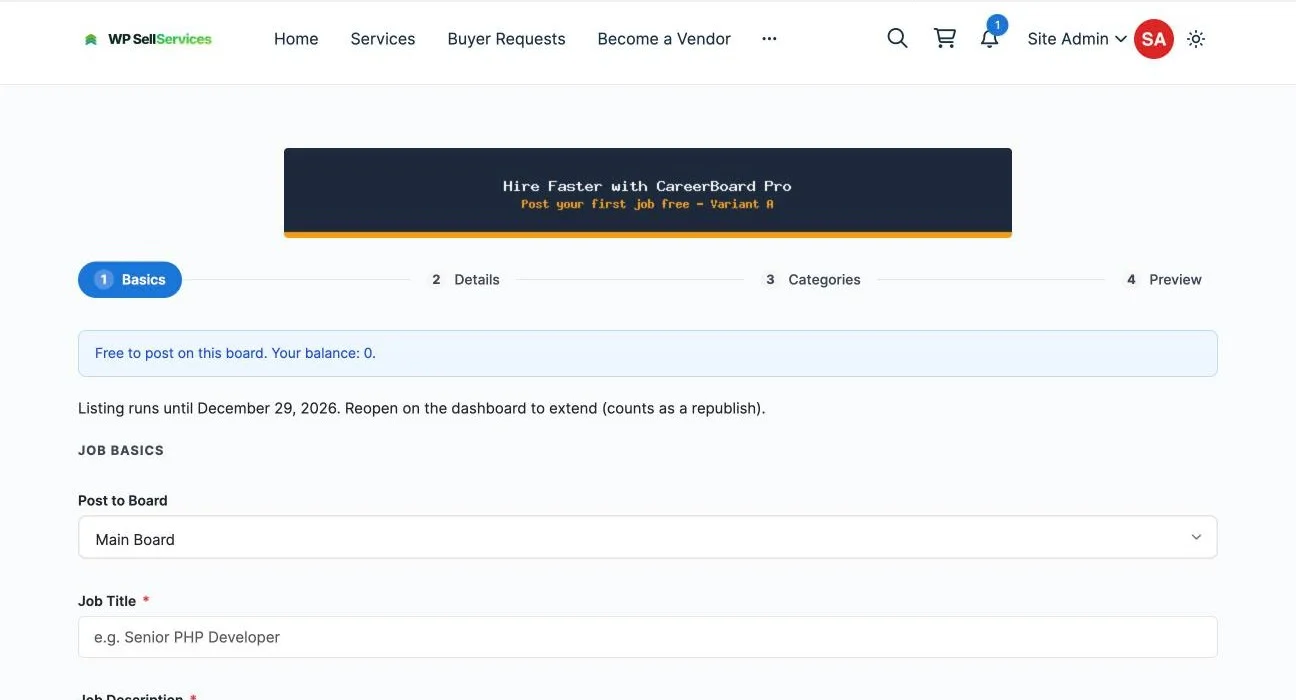
Before you touch any BuddyPress settings, confirm the plugin works in isolation. Visit the Jobs page in a private browser window and confirm listings render, visit Post a Job and confirm the multi-step form (Basics, Details, Categories, Preview) loads cleanly, and submit one test listing end to end. Fixing a broken form before you add member-type gating is far easier than debugging two systems at once.
Configuring employer accounts that can post but cannot browse
This is the part most job board tutorials skip, because a standalone job board site does not need it: there is no member directory to protect. An association site has exactly the opposite problem. Your directory is the asset. An employer account that can browse it defeats the reason members trusted you with their profile in the first place.
The fix is not a setting inside WP Career Board. It is an intersection of three pieces you should already have from the member-layer build: BuddyPress member types, profile field visibility, and Wbcom’s free Private Community for BuddyPress plugin. Here is the exact sequence.
- Create a dedicated Employer member type. Using the free BuddyPress Member Type plugin, add “Employer” as its own type, separate from active, lapsed and honorary member. Do not reuse an existing type, even a disabled one. A clean, dedicated type is what every later rule keys off.
- Route employer registration to that type, not the general signup flow. Build a separate registration path for the Post a Job page, either a distinct registration form or an admin-assigned role after a company requests access. WP Career Board’s own employer dashboard and posting flow do not require wp-admin access, so an Employer account only ever needs frontend capabilities: submit a job, edit a job, view applicants to their own postings.
- Exclude the Employer type from directory search. BuddyPress’ member directory query can be scoped by member type. With Employer kept out of every member-facing directory query, an employer account simply never appears as a searchable profile, and more importantly, never gets directory browsing capability extended to it in the first place, because it was never granted the active-member profile fields that make a profile browsable.
- Lock the directory itself behind Private Community for BuddyPress, exactly as the base association build describes, with the explicit addition that the Jobs, Post a Job, and company-profile pages are among the pages you carve out as accessible to a non-member-type visitor. An employer should reach “post a job” without ever being prompted to log in as a member, and should never reach “/members/” at all.
- Keep profile field visibility pointed at member types, not roles. If a field like “employer” or “mailing address” is visible to “members” as a BuddyPress audience, confirm that audience definition does not accidentally include the Employer member type. This is the step most builds get wrong: they lock down the directory page, then leave a profile field visibility rule that still exposes individual fields to anyone logged in, employer accounts included.
| Account type | Can browse the member directory | Can post a job | Can apply to a job | Appears in directory search |
|---|---|---|---|---|
| Active alumni/association member | Yes, full search and filters | No, unless also granted Employer type | Yes | Yes |
| Employer account | No | Yes, to boards it is permitted to post on | No | No |
| Lapsed member | Reduced view, per the base membership guide | No | Can view but is prompted to renew before applying | Reduced |
| Logged-out visitor | No | No, unless you choose to open posting publicly | No, must register first | No |
Notice the one deliberate exception worth naming: a single person can hold both an active member account and, separately, an employer account for their company, if an alumnus wants to hire through their own business. Do not try to merge these into one account with two roles. Keep them as two logins. It is a minor inconvenience for a handful of people and it keeps the access model easy to reason about for everyone else, including whoever audits it after you.
Gating visibility: alumni-only postings versus public postings
Not every association wants every job hidden behind a login. Many want the opposite split: a public-facing board that markets the association’s industry relevance to search engines and prospective members, sitting next to a private, alumni-only board that carries the actual exclusive value, postings from alumni-owned companies, internal referral roles, or positions an employer specifically wants seen only by this network before going wide.
This is where WP Career Board Pro’s multi-board management earns its keep. Rather than one undifferentiated Jobs archive, you run two:
- Public board, embedded on a marketing-facing careers or industry page that sits outside Private Community for BuddyPress’ login wall. This board carries general listings, works for SEO, and functions as a recruiting pitch for membership itself: “see what’s available to members” is a strong join-page argument.
- Alumni-only board, embedded on a career-services page inside the members-only area, scoped to active and honorary member types the same way the resource library is scoped in the base membership build. This board carries the postings employers specifically tag as exclusive, visible only after login and, if you want a second layer of trust, only to members whose profile shows active dues status.
When an employer submits a listing, the “Post to Board” field in WP Career Board’s submission form is where this choice gets made. Default new employer accounts to the public board unless they have been manually verified as an alumni-owned or alumni-affiliated company, at which point you grant them posting access to the alumni-only board as well. This keeps the exclusive board’s trust intact: nothing appears there that an admin has not at least glanced at once.
Keep the career-services page itself separate from your general activity feed, not merged into it. A career-services page with its own URL, its own short intro paragraph explaining who can post and how exclusivity works, and its own embedded alumni-board block reads as a program the association runs on purpose. The same listings dropped into the general activity stream read as noise competing with graduation announcements and event RSVPs. Members who specifically want career content should be able to bookmark one page and ignore everything else; members who do not care about the job board should never have to scroll past it to find their chapter’s latest post.
Real-world scenario: a university alumni association
A university alumni office with 40,000 graduates across fifty years of classes is the clearest case for this architecture, because it has two employer populations that behave completely differently. Large corporate recruiters want visibility to the whole graduating class regardless of major, and are comfortable on the public board. Individual alumni who started a company, a law practice, a clinic or a consultancy want to hire specifically from their own school, often for a role they would never post on a general job site because the volume of unqualified applicants is not worth the time.
The alumni-only board is built for that second group. An alum who founded a 12-person design studio can post one open role to a board seen only by fellow graduates, with no obligation to a credit system or per-post fee at launch, and that single listing becomes a visible signal to current students and recent graduates that the alumni network has real, ongoing value beyond the annual gala invitation. Scope that alumni-only board further by graduation cohort or school/department group if your member-type and group-type structure already supports it from the base association build; a listing visible only to the Engineering alumni group, for instance, filters out noise for everyone else without any extra plugin work, because it is riding the same group-scoping mechanism your chapters already use.
Real-world scenario: a trade or professional association
A trade association, say a regional healthcare administrators’ association with 2,000 dues-paying members, has a tighter but higher-intent employer base: member organizations that already pay for corporate membership and want first access to candidates before a role goes to a general healthcare job site. Here the public board is less important; most of these associations are comfortable keeping the entire career board behind the member login, treating it as a pure retention benefit rather than a marketing surface.
The employer-account separation matters even more in this context than in the university scenario, because trade association members often work for competing organizations in the same regional market. A hospital system’s HR lead registering as an employer must never be able to browse the directory and see which staff at a competing hospital are active, engaged members of the association, since that is exactly the kind of information a dues-paying member expects to be protected. Treat employer verification seriously here: require a company email domain match and a quick manual check before granting Employer access, and keep the audit trail of who approved which employer account, since this is the kind of access decision a board will ask about eventually.
Pricing: Reign plus WP Career Board
WP Career Board’s free plugin is enough to validate the whole workflow, including employer accounts, company profiles and the member-type gating described above. The one place you need Pro is multi-board management for the public/alumni-only split; everything else in this guide runs on free. Reign itself is the theme layer underneath both the membership build and the career board.
| Plan | Reign (theme) | WP Career Board | Combined, 1 site |
|---|---|---|---|
| Starter (validate the build) | Personal, yearly or lifetime licence | Free | Yearly or one-time licence |
| Production (public + alumni-only boards) | Personal, yearly or lifetime licence | Pro Personal, yearly or lifetime licence | Two yearly licences or two one-time licences |
| Agency (managing boards for multiple client associations) | Agency, yearly or lifetime licence | Pro Agency, yearly or lifetime licence | Two yearly licences or two one-time licences |
Prices are current as published on the respective Wbcom Designs product pages at the time of writing; confirm against the live pricing tables before budgeting, since they change with promotions and version updates.
Common mistakes
- Launching the board empty. An association with zero live postings on day one gets zero logins on day one. Seed it yourself: ask five board members or known alumni employers for a real opening before you announce the feature.
- Letting the Employer role double as a member account. The moment one person holds both capabilities on one login, your “employers cannot browse the directory” guarantee breaks for that account, and there is no clean way to explain the exception later. Two logins, always.
- Putting the career board in the general activity feed instead of its own page. It buries the benefit for members who want it and annoys members who do not.
- Skipping employer verification entirely. An unverified employer account on a trade-association site is a direct line into a directory your members assume is protected, even if that account technically cannot browse it, the posting itself can be used to phish or scrape applicant data if nobody is checking who is behind it.
- Forgetting the lapsed-member case. If dues lapse, decide explicitly whether the career board degrades like the rest of the member benefits described in the base association guide, or cuts off entirely. An inconsistent answer here (full directory degrades gracefully, job board cuts dead) reads as arbitrary to the member experiencing it.
- Treating the public board as a second-class afterthought. If you run one, give it real design attention. A thin, empty-looking public board does more damage to your association’s credibility than not having one at all.
Questions people ask
Do we need WP Career Board Pro to launch, or can we start on the free plugin?
Start on free. Everything in this guide except the public/alumni-only multi-board split runs on the free plugin: employer accounts, company profiles, the candidate dashboard, job alerts and the member-type gating described above. Add Pro when you are ready to run two boards.
Can a lapsed member still see alumni-only job postings?
That is a policy decision, not a technical default, the same way it is for the directory and resource library in the base membership build. Most associations degrade this gracefully: a lapsed member sees that the career board exists and is prompted to renew before applying, rather than being cut off outright.
What stops an employer account from simply registering a second time as a regular member to see the directory?
Nothing technical stops a person from holding two separate, correctly-typed accounts, and that is fine; a legitimate employer who is also an alumnus should hold both. What this architecture prevents is the single Employer account itself ever being granted directory-browsing capability. If you are concerned about bad-faith dual registration, require a verified alumni email or ID check for the member-side account, which most associations already do for dues purposes.
Should job postings count toward an employer’s membership dues, if the employer is also a member organization?
Many trade associations bundle a fixed number of job postings into corporate membership tiers and charge per-listing or via credits beyond that. WP Career Board Pro’s credit system, sold through WooCommerce, Paid Memberships Pro or MemberPress, supports that model directly; map your corporate membership tier to a starting credit balance rather than building a separate payment flow.
Do we need custom development for the employer/member separation described here?
No. BuddyPress Member Type, Private Community for BuddyPress and WP Career Board’s employer role are all configuration-driven. The sequence in this guide is a setup order, not a development project. Custom development only becomes necessary if you want conditional logic the plugins do not expose out of the box, such as auto-approving employer accounts from a verified domain list.
Can we scope alumni-only postings to a specific chapter or graduating cohort, not just “all alumni”?
Yes, if your chapters and cohorts are already built as BuddyPress group types per the base association guide. A job posting can be routed to a specific group’s space the same way a chapter event is, which is the mechanism described in the university scenario above.
How do we keep the public board from exposing information we only want members to see, like company contact details?
Keep company profile fields deliberately sparse on public-board listings and let the full profile, direct contact routing, and any alumni-specific notes live only on the alumni-only board. This is a content decision employers make when they choose which board to post to, not a plugin setting, so make the distinction clear on the Post a Job page itself.
What happens to an employer’s posting history if we ever revoke their access?
Revoking the Employer member type and deactivating the account stops them from posting new listings and managing existing ones, but historical listings and application records remain in WP Career Board’s database unless you explicitly delete them. Decide your data retention policy for this the same way you would for lapsed member data, since the two cases are structurally similar.
Is this approach specific to universities, or does it work for any professional association?
The mechanism is identical regardless of the association type; only the verification bar and the balance between public and alumni-only postings changes. A university alumni office typically leans toward a larger public board for visibility, while a tighter trade association typically keeps nearly everything behind the member login, as the two scenarios above show.
Summary
A member directory tells people who else is in the room. A career board tells them the room is worth staying in. The two features reinforce each other, but only if you resist the shortcut of treating the job board as a generic plugin install bolted onto an existing community. The architecture that actually works for an association is narrower than a generic job board tutorial: a dedicated, non-member Employer account type that can post but never browse, a clean split between what is public and what is reserved for people who are actually paying dues, and a career-services page that stands on its own instead of getting lost in the activity feed.
Build the member layer first if you have not already. Add WP Career Board on top of it using the free plugin to validate the whole flow, including the employer-access restriction described above, before deciding whether the multi-board Pro tier earns its price for your specific mix of public and alumni-only demand.
Get started: Reign plus WP Career Board
Reign is the BuddyPress-powered WordPress theme this entire build sits on: member states, chapters, the directory, and the private/public split that keeps your members’ data where it belongs. See plans and a live demo on the Reign theme page.
WP Career Board is the job-board layer: employer dashboards, company profiles, candidate applications and, in Pro, the multi-board management that makes an alumni-only board possible alongside a public one. Review the full feature breakdown and current pricing on the WP Career Board product page.
Together, they are the fastest path to a career-services benefit your association can point to as a reason to renew, not just a reason to have joined in the first place.