
Why One-Size-Fits-All Advertising Fails on Global Communities
If your BuddyPress community serves members from multiple countries or regions, you are sitting on one of the most underutilized monetization opportunities in community management. Most community site owners run the same ads to every member regardless of location. A member in Germany sees the same promotion as a member in Brazil, the same currency, the same language, the same offer, and the same mediocre conversion rates.
The numbers tell the story. Generic, untargeted display ads on community sites typically convert at 0.1-0.3%. Geo-targeted ads on the same sites routinely hit 1-3%, a ten-fold improvement. The reason is obvious when you think about it: relevance. An ad for a local coworking space in Mumbai is worthless to a member in Toronto, but it is highly relevant to the 500 members in your community who are actually in Mumbai.
Global communities powered by Reign and BuddyPress are uniquely positioned to benefit from geo-targeting because they have what advertisers crave: engaged audiences organized by location. Your members have profiles, they participate in region-specific groups, and they log in regularly. This is not drive-by traffic from search engines. These are known, engaged users whose location data translates directly into advertising value.
Whether you are building a paid membership community or running a free-access platform, geo-targeted ads can dramatically improve your revenue per visitor.
WB Ad Manager Pro includes built-in geo-targeting that works at the country, region, and city level. It was designed specifically for the multi-region community use case, and it integrates directly with BuddyPress member data and Reign’s layout system. Let us explore how to use it effectively.

How Country-Level Targeting Actually Works
Geo-targeting in WB Ad Manager Pro works by identifying each visitor’s location using their IP address and matching it against a geo-IP database. When a page loads, the plugin determines the visitor’s country (and optionally region and city), then serves only the ads that match that location’s targeting rules.
The Technical Foundation
WB Ad Manager Pro uses a server-side geo-IP lookup that happens before the page is rendered. This means there is no JavaScript-based location detection that slows down the page or triggers browser permission prompts. The lookup adds negligible latency, typically under 5 milliseconds, and the results are cached for the session to avoid repeated lookups.
The geo-IP database covers over 250 countries and territories and is updated regularly to maintain accuracy. For most commercial purposes, country-level accuracy exceeds 99%. Region and city-level accuracy varies but typically ranges from 85-95% depending on the country and ISP infrastructure.
For community sites, country-level targeting is usually sufficient. Your advertisers want to reach “members in Germany” or “members in India”, they rarely need city-level precision. That said, city-level targeting is available for cases where it matters, such as promoting local events or location-specific services.
Setting Up Country-Level Rules
In WB Ad Manager Pro, each ad can have one or more geo-targeting rules. The simplest configuration is an include rule: show this ad only to visitors from specific countries. You can also use exclude rules: show this ad to everyone except visitors from specific countries.
The plugin supports combining multiple rules with AND/OR logic. For example: show this ad to visitors from the United States OR Canada AND who are not premium members. This lets you build sophisticated targeting that goes well beyond simple location matching.
A practical approach for most community sites is to start with broad regional groupings rather than individual countries. Create ad zones for major regions, North America, Europe, Asia Pacific, Latin America, and assign ads to each region. As you gather data and attract region-specific advertisers, you can narrow targeting to individual countries.
Creating Region-Specific Ad Zones
An ad zone in WB Ad Manager Pro is a defined placement area on your site where ads can appear. The power of geo-targeting comes from combining these zones with location rules to create region-specific ad experiences.
The Zone Architecture
Think of your ad zone architecture as a matrix. On one axis, you have placement positions: header banner, sidebar top, sidebar bottom, in-content, footer bar, and so on. On the other axis, you have regions: North America, Europe, Asia, and others. Each cell in this matrix can contain a different ad or set of ads.
WB Ad Manager Pro makes this manageable by letting you create zone templates. You define the placement positions once in your Reign theme layout, then create multiple ads that target different regions for each position. The plugin handles the logic of showing the right ad to the right visitor.
For a community with members in 20+ countries, a realistic zone architecture might look like this:
- Header banner: 4 variants (North America, Europe, Asia Pacific, Rest of World)
- Sidebar top: 4 variants matching the same regions
- In-content ad: 4 variants, or a single global ad if you have a universally relevant offer
- Footer bar: A global ad (usually your own cross-promotion or a universally available affiliate)
This gives you 13 ad configurations total, a manageable number that still provides meaningful geographic personalization.
Handling the “Rest of World” Case
No matter how many regions you target individually, there will always be traffic from countries you have not specifically addressed. WB Ad Manager Pro handles this with a fallback mechanism: if no geo-targeted ad matches the visitor’s location, it serves a default ad for that zone.
Your fallback ads should be universally relevant offers. Affiliate programs that work globally, your own premium membership promotion, or generic brand awareness ads from sponsors all work well as defaults. The key is ensuring that no visitor ever sees an empty ad slot because their country was not covered by any targeting rule.
Selling Regional Inventory to Local Businesses
Here is where geo-targeting transforms from a nice-to-have into a genuine revenue engine. Local businesses want to reach local audiences. Your community has those local audiences, segmented and engaged. The challenge is connecting the two.
Building the Sales Case
When you approach a local business about advertising on your community site, the conversation is fundamentally different from selling generic display advertising. You are not saying “we have 100,000 monthly pageviews.” You are saying “we have 5,000 engaged community members in your city who visit our site an average of 12 times per month.”
That specificity changes the perceived value dramatically. A local restaurant, gym, or professional services firm does not care about your total traffic, they care about reach within their serviceable market. Geo-targeting lets you make that promise and deliver on it with verifiable impression and click data.
WB Ad Manager Pro’s reporting breaks down performance by geography, so you can show each regional advertiser exactly how many impressions and clicks their ads received from their target market. This transparency builds trust and justifies premium pricing.
Pricing Regional Inventory
Regional ad pricing should reflect the value of the audience, not just the volume. A sidebar ad shown to 5,000 members in New York City is worth more than the same ad shown to 5,000 members spread across 50 countries, because the New York audience is concentrated and actionable for local advertisers.
A common pricing approach for community sites is to charge a flat monthly rate per region per placement. For example:
- Tier 1 regions (US, UK, Canada, Australia): $200-500/month per placement
- Tier 2 regions (Western Europe, Japan, Singapore): $100-300/month per placement
- Tier 3 regions (rest of world): $50-150/month per placement
These are illustrative numbers, your actual pricing depends on your community’s size, engagement level, and niche. The point is that geo-targeting enables tiered pricing that extracts more value from high-value regions while still monetizing lower-value traffic.
Self-Service Ad Submission
For communities large enough to attract multiple regional advertisers, WB Ad Manager Pro supports a self-service workflow where advertisers can submit their ads and specify their target regions. This reduces the administrative burden on you and lets advertisers manage their own campaigns.
The self-service portal includes region selection, date range scheduling, and creative upload. All submissions go through an approval workflow so you maintain control over what appears on your site. Once approved, the ads automatically start serving to the targeted regions.
Combining Geo-Targeting with Language and Device Rules
Geo-targeting alone is powerful, but the real magic happens when you combine it with other targeting dimensions. WB Ad Manager Pro lets you layer multiple targeting rules to create highly specific audience segments.
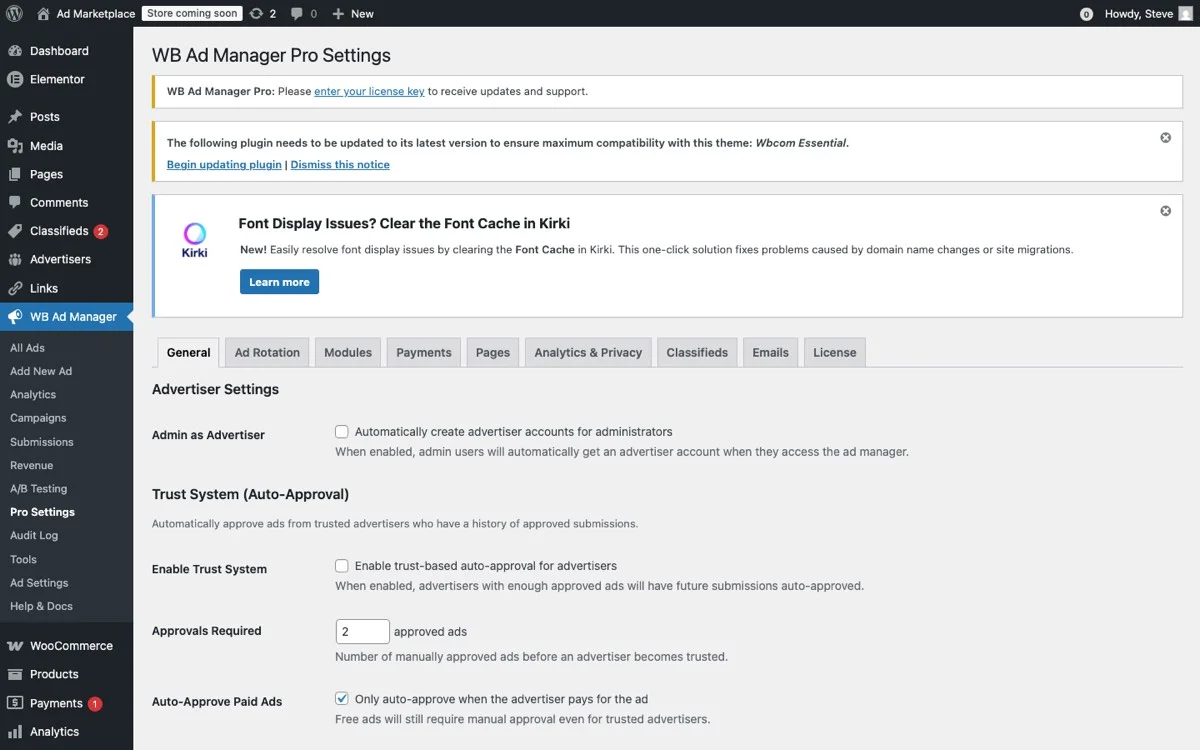
The Pro Settings panel allows you to combine geo-targeting with language detection and device rules for precise, multi-dimensional ad targeting across your global community.
Geo Plus Language
Location and language do not always align. Canada has English and French speakers. Belgium has Dutch, French, and German speakers. Switzerland has four official languages. India has hundreds of languages with English widely used in professional contexts.
If your community supports multiple languages (through a plugin like WPML or TranslatePress), you can combine geo-targeting with language detection. Show French-language ads to visitors from France and to French-language visitors from Canada. Show English-language ads to visitors from India who are browsing in English.
This combination dramatically improves ad relevance. An ad in the visitor’s language from their region feels native and trustworthy. An ad in the wrong language or from an irrelevant region feels like spam.
Geo Plus Device Type
Mobile usage patterns vary dramatically by region. In many developing markets, mobile accounts for 80%+ of web traffic. In mature markets, the split is closer to 60/40 mobile-to-desktop. Your ad strategy should reflect these differences.
WB Ad Manager Pro lets you target by device type in addition to geography. For regions with high mobile penetration, you might prioritize mobile-optimized ad formats like sticky footer bars and in-feed native ads. For regions with higher desktop usage, you can include sidebar ads and larger banner formats that work better on wider screens.
The combination also matters for advertiser selection. A mobile app advertiser wants to reach mobile users in specific markets. A SaaS product advertiser might want desktop users in specific countries. Offering this combined targeting makes your inventory more attractive to both types of advertisers.
Geo Plus User Role
BuddyPress communities typically have multiple user roles: anonymous visitors, registered free members, premium members, group admins, and site moderators. Combining geo-targeting with user role targeting lets you create incredibly specific advertising experiences.
For example: show a premium membership upgrade ad to free members in the United States (where premium pricing is in USD). Show a different premium membership ad with EUR pricing to free members in Germany. Show no ads at all to premium members regardless of location. Show sponsor appreciation ads to group admins who manage sponsored groups.
This level of targeting sophistication is typically only available in enterprise ad serving platforms. WB Ad Manager Pro brings it to the BuddyPress ecosystem at a fraction of the cost and complexity.
Measuring Regional Ad Performance
You cannot improve what you do not measure, and regional advertising requires region-specific measurement. Aggregate metrics hide the story, an ad campaign that averages 1% CTR might actually be getting 3% CTR in one region and 0.2% in another. Without geographic breakdowns, you would never know and would never be able to optimize.

The analytics dashboard provides detailed geographic breakdowns of ad performance, helping you identify which regions drive the most engagement and revenue.
Key Metrics by Region
WB Ad Manager Pro provides the following metrics broken down by geography:
- Impressions by region: How many times was each ad shown to visitors from each region? This tells you about your traffic distribution and helps you price regional inventory accurately.
- Click-through rate by region: Which regions have the highest engagement with your ads? High CTR regions are prime targets for premium pricing.
- Revenue by region: If you are running CPC or CPA campaigns, which regions generate the most revenue? This data feeds directly into your pricing strategy.
- Fill rate by region: What percentage of ad opportunities in each region are filled with targeted ads versus defaults? Low fill rates indicate opportunities to recruit region-specific advertisers.
Using Data to Recruit Advertisers
Your regional performance data is a sales tool. When approaching a potential advertiser in a specific region, you can share anonymized data about the traffic volume, engagement level, and demographic profile of your members in their market.
For example: “Our community has 3,200 active members in Australia who average 15 page views per session. Our current Australia sidebar ad has a 2.1% CTR, and we have availability in the Australia header banner position.” That is a compelling pitch backed by real data, and it is only possible because you are measuring performance at the regional level.
Setting Up Regional Dashboards
WB Ad Manager Pro lets you create custom reporting views filtered by region. Set up a dashboard for each of your major regions that shows impressions, clicks, CTR, and revenue for all ads targeting that region. Review these dashboards weekly to catch trends early, a declining CTR in a region might indicate ad fatigue that calls for creative refresh.
You can also grant limited reporting access to advertisers so they can see their own campaign performance. This self-service reporting reduces support requests and builds advertiser confidence in your platform.
Common Geo-Targeting Mistakes to Avoid
As you implement geo-targeted advertising on your community site, watch out for these common pitfalls that can undermine your efforts.
Over-Segmenting Too Early
It is tempting to set up targeting for every country you have members in. Resist this urge. Start with 3-5 broad regional groupings and a strong default. Only add country-specific targeting when you have enough traffic in that country to generate meaningful ad impressions AND you have an advertiser or offer specific to that country.
Over-segmenting too early creates an administrative burden without proportional revenue gain. You will spend more time managing 50 country-specific ad configurations than you will earn in incremental revenue over 5 regional groupings.
Ignoring VPN and Proxy Traffic
A meaningful percentage of internet users use VPNs, which can make their traffic appear to originate from a different country. This is especially common among tech-savvy community members. Do not panic about this, for most advertising purposes, a 5-10% inaccuracy rate is acceptable and is baked into your CPM pricing.
If VPN traffic is a significant concern (for instance, if you are running compliance-sensitive ads), WB Ad Manager Pro can flag potential VPN connections. However, for most community sites, the added complexity is not worth the marginal improvement in accuracy.
Forgetting About Content Relevance
Geo-targeting should complement content relevance, not replace it. An ad for a Japanese language course shown to a visitor in Japan is geo-targeted but not necessarily relevant, they likely already speak Japanese. Context still matters. Combine geo-targeting with page-level targeting to ensure that the ad matches both the visitor’s location and their current browsing context.
Neglecting Privacy Compliance
Geo-targeting uses IP-based location detection, which falls under various privacy regulations depending on the jurisdiction. GDPR in the EU, CCPA in California, and similar laws in other regions all have implications for how you collect and use location data.
WB Ad Manager Pro uses server-side IP geolocation that does not track individual users and does not store IP addresses. It determines location at the session level for ad serving purposes only. This approach is generally compliant with major privacy regulations, but you should still disclose the use of geo-targeting in your privacy policy and ensure your cookie consent mechanism covers it where required.
A Step-by-Step Implementation Plan
Ready to add geo-targeting to your Reign community? Here is a practical plan to get started.
- Audit your traffic geography. Use your analytics platform to identify your top 10 countries by traffic volume and engagement. This tells you where to focus your initial targeting efforts.
- Define regional groupings. Group your top countries into 3-5 regions based on geography, language, and advertiser relevance. Create a “rest of world” default for everything else.
- Set up ad zones in WB Ad Manager Pro. Define your placement positions in the Reign layout and create the zone architecture described earlier.
- Create regional ads. Start with your own offers (premium membership, affiliate programs) targeted to each region. Use the appropriate currency and language for each region.
- Configure fallback ads. Ensure every zone has a globally relevant default ad for visitors who do not match any regional targeting rule.
- Launch and measure. Run the geo-targeted configuration for at least 30 days to gather meaningful data across all regions.
- Recruit regional advertisers. Use your 30-day data to build sales materials and approach local businesses in your highest-traffic regions.
- Iterate and expand. Add country-specific targeting as advertiser demand justifies it. Continuously optimize based on regional performance data.
Communities that combine geo-targeting with strong engagement foundations, like those focused on learning and member retention, see the best long-term results from regional ad strategies.
Start Monetizing Your Global Community Today
Your multi-region community is a goldmine of advertising opportunity that generic ad plugins cannot tap. WB Ad Manager Pro’s geo-targeting features give you the tools to serve relevant, location-specific ads that convert at significantly higher rates while providing more value to your advertisers.
The combination of geo-targeting with BuddyPress-aware user role targeting and Reign-native design integration makes WB Ad Manager Pro the only ad management solution built specifically for your use case. And if you are also running community events, geo-targeted event promotion ads can drive significantly higher attendance rates.