

Why Community Sites Struggle With Email List Growth
Community site owners face a paradox when it comes to email marketing. They have something most marketers would kill for, an engaged, returning audience that logs in regularly and interacts with content. Yet most BuddyPress communities have anemic email lists, far smaller than their active member counts would suggest.
The reason is structural. When someone joins your BuddyPress community on Reign, they create an account. They get a username, a profile, and access to groups and activity feeds. From their perspective, they have already “signed up.” Asking them to also subscribe to an email list feels redundant, and the standard email capture methods, sidebar widgets, generic popups, footer forms, do nothing to challenge that perception.
The result is that community sites with 10,000 active members often have email lists of 500-1,000 subscribers. That is a 5-10% capture rate on an audience that is already engaged enough to create accounts and participate. Compare that to content sites that routinely capture 15-25% of their visitors into email lists, and it is clear that communities are leaving massive value on the table.
The email list matters because it is the one communication channel you fully control. BuddyPress notifications depend on members logging in. Social media reach is throttled by algorithms you do not own. Push notifications have low opt-in rates and high churn. Email remains the most reliable way to reach your members outside of the community platform itself, and it is essential for re-engagement campaigns, premium upsells, event promotions, and sponsor communications.
If you are running a paid membership community, email is also your primary tool for reducing churn and driving renewals.
WB Ad Manager Pro approaches email capture differently from generic popup plugins. It treats email capture as an ad type with all the targeting, timing, and frequency controls that implies. This means you can deploy email capture forms with the same sophistication you would apply to any other ad campaign, targeting by user role, page context, engagement level, and device type.

Email Capture as an Ad Type: Why It Works
Most community sites treat email capture as a separate concern from advertising, a widget here, a form there, maybe a generic popup. WB Ad Manager Pro treats email capture as a first-class ad type, and this distinction changes everything about how you approach list building.
When email capture is an ad type, it inherits all the capabilities of the ad management system:
- A/B testing: Test different email capture offers, headlines, and form designs against each other with proper traffic splitting.
- Targeting rules: Show email capture forms to specific user segments based on role, behavior, location, and page context.
- Frequency capping: Control how often each user sees the email capture prompt, preventing the fatigue that kills conversion rates.
- Performance tracking: Track impressions, form views, submissions, and conversion rates with the same analytics infrastructure used for all other ads.
- Scheduling: Run email capture campaigns on a schedule, launch them during high-traffic periods, pause them during low-engagement windows.
This ad-based approach means you stop thinking of email capture as a static website element and start thinking of it as an optimizable campaign. And campaigns, when properly optimized, dramatically outperform static elements.
The Offer Matters More Than the Form
The biggest mistake in email capture is focusing on the form design while ignoring the offer. No amount of design polish will convince someone to hand over their email address if the value proposition is weak. “Subscribe to our newsletter” is not a value proposition, it is a request with no clear benefit.
For community sites, effective email capture offers connect to the community experience:
- Weekly community digest: “Get the top discussions, new groups, and member highlights delivered to your inbox every Monday.” This is specific, valuable, and clearly connected to the community.
- Exclusive content: “Join our email list for exclusive guides, templates, and resources not available on the community site.” This creates perceived scarcity.
- Early access: “Be the first to know about new features, events, and premium group launches.” This appeals to members who want insider status.
- Lead magnets: A downloadable resource (guide, checklist, template) relevant to your community’s niche. This is the classic email capture technique, and it works on community sites just as well as content sites when the resource is genuinely valuable.
WB Ad Manager Pro’s email capture ad type lets you present these offers in rich, visually appealing formats that go beyond a simple form field. You can include images, formatted descriptions, social proof elements, and styled CTA buttons, everything you need to sell the value of subscribing.
High-Converting Placement Positions
Where you place your email capture ads matters enormously. The right placement can double or triple your conversion rate compared to a poorly positioned form. Here are the positions that work best on Reign-powered community sites, ranked by typical conversion rate.
1. Exit-Intent Modal (Desktop Only)
Exit-intent email capture modals consistently deliver the highest conversion rates because they only appear to users who are about to leave. There is no UX cost to showing a form to someone who is already on their way out, and the modal format demands attention at a critical moment.
On community sites, exit-intent modals typically convert at 3-7% for anonymous visitors and 1-3% for logged-in members who are not yet subscribed. The key is offering something immediately valuable, not just “subscribe” but “get this week’s top 5 community discussions in your inbox.”
2. In-Content After Engagement
Placing an email capture form within the content flow, after a forum post, within an activity feed, or between group listings, catches users at a moment of engagement. They have just consumed content and are in a receptive mindset.
WB Ad Manager Pro supports in-content ad injection that can place email capture forms after a defined number of content items. For activity feeds, inserting a capture form after every 10th activity item works well. For forum threads, placing it after the original post but before replies is effective. For group directories, inserting after every 8-10 group listings keeps it visible without being intrusive.
In-content email capture typically converts at 1-3%, but the high impression volume (every user scrolling through content sees it) makes it one of the highest-volume capture mechanisms.
3. Sticky Footer Bar
A sticky footer bar with an inline email capture field is the most persistent placement option. It remains visible throughout the session without blocking content, and the inline form lets users subscribe without any popup or overlay interrupting their browsing.
Footer bar email capture converts at lower rates, typically 0.5-1.5%, but the constant visibility means it captures subscribers over time from users who might not respond to a more aggressive prompt. It works particularly well for members who visit frequently and eventually decide to subscribe after seeing the bar multiple times.
4. Sidebar Widget
The classic sidebar email capture form has lower conversion rates than overlay formats, but it has the advantage of being completely non-disruptive. On Reign’s sidebar layout, a well-designed capture form sits alongside other community widgets (recent members, active groups, upcoming events) and feels like a natural part of the page.
Sidebar capture works best when paired with social proof: “Join 2,500+ community members who get our weekly digest.” Showing the subscriber count creates social validation that nudges fence-sitters toward subscribing.
5. Post-Registration Prompt
The moment after a new member creates their BuddyPress account is the highest-intent moment for email capture. They have just committed to joining your community and are in a “yes” mindset. A well-timed email capture prompt at this point can convert at 15-30%.
WB Ad Manager Pro can target ads to specific BuddyPress registration flow pages, letting you show an email capture form as part of the new member onboarding experience. Frame it as part of the setup: “Complete your profile by choosing how you want to stay connected. Subscribe to get weekly highlights delivered to your inbox.”
Targeting by User Role: The Community Advantage
This is where community sites have a massive structural advantage over generic content sites. You know who your users are. BuddyPress user roles give you targeting precision that content sites can only dream of.
Anonymous Visitors
Visitors who have not logged in or created an account represent your highest-opportunity segment for email capture. They have found your community through search or referral, they are interested enough to browse, but they have not committed to joining yet.
For this segment, the email capture offer should lower the commitment barrier. “Get the best of our community in your inbox, no account required” is more appealing than “Join our community.” The email list becomes a soft entry point that you can later use to nurture them toward full membership.
WB Ad Manager Pro lets you target anonymous visitors specifically, showing them email capture ads while hiding those same ads from logged-in members. This prevents the redundancy of asking existing members to subscribe to something they may already receive through BuddyPress notifications.
Registered Members (Not Subscribed)
Members who have accounts but have not subscribed to your email list need a different approach. They are already in your community, they do not need to be sold on the community itself. Instead, sell the unique value of the email channel.
Effective offers for this segment include:
- “Never miss a reply”: Email notifications when someone responds to their posts or mentions them, even when they are not logged in.
- “Weekly highlights”: A curated summary of the best content and discussions they might have missed.
- “Exclusive member offers”: Discounts, early access, or exclusive content available only to email subscribers.
The messaging acknowledges their existing membership: “You are already part of our community. Make sure you never miss what matters most.”
Premium Members
Premium members are your most valuable segment, and they should receive the most careful treatment. If they are not on your email list, the capture approach should feel premium too, not a generic popup but a personalized, high-value offer.
Consider: “As a premium member, you get early access to our monthly industry report. Enter your email to receive it directly.” This positions email subscription as an additional premium benefit rather than a separate marketing channel.
Alternatively, premium members might be better served through a direct opt-in within their BuddyPress profile settings rather than an ad-style capture form. WB Ad Manager Pro lets you exclude premium members from standard email capture ads entirely, which might be the right approach if you have a separate premium email communication channel.
Group Admins and Moderators
Group admins and moderators are community leaders who can amplify your email list growth. Consider a targeted email capture that is less about subscribing them and more about equipping them: “Get our monthly Community Leader Toolkit, tips, resources, and strategies for running better groups.”
When community leaders subscribe and find value, they often mention it to their group members, creating organic word-of-mouth growth for your email list.
Frequency Capping for Email Capture
Frequency capping is even more critical for email capture ads than for regular advertising. A member who has already declined to subscribe does not want to see the same ask every session. Without proper frequency capping, email capture prompts quickly become the most annoying element on your site.
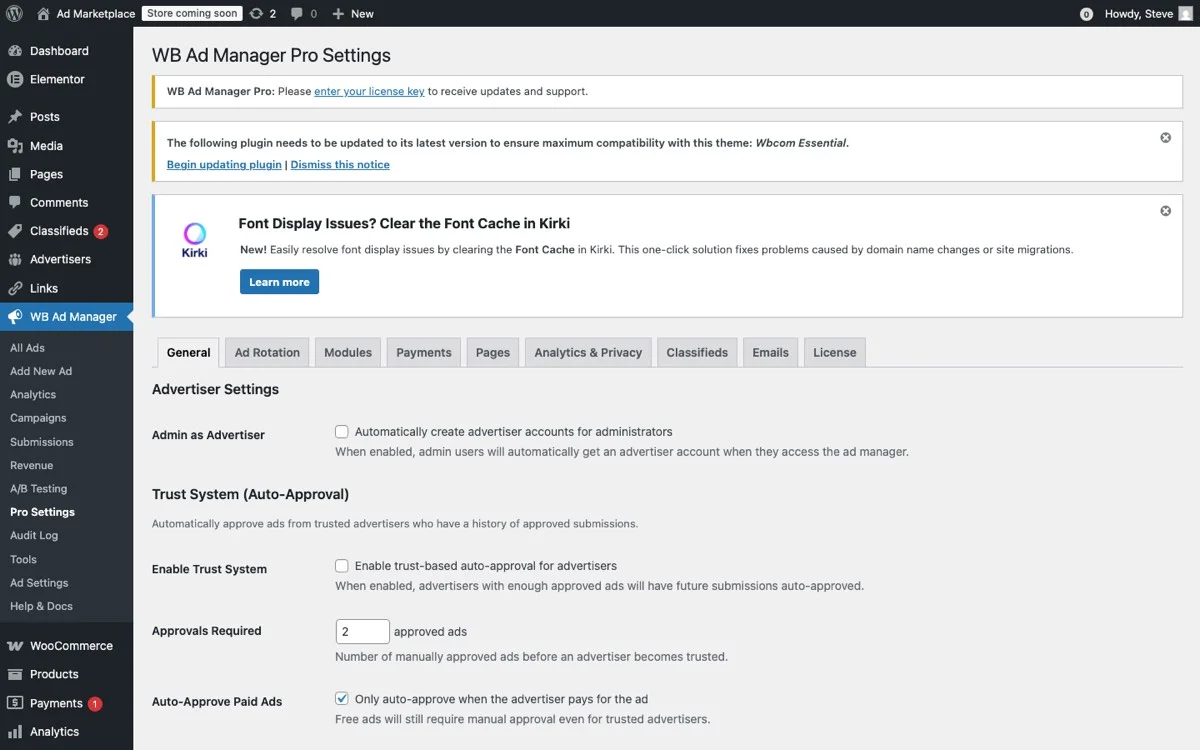
The Pro Settings panel provides granular frequency capping controls for email capture campaigns, ensuring you never over-prompt members who have already declined.
Recommended Frequency Settings
WB Ad Manager Pro’s frequency capping for email capture ads works at multiple levels:
- After submission: Once a user submits their email, immediately suppress all email capture ads for that user. They have converted, stop asking.
- After dismissal: When a user closes an email capture popup or dismisses a sticky bar, suppress that specific ad for a defined period. A 7-day suppression after dismissal is a good starting point.
- Per-session limit: Show no more than one email capture ad per session, regardless of format. Seeing multiple capture prompts in a single session feels desperate.
- Per-user escalation: If a user has dismissed the capture prompt three times, extend the suppression period to 30 days. They are clearly not interested right now, and continued prompting will only generate resentment.
The Decay Strategy
Smart frequency management is not just about limiting impressions, it is about varying the approach over time. WB Ad Manager Pro lets you create sequential ad campaigns where the same user sees different capture ads over time.
Week 1: Show a content-focused lead magnet offer. If declined, suppress for 7 days.
Week 2: Show a community digest offer with a different value proposition. If declined, suppress for 14 days.
Week 3: Show a social-proof-heavy offer (“12,000 members get our weekly email”). If declined, suppress for 30 days.
Each attempt uses a different angle, avoiding the staleness of seeing the exact same prompt repeatedly. After three declined attempts, the user enters a long cooling-off period before the cycle restarts.
Connecting to Marketing Platforms
Email capture is only valuable if the captured emails flow into a marketing platform where you can actually send campaigns. WB Ad Manager Pro integrates with major email marketing services to ensure seamless data flow.
Supported Integrations
WB Ad Manager Pro supports direct integration with the email marketing platforms most commonly used by community site owners:
- Mailchimp: The most popular email platform for small to mid-size communities. WB Ad Manager Pro can add subscribers directly to specific Mailchimp lists and apply tags based on the capture source and user role.
- ConvertKit: Popular among creator communities. The integration supports ConvertKit’s tag-based subscriber system, letting you tag subscribers based on which capture form they used, their BuddyPress role, and their community engagement level.
- ActiveCampaign: For communities running sophisticated marketing automation. WB Ad Manager Pro can push subscriber data including custom fields for BuddyPress profile data, enabling personalized automation workflows.
- Mailerlite: A cost-effective option for communities on a budget. The integration handles subscriber addition and group assignment.
- Custom webhooks: For platforms not directly supported, WB Ad Manager Pro can send form submission data to any webhook URL, making it compatible with virtually any email platform that accepts inbound data.
Passing BuddyPress Data to Your Email Platform
This is where WB Ad Manager Pro’s BuddyPress integration creates unique value. When a logged-in member subscribes, the plugin can pass their BuddyPress profile data, display name, member type, group memberships, profile fields, to your email platform. This data enables segmentation and personalization in your email campaigns that would be impossible with a generic capture form.
For example, if a member belongs to a “Web Developers” group and a “WordPress” group, that information can be passed to ConvertKit as tags. You can then send targeted email campaigns about web development topics to that segment, achieving relevance that dramatically improves open and click rates.
WB Ad Manager Pro handles the data mapping through a configuration interface where you define which BuddyPress fields map to which email platform fields. Once configured, the mapping works automatically for all future subscriptions.
Double Opt-In Considerations
Most email platforms default to or recommend double opt-in, where subscribers must click a confirmation link in an email before being fully added to the list. For community sites, double opt-in has pros and cons.
The pro: higher list quality. Every subscriber has confirmed their interest, reducing complaints and improving deliverability. The con: lower conversion rates. Some studies show that double opt-in can reduce effective subscription rates by 20-40% because some people never click the confirmation email.
For logged-in BuddyPress members, you can make a reasonable argument for single opt-in. They have already verified their email as part of the account creation process, and the subscription is happening within an authenticated session. For anonymous visitors, double opt-in is strongly recommended to maintain list quality and comply with anti-spam regulations.
WB Ad Manager Pro lets you configure opt-in behavior per capture form, so you can use single opt-in for authenticated member capture and double opt-in for anonymous visitor capture.
Measuring Email Capture Performance
WB Ad Manager Pro provides dedicated analytics for email capture campaigns that go beyond simple submission counts.

The analytics dashboard tracks the complete email capture funnel, from impressions through form views to confirmed subscriptions, broken down by placement and user segment.
Funnel Metrics
Track the full capture funnel:
- Impressions: How many times was the capture ad shown?
- Form views: How many users saw the actual form (relevant for popups where the form is not visible until triggered)?
- Form starts: How many users began typing in the email field?
- Submissions: How many users submitted the form?
- Confirmed subscriptions: How many submissions resulted in confirmed email subscribers (relevant for double opt-in)?
Each step in this funnel reveals optimization opportunities. A high impression-to-form-view ratio with a low form-view-to-submission ratio suggests the form itself needs improvement. A high submission-to-confirmation drop-off suggests your confirmation email needs work.
Segmented Performance
Break down capture performance by the targeting dimensions you are using:
- By user role: Which segments convert best? Anonymous visitors might have higher volume but lower rates. Registered members might convert at higher rates but lower volume.
- By placement: Which positions drive the most subscriptions per impression? Exit-intent modals might have the highest rate, but in-content forms might deliver the most total subscriptions.
- By offer: Which lead magnet or value proposition converts best? A/B test different offers and track which ones win.
- By device: Do mobile users subscribe at different rates than desktop users? This informs your mobile placement strategy.
Long-Term Value Tracking
The ultimate measure of email capture success is not the number of subscribers but the value those subscribers generate. Track downstream metrics: email open rates by capture source, click rates, premium membership conversions from email campaigns, and email-driven return visits to the community.
WB Ad Manager Pro’s reporting can be combined with your email platform’s analytics to build a complete picture of the capture-to-value pipeline. This data justifies continued investment in email capture optimization and helps you calculate the true return on your ad placement decisions.
For communities that also manage events through BuddyPress, email lists become a powerful channel for driving event registrations and attendance.
Implementation Playbook
Here is a practical, step-by-step plan for launching email capture ads on your Reign community with WB Ad Manager Pro.
- Define your email value proposition. What specific value will subscribers receive that they cannot get from BuddyPress notifications alone? Write this down clearly before designing any forms.
- Create a lead magnet. Develop a downloadable resource (guide, checklist, template) relevant to your community niche. This will be your highest-converting capture offer.
- Set up your email platform integration. Configure the connection between WB Ad Manager Pro and your email marketing service. Map BuddyPress fields to email platform fields.
- Create three capture ads. An exit-intent modal for desktop, a sticky footer bar for mobile, and an in-content form for activity feeds. Each should use your lead magnet offer.
- Configure user role targeting. Set different capture ads for anonymous visitors, free members, and registered members. Exclude premium members or create a separate premium-specific capture.
- Set frequency caps. One capture impression per session, 7-day suppression after dismissal, permanent suppression after submission.
- Launch and monitor. Run the campaign for two weeks and review funnel metrics for each placement and user segment.
- A/B test the offer. After establishing a baseline, test alternative value propositions: community digest vs. lead magnet vs. exclusive content.
- Optimize based on data. Double down on the placements and offers that convert best. Adjust frequency caps based on dismissal patterns.
- Scale with sequential campaigns. Implement the decay strategy described above, cycling through different offers for users who decline the initial prompt.
Building a learning community that members return to becomes even more effective when you have a strong email channel to complement your on-platform engagement.
Grow Your Email List the Smart Way
Your BuddyPress community is full of engaged members who would subscribe to your email list if you asked them the right way, at the right time, with the right offer. WB Ad Manager Pro gives you the tools to do exactly that, with ad-quality targeting, frequency controls, and analytics that turn email capture from a passive form into an optimized conversion machine.
Stop leaving email subscribers on the table. Start capturing them with the intelligence your community deserves.