

In the digital age, website security is paramount. With WordPress powering over 43.5% of all websites, it has become a prime target for hackers and malicious attacks. To safeguard your site, utilizing security plugins is essential. This blog post explores the 10 best plugins for WordPress security, providing insights into their features, pros, and cons. By the end, you’ll be equipped to make informed decisions to protect your online presence.

Why WordPress Security Plugins Matter
The importance of securing your WordPress site cannot be overstated. Cyber threats are evolving, and attackers are continually finding new ways to exploit vulnerabilities.
Understanding the Risks
Every day, thousands of websites fall victim to attacks that compromise sensitive data, disrupt services, or even lead to complete site takeovers. Common threats include malware infections, brute force attacks, and SQL injections. Without proper security measures in place, your website could easily become a victim.
Peace of Mind
Using security plugins not only protects your site but also provides peace of mind. Knowing that you have robust defenses in place allows you to focus on creating content and engaging with your audience rather than worrying about potential threats.
1. Wordfence Security
Wordfence is one of the most popular security plugins for WordPress, offering comprehensive protection against various threats.
Key Features
Web Application Firewall (WAF): Blocks malicious traffic before it reaches your site.
Malware Scanner: Regularly scans for vulnerabilities and malware.
Pros
User-friendly interface suitable for beginners.
Active community support and frequent updates.
Cons
The free version has limited features compared to the premium version.
Can slow down your site if not configured properly.
2. Sucuri Security

Sucuri is another leading name in the realm of website security. It provides a range of features designed to protect your site from various threats.
Key Features
Security Activity Auditing: Monitors user activity and system events.
Malware Scanning: Detects and removes malware from your site.
Pros
Offers both free and premium versions.
Excellent customer support and documentation.
Cons
Some advanced features require a premium subscription.
The firewall is only available in the paid version.
3. All-In-One WP Security & Firewall
This plugin offers a comprehensive suite of security features that cater to users of all experience levels.
Key Features
Brute Force Protection: Limits login attempts to prevent unauthorized access.
User Account Monitoring: Tracks user activity and suspicious behavior.
Pros
Easy to set up with a user-friendly interface.
Provides detailed reports on security status.
Cons
Some features may require manual configuration.
The firewall may not be as robust as dedicated solutions like Sucuri.
4. iThemes Security

Formerly known as Better WP Security, iThemes Security offers a plethora of features aimed at hardening your WordPress installation.
Key Features
File Change Detection: Monitors files for unauthorized changes.
Two-Factor Authentication: Adds an extra layer of security during login.
Pros
Comprehensive security hardening options.
Regular updates and active support community.
Cons
The interface can be overwhelming for beginners.
Some advanced features are locked behind the pro version.
5. Jetpack Security
Jetpack is a multifunctional plugin that includes robust security features alongside performance enhancements.
Key Features
Real-Time Backups: Automatically backs up your site data.
Spam Protection: Protects against spam comments and brute force attacks.
Pros
Easy integration with other Jetpack features like performance optimization.
Reliable support from Automattic, the creators of WordPress.com.
Cons
Some users may find it resource-heavy due to its many features.
Advanced security options require a premium subscription.
6. MalCare Security
MalCare focuses on providing advanced malware detection and removal capabilities without impacting site performance.
Key Features
Daily Malware Scanning: Automatically scans for malware every day.
One-click Malware Removal: Quickly removes detected malware with ease.
Pros
Does not use server resources for scanning; scans are performed on MalCare’s servers.
User-friendly dashboard with clear notifications.
Cons
Premium features require a subscription.
Limited free version functionality compared to competitors.
7. Defender
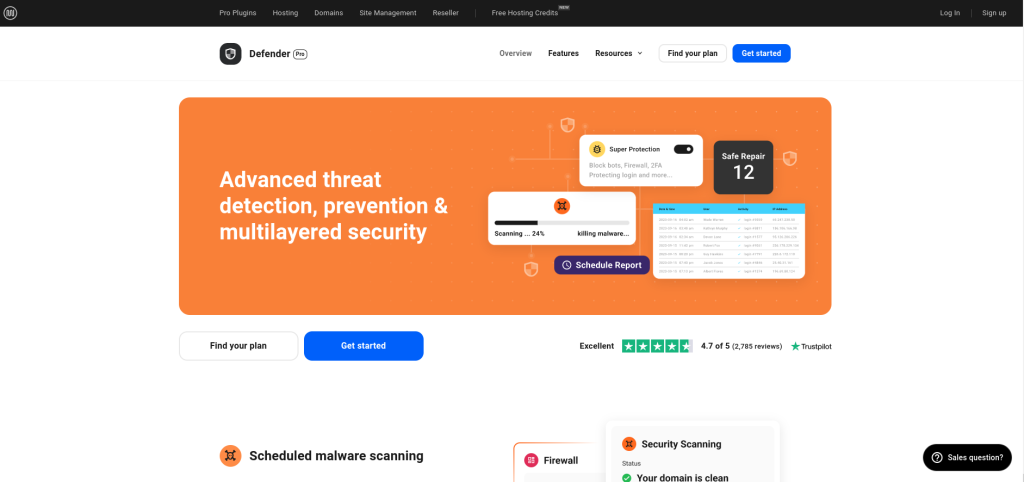
Defender offers an array of tools designed to enhance WordPress security effectively.
Key Features
Security Audits: Conducts regular audits to identify vulnerabilities.
Firewall Protection: Blocks common threats before they reach your site.
Pros
Comprehensive reporting on vulnerabilities and suggested fixes.
Easy setup process suitable for all users.
Cons
Some advanced features may require additional configuration.
Limited support options in the free version.
8. SecuPress

SecuPress provides an intuitive interface with powerful security tools tailored for WordPress users.
Key Features
Security Scanning: Regularly checks for vulnerabilities in themes and plugins.
Antivirus Engine: Detects malware across your site files.
Pros
User-friendly setup wizard guides you through configuration.
Offers both free and premium versions with extensive documentation.
Cons
The premium version can be costly for small businesses.
Some users report slower performance during scans.
9. BulletProof Security

BulletProof Security offers robust protection against common attacks while remaining lightweight on resources.
Key Features
Setup Wizard: Helps configure essential settings quickly.
Maintenance Mode: Allows you to put your site in maintenance mode during updates or repairs.
Pros
Lightweight plugin that does not slow down your site significantly.
Comprehensive protection against various attack vectors.
Cons
Interface may feel outdated compared to modern alternatives.
Requires some technical knowledge for optimal configuration.
Comparison Table of the 10 Best Plugins for WordPress Security
| Plugin | Key Features | Pros | Cons |
|---|---|---|---|
| Wordfence Security | Web Application Firewall, Malware Scanner | User-friendly interface, active community support | Free version has limited features, can slow down your site |
| Sucuri Security | Security Activity Auditing, Malware Scanning | Offers free and premium versions, excellent customer support | Advanced features require premium subscription |
| All-In-One WP Security & Firewall | Brute Force Protection, User Account Monitoring | Easy to set up, detailed reports on security status | Some features may require manual configuration |
| iThemes Security | File Change Detection, Two-Factor Authentication | Comprehensive security hardening options, regular updates | Interface can be overwhelming for beginners |
| Jetpack Security | Real-Time Backups, Spam Protection | Easy integration with other Jetpack features, reliable support | Resource-heavy due to many features, advanced options require premium subscription |
| MalCare Security | Daily Malware Scanning, One-click Malware Removal | No server resource impact, user-friendly dashboard | Premium features require a subscription, limited free version functionality |
| Defender | Security Audits, Firewall Protection | Comprehensive reporting on vulnerabilities and suggested fixes | Some advanced features may require additional configuration |
| SecuPress | Security Scanning, Antivirus Engine | User-friendly setup wizard, extensive documentation available | Premium version can be costly for small businesses |
| BulletProof Security | Setup Wizard, Maintenance Mode | Lightweight plugin that does not slow down your site significantly | Outdated interface compared to modern alternatives |

Last Remarks: Strengthen Your WordPress Fortress
Securing your WordPress site is crucial in today’s digital landscape filled with potential threats. Utilizing one or more of these 10 best plugins for WordPress security, you can create a robust defense against cyber-attacks. Each plugin offers unique features tailored to different needs - whether you seek comprehensive protection or specific functionalities like malware scanning or firewall capabilities. By investing time in selecting the right tools and implementing them effectively, you can ensure that your online presence remains safe and secure against evolving threats.
Interesting Reads: