

Your Members Are Leaving for Instagram. Here’s How to Win Them Back.
You built a thriving community website. Members signed up, posted updates, joined groups, and connected with each other. Then something shifted. Activity slowed. Engagement dropped. Your analytics told the story you already suspected: members were spending their visual sharing time on Instagram instead of your community.
This is not a unique problem. Community managers across every niche face this same challenge. The pull of Instagram, Snapchat, and TikTok is real. These platforms have spent billions perfecting features that keep users scrolling, tapping, and coming back multiple times a day. Your WordPress community, no matter how valuable its content, struggles to compete with that kind of sticky engagement.
But here is the good news: you do not have to compete with Instagram on their turf. You can bring the exact social mechanics that make those platforms addictive directly into your community website. And with WP Stories, you can do it without writing a single line of code.
This guide walks you through the Instagram-like features your community website needs, why they work, and exactly how to implement them using WP Stories with the Reign theme.
Why Members Drift to Instagram (And What It Means for Your Community)
Understanding why members leave is the first step toward bringing them back. It is rarely about dissatisfaction with your community. It is almost always about engagement mechanics.
Instagram succeeds because it creates a visual-first experience. Users open the app and immediately see content from people they follow. There are no walls of text, no forum threads to navigate, no complex menu structures. The content is front and center, and consuming it requires nothing more than a tap or a swipe.
Your community website likely relies on text-based activity feeds, discussion forums, and profile pages. These are valuable for deep conversations, but they do not create the same kind of quick-hit dopamine response that visual stories deliver. When a member has five minutes to kill, they reach for Instagram because the engagement loop is faster, more visual, and more satisfying. If you are evaluating platforms, check out our comparison of Reign Theme vs BuddyBoss to see how Reign supports these engagement features natively.
The second factor is content creation friction. Posting an Instagram story takes about ten seconds. Open the camera, snap a photo, add a sticker, tap share. Compare that with writing a forum post or even a quick status update on most community platforms. The barrier to creating content matters enormously, and Instagram has reduced that barrier to almost nothing.
The third factor is the ephemeral nature of stories. Because Instagram stories disappear after 24 hours, members feel less pressure about what they share. A forum post lives forever and feels permanent. A story is casual, in-the-moment, and low-stakes. This psychology drives significantly higher posting frequency.
Three Features That Keep Users Hooked on Instagram
Before we build, let us understand what specifically makes Instagram so engaging. Three features stand above the rest.
1. Tap-Through Stories
Stories are the single most copied feature in social media history. Instagram did not invent them (Snapchat did), but Instagram perfected the format. The tap-to-advance mechanic creates a rhythm of consumption that is almost meditative. Users enter a flow state, tapping through story after story, consuming content from dozens of people in just a few minutes.
The key elements that make stories work include the full-screen immersive format that blocks out everything else, the progress bar at the top showing how many slides remain, the automatic advancement to the next person’s story when the current one finishes, and the ring indicators showing which users have new stories to view.
2. Story Highlights
While individual stories disappear after 24 hours, Instagram Highlights let users curate their best story content into permanent collections displayed on their profile. This solves the ephemeral content dilemma: members get the low-pressure posting experience of stories with the option to preserve their best content.
Highlights serve as a visual portfolio or introduction. When someone visits a profile, the highlight circles immediately communicate who this person is, what they care about, and what kind of content they create. They act as a visual resume for the community.
3. Visual Reactions and Social Proof
Instagram stories include quick reaction options: emoji responses, reply stickers, polls, and question boxes. These micro-interactions reduce the friction of engagement to a single tap. A member does not need to think of a thoughtful comment. They can react with a heart emoji and move on. This drives engagement numbers through the roof because the cost of participating is so low.
Bringing Tap-Through Stories to Your Community Website
WP Stories brings the full Instagram stories experience to your WordPress community. Here is what that looks like in practice.
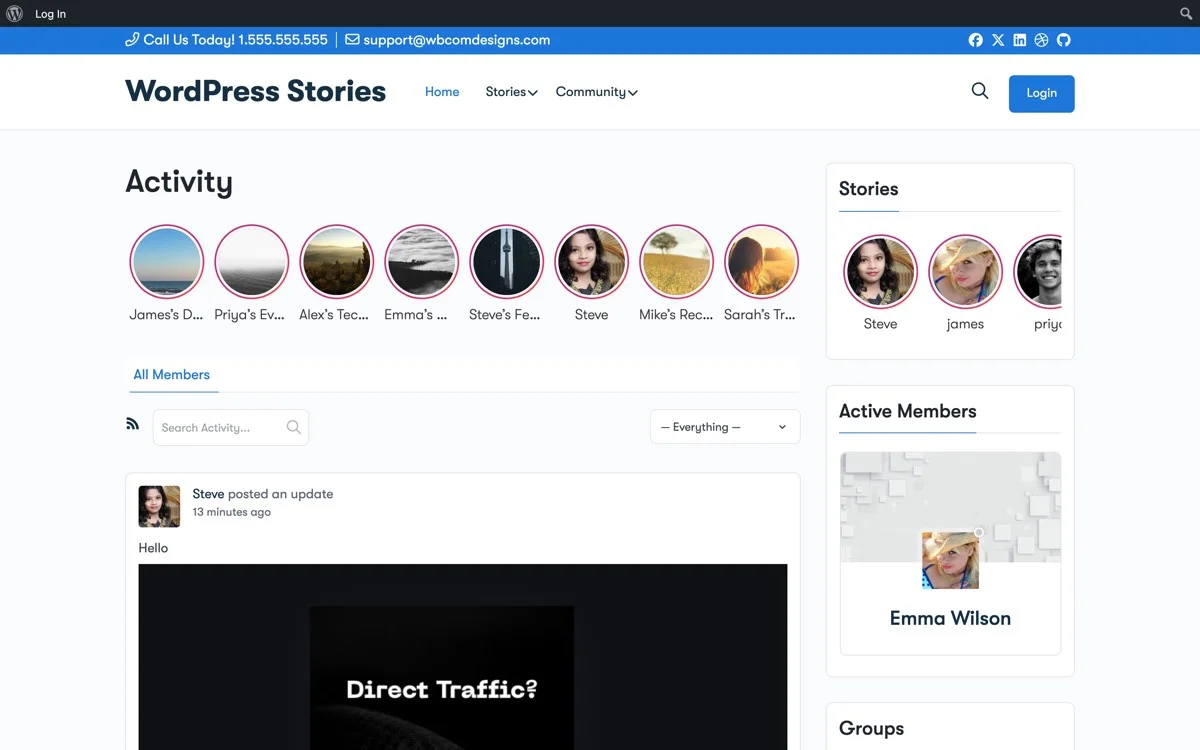
When members visit your site, they see a row of story circles at the top of the activity feed, exactly like Instagram. Each circle shows a member’s avatar with a colored ring indicating an unviewed story. Tapping a circle opens the full-screen story viewer with the same tap-to-advance, swipe-to-skip mechanics that users already know from Instagram.
The technical implementation handles all the complexity behind the scenes. Stories auto-advance on a timer. The progress bar shows remaining slides. Pausing works by holding down on the screen. Navigation between different members’ stories happens automatically. All of this runs natively in the browser without requiring members to install anything.
For community managers, this means your members get the Instagram experience without leaving your website. The visual content stays in your community. The engagement happens on your platform. The connections form within your ecosystem, not on a third-party social network that does not care about your community goals. This is one of the key advantages when you build a learning community that members actually return to.

Story Collections as Highlights: Permanent Content Worth Keeping
The highlights feature in WP Stories lets members save their best stories into themed collections that appear permanently on their profile. This is a direct parallel to Instagram Highlights, and it solves the same problem: giving members a reason to create stories while also building a lasting profile presence.
Members can create highlight collections like “My Projects,” “Travel Adventures,” “Tips and Tutorials,” or anything else that represents their contributions to the community. Each collection has a custom cover image and title, displayed as circles on the member’s profile page.
For community managers, highlights become a powerful curation tool. You can feature highlight collections on community pages, use them to showcase member expertise, or create official highlight collections for announcements, events, and community guidelines. The possibilities extend well beyond what Instagram offers because you control the platform.
The permanence of highlights also addresses a common concern about ephemeral content. Some community managers worry that stories will reduce the amount of lasting, searchable content on their platform. Highlights solve this by letting the best story content live on indefinitely while maintaining the low-pressure posting dynamic that drives high story creation rates.
Three Visual Styles to Match Your Community Brand
One area where WP Stories goes beyond what Instagram offers is visual customization. Instagram stories look the same on every account. Your community website does not have that limitation.
Classic Circle Style
The classic style displays story indicators as circular avatars with gradient rings, matching the Instagram pattern that users instantly recognize. This is the safest choice for communities where members are already familiar with Instagram and will intuitively understand how to interact with stories. The circle style works well in activity feeds and sidebars.
Card Style
The card style shows stories as rectangular cards with the member’s name, avatar, and a preview of the story content. This style works better for communities that prioritize content discovery over social familiarity. Cards give members more context about what they will see before tapping, which can increase tap-through rates for high-quality content creators.
Minimal Style
The minimal style strips stories down to small, clean indicators that integrate subtly into your existing design. This is ideal for professional communities or platforms where the visual weight of Instagram-style circles might feel too casual. The minimal approach lets you add stories without dramatically changing the look and feel of your community.
Each style is fully customizable through the Reign theme customizer. You can adjust colors, sizes, spacing, and animation to match your brand identity. The ring colors can match your brand palette, and the overall presentation can be tuned to feel native to your community rather than imported from another platform.
Native Reign Theme Integration: Stories That Belong
WP Stories was built specifically for the BuddyPress and Reign ecosystem. This is not a generic WordPress stories plugin bolted onto your community as an afterthought. The integration touches every part of the community experience.
Stories appear in the activity feed alongside regular activity updates. When a member posts a story, it shows up both in the story circles at the top and as an activity item in the feed. This dual visibility ensures that stories get maximum exposure without requiring members to specifically look for them.
Member profiles display story highlights below the profile header, creating a visual introduction that complements the existing profile fields, activity stream, and group memberships. The highlight circles match the Reign theme styling automatically, creating a cohesive look that feels designed rather than added.
Group integration means that stories can be shared within BuddyPress groups, not just on the global feed. A member of a photography group can post a story that appears only in that group’s feed, creating context-specific visual content that strengthens group engagement.
The notification system ties into BuddyPress notifications, alerting members when someone they follow posts a new story or when someone views their story. These notifications create the engagement loops that bring members back to your community, the same loops that make Instagram’s notification system so effective at driving daily active usage. For communities exploring paid models, these engagement features pair well with building a paid membership community with Reign Theme.
Setup Guide: Adding Instagram-Like Stories to Your Reign Community
Getting WP Stories running on your Reign community takes about fifteen minutes. Here is the step-by-step process.
Step 1: Install and Activate
Download WP Stories from WBCom Designs and install it through your WordPress dashboard. Navigate to Plugins, click Add New, then Upload Plugin. Select the zip file and activate. The plugin automatically detects BuddyPress and Reign and configures itself for your setup.
Step 2: Configure Story Settings
Go to the WP Stories settings panel in your WordPress admin. Here you will configure the core behavior: story duration (how long each slide displays before auto-advancing), story expiry (how many hours before a story disappears), who can post stories (all members, specific roles, or group admins), and the maximum number of slides per story.
The recommended starting configuration is 5 seconds per slide, 24-hour expiry, all members can post, and a maximum of 10 slides per story. These settings mirror Instagram defaults and create a familiar experience for your members.
Step 3: Choose Your Display Style
In the Reign theme customizer, navigate to the Stories section. Select your preferred visual style (classic circles, cards, or minimal). Adjust the ring colors to match your brand. Set the display location: above the activity feed, in the sidebar, or both. Preview the changes in real-time before publishing.
Step 4: Enable Highlights
Turn on the Highlights feature in the WP Stories settings. This adds the highlights section to member profiles and gives each member the ability to create and manage their own highlight collections. You can also create site-wide highlights that appear on the main community page for announcements and featured content.
Step 5: Set Up Notifications
Configure which story events trigger notifications: new story from followed members, story views, and story reactions. Connect these to BuddyPress email notifications if you want to extend the engagement loop beyond the website itself. Members who receive an email notification about a new story are highly likely to click through and view it, driving return visits.
Step 6: Launch and Promote
Before launching stories to your full community, consider posting a few stories yourself to seed the feature. Create an announcement post explaining the new stories feature. Pin a story that walks members through how to create their first story. The first 48 hours after launch are critical for adoption, so make sure there is content to discover when members first encounter the feature.
The Engagement Impact: What to Expect
Communities that add visual story features typically see measurable engagement improvements within the first two weeks. The exact numbers vary by community size and niche, but the patterns are consistent.
Daily active usage tends to increase as members develop the habit of checking stories. The casual, low-effort nature of story creation means more members participate in content creation, not just content consumption. Members who never posted in forums or wrote status updates often become active story creators because the barrier to entry is so much lower.
Time on site increases because stories create a browsing loop. A member opens the site, sees story circles, taps through a few stories, and then naturally scrolls down into the activity feed. The stories act as an engagement gateway that leads to deeper community interaction.
Perhaps most importantly, the visual nature of stories creates stronger emotional connections between members. Seeing someone’s face, their workspace, their daily life, or their creative process builds a sense of knowing that text-based interactions struggle to achieve. These emotional connections are what transform a website into a community.
Stop Competing with Instagram. Co-opt Their Best Ideas Instead.
Your community website will never be Instagram, and it should not try to be. What you can do is adopt the engagement mechanics that work and apply them within the context of your community’s unique value. Stories, highlights, and visual reactions are not Instagram’s invention. They are engagement patterns that work everywhere.
WP Stories lets you bring these patterns to your Reign community without the algorithmic manipulation, advertising noise, and platform risk that come with building on someone else’s social network. Your community keeps its content, its connections, and its identity, all while giving members the visual engagement experience they have come to expect from modern social platforms.
The next time a member has five minutes to kill, give them a reason to open your community instead of Instagram. Give them stories to tap through, highlights to explore, and a visual experience worth coming back to.
Get WP Stories today and transform your Reign community into the engaging, visually rich platform your members deserve.