If you’re looking to make product browsing a breeze on your WooCommerce store, WooCommerce Plugins Ajax Product Filter is are essential tool that can completely reshape your customer experience. Instead of forcing shoppers to reload the page every time they change a filter or sort option, these tools provide instant, real-time updates—giving users exactly what they want without breaking their flow. Whether it’s narrowing products by price range, category, size, color, or even custom attributes, the process feels smooth and effortless.
In a world where online shoppers have short attention spans and endless alternatives, speed and convenience are critical. Ajax product filters deliver by eliminating unnecessary clicks and wait times. They make large catalogs feel easy to explore, guiding customers toward the products that match their preferences in seconds.

What is a WooCommerce plugin’s Ajax Product Filter?
An Ajax product filter is a dynamic filtering interface within WooCommerce that updates product results instantly as customers adjust criteria—like price, category, rating, or attributes—without refreshing the page. This interactivity reduces friction, keeps users engaged, and accelerates product discovery.
By letting shoppers see updates as they filter, these plugins elevate the overall shopping experience, reduce bounce rates, and encourage deeper browsing. In short, they are game-changers for stores with large inventories or diverse product ranges.
How to Use a WooCommerce Plugin’s Ajax Product Filter
Here’s a simple way to get started with any of these filters:
- Install and activate the plugin from WordPress or upload the plugin files.
- Go to plugin settings to define filter criteria—by category, price, attributes, etc.
- Customize the filter layout (sidebar, dropdowns, color swatches, or checkboxes).
- Place the filter via widget or shortcode on your shop/archive pages.
- Test filters on the front end—adjust options and confirm products update instantly.
- Refine settings: tweak performance, add “reset filters” button, style to match your theme.
Top 10 WooCommerce Plugins Ajax Product Filter
- Filter for WooCommerce (WOOF)
- YITH WooCommerce Ajax Product Filter
- WooCommerce Product Filter by WPWhale
- Advanced AJAX Product Filters
- FacetWP
- Product Filters for WooCommerce (Filter Everything)
- JetSmartFilters
- Beast Product Filters for WooCommerce
- Smart AJAX Product Filter
- Premium WooCommerce Product Filters
1. Filter for WooCommerce (WOOF)

This plugin delivers powerful AJAX filters with minimal setup. It allows filters by categories, attributes, tags, prices, and custom taxonomies. The user interface is intuitive, giving end users seamless control over product refining.
Its performance is solid, even on large catalogs. WOOF supports shortcode placement and widget integration. It includes shortcode parameters to control appearance and filter behavior, ideal for granular control without sacrificing speed.
Key Features:
- Filter by categories, attributes, tags, taxonomies, and price
- Shortcode and widget support
- Lightweight and fast loading
Pricing: Free core version; Premium version starts at $35/year.
2. YITH WooCommerce Ajax Product Filter
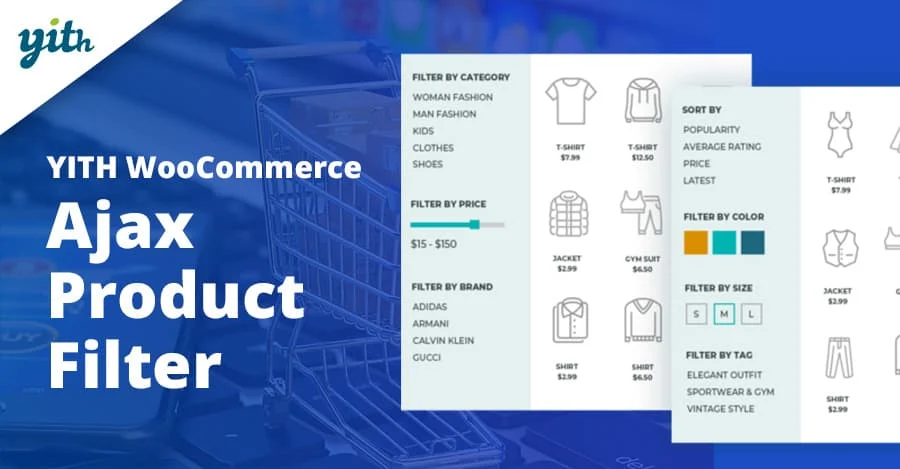
The YITH filter plugin offers sleek filtering layouts—checkboxes, color swatches, labels, dropdowns—all updating via AJAX. It integrates well with YITH’s suite of WooCommerce enhancements, making it ideal if you already use their ecosystem.
With a drag-and-drop filter builder and customizable appearances, it’s highly user-friendly. Store owners can create filters that reflect product attributes, price ranges, and product tags with ease and visual appeal.
Key Features:
- Multiple filter styles: swatches, lists, dropdowns
- Visual drag-and-drop layout builder
- Easy styling and integration in the YITH suite
Pricing: Free version; Premium from €59.99/year.
3. WooCommerce Product Filter by WPWhale
This plugin provides real-time AJAX filters with a modern, responsive design. It supports unlimited filters, allowing you to fine-tune by attributes, tags, custom taxonomies, price, and stock status dynamically.
There’s a live search feature that complements the filters, giving customers an immediate view of matching products. Mobile devices are fully supported, ensuring smooth experiences across all devices.
Key Features:
- Unlimited filters, live search, mobile-friendly
- Supports custom taxonomies and stock filtering
- Fully AJAX-enabled, responsive layout
Pricing: Starts at $29/year
Also Read: Best WooCommerce Plugins Request a Quote
4. Advanced AJAX Product Filters
Advanced AJAX Product Filters offer deep customization for filtering logic—operators (AND/OR), multiple selection behavior, and hierarchy support. Filters update instantly and can be styled thoroughly.
Admin interface is robust, with clear control over each filter’s logic and appearance. Great for stores needing fine-grained control over multi-faceted filtering behaviors.
Key Features:
- Complex filter logic (AND/OR), multi-select, hierarchy support
- Detailed styling options
- Shortcode support for varied placement
Pricing: Premium only, approx. $49/year.
5. FacetWP
FacetWP is known for its speedy, SEO-friendly AJAX filters. It caches results for optimal speed, works with large datasets, and integrates with custom fields and taxonomies. It’s developer-friendly with templating support.
Great choice for complex WooCommerce setups and heavy catalogs. Its integration with page builders and custom query pages makes it extremely versatile and scalable.
Key Features:
- Fast, cached filters, SEO-friendly URLs
- Integrates with custom fields, page builders
- Developer API and templating ready
Pricing: Starts at $99/year.
Also Read: Best WooCommerce Plugins Dynamic Pricing and Discounts
6. Product Filters for WooCommerce (Filter Everything)
This plugin—Filter Everything—enables AJAX filtering across all product archive pages, with flexible filter placement and styling. It supports product attributes, taxonomies, price, and content fields.
Admins can hide filters when irrelevant (e.g., single product), set filter logic (AND/OR), and customize layouts. It’s a versatile and well-designed free option with optional paid features.
Key Features:
- AJAX filters on all archive pages, flexible placement
- Filter by content fields, AND/OR logic setting
- Show/hide filters conditionally
Pricing: Free version; Pro from $29/year.
7. JetSmartFilters
JetSmartFilters, part of the Crocoblock ecosystem, provides gorgeous filter panels, AJAX-based, and builder integration with Elementor and Gutenberg. Filter types include date range, price slider, checkboxes, select, and range pickers.
It works seamlessly with JetWooBuilder and dynamic content layouts. Ideal if you’re using Elementor or other Crocoblock tools, offering consistent styling and powerful filtering that feels native.
Key Features:
- Wide variety of filter types: sliders, range, checkboxes
- Deep integration with Elementor and Crocoblock tools
- AJAX results with flexible pagination & sorting
Pricing: Part of Crocoblock subscription—starting around $39/month.
Also Read: How to Personalize WooCommerce Checkout Fields to Match Your Store
8. Beast Product Filters for WooCommerce
Beast Filters prides itself on fast loading and customizable AJAX filters. It allows horizontal and vertical filter layouts, product counts next to filter labels, and intuitive styling options.
Mobile-optimized and developer-focused, it supports advanced attribute filtering and works well with large inventories. The premium version unlocks more UI variations and performance tuning.
Key Features:
- Horizontal/vertical layouts, count badges
- Mobile-optimized, fast performance
- Custom CSS & advanced attribute filters
Pricing: Starts at $29/year.
9. Smart AJAX Product Filter
Smart AJAX Product Filter offers a quick way to add layered filters over your catalog, with filter types such as range sliders, checkboxes, dropdowns, and color swatches. Results are updated instantly and can be animated.
Admin panel includes detailed layout settings and smooth integration with most themes. Ideal for visually-rich catalogs where presentation and speed matter.
Key Features:
- Range sliders, swatches, checkboxes, dropdowns
- Animated AJAX updates
- Theme-compatible, layout settings
Pricing: Premium plugin; approx. $39/year.
Also Read: Best WooCommerce Plugins Order and Shipment Tracking
10. Premium WooCommerce Product Filters
This plugin gives extensive filtering options—categories, tags, attributes, price, stock status—with enhanced styling, presets, and flexible placement via shortcodes or widget regions. It’s performance-oriented and reliable at scale.
The filters are AJAX-powered and come with presets for quick setup. Perfect for stores wanting powerful filters with minimal fuss and a clean design out of the box.
Key Features:
- Presets, category/tag/attribute/price filters
- Widget and shortcode placement
- Performance-focused AJAX filtering
Pricing: Around $39/year.
Pricing Comparison
| Plugin | Key Features | Pricing |
|---|---|---|
| Filter for WooCommerce (WOOF) | Category, attributes, tags, filters; shortcode/widget; lightweight | Free; Premium $35/yr |
| YITH WooCommerce Ajax Product Filter | Swatches, dropdowns, drag-and-drop layout | Free; Premium €59.99/yr |
| WooCommerce Product Filter (WPWhale) | Unlimited filters, live search, mobile-friendly | $29/yr |
| Advanced AJAX Product Filters | AND/OR logic, multi-select, styling | $49/yr |
| FacetWP | Fast cached filters, SEO-friendly, dev API | $99/yr |
| Filter Everything | Archive filters, logic control, and conditional display | Free; Pro $29/yr |
| JetSmartFilters | Varied filter types, Elementor integration | ~$39/mo (Crocoblock) |
| Beast Product Filters | Layouts, count badges, fast, mobile-ready | $29/yr |
| Smart AJAX Product Filter | Sliders, swatches, animations, theme-friendly | $39/yr |
| Premium Product Filters | Presets, widget/shortcode, performance focus | $39/yr |

Optimizing Your Store’s Filtering Experience
Choosing the right WooCommerce plugin Ajax Product Filter can make a remarkable difference to how customers navigate your store. From lightning-fast results to visually engaging filter layouts, the right plugin not only improves the shopping experience but can also lead to better engagement and higher conversion rates.
Each option in this list offers unique strengths—whether you need advanced logic, stylish swatches, or deep integration with page builders. Assess your store’s needs, budget, and desired features, then test a couple to see which one fits seamlessly with your theme and product catalog. With the right filter in place, product discovery becomes effortless—and your customers stay happy.
Interesting Reads:
Best WooCommerce Plugins Pre-Order