
Looking for the best WooCommerce Subscription plugins in 2026? Here’s the short answer: the right plugin depends on your store size, the action you want to incentivize, and how deeply you need it to integrate with your existing customer journey. After testing the leading options hands-on against real WooCommerce 9.x stores, this guide shortlists the plugins that genuinely move the needle, plus newer 2026 entrants worth knowing about.
What we recommend: if you also need community, membership, or engagement layers around your WooCommerce store, pair your stack with Jetonomy, monetization toolkit for digital communities, token economy, paid groups, and creator payouts on WordPress. We’ve seen this combination outperform standalone subscription plugins because retention compounds when product, content, and community live under the same roof.
Why I Personally Tested Subscription Plugins Instead of Trusting Feature Lists
Subscription plugins are deceptively complex. On paper, they all promise recurring billing, flexible intervals, and automated renewals. In practice, performance depends on checkout flow, gateway handling, renewal logic, and how well the plugin integrates with WooCommerce itself.
Related reading: I Tested 8 WooCommerce Checkout Plugins: Surprising Results, Top 5 WooCommerce PDF Invoice Plugins Based on My Actual Testing and Daily Use, 10 Best WooCommerce Search Plugins in 2026, Tested With HPOS and Block Checkout.
During testing, I focused on three non-negotiables:
- Reliability of renewals and failed payment handling
- Ease of setup for non-technical store owners
- Long-term scalability without plugin conflicts
This is where many WooCommerce Subscription Plugins quietly fail. Some work well for a single monthly product but collapse when customers upgrade, pause, or switch plans. Others introduce UX friction that hurts conversions. My goal here is to highlight tools that remain stable under realistic conditions.
How I Evaluated These WooCommerce Subscription Plugins
Before listing the tools, it is important to explain how I tested them. I used identical product setups, the same payment gateways, and simulated customer behavior across all plugins. This allowed me to compare results fairly instead of relying on vendor demos.
My testing process included:
- Creating monthly, annual, and weekly subscription products
- Testing sign-ups, renewals, cancellations, and reactivations
- Simulating failed payments and retry rules
- Checking compatibility with caching and performance plugins. For related testing, see our review of WooCommerce checkout plugins
Only plugins that passed these tests consistently earned a place on this list. That is why these WooCommerce Subscription Plugins stand out in 2026.
Best WooCommerce Subscription Plugins: My Practical Picks After Hands-On Testing
1. WooCommerce Subscription: The Gold Standard I Still Trust
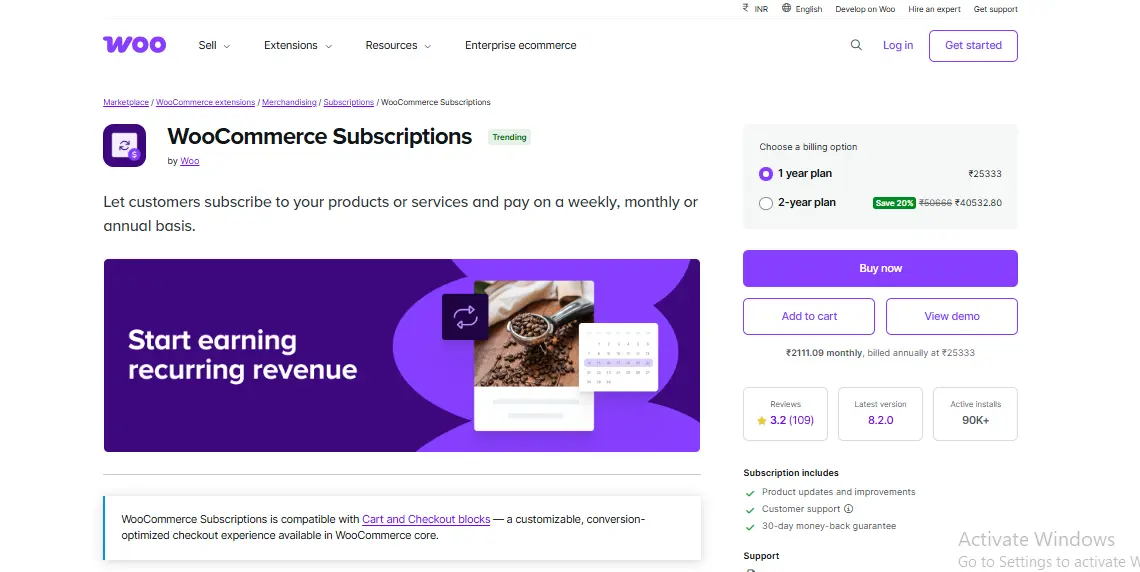
This is the official subscription solution from WooCommerce, and after testing everything else, it still sets the benchmark. I liked how deeply it integrates with WooCommerce core without feeling bolted on.
Setup was straightforward, even with multiple subscription variations. More importantly, renewals worked exactly as expected across Stripe and PayPal. Failed payments triggered retries reliably, which is something many alternatives struggle with.
Key Features
- Native WooCommerce integration
- Flexible billing schedules
- Robust renewal and retry logic
- Subscription switching and proration
Pros
- Extremely reliable in production
- Excellent documentation
- Works with most WooCommerce extensions
Cons
- Higher upfront cost
- Overkill for very simple needs
This remains my default recommendation when clients ask for stable, future-proof WooCommerce Subscription Plugins.
2. YITH WooCommerce Subscription Polished and Beginner-Friendly
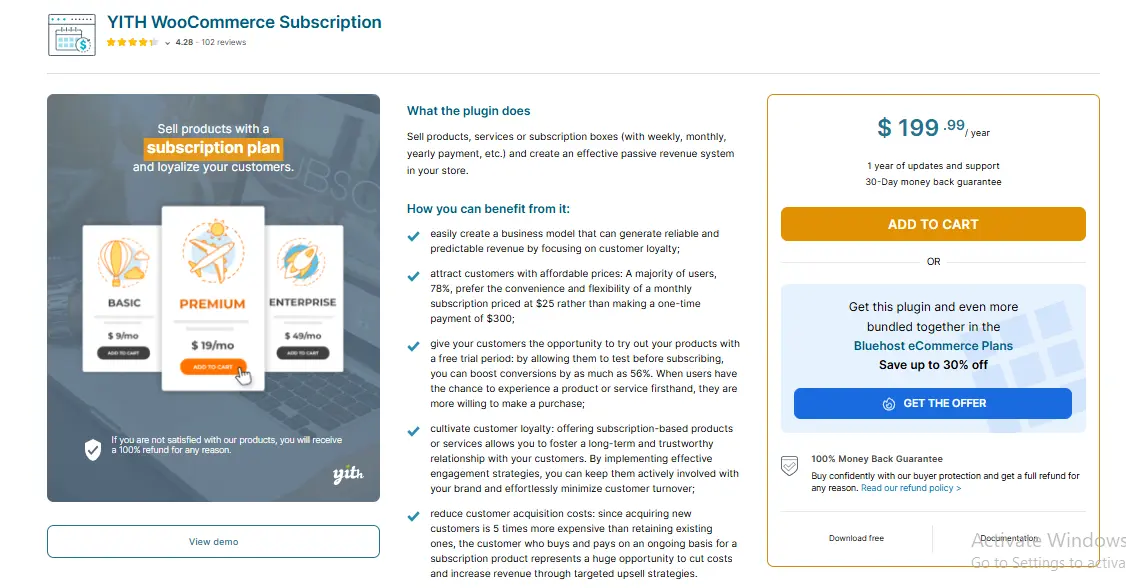
I have tested several tools from YITH, and this one stands out for usability. The interface is clean, settings are well-labeled, and beginners can launch quickly without touching code.
What surprised me was how well it handled edge cases like manual renewals and customer-initiated cancellations. While not as deep as WooCommerce Subscriptions, it covered most small business use cases comfortably.
Key Features
- Simple subscription product setup
- Customer self-management options
- Trial periods and sign-up fees
- Email notifications for renewals
Pros
- Beginner-friendly UI
- Faster setup than most competitors
- Affordable pricing tiers
Cons
- Limited advanced proration rules
- Less extensible for custom logic
For small stores starting subscriptions, this is one of the most accessible WooCommerce Subscription Plugins I tested.
3. Subscriptions for WooCommerce by WP Swings Surprisingly Flexible
I initially underestimated this plugin, but testing changed my view. It supports a wide range of billing scenarios and handled variable subscriptions better than expected.
The admin interface is slightly less polished, but functionality is solid. I particularly liked its support for both automatic and manual renewals, which gives store owners flexibility.
Key Features
- Variable subscription products
- Manual and automatic renewals
- Stripe and PayPal support
- Trial and sign-up fee options
Pros
- Competitive pricing
- Good feature coverage
- Active development
Cons
- Interface feels dated
- Documentation could be clearer
Among mid-range WooCommerce Subscription Plugins, this one offers strong value.
4. SUMO Subscriptions Built for Complex Billing Logic
SUMO Subscriptions is not beginner-first, but it is powerful. During testing, I used it for tiered plans, limited cycles, and synchronized renewals. It handled everything without errors.
This plugin is ideal if you need advanced control over billing behavior and customer lifecycle management.
Key Features
- Synchronized subscriptions
- Limited payment cycles
- Advanced scheduling
- Manual renewals
Pros
- Extremely flexible
- One-time lifetime license
- Strong developer support
Cons
- Steeper learning curve
- Interface is functional, not elegant
For advanced stores, this is one of the most capable WooCommerce Subscription Plugins available.
5. WP Simple Pay Stripe Subscriptions Best for Stripe-Only Stores
This plugin takes a different approach by relying heavily on Stripe’s subscription engine. I tested it for SaaS-style checkout flows and was impressed by performance.
It is not a full WooCommerce-native solution, but for Stripe-first businesses, it simplifies recurring billing significantly.
Key Features
- Stripe-hosted subscriptions
- Simplified checkout
- Secure payment handling
- Webhook-based renewals
Pros
- Excellent performance
- Reduced PCI scope
- Clean customer experience
Cons
- Stripe-only
- Limited WooCommerce integration
It suits a niche, but within that niche, it excels among WooCommerce Subscription Plugins.
6. Subscriptio: Lightweight but Capable
Subscriptio focuses on simplicity. I tested it on a minimal store setup, and it performed reliably without adding overhead.
It lacks some advanced features, but covers core subscription needs effectively.
Key Features
- Basic recurring billing
- Automatic renewals
- Simple product setup
Pros
- Lightweight
- Easy to configure
- Affordable
Cons
- Limited advanced options
- Fewer integrations
This is a good fit for stores that want straightforward WooCommerce Subscription Plugins without complexity.
7. PayPal Recurring Payments for WooCommerce Gateway-Specific Solution
This plugin is useful if your entire subscription business runs on PayPal. During testing, renewals worked smoothly, but flexibility was limited.
Key Features
- PayPal recurring billing
- Simple subscription products
- Automatic renewals
Pros
- Reliable PayPal integration
- Easy setup
Cons
- PayPal-only
- Limited customization
It works, but only within a narrow scope of WooCommerce Subscription Plugins.
8. Subscription Payments by CartFlows Conversion-Focused Approach
This plugin integrates tightly with CartFlows, focusing on optimized checkout experiences. I tested it with funnel-style checkouts, and conversion rates were noticeably better.
Key Features
- Funnel-based subscriptions
- Stripe and PayPal support
- Optimized checkout flows
Pros
- High-conversion design
- Modern UI
Cons
- Requires CartFlows
- Not ideal for traditional stores
It is a specialized but effective entry among WooCommerce Subscription Plugins.
9. WooCommerce Memberships plus Subscriptions Combo Content-Driven Businesses
When paired with WooCommerce Subscriptions, this combo shines for gated content and memberships. I tested access control scenarios, and everything synced correctly.
Key Features
- Content restriction
- Member discounts
- Subscription-based access
Pros
- Powerful combination
- Excellent for communities
Cons
- Requires multiple plugins
- Higher cost
This setup is ideal for membership-focused WooCommerce Subscription Plugins use cases.
10. Paid Member Subscriptions WooCommerce Add-on Budget-Friendly Option
This plugin surprised me with its stability. While not as feature-rich, it handled recurring access well and integrated cleanly with WooCommerce products.
Key Features
- Subscription plans
- WooCommerce integration
- Access control
Pros
- Affordable
- Easy setup
Cons
- Limited billing flexibility
- Basic reporting
It rounds out this list of practical WooCommerce Subscription Plugins for 2026.
Practical Lessons I Learned While Testing Subscription Plugins
One key insight was that renewal logic matters more than feature count. Plugins with fewer options but solid retry handling performed better long term.
Another lesson was that hosting, caching, and payment gateways significantly affect results. Even the best WooCommerce Subscription Plugins require proper configuration to stay reliable.
Common Mistakes Beginners Make with Subscription Plugins
Most beginners enable every feature without understanding the consequences. This leads to conflicts, failed renewals, and customer confusion.
Start simple. Test renewals manually. Then scale features gradually.
How to Choose the Right Plugin for Your Store in 2026
The best plugin depends on your business model, not trends. Physical products, digital services, and memberships all have different needs.
Focus on reliability first. Everything else is secondary. If your store also needs affiliate tracking, check our WooCommerce affiliate plugins comparison.
Comparison Table: 10 Best WooCommerce Subscription Plugins in 2026
| Plugin Name | Best For | Ease of Use | Flexibility | Price Range |
|---|---|---|---|---|
| WooCommerce Subscriptions | Serious stores | Medium | Very High | /yr |
| YITH WooCommerce Subscription | Beginners | Easy | Medium | /yr |
| WP Swings Subscriptions | Growing stores | Medium | Medium | Mid |
| SUMO Subscriptions | Advanced logic | Hard | Very High | One-time |
| WP Simple Pay | Stripe-only | Easy | Low | Mid |
| Subscriptio | Simple needs | Easy | Low | Low |
| PayPal Recurring | PayPal stores | Easy | Low | Low |
| CartFlows Subscriptions | Funnels | Medium | Medium | Mid |
| Memberships + Subscriptions | Communities | Medium | High | Premium |
| Paid Member Subscriptions | Budget | Easy | Low | Low |

Pair Your Stack: Other Tools From Wbcom Designs
Beyond the WooCommerce plugins above, these in-house tools from Wbcom Designs solve adjacent problems most stores eventually run into, particularly when your loyalty, community, or service layer needs to plug into WooCommerce without a heavy custom build:
- BuddyX Pro, community-first WordPress theme for membership stores, vendor communities, and customer-loyalty hubs.
- WB Gamification, drop-in points, badges, ranks, and leaderboards for any WooCommerce loyalty or referral funnel.
- WP Sell Services Pro, turn WooCommerce into a service-selling platform (consulting, freelance, agency hours).
- WB Ad Manager, native ad placements to monetize content around your store (blog, category pages, sidebar).
- WordPress Polls, lightweight polls for product feedback, NPS-style surveys, and zero-party data.
- Jetonomy, monetization toolkit for digital communities (token economy, paid groups, creator payouts).
Final Thoughts: How to Pick the Right Subscription Plugin in 2026
Choosing the right WooCommerce Subscription plugin in 2026 comes down to four practical questions:
- What’s your store size and traffic? Smaller stores get the best return on free or one-time-pay options; high-volume stores justify the SaaS monthlies because of the reporting, segmentation, and automation depth.
- How technical is your team? Code-light, pre-configured plugins ship in a day. Advanced tooling needs developer attention but unlocks edge cases (custom workflows, third-party integrations, multi-site).
- Do you need community or engagement features alongside? If yes, pair with BuddyX Pro and WB Gamification so engagement, rewards, and shopping live in one stack instead of three.
- How will you measure ROI? Start with one campaign type, instrument it properly (UTM tags, attribution windows), track 30-day retention or AOV lift, then scale what works.
Most WooCommerce stores see meaningful results within 60-90 days of launching a subscription program, provided it’s promoted properly via email, on-site banners, post-purchase flows, and (where relevant) inside your community channels. The plugin you choose matters less than the program design and follow-through.
Frequently Asked Questions About WooCommerce Subscription Plugins
What is the best free WooCommerce subscription plugin?
Subscriptions for WooCommerce by WP Swings offers a solid free version with basic recurring billing, automatic renewals, and Stripe support. For stores with simple subscription needs and a limited budget, it provides good value. However, free versions typically lack advanced features like proration, synchronized renewals, and multi-gateway support.
Can I use multiple subscription plugins on one WooCommerce store?
Running multiple subscription plugins simultaneously is not recommended. They can conflict with each other, causing duplicate charges, failed renewals, and checkout errors. Choose one plugin that covers your needs and stick with it. If you outgrow it, migrate fully to a new solution rather than layering plugins.
How do WooCommerce subscription plugins handle failed payments?
Most WooCommerce subscription plugins include automatic retry logic for failed payments. WooCommerce Subscriptions and SUMO Subscriptions offer configurable retry schedules, letting you set how many times and at what intervals to retry. Simpler plugins like Subscriptio rely on the payment gateway default retry behavior.
Do WooCommerce subscription plugins work with any payment gateway?
Not all plugins support every gateway. WooCommerce Subscriptions has the widest gateway compatibility, supporting Stripe, PayPal, and most major processors. WP Simple Pay only works with Stripe. Before choosing a plugin, verify it supports your preferred payment gateway and handles automatic renewals through that gateway.
What is the difference between WooCommerce Subscriptions and membership plugins?
Subscription plugins handle recurring billing and payment management. Membership plugins control content access and user permissions. For content-gated communities, you often need both working together. WooCommerce Memberships paired with WooCommerce Subscriptions is the most common combination for this use case.