
Choosing the right WooCommerce Support & Online Chat Plugins can transform customer experience, reduce abandoned carts, and speed up resolution times. This guide walks through practical setup steps, what each plugin offers, and clear pricing so a store owner can pick the right chat and Q&A tools for the business.
Each plugin listed below includes an overview, key features, and pricing highlights. The content follows modern search guidelines and E-E-A-T (experience, expertise, authoritativeness, trustworthiness) principles by focusing on actionable setup advice and objective feature comparisons.

What is “WooCommerce Support & Online Chat Plugins”?
WooCommerce Support & Online Chat Plugins are WordPress extensions built to integrate live chat, messaging widgets, or question-and-answer systems directly into an online store. They enable real-time customer conversations, automated replies, ticket creation, and knowledge base access without sending shoppers away from product pages.
These plugins range from simple chat windows to fully integrated helpdesk systems that sync with order data, customer profiles, and analytics. Selecting the right tool depends on traffic volume, support workflows, preferred channels (chat, email, WhatsApp), and budget constraints.
Also Read: Best WooCommerce Plugins for Saving Carts for Later
How to use WooCommerce Support & Online Chat Plugins
The following step-by-step process applies to most chat plugins and will help get a store chat-ready in minutes. It covers installation, basic configuration, and verification with common WooCommerce workflows.
- Back up the site and ensure WordPress, WooCommerce, and the theme are updated.
- Install the plugin via Plugins → Add New (search by name) or upload the plugin ZIP file from the vendor.
- Activate the plugin and locate its settings page under WooCommerce, Tools, or a top-level menu created by the plugin.
- Connect any external accounts (LiveChat, Tidio, Zendesk, etc.) using API keys or single sign-on if required.
- Configure appearance (widget position, colors, greeting message) and set availability hours.
- Integrate with WooCommerce: enable order context, attach customer and cart info to chats, and turn on automated cart recovery messages if available.
- Create canned responses and chatbot flows for common questions like shipping, returns, and payment issues.
- Test on desktop and mobile; verify notifications for agents and that chat transcripts attach to orders or tickets.
- Train staff on the dashboard, SLAs, and handoffs to email/tickets when chats escalate.
Table of contents
- LiveChat for WooCommerce
- YITH WooCommerce Questions and Answers
- Tidio Live Chat
- Tawk. to Live Chat
- Zendesk Chat (Zendesk Suite)
- Intercom
- Freshchat
- Drift
- Olark
- WP Live Chat (3CX)
Top 10 WooCommerce Support & Online Chat Plugins
Below is a curated list of 10 plugins that cover live chat, Q&A, and conversational help for WooCommerce stores. Each entry includes a short overview, a two-paragraph explanation, key features, and pricing notes.
1. LiveChat for WooCommerce

LiveChat for WooCommerce embeds a polished chat widget directly into product and cart pages, surfacing order context and visitor details to agents. It’s built for quick responses and integrates with many CRMs, email platforms, and analytics tools.
The integration attaches order metadata to each chat session so agents can view cart contents, order history, and customer lifetime value during conversations. Chat routing, canned responses, and chat-to-ticket handoffs make it suitable for stores with moderate to high support needs.
Key features
- Order and cart context inside chat sessions
- Customizable widget and proactive greetings
- Chat transcripts and ticket integration
- Multi-channel integrations (email, Messenger, WhatsApp)
- Reporting and SLA dashboards
Pricing: Starts with a monthly per-agent subscription; tiered plans include chat, automation, and advanced reporting.
2. YITH WooCommerce Questions and Answers
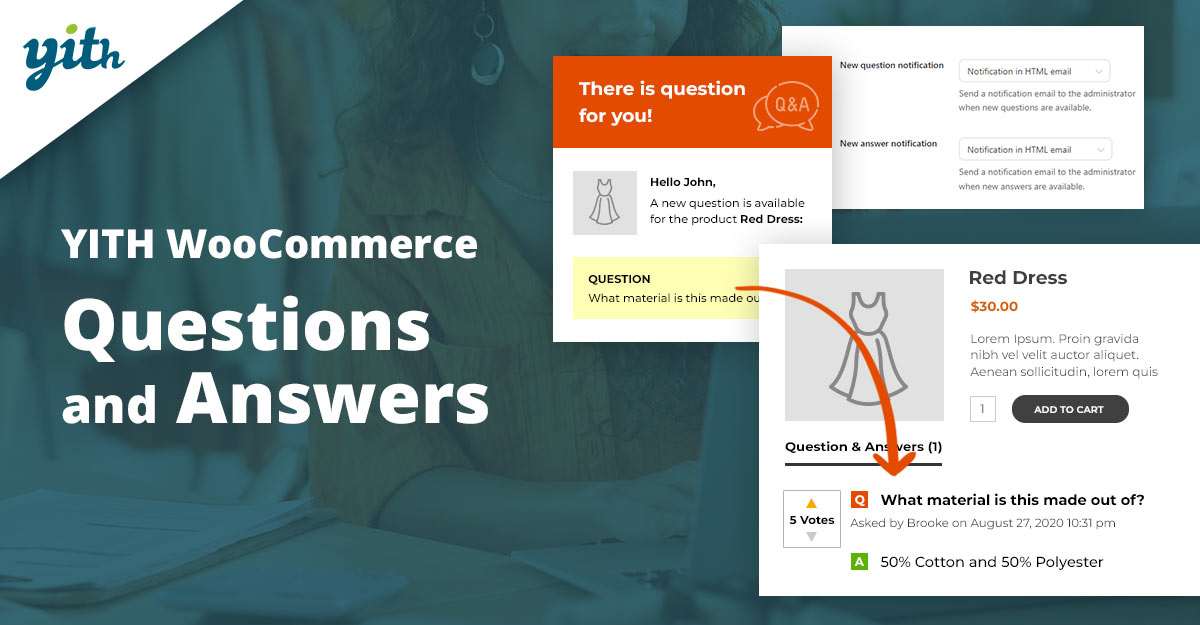
YITH Questions and Answers is a Q&A-style plugin tailored for WooCommerce product pages. Instead of real-time chat, it provides a structured place for customers to ask product-specific questions and for store owners or community members to answer them.
This plugin helps improve conversion by surfacing product knowledge, reducing repetitive inquiries, and building a knowledge base on product pages. Moderation, voting, and email notifications help keep the content trustworthy and relevant.
Key features
- Product-level Q&A section with moderation tools
- Anonymous or registered user submissions
- Voting and answer highlighting
- Email alerts for new questions or answers
- Shortcodes to display Q&A in custom locations
Pricing: Available as a freemium plugin — basic functionality is free.
3. Tidio Live Chat
Tidio combines live chat, chatbots, and email automation into a single plugin with a lightweight footprint. For WooCommerce, Tidio pulls cart and order data and provides templated automation tailored to e-commerce behaviors like cart abandonment.
The chat interface is easy to manage from a web dashboard or mobile app, and the chatbot visual flow builder allows non-technical teams to create automated funnels. Multi-language support and visitor analytics are useful for international stores.
Key features
- AI-assisted chatbots and ready-made automation templates
- WooCommerce order and cart integration
- Mobile and desktop agent apps
- Multi-channel messages (email + chat)
- Visitor tracking and segments
Pricing: Free plan with basic features; paid tiers unlock chatbots, unlimited contacts, and priority support.
4. Tawk. to Live Chat
Tawk. to offers a free live chat widget with agent dashboards and mobile apps. The plugin integrates easily with WooCommerce and supports real-time visitor monitoring and canned replies.
For stores on tight budgets, Tawk. to provides surprising capability at no cost. Paid add-ons are available for hiring agents or removing branding, while the core widget remains a full-featured option for startups.
Key features
- Completely free core product with unlimited agents
- Visitor monitoring and custom triggers
- Native mobile apps and a desktop dashboard
- Chat history and export
- Optional paid agent services and branding removal
Pricing: Core chat is free. Paid extras include removing tawk.to branding or hiring chat agents;
Also Read: How to Add Order Tracking in WooCommerce
5. Zendesk Chat (Zendesk Suite)
Zendesk Chat integrates a familiar customer service platform with chat, ticketing, and knowledge base tools. For WooCommerce stores, Zendesk can attach chat transcripts to customer profiles and orders, providing context across channels.
This option suits teams that require mature ticketing, SLA reporting, and multi-channel support. The broader Zendesk Suite includes email, voice, and social support components for omnichannel customer care.
Key features
- Integrated ticketing and chat transcripts
- Knowledge base linking and help center
- Advanced routing and SLA monitoring
- Analytics and agent performance reporting
- Apps marketplace for add-ons
Pricing: Tiered pricing with chat-only and full-suite options; typically billed per agent per month. Trials and enterprise plans are available.
6. Intercom
Intercom focuses on conversational relationships, combining live chat, bots, in-app messages, and product tours. When connected to WooCommerce, Intercom helps personalize messages using order and product data.
The platform is well-suited for businesses prioritizing growth and lifecycle messaging. Its automation and segmentation capabilities allow targeted campaigns and tailored support for high-value customers.
Key features
- Powerful automation and segmentation
- Product-driven messages and in-app tours
- Context-rich chat with customer attributes
- Bot flows and routing to teams
- Extensive app ecosystem
Pricing: Premium pricing tiers oriented to growth teams; costs depend on active users and feature bundles.
Also Read: Best WooCommerce Plugins Anti-Fraud
7. Freshchat
Freshchat (part of Freshworks) is built for modern messaging with chatbots, message campaigns, and ticket escalation. WooCommerce integration shares customer context for faster resolutions and targeted campaigns.
The platform balances ease of use and enterprise requirements, making it a good match for stores that want automation plus reliable routing and reporting for distributed teams.
Key features
- Bot builder and automated campaigns
- Unified inbox and team routing
- Customer timeline with order context
- Performance analytics and SLAs
- Integrations with CRM and marketing tools
Pricing: Multiple plans exist, from a basic messaging option to enterprise bundles that include automation and advanced analytics. Pricing per seat typically applies.
8. Drift
Drift emphasizes conversational marketing and qualification via chat. It combines live chat with playbooks for lead qualification and routing, suitable for stores that treat some traffic as high-value leads.
When paired with WooCommerce, Drift can surface relevant product information and route high-intent visitors to sales or premium support. The platform fits businesses that want chat to drive both support and conversions.
Key features
- Playbooks for automated qualification
- Conversational landing pages and routing
- Lead intelligence and integrations
- Conversation analytics and outcomes tracking
- Sales-focused bot flows
Pricing: Premium pricing oriented toward sales teams; packages vary by features and number of seats. A free tier or trial may exist with limited capabilities.
Also Read: Best WooCommerce Plugins Coupon Email System
9. Olark
Olark offers a straightforward live chat solution with simple setup and a focus on ease-of-use. WooCommerce integration allows agents to view customer order history and personalize chats quickly.
Olark is a fit for small to medium stores that need reliable chat functionality without complex bells and whistles. Report export, transcript storage, and basic automation make it easy to operate.
Key features
- Simple widget setup and lightweight dashboard
- Order info integration for WooCommerce
- Chat transcripts and search
- Basic automation and canned responses
- Exportable reports
Pricing: Monthly per-user pricing with straightforward tiers; free trials are usually available to test the service before committing.
10. WP Live Chat (3CX)
WP Live Chat by 3CX is an on-premise chat plugin with a free core version and optional paid features. It provides live chat, offline messages, and native integration into WordPress, with a WooCommerce-focused data flow available through settings.
Because it can be hosted and configured directly within WordPress, WP Live Chat is suitable for stores that prefer more control over data and want a cost-effective chat widget without recurring per-agent fees for basic use.
Key features
- Free core plugin with paid upgrades
- Offline forms, chat history, and visitor targeting
- Simple WooCommerce integration for context
- Local storage of conversations, if desired
- Easy setup and low technical overhead
Pricing: Free for the base plugin; premium add-ons and a pro license are available for advanced functionality at a one-time fee or annual renewal, depending on the package.
Also Read: How to Set Up WooCommerce One Page Checkout
Quick pricing comparison
| Plugin | Starting price | Notes |
|---|---|---|
| LiveChat for WooCommerce | From approx. $16/agent/month | Per-agent pricing; trial often available |
| YITH Questions & Answers | Free / Premium ~€79/yr | Freemium: premium adds moderation and display options |
| Tidio Live Chat | Free / Paid from ~$19/month | Paid tiers unlock bots & automation |
| Tawk. to | Free | Free core; paid extras available |
| Zendesk Chat / Suite | From ~$19/agent/month (chat tiers vary) | Tiered pricing; full Suite higher |
| Intercom | From ~$39/month (varies by features) | Feature and user-based pricing |
| Freshchat | Free tier / Paid from ~$15/seat/month | Automations available on paid plans |
| Drift | Custom / starts higher (sales-focused) | Typically, premium pricing for playbooks |
| Olark | From ~$19/agent/month | Simple tiers and trials available |
| WP Live Chat (3CX) | Free / Pro add-ons from ~$49 one-time | Free core; optional paid features |

Picking the right WooCommerce Support & Online Chat Plugins
For stores that need lightweight, cost-effective chat, Tawk. to or WP Live Chat offers a strong starting point. For teams requiring sophisticated automation, routing, and analytics, platforms like LiveChat, Zendesk, Intercom, or Freshchat deliver enterprise-grade features.
The best approach is to match support objectives to plugin strengths: choose a Q&A plugin like YITH for product-specific knowledge, adopt chat platforms for immediate assistance, and combine both for a comprehensive support experience. Always run a short pilot and evaluate metrics such as response time, conversion uplift, and customer satisfaction before scaling.
Interesting Reads:
Best WooCommerce Plugins: Checkout Manager