

The First 48 Hours: Where You Lose Half Your New Members
Here is a number that should keep every community manager up at night: most online communities lose between 40 and 60 percent of new members within the first 48 hours of signup. Not the first month. Not the first week. The first two days.
Think about what that means. You spent time, money, and effort attracting someone to your community. They were interested enough to create an account and fill out a profile. They had genuine intent to participate. And then, within 48 hours, they disappeared. They did not leave because your community was bad. They left because the onboarding experience failed to show them why they should stay.
The culprit is almost always the same: a text-heavy welcome email followed by a community homepage that assumes the new member already knows what to do, where to go, and how to participate. The welcome email gets skimmed or ignored. The homepage feels overwhelming. The new member does not make a connection in those critical first hours, and they never come back.
There is a better way. With WP Stories, you can replace boring text-based onboarding with interactive visual story sequences that guide new members through your community step by step. Stories are the format people already know and love from Instagram and Snapchat. Tapping through a welcome story sequence is intuitive, fast, and engaging in a way that reading a welcome email will never be.
Why Visual Onboarding Beats Text Every Time
The case against text-based onboarding is backed by both data and psychology. Let us look at why visual story sequences outperform traditional approaches across every metric that matters.
Completion Rates
Welcome emails have an average open rate of around 50 percent for community platforms, which sounds decent until you realize that open rate measures whether someone glanced at the email, not whether they read it. The actual read-through rate, meaning someone who reads the email from top to bottom and follows the calls to action, is closer to 10 to 15 percent.
Stories, by contrast, have completion rates of 70 to 85 percent. When someone starts tapping through a story sequence, the tap-to-advance mechanic creates momentum that carries them through to the end. The progress bar at the top shows how far along they are, creating a completion bias. People want to finish what they started, and stories make finishing feel effortless.
Information Retention
Humans process visual information 60,000 times faster than text. A story slide showing a screenshot of your activity feed with an arrow pointing to the Post Update button communicates more information in one second than a paragraph of text describing how to post an update. This is not about dumbing things down. It is about matching the format to how human brains actually process information.
When new members view a visual walkthrough, they build a spatial mental model of your community. They remember where things are because they saw them in context. Text instructions create a verbal model that requires translation: the member reads the instruction, then has to find the element, then has to match the description to what they see. Visual walkthroughs skip the translation step entirely.
Emotional Connection
The most overlooked aspect of onboarding is emotional. A new member needs to feel welcomed, not just informed. Text emails, no matter how warmly written, struggle to convey genuine warmth. A story sequence with photos of real community members, video greetings from moderators, and visual snapshots of community life creates an emotional first impression that text cannot match.
When a new member taps through a welcome story and sees smiling faces, active discussions, and a vibrant community, they feel something. That feeling is what turns a signup into an active member. It is the same emotional hook that helps you build a learning community that members actually return to.
Designing Your Welcome Story Sequence
A great welcome story sequence has a clear structure that guides new members through discovery, connection, and first action. Here is a proven framework for designing yours.
Story 1: The Welcome (3-4 Slides)
The first story in your sequence should accomplish one thing: make the new member feel genuinely welcomed. Start with a warm greeting slide that uses their first name if possible or a general welcome message if not. Include a photo of the community manager or founder. Follow with a slide that states what this community is about in one sentence. End with a slide that says what they will learn in this welcome sequence, setting expectations for the journey ahead.
Keep the tone conversational and personal. This is not a corporate onboarding deck. It is a friendly neighbor showing a new resident around the neighborhood.
Story 2: The Tour (5-6 Slides)
The second story walks the new member through the key areas of your community. Each slide focuses on one location or feature. Show a screenshot of the activity feed and explain that this is where members share updates and conversations. Show the groups directory and explain how to find and join groups that match their interests. Show a member profile and explain what information they can add to their own profile. Show the messaging feature and explain how to connect directly with other members.
Each slide should include a clear visual (screenshot or illustrated guide) and no more than two lines of text. The visual does the heavy lifting. The text provides context. Resist the urge to explain everything. The goal is orientation, not documentation.
Story 3: The First Action (3-4 Slides)
The third story guides the member toward their first meaningful action. This is the most critical story in the sequence because it converts a passive viewer into an active participant. Research shows that members who complete one action within the first hour are three times more likely to become long-term active members.
Choose one action that is low-friction and high-reward. Good first actions include posting a brief introduction in the community feed, joining one group related to their interests, or updating their profile photo. Walk them through the action step by step with visual guides. End with an encouraging message acknowledging that they have taken their first step.
Story 4: The Connection (3-4 Slides)
The fourth story introduces the new member to people they should connect with. Feature three to five active community members with their photos, a brief description of what they contribute, and an encouragement to visit their profiles. This story serves double duty: it helps the new member find their initial connections, and it showcases your community’s human side.
If your community has mentors, moderators, or welcome committee members, this is where you introduce them. Knowing that specific real people are available to help reduces the anxiety that comes with joining a new community.
Story 5: The Value Promise (2-3 Slides)
The final story reinforces why the member made the right choice by joining. Share one or two brief success stories from existing members. Show the kind of value that active members get from the community. End with a clear next step and an invitation to start exploring.
This story closes the onboarding loop by connecting the emotional welcome of Story 1 with tangible proof of value. The new member has been welcomed, oriented, activated, connected, and motivated.
Interactive Walkthroughs vs. Static Documentation
Many communities invest in creating documentation: help pages, FAQ sections, knowledge bases, and getting-started guides. This content is valuable for reference, but it fails as an onboarding tool because it requires the new member to take initiative. They have to know what questions to ask, find the relevant documentation, and read through it. Most new members do not do this because they do not yet know what they need to know.
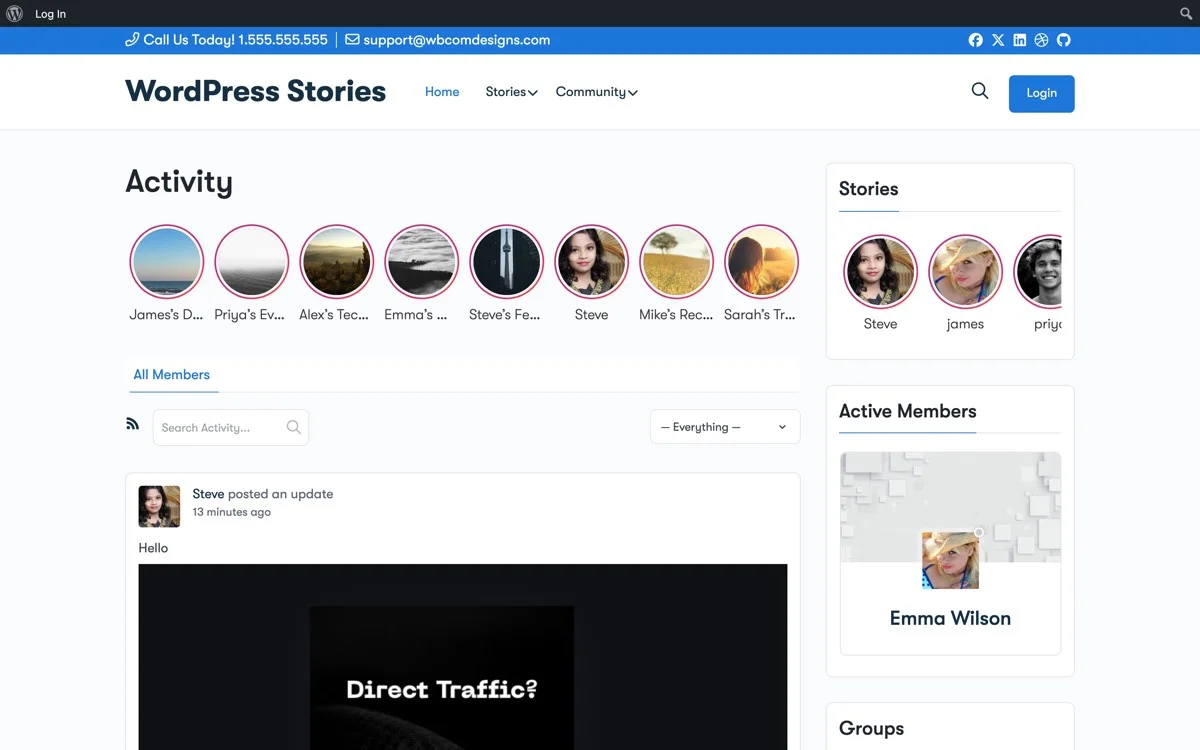
Interactive story walkthroughs invert this dynamic. Instead of waiting for the member to seek information, you push the information to them in a format they cannot miss. The stories appear on the activity feed and on the member dashboard, greeting them the moment they log in. The tap-through format ensures sequential consumption. The visual format ensures comprehension.
This does not mean you should abandon documentation. Keep your help center for members who need to look up specific information later. But stop relying on documentation as your primary onboarding mechanism. Use stories for onboarding and documentation for reference. These are different jobs that require different formats.
The interactive nature of stories also allows for branching paths. You can create different story sequences for different member types. A new free member sees a different welcome sequence than a new premium subscriber. A member who joined through a specific marketing campaign sees stories tailored to the promises made in that campaign. This personalization is far more difficult with static documentation but straightforward with a story-based approach. This flexibility is especially valuable when you are running a paid membership community with Reign Theme and need different onboarding for different membership tiers.

Permanent Stories as Your Always-On Welcome Guide
One of WP Stories most powerful features for onboarding is the ability to create permanent stories that do not expire. Unlike regular 24-hour stories, permanent stories stay in your story bar indefinitely. This is perfect for welcome content because new members join every day, and your welcome sequence needs to be available whenever they arrive.
Create a permanent highlight collection called Welcome or Start Here and pin it to the first position in your story carousel. This ensures it is always the first thing new members see in the story bar. Returning members who have already viewed the welcome stories will see them marked as viewed (no colored ring), so they are not intrusive for existing members.
The permanent welcome highlight also serves as a reference point that members can return to. If a member forgets how to do something they learned during onboarding, they can tap back into the welcome stories and review the relevant section. This eliminates a common pain point where members feel embarrassed to ask basic questions in forums.
Update your welcome stories periodically to reflect changes in your community. If you add a new feature, add a story slide about it. If you redesign a section of the site, update the relevant screenshots. Keeping the welcome stories current ensures that every new member gets accurate, up-to-date onboarding regardless of when they join.
Consider creating secondary permanent highlights for specific topics: How to Post, Finding Groups, Profile Tips, and Community Guidelines. These micro-guides supplement the main welcome sequence and provide targeted help for specific tasks. Members can dip into these whenever they need a visual reminder of how something works.
Tracking Completion and Engagement via Story Views
WP Stories provides view tracking that gives you valuable insights into your onboarding effectiveness. For each story in your welcome sequence, you can see how many members viewed it, how many completed it (viewed all slides), and where drop-offs occurred.
This data is gold for optimizing your onboarding flow. If Story 2 (The Tour) has a significant drop-off at slide 4, that slide is probably too long, too confusing, or not engaging enough. If Story 3 (The First Action) has low completion rates, the action you are asking for might be too complex or not compelling enough.
Track these metrics weekly and iterate on your welcome stories based on the data. Small changes can produce significant improvements. Shortening a slide text by one line, replacing a screenshot with a more clear one, or reordering the story sequence can measurably increase completion rates.
You can also use view data to identify members who are struggling with onboarding. If a new member has not viewed any of the welcome stories after 24 hours, that is a signal to reach out personally. A direct message from a community manager or welcome committee member, referencing the welcome stories and offering to help, can rescue a member who was about to become a dropout statistic.
Compare onboarding metrics before and after implementing story-based onboarding to quantify the impact. Track 7-day and 30-day retention rates for members who completed the welcome stories versus those who did not. This data justifies the investment in story content creation and provides a baseline for future improvements.
Creating Your Welcome Story Flow: Step-by-Step Implementation
Here is a practical guide for building and launching a welcome story onboarding sequence on your Reign community with WP Stories.
Step 1: Install and Configure WP Stories
Download and install WP Stories from WBCom Designs. In the settings panel, enable permanent stories and configure the highlight feature. Set the story display to appear at the top of the activity feed and on member dashboards. These two locations ensure maximum visibility for new members during their first visit.
Step 2: Plan Your Story Content
Before creating any stories, map out the complete sequence using the framework described above. Write the text for each slide. Take screenshots of every community area you plan to show. Gather photos of community members and moderators who will appear in the stories. Prepare everything before you start building to ensure a cohesive, well-structured sequence.
Step 3: Create the Welcome Stories
Build each story in the sequence using the WP Stories creator. Upload your screenshots and photos as story slides. Add text overlays keeping them brief and scannable. Use consistent branding colors and fonts across all stories to create a professional, unified look. Preview each story on both desktop and mobile to ensure readability on all devices.
Step 4: Set Up the Welcome Highlight
Create a permanent highlight collection called Start Here or Welcome. Add all five welcome stories to this collection in the correct order. Set a clear, recognizable cover image for the highlight. Pin it to the first position in the story carousel so new members cannot miss it.
Step 5: Configure New Member Targeting
Set up your welcome stories to appear prominently for new members. You can create a custom welcome page that new members are redirected to after registration, featuring the welcome stories front and center. Alternatively, use BuddyPress notifications to send new members an alert encouraging them to check out the welcome stories.
Step 6: Create Follow-Up Stories
Build secondary story sequences for the first week of membership. Day 2: Did you know stories highlighting hidden features. Day 3: Meet the moderators story introducing community leaders. Day 5: Your first week recap story celebrating the member early engagement. Day 7: What is next story with deeper engagement suggestions. Stagger these to maintain touch points throughout the critical first week. You can also pair these story sequences with event management features to invite new members to their first community event.
Step 7: Monitor and Optimize
After launching, monitor your story view metrics daily for the first two weeks. Identify drop-off points and friction areas. Test different slide designs, text lengths, and story sequences to optimize completion rates. Track the correlation between welcome story completion and 30-day retention to measure ROI.
Advanced Techniques: Personalized Onboarding Paths
Once your basic welcome sequence is running, you can level up with personalized onboarding paths. Create different welcome story collections for different member segments.
If your community serves multiple audiences, each audience needs different onboarding. A learning community might have separate welcome sequences for students and instructors. A marketplace community might have sequences for buyers and sellers. A professional network might segment by industry or career stage.
Create role-specific highlight collections and direct new members to the relevant one based on information gathered during registration. If your registration form asks what brings you here or what is your role, use those answers to route the member to a tailored welcome sequence that speaks directly to their needs and interests.
You can also create interest-based follow-up stories. After the general welcome sequence, show the member stories about the specific groups, topics, or features most relevant to their stated interests. This personalization makes new members feel like the community was built specifically for them, dramatically increasing the emotional connection that drives long-term retention.
The Retention Math: Why This Investment Pays Off
Let us quantify the business case for story-based onboarding. Suppose your community gets 100 new signups per month. With a typical 50 percent first-week dropout rate, you retain 50 members. Each retained member generates value through content creation, engagement, word-of-mouth referrals, and potentially subscription revenue.
If story-based onboarding reduces your first-week dropout rate by even 15 percentage points, from 50 percent to 35 percent, you retain 65 members per month instead of 50. That is 15 additional active members every month, compounding over time. After 12 months, you have 180 more active members than you would have without the improved onboarding. Those 180 members are creating content, engaging with others, and contributing to the community growth.
The cost of creating a welcome story sequence is a few hours of work. The cost of those 180 lost members, in terms of the acquisition spending wasted on people who signed up and left, is significantly higher. Story-based onboarding is one of the highest-ROI investments you can make in your community.
Beyond the raw numbers, better onboarding changes the quality of your member base. Members who have been properly onboarded understand community norms, know where to find things, and have already made initial connections. They contribute more meaningfully, require less support, and are more likely to become the kind of active participants who make your community valuable for everyone.
Stop Losing Members to Bad First Impressions
The first 48 hours determine whether a new signup becomes a long-term community member or a churn statistic. Text-based welcome emails and static help pages are not good enough for this critical window. Your members deserve an onboarding experience that matches the quality and energy of your community itself.
WP Stories gives you the tools to create that experience. Visual, interactive, engaging welcome sequences that feel more like a friendly tour than a corporate orientation. Permanent highlights that serve as an always-available guide. View tracking that lets you optimize continuously. And the familiar story format that every member already knows how to use from their favorite social platforms.
Your community worked too hard to earn each new signup. Make sure those signups stick around long enough to discover why your community is worth staying in.
Get WP Stories today and build an onboarding experience that turns new signups into lifelong community members.