

What is a WooCommerce audio plugin?
A WooCommerce audio plugin adds audio-specific functionality to a WordPress + WooCommerce setup. That can include on-product audio previews, streaming or downloadable tracks, stylish players (waveform or classic), playlist support, purchase buttons integrated with product pages, and protections to prevent casual file theft. In short, it makes audio products behave like first-class citizens in your store.
Depending on the plugin, you’ll get features tailored for musicians (albums, buy buttons, waveforms), podcasters (sticky players, continuous playback), or educators (sample lessons, protected downloads). Some plugins are WooCommerce-focused; others are general audio players that integrate neatly with WooCommerce products.
How to use
Below is a short, practical workflow that works for most WooCommerce audio plugins. The exact labels and fields will vary across plugins, but these steps will get you from zero to a playable/sellable audio product.
- Install the plugin: From your WordPress admin, go to Plugins → Add New. Upload the plugin .zip or search the repo and click Install → Activate.
- Add or register license (if applicable): Enter the license key in the plugin’s settings so you can receive updates and support.
- Configure global player settings: Choose default player style, placement (product page, shop loop), autoplay rules, and whether to enable downloads/previews.
- Create or edit a WooCommerce product: Add your audio file(s) either as downloadable product file(s) or attach them in the product media area (depending on the plugin).
- Enable preview or buy links: Many plugins let you enable an inline preview player and optionally add a “Buy this track” CTA within the player or product block.
- Test in private mode: Test playback and purchase flow on a staging site or with a draft product — test on desktop and mobile to catch responsive issues.
- Protect your files (optional): Use plugin security features or a protected storage method if you don’t want files publicly downloadable until purchase.
List of WooCommerce Audio Plugins
Below you’ll find ten well-regarded options. The first two are focused specifically on WooCommerce product-level audio features; the rest are a mix of WooCommerce integrations and excellent WordPress audio players that work beautifully with WooCommerce.
Each plugin entry includes a short overview, at least two quick paragraphs, key features, and pricing so you can compare quickly.
1. Audio Player for WooCommerce

Audio Player for WooCommerce is a purpose-built extension that adds audio previews and in-product players to WooCommerce stores. It’s made to convert audio-first product pages into listening experiences where customers can preview or download tracks before buying.
The plugin places a player on product pages and can handle multiple audio files per product. It’s a straightforward choice if your primary goal is a clean audio preview inside the WooCommerce buying experience — no need to stitch together separate audio player plugins and WooCommerce rules.
Key features
- An inline audio player on product and shop pages.
- Multiple audio files per product (samples, full track, stems).
- Customizable player appearance, labels, and download options.
Pricing: Available via the WooCommerce extensions marketplace (pricing varies; check the product page for current rates).
2. YITH WooCommerce Featured Audio & Video Content
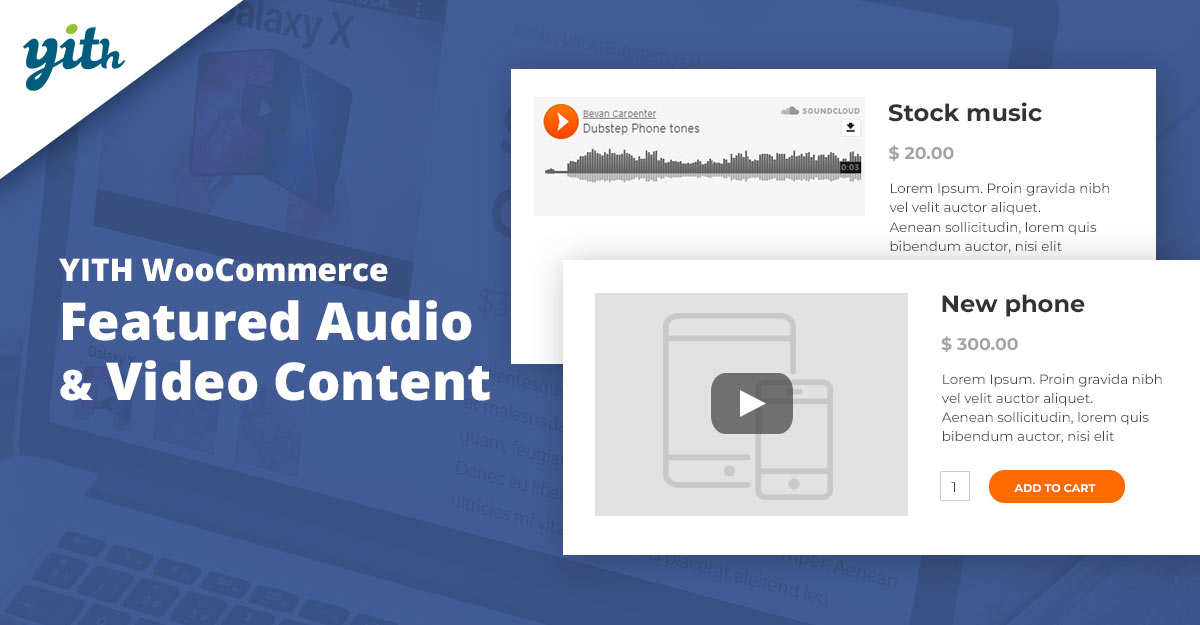
YITH’s Featured Audio & Video Content plugin lets you replace a product’s featured image with audio or video content — ideal for stores that want an audiovisual product card instead of a static image. It supports common audio and video formats and displays the player where the featured image normally sits.
This is especially useful for product previews in catalog layouts: visitors get an instant audio snippet on the shop grid before they click through. It’s made by YITH, a well-known vendor of WooCommerce utilities, and integrates cleanly with most themes.
Key features
- Replace featured image with playable audio/video content.
- Works on shop, category, and product list templates.
- Supports multiple file formats and responsive playback.
Pricing: YITH sells this as a premium plugin — typical YITH premium pricing starts around the $49–$59/year range, but verify current pricing on their site.
3. MP3 Audio Player by Sonaar
Sonaar’s MP3 Audio Player is a visually polished audio player aimed at musicians, podcasters, and beatmakers. It includes waveforms, sticky players, and Elementor + Gutenberg support, plus features designed for selling tracks and albums from your site.
This plugin is powerful if you care about design — the waveform visuals and continuous playback are popular with music sites. Sonaar also offers tiered pricing (Starter, Business, Unlimited, Lifetime plans) so you can pick the license that fits how many sites or features you need.
Key features
- Waveform player, sticky/continuous playback, import tools.
- Shortcodes, Elementor widgets, playlist & album support.
- Sell files with integrated buy/download buttons for WooCommerce.
Pricing: Sonaar’s pricing tiers typically start around $49/year for entry plans; check Sonaar for current plans and a lifetime option.
4. AudioIgniter
AudioIgniter is a user-friendly playlist-focused player that makes creating music or podcast playlists quick and simple. It integrates with the WordPress media library and can be used together with WooCommerce to sell tracks. The plugin is popular and actively maintained on the WP.org repository. :contentReference[oaicite:7]{index=7}
The free version covers most basic needs, while the premium version adds advanced controls and styling. AudioIgniter is a great middle-ground: easy setup, playlist-first UX, and enough power for most musicians and podcasters selling audio through WooCommerce.
Key features
- Create unlimited playlists and embed with shortcodes or blocks.
- Simple buy/download button integrations to connect with WooCommerce.
- Premium adds additional player types and advanced styling.
Pricing: Freemium — premium plans typically start around $49/year (check vendor for current pricing).
5. WavePlayer (Waveform Audio Player)
WavePlayer focuses on waveform-style players with a modern look and good WooCommerce compatibility. It’s designed for track previews and album-style presentations, with multiple skins and responsive controls. Because of the waveform, it feels highly interactive for listeners.
WavePlayer integrates with Elementor, WooCommerce, and even tools like Document Library Pro, so it’s a solid option if you want both visual flair and compatibility with product listing solutions.
Key features
- Waveform display, multiple skins, sticky player option.
- WooCommerce & page-builder compatibility.
- Detailed documentation and customization settings.
Pricing: Historically sold on marketplaces (single-site licenses or marketplace pricing). Check the official WavePlayer site or marketplaces like CodeCanyon for the current price.
6. HTML5 Audio Player
HTML5 Audio Player is a lightweight, responsive audio player plugin that leverages core browser capabilities. It’s suitable when you want reliability and simplicity without heavy UI bloat. It supports MP3/OGG and is easy to embed using shortcodes.
If you prefer a minimal UI and maximum compatibility (including older browsers where fallback is needed), this plugin is a practical choice. It’s often available in a free version with paid upgrades for additional skins and playlists.
Key features
- Responsive HTML5 player, shortcode-based embeds.
- Support for MP3 & OGG; lightweight and fast.
- Good default compatibility across themes and builders.
Pricing: Free core plugin on WordPress.org; premium add-ons may be available depending on the author.
Also Read: Best WooCommerce Combinations & Product Customization Plugins
7. Music Player for WooCommerce
Music Player for WooCommerce plugs directly into product pages to display a player for audio files attached to a product. It supports multiple audio formats, playlists, and a few skins — a practical choice when you want audio features that feel native to WooCommerce.
The plugin is designed specifically for stores selling audio: from single-track downloads to multi-track albums. It often includes options for securing files and making sample previews available prior to purchase.
Key features
- Built to show audio players on WooCommerce product pages.
- Supports OGA, MP3, WAV, WMA, and playlist formats (M3U, M3U8).
- Marketplace and multivendor compatibility (Dokan, WCFM).
Pricing: Often available in free and premium versions; check the plugin page for exact pricing and license tiers. 8. Compact WP Audio Player
Because it’s compact and simple, it’s typically free and stable. Keep in mind feature limitations — no fancy waveforms or integrated stores — but that can be a benefit if you need minimalism and speed.
Key features
- Very small footprint, shortcode-based embed.
- Supports MP3 and OGG, mobile-friendly playback.
- Low complexity — great for simple previews or single-track embeds.
Pricing: Free on the WordPress.org repository; premium forks or add-ons may exist.
9. The Plus Addons — Audio Player (Elementor widget)
The Plus Addons for Elementor includes a polished Audio Player widget that works inside Elementor pages and supports single tracks or playlists. If your store is built with Elementor, this is a convenient way to add a fully styled player that matches your page builder design system.
The widget is part of a broader add-ons pack (120+ widgets). That means you get an audio player plus many other design controls — useful if you want consistency across product pages and landing pages without juggling separate audio plugins.
Key features
- Elementor widget with multiple pre-built player styles.
- Supports playlists, autoplay, and customizable styling.
- Works well for landing pages or product showcases built in Elementor.
Pricing: The Plus Addons has a freemium model; pro plans that include the audio widget start at affordable annual rates — check their pricing page for current plans.
Also Read: Best WooCommerce Sizes & Units Plugins
10. Audio Album
Audio Album groups tracks into album-style blocks using core WordPress audio capabilities. It’s ideal for artists who want an “album” presentation: track list, artwork, and per-track controls inside a neat block. The plugin is lightweight and taps into WordPress media features.
Audio Album is particularly good if you want a simple album layout without heavy overhead. It’s often free, regularly updated, and integrates nicely with the block editor.
Key features
- Album-style block with multiple tracks and metadata.
- Customizer options for colors and layout.
- Free, lightweight, and built on WordPress core audio handling.
Pricing: Free on the WordPress.org repository (with active installs and updates).
Quick comparison — key features & starting pricing
| Plugin | Key features | Typical starting price | WooCommerce-ready? |
|---|---|---|---|
| Audio Player for WooCommerce | Inline product player, multiple files per product | Marketplace pricing (varies) | Yes |
| YITH Featured Audio & Video | Replace featured image with audio/video | ~$49–$59/yr (typical) | Yes |
| MP3 Audio Player (Sonaar) | Waveform, sticky player, album support | From ~$49/yr | Yes |
| AudioIgniter | Playlist-focused, easy embeds | Free + Pro ~$49/yr | Yes |
| WavePlayer | Waveform visuals, skins, WooCommerce support | Marketplace pricing (single-site) | Yes |
| HTML5 Audio Player | Lightweight, dependable, shortcodes | Free (core) | Yes |
| Music Player for WooCommerce | Built specifically for WooCommerce product pages | Free + premium tiers | Yes |
| Compact WP Audio Player | Tiny, shortcode-based player | Free | Works with WooCommerce |
| The Plus Addons (Audio widget) | Elementor widget, multiple styles | Freemium, pro plans start low | Yes (via Elementor product pages) |
| Audio Album | Group tracks into album-style blocks | Free | Works with WooCommerce |

Which WooCommerce audio plugin should you pick?
If your priority is deep WooCommerce product integration (product-level previews, downloads, sample tracks), start with dedicated solutions like Audio Player for WooCommerce or YITH Featured Audio & Video. They are designed to make audio products behave like any other WooCommerce product and often include features to sell and protect files.
If you want great presentation (waveforms, sticky players, album layouts) or if you also use a page builder like Elementor, consider Sonaar, WavePlayer, or The Plus Addons’ audio widget. For lean, low-footprint use-cases, HTML5 Audio Player or Compact WP Audio Player will keep things fast and simple. Always test playback, mobile responsiveness, and the purchase flow before going live.
Interesting Reads:
Best WooCommerce Fast & Mass Update Plugins