Repeat customers are the backbone of any successful online store. Research shows that increasing customer retention rates by just 5% can lead to profits rising by 25% to 95%. One of the key factors that encourages repeat business is making the purchasing process as simple and seamless as possible. This is where the ability to reorder products easily in WooCommerce becomes a powerful tool.
Allowing customers to quickly reorder items they have previously purchased not only enhances their shopping experience but also reduces friction, increases customer satisfaction, and boosts lifetime value. According to a study by Invesp, 44% of customers say that the ability to reorder items with ease is one of the top features they look for in ecommerce stores.
WooCommerce’s Buy Again extension offers a native, efficient way to add reorder functionality to your online store, enabling customers to repurchase products without hassle. This guide will walk you through how to use this plugin effectively, explain its features, and provide actionable tips to maximize repeat sales while keeping your customers engaged.

What Is the WooCommerce Buy Again Plugin?
The WooCommerce Buy Again plugin is an official extension from the WooCommerce team that streamlines the reorder process for customers. It provides a dedicated section on the My Account page where shoppers can easily see their past purchases and reorder products with just one click.
Key Features:
- A Buy Again table displaying all previous purchases clearly on the My Account page
- One-click buttons that add products back into the cart instantly
- Full support for variable products, subscriptions, and custom product types
- Mobile-friendly interface for seamless use across devices
- Smooth integration with WooCommerce core, ensuring your store runs efficiently without slowdowns
By adding this plugin, you simplify repurchasing, turning a tedious task into a fast, user-friendly experience that encourages repeat business.
Why Let Customers Reorder Products Easily in WooCommerce?
Before diving into the how-to, it’s important to understand the benefits of simplifying reorder processes:
1. Boost Customer Retention and Loyalty
Customers appreciate it when stores make their lives easier. By offering simple reorder options, you build trust and encourage repeat visits. Repeat customers tend to spend more per transaction and recommend your store to others.
2. Increase Average Order Value (AOV)
The reorder process can be an opportunity to upsell or cross-sell related products. If customers can easily add their favorite items to the cart, you increase the chances they’ll add complementary products as well.
3. Reduce Cart Abandonment
The easier the checkout process, the lower the chance customers will abandon their cart. Quick reorder buttons remove barriers and speed up purchase decisions.
4. Enhance User Experience
A smooth and efficient reorder system improves overall satisfaction. Customers don’t have to remember product names or browse through categories, saving time and effort.
How to Install and Set Up the WooCommerce Buy Again Plugin
Getting started with the WooCommerce Buy Again plugin is straightforward. Follow these steps to install and configure it on your WordPress site:
1: Purchase and Download the Plugin
-
Visit the WooCommerce Buy Again product page.
-
Complete the purchase and download the plugin ZIP file to your computer.
2: Install the Plugin
-
Log in to your WordPress admin dashboard.
-
Navigate to Plugins > Add New > Upload Plugin.

-
Click Choose File, select the downloaded ZIP file, then click Install Now.
-
Once installed, click Activate Plugin.
3: Configure Basic Settings
-
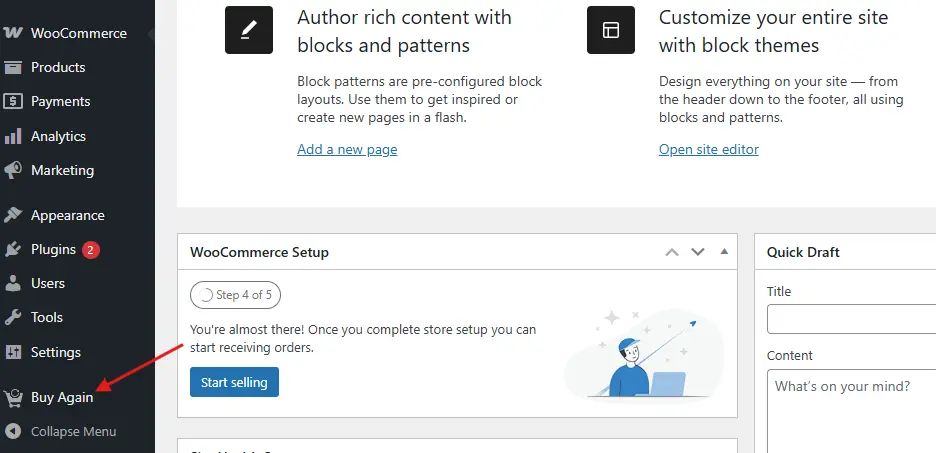
Go to WordPress Dashboard > Buy Again.
-
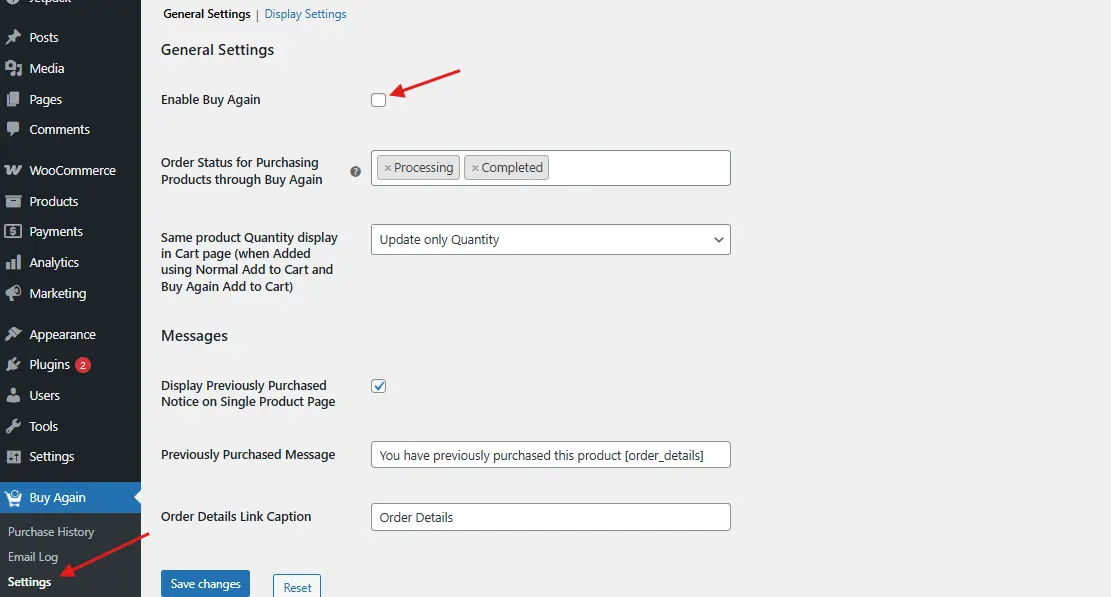
Here, you can enable or disable the Buy Again table on the My Account page.
-
Customize button text, layout styles, and other preferences as needed.
-
Don’t forget to click Save Changes to apply your settings.
After setup, your customers will be able to see their past purchases and reorder with ease!
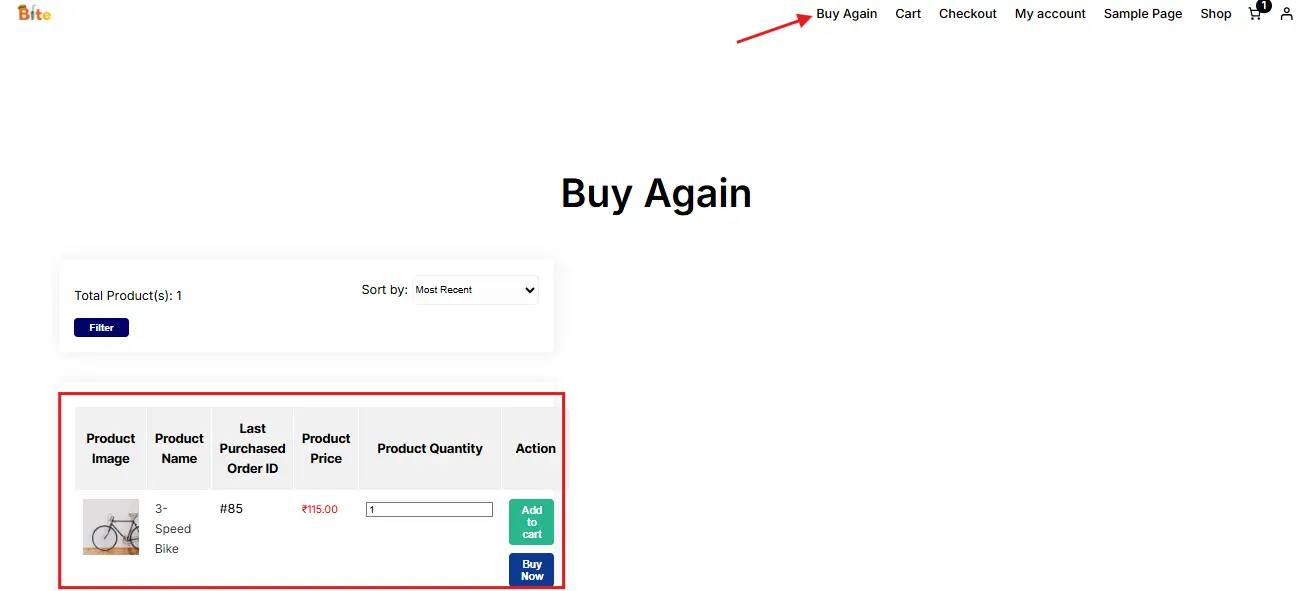
How Customers Can Reorder Products with the Plugin
Once the WooCommerce Buy Again plugin is activated, customers gain access to a convenient reorder feature directly within their account area.
What Customers Experience:
- A clear table listing all their previously purchased products, including details like product name, purchase date, and quantity.
- A prominent Buy Again button next to each product, allowing them to instantly add the item back to their shopping cart.
- The ability to reorder multiple products quickly and effortlessly—no need to search or navigate through the entire store.
- A mobile-friendly layout that works smoothly on any device, ensuring reorder convenience on the go.
This streamlined reorder process reduces friction, making it easy for customers to repeat purchases and boosting your store’s customer loyalty and sales.
Customizing the Buy Again Experience
To create a reorder experience that truly fits your store and delights your customers, consider these customization options:
1. Personalize Button Text and Style
Use WooCommerce’s built-in customization settings or add custom CSS through your theme to modify the Buy Again button’s text and appearance. This helps maintain your brand voice and visual consistency across your site.
2. Add Product Recommendations
Enhance the Buy Again page by showing related products or upsell opportunities. You can use plugins like WooCommerce Recommendations or implement custom code to display complementary items, encouraging customers to add more to their cart.
3. Set Restrictions for Special Products
Some products might require manual handling, be out of stock, or be discontinued. Use the plugin’s settings or custom filters to hide or disable the Buy Again button for these items, preventing customer confusion or frustration.
4. Integrate with Subscriptions
If you offer subscriptions, WooCommerce Buy Again integrates smoothly with WooCommerce Subscriptions. This lets customers reorder one-time products or additional items alongside their subscription orders, providing a flexible, unified buying experience.
Advanced Tips for Maximizing Reorders in WooCommerce
Adding reorder functionality is just the beginning. To truly boost repeat sales and maximize customer lifetime value, implement these proven strategies:
1. Email Reminders and Reorder Notifications: Leverage email marketing platforms like WooCommerce Follow-Ups or Mailchimp to send personalized reorder reminders. Including direct links to the Buy Again page or specific products makes it effortless for customers to repurchase, significantly increasing reorder rates.
2. Incentivize Reorders: Encourage repeat purchases by offering special discounts, free shipping, or loyalty points on reorders. Promote these incentives clearly on the Buy Again page and through email campaigns to motivate customers to come back sooner.
3. Simplify Payment and Shipping: Streamline the checkout process by enabling saved payment methods and shipping addresses during reorder checkouts. Reducing friction by minimizing steps ensures customers complete their orders quickly and without hassle.
4. Highlight Popular Products: Feature frequently reordered or trending products on your homepage, category pages, or product pages. This social proof and visibility can nudge customers to reorder items they might have forgotten or discover popular alternatives.
5. Monitor Customer Behavior: Regularly analyze reorder trends using WooCommerce Reports, Google Analytics, or other analytics tools. Understanding which products are reordered most often can guide your inventory management and marketing strategies to focus on what truly drives repeat business.

Simplify Reorders to Boost Customer Loyalty
Making it simple for customers to reorder products easily in WooCommerce can significantly strengthen your store’s customer retention and sales growth. The WooCommerce Buy Again plugin streamlines the reorder process, offering a fast, intuitive experience that encourages shoppers to come back again and again.
By implementing the steps outlined in this guide, you’ll set up a seamless reorder system that not only boosts your revenue but also improves overall customer satisfaction. Remember, the easier it is for customers to reorder products easily in WooCommerce, the stronger their loyalty to your brand becomes.
Start using the power of quick reorders today and watch your WooCommerce store grow steadily with happy, returning customers.
Interesting Reads:
How to Make Shipping Free After a Minimum Order Amount in WooCommerce
10 Best WooCommerce Express Checkout Process Plugins
How to Schedule Posts Ahead and Stay Consistent Online with BuddyPress