
Choosing the right WooCommerce Search & Filters Plugins can drastically improve your store’s user experience and drive more sales. With the right tools, your customers can quickly find exactly what they’re looking for — no frustration, no bounces. In this guide, we’ll walk you through everything you need to know about WooCommerce search and filter tools and review the top 10 plugins available today.

What is a WooCommerce Search & Filters Plugin?
Simply put, a WooCommerce Search & Filters Plugin adds advanced search, filtering, and sorting functionalities to your online store. Instead of just browsing categories, your customers can filter by price, attributes, reviews, custom fields, and more. These plugins bridge the gap between a chaotic product catalog and a seamless shopping experience.
Without them, your visitors may feel lost, especially if you have hundreds or thousands of products. These tools improve discoverability, reduce bounce rates, and increase conversions.
How to Use WooCommerce Search & Filters Plugins
Integrating a WooCommerce search and filter plugin is easier than you might think. Here’s a quick guide:
- Choose a plugin: Pick one that fits your needs (start with our list below).
- Install the plugin: Go to Plugins > Add New in your WordPress dashboard and upload or search for the plugin.
- Activate it: After installation, click Activate.
- Configure filter rules: Set up filter options like price range, tags, categories, etc.
- Add the filter widget: Place it using Gutenberg blocks, shortcodes, or widget areas.
- Customize the design: Most plugins allow CSS tweaks or visual styling.
And that’s it! Your store will be much easier to navigate.
List of the Best WooCommerce Search & Filters Plugins
Below is a curated list of the 10 best plugins, complete with features, pricing, and insights.
- Product Filters for WooCommerce
- YITH WooCommerce Ajax Product Filter
- Filter Everything
- WooCommerce Product Search
- JetSmartFilters
- Ajax Search Lite
- Searchanise Smart Search
- WPFunnels Filter Addon
- FiboSearch – Ajax Search for WooCommerce
- WooCommerce Ajax Filters by BeRocket
1. Product Filters for WooCommerce

Product Filters for WooCommerce by WooBeWoo is a powerful, customizable plugin designed to make product navigation seamless. It supports AJAX filtering, ensuring users don’t have to reload pages while browsing. You can filter by categories, attributes, tags, price, and even custom taxonomies.
Whether you’re running a large store or a niche boutique, this plugin enhances user experience with intuitive filtering layouts, sliders, checkboxes, and dropdowns. Plus, it’s Gutenberg and Elementor compatible, making integration super simple.
Key Features:
- AJAX-powered filters for instant results
- Drag-and-drop filter builder
- Mobile-responsive UI
- Supports custom taxonomies
- Works with Elementor, Gutenberg
Pricing: Free version available. Premium plans start at $49/year.
2. YITH WooCommerce Ajax Product Filter
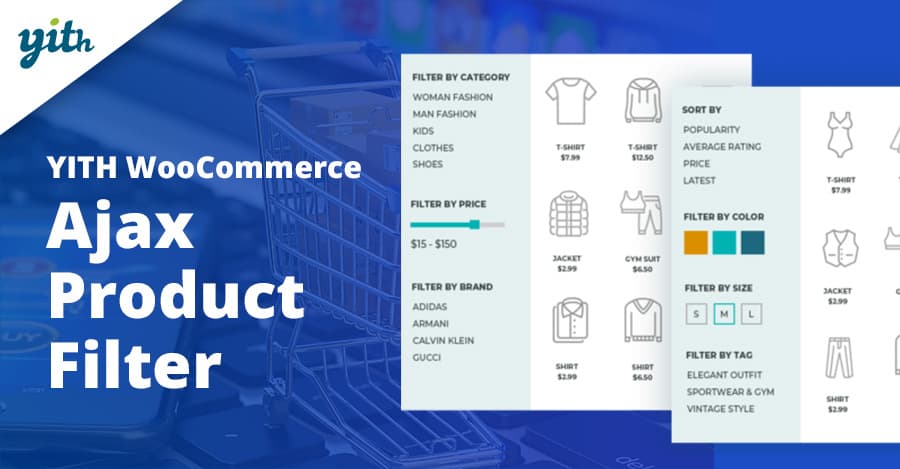
YITH WooCommerce Ajax Product Filter is one of the most popular solutions in the WordPress ecosystem. This plugin allows your users to filter products by categories, attributes, tags, price, and rating — all without reloading the page.
It comes with advanced filter layouts, including toggle, color swatches, checkboxes, and dropdown menus. The real-time results keep users engaged, improving usability and conversion rates. YITH also supports multi-filtering for granular control.
Key Features:
- Real-time AJAX filtering
- Advanced customization and layouts
- Supports multiple filter criteria
- SEO-friendly URLs
- Compatible with Elementor and Gutenberg
Pricing: Free version available. Premium starts at €89.99/year.
3. Filter Everything
Filter Everything is an advanced plugin that gives you full control over what users can filter. It supports any post type, taxonomy, and even custom fields. If your store includes blog content, portfolios, or other complex structures, this plugin is for you.
With intuitive builder options and support for SEO-friendly filtering, it’s a solid tool for boosting engagement and relevance in search results.
Key Features:
- Support for any post type and taxonomy
- SEO-friendly filter URLs
- Responsive and mobile-optimized
- Custom filter sets and layouts
Pricing: Free version available. Pro starts at $40/year.
4. WooCommerce Product Search
WooCommerce Product Search is the official plugin by Automattic, built to work natively with WooCommerce. It delivers accurate, real-time search results with powerful filter options, helping users discover products efficiently.
Its live search and smart filters are especially useful for stores with large inventories. You also get built-in analytics to track what customers are searching for — great for optimizing your product catalog.
Key Features:
- Live AJAX search results
- Product filters and widgets
- Detailed analytics dashboard
- Integration with shortcodes and Gutenberg blocks
Pricing: $49/year.
Also Read: Best WooCommerce Pop‑up Plugins
5. JetSmartFilters
JetSmartFilters by Crocoblock is ideal for Elementor users. It lets you create complex filtering systems using checkboxes, range sliders, date pickers, and more. Designed with performance in mind, it supports indexer functionality for improved speed.
Perfect for dynamic WooCommerce stores using JetEngine or other Crocoblock tools, this plugin offers full design control and flexibility.
Key Features:
- Seamless Elementor integration
- Indexer for faster filtering
- 9+ filter types
- Dynamic data sources support
Pricing: Starts at $43/year (standalone).
6. Ajax Search Lite
Ajax Search Lite is a free, lightweight plugin that offers a clean and responsive live search bar. It’s highly customizable and includes features like image thumbnails, keyword suggestions, and category filters.
If you’re just getting started with WooCommerce and want basic yet polished search functionality, Ajax Search Lite is a great pick.
Key Features:
- Live AJAX search
- Mobile-friendly and lightweight
- Customizable search logic
- Thumbnails and product previews
Pricing: Free. Pro version starts at $36.
Also Read: Best WooCommerce Cross‑selling & Product Bundles Plugins
7. Searchanise Smart Search
Searchanise is a cloud-based search solution offering powerful predictive search, analytics, and merchandising tools. It’s suitable for high-volume WooCommerce stores needing intelligent product discovery capabilities.
It uses advanced algorithms to deliver search suggestions, synonyms, typo tolerance, and even upsell widgets within search results.
Key Features:
- Instant search results
- Cloud-based performance
- Autocomplete with product previews
- Analytics and merchandising tools
Pricing: Starts at $19/month.
8. WPFunnels Filter Addon
WPFunnels Filter Addon brings filtering capabilities to WPFunnels users. It’s perfect for funnel-based stores that want advanced filtering between steps. You can filter by product types, categories, or funnel stages.
This addon works well for niche WooCommerce use cases where guided selling or custom flows are important.
Key Features:
- Filter by funnel steps and stages
- Conditional logic support
- Easy drag-and-drop UI
Pricing: Included in WPFunnels Pro ($97/year).
9. FiboSearch – Ajax Search for WooCommerce
FiboSearch (formerly Ajax Search for WooCommerce) offers lightning-fast AJAX product search with autocomplete. It supports SKU search, product suggestions, and results with images, prices, and categories.
Its speed and UX make it ideal for mobile shoppers and high-traffic WooCommerce stores.
Key Features:
- Instant live search with images
- SKU search
- Fully responsive
- Integrates with popular themes
Pricing: Free. Pro starts at $49/year.
Also Read: Best WooCommerce Third‑party Data Integration Plugins
10. WooCommerce Ajax Filters by BeRocket
BeRocket’s WooCommerce Ajax Filters delivers deep customization options for creating layered navigation. With a visual editor and multiple filter layouts, it suits complex product catalogs.
The plugin also supports infinite scroll and load more features, making it great for content-heavy stores.
Key Features:
- Layered AJAX filters
- Visual editor for layout building
- SEO-friendly and fast
- Infinite scroll support
Pricing: Starts at $59/year.
By carefully selecting the right WooCommerce Search & Filters Plugins, you can make product discovery easier, increase engagement, and boost conversions. Whether you’re using a free tool or investing in a premium one, these plugins are essential for any serious WooCommerce store.
Plugin Comparison Table
| Plugin Name | Key Features | Pricing |
|---|---|---|
| Product Filters for WooCommerce | AJAX filtering, drag-and-drop builder, mobile responsive | Free / from $49/year |
| YITH WooCommerce Ajax Product Filter | Multi-filter, AJAX, SEO-friendly, Elementor compatible | Free / from €89.99/year |
| Filter Everything | Supports custom fields, taxonomies, SEO URLs | Free / from $40/year |
| WooCommerce Product Search | Live search, analytics, and shortcodes | $49/year |
| JetSmartFilters | Elementor integration, dynamic data, 9+ filter types | From $43/year |
| Ajax Search Lite | Live search, image thumbnails, mobile optimized | Free / Pro from $36 |
| Searchanise Smart Search | Predictive search, analytics, and cloud-based | From $19/month |
| WPFunnels Filter Addon | Step-based filters, drag-and-drop, conditional logic | Included in $97/year |
| FiboSearch | Live AJAX search, SKU search, responsive | Free / from $49/year |
| WooCommerce Ajax Filters by BeRocket | Layered filters, infinite scroll, SEO-friendly | From $59/year |

Final Thoughts
When it comes to eCommerce, user experience is everything. The easier it is for customers to find what they need, the more likely they are to convert. That’s exactly what the right WooCommerce Search & Filters Plugins can do for your store.
Take the time to assess your store’s needs, choose the plugin that aligns best with your product catalog and design preferences, and you’ll quickly see the difference in engagement and sales. A well-filtered store isn’t just nice to have — it’s a competitive advantage.
Interesting Reads:
Best WooCommerce Accounting & Invoicing Plugins