
If you sell higher-value items, subscriptions, customized goods, or bookings, adding a prepayment option is a powerful way to reduce cart abandonment and improve cash flow. This guide walks through the top WooCommerce Prepayment Plugins, why they matter, how to use them, and a side-by-side summary so you can pick the right fit for your store.

Table of Contents
Plugins
- Prepaid for WooCommerce Subscriptions
- YITH WooCommerce Deposits / Down Payments
- WooCommerce Deposits (official)
- WooCommerce Deposits & Partial Payments — AcoWebs
- Deposits & Partial Payments (Bayna / WP repo)
- Partially (Payment Plans)
- WooCommerce Deposits (Webtomizer)
- SUMO / SUMO Payment Plans
- WPDepositly — Deposit & Partial Payment
- Payment Plans for WooCommerce (various)
- Comparison table (responsive)
- Final thoughts & selection tips
What is a prepayment/deposit plugin?
Prepayment (or deposit/partial payment) plugins let shoppers pay part — or all of an order up front and settle the rest later. That can mean a deposit to reserve an item, a prepaid subscription (pay yearly and receive monthly deliveries), or a managed installment plan that charges customers on a schedule.
These plugins help stores sell higher-priced or custom products, reduce inventory risk on pre-orders, and improve cash flow by collecting money earlier. Different plugins focus on different needs — some are subscription-focused, others handle one-off deposits or automated installment payments — so matching plugin capability to your business model matters.
Also Read: Best WooCommerce Videos Plugins
How to use a prepayment plugin
Most prepayment plugins follow a similar setup flow. Below is a general step-by-step guide you can apply to almost any plugin listed here.
- Pick & install: Choose a plugin that fits your use case (prepaid subscriptions vs. deposits vs. flexible payment plans). Install it from the vendor or WordPress plugin repo and activate.
- Set global defaults: Configure global deposit rules (percentage or fixed amount), whether deposit is optional or required, and any balance / due-date behavior.
- Enable per-product rules: For products that need special handling (bookings, variations), configure per-product settings or variation-level deposits.
- Configure balance handling: Decide whether balance orders are created automatically in WooCommerce, paid via the site, or handled externally (offline payment). Set up automated charging if supported (Stripe tokenization, Partial.ly, etc.).
- Test checkout flow: Make test purchases — deposit and full-pay — to confirm the cart flow, emails, and balance collection behave as expected.
- Communicate clearly: Update product pages with clear copy about what’s being charged now and what will be charged later (dates, amounts, and refund rules).
That short checklist gets most stores live quickly, but always read the plugin docs for gateway compatibility and recurring billing caveats.
A quick note before the plugin list
Below you’ll find a curated list of 10 solid options — a mix of official WooCommerce extensions, popular premium plugins, and well-known third-party solutions. Each entry includes an overview, key features, and pricing notes so you can compare quickly.
I’ve cited vendor pages and official docs for the most important details; double-check current pricing and compatibility with your WooCommerce / PHP versions before purchasing.
1. Prepaid for WooCommerce Subscriptions
 If your business ships goods on a schedule but wants customers to pay upfront for a period (for example, pay annually, ship monthly), this plugin extends WooCommerce Subscriptions so you can create prepaid plans and separate billing from fulfillment. It’s ideal for magazines, subscription boxes, and stores that want predictable revenue.
Prepaid plans let you add multiple prepaid options per subscription product (e.g., 6-month and 12-month prepaid choices) and manage different shipping/billing schedules. The extension is built to integrate with the official Subscriptions extension, and its docs explain how prepaid intervals and shipping cadence work.
Key features
- Create unlimited prepaid plans per subscription product
- Ship on a different schedule than billing (pay yearly, ship monthly)
- Customizable product page layouts for prepaid options
Pricing — sold on WooCommerce.com as a paid extension (see official product page for current price and licensing).
2. YITH WooCommerce Deposits / Down Payments
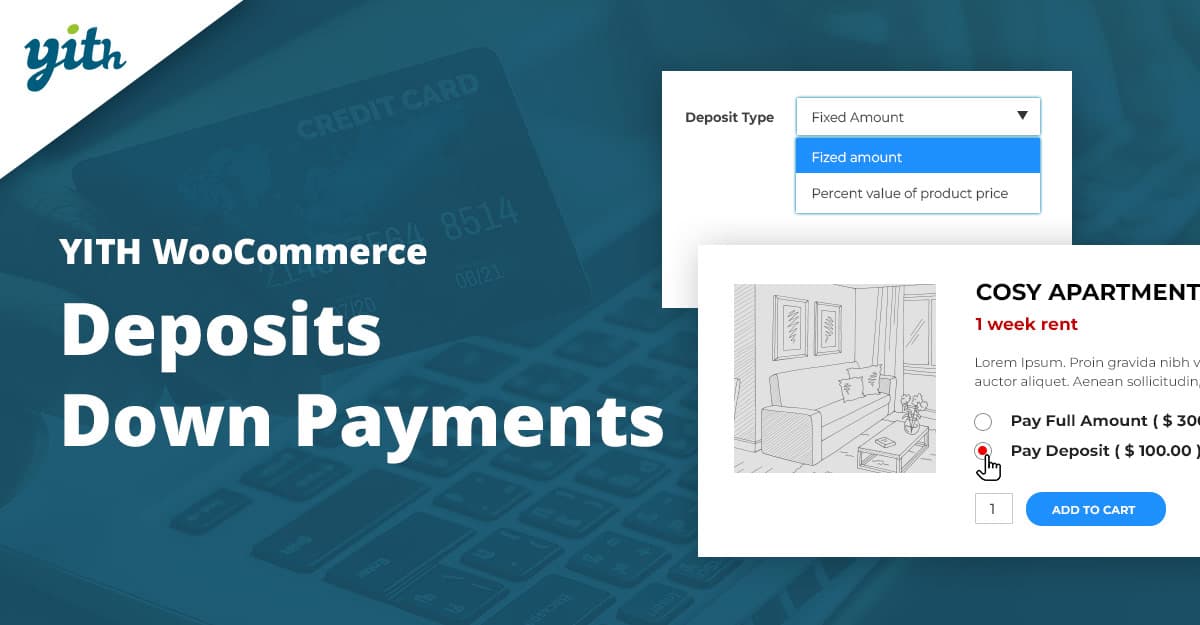 YITH’s deposits plugin is a polished option that handles deposits and balance collection with lots of flexibility — fixed or percentage deposits, per-product or global settings, scheduled balance due dates, and integrations with YITH Booking/Appointment products for reservation flows.
It’s widely used (thousands of customers) and includes features like optional vs required deposits, automatic balance order creation, and options to automatically charge the customer’s card for the balance (when combined with YITH Stripe integrations). The vendor’s documentation is extensive and includes behavior for unpaid balances and refunds.
Key features
- Fixed or percentage deposit amounts, per product/category/variation
- Set when the balance is due (date or time range)
- Integration with YITH Booking & Stripe for automatic balance capture
Pricing — premium plugin from YITH with a yearly license and a 30-day refund policy.
3. WooCommerce Deposits (official extension)
The official WooCommerce Deposits extension offers an enterprise-level, well-supported way to accept deposits and create custom payment schedules. It supports deposits, layaway, and multiple payment structures, and integrates tightly with WooCommerce checkout and product management.
Use it when you want a seamless, WooCommerce-native experience and clear visuals during checkout that explain deposit vs remaining balance options. The official docs also cover requirements and expected behaviors across WooCommerce versions.
Key features
- Custom payment schedules (days/weeks/months)
- Customers can choose to pay full or deposit at checkout
- Clear UI for payment plans and merchant controls
Pricing — official paid extension; check the WooCommerce marketplace for current pricing and licensing details.
4. WooCommerce Deposits & Partial Payments — AcoWebs
AcoWebs’ plugin is a popular freemium choice that supports fixed/percentage deposits, multiple installment schedules, and per-product controls. It’s user-friendly and frequently recommended in roundup guides for stores wanting flexible deposit rules without complex setup.
The plugin has a free version with core features and a premium tier that unlocks advanced payment-plan scheduling and extra integrations; documentation covers activation, scheduling, and balance collection. Guides and reviews from the developer provide setup walkthroughs for common use cases.
Key features
- Fixed or percentage deposits, forced or optional
- Payment plans and schedule management
- Per-product/variation configuration
Pricing — freemium on WordPress.org; premium yearly tiers typically start in the ~$40–50/yr range (vendor site lists current plans). Always check Acowebs for live pricing.
Also Read: How to Assign Shipping by Dimensions in WooCommerce
5. Deposits & Partial Payments (Bayna / WordPress.org)
Several authors publish “Deposits & Partial Payments” solutions on the WP repo (Bayna and others). These are straightforward, often free-to-start plugins that add deposit logic to products and support both fixed and percentage deposits.
These repo plugins are useful if you want a lightweight, low-cost entry point. The pro or premium upgrades (when available) add automation, better balance-order handling, and support. Always confirm active installs and recent updates before depending on a free plugin.
Key features
- Free/freemium options on WordPress.org
- Basic deposit rules (fixed/percent)
- Balance payment actions (create order, reminder, manual)
Pricing — many of these have free tiers; premium add-ons typically start from around $29–$69, depending on the vendor. Check the plugin page for exact tiers.
6. Partially — Payment Plans for WooCommerce
Partially is a hosted payment plan service with a WooCommerce integration. Rather than the store storing installment logic locally, Partial.ly opens a payment plan with its service and automates recurring collections for you.
Partial.ly is great if you want scheduled automated collections (merchant account payouts handled by Partial.ly) and a simple commerce integration. The vendor is transparent about pricing: they charge a percentage fee per transaction for their payment plan service and provide detailed docs on how the WooCommerce plugin communicates with Partially.
Key features
- Hosted payment plans with automated collections
- 2% transaction fee (vendor pricing model; check site for exact terms)
- WooCommerce order sync and plan customization
Pricing — Partial.ly’s pricing is primarily transaction-based (example: ~2%/transaction for many shops); consult Partial.ly for the latest rates and merchant payout options.
Also Read: Best WooCommerce Combinations & Product Customization Plugins
7. WooCommerce Deposits (Webtomizer / Woo-deposits)
Webtomizer’s WooCommerce Deposits (also marketed as “Woo Deposits” or “WooCommerce Deposits by Webtomizer”) is a premium plugin that supports product-level deposits, cart deposits, and compatibility with bookings and variations.
It’s a stable option if you prefer a paid premium plugin from a third-party that focuses solely on deposit features and integrates with WPML and notable payment gateways. The vendor site and documentation provide installation steps and examples.
Key features
- Per-product/variation deposit configuration
- Compatibility with bookings and multi-language setups
- Options to force or allow deposit payments
Pricing — premium plugin sold via vendor site; pricing is listed on vendor pages — check the product page for current licensing options.
8. SUMO / SUMO WooCommerce Payment Plans
SUMO (SUMO WooCommerce Payment Plans) is a feature-rich codecanyon/third-party plugin that provides deposits, down payments, and multiple installment schemes. It’s a long-standing option for stores that want many payment-plan types and gateway compatibility.
SUMO supports fixed installments, variable installments, deposit with balance, and Stripe-based automatic charging in some configurations. It’s frequently available on marketplaces and sometimes bundled with themes or plugin packs.
Key features
- Multiple payment-plan types (fixed, variable, deposit + balance)
- Supports Stripe automatic payments (depending on setup)
- Marketplace-friendly pricing (CodeCanyon / plugin sellers)
Pricing — commonly sold on CodeCanyon for a one-time fee (often around $49 for a single-site license) — confirm the marketplace listing for licensing and updates.
9. WPDepositly — Deposit & Partial Payment Solutions
WPDepositly provides deposit and partial-payment options, often marketed as a budget-friendly plugin with freemium and premium tiers. It handles deposit rules, balance payment flows, and shows payment history in the My Account area.
For stores that want a lower-cost option with decent feature coverage and easy setup, WPDepositly is worth testing. As with all repo plugins, check update frequency and support responsiveness before deploying to a live storefront.
Key features
- Fixed/percentage deposit options
- Balance payment from the My Account page
- Free core plugin with premium upgrades
Pricing — free core plugin; premium addons and bundles typically from $29+, depending on vendor and license. Check the WordPress repo or vendor page for current tiers.
Also Read: Best WooCommerce Search & Filters Plugins
10. Payment Plans for WooCommerce / Other Payment Plan Plugins
This bucket contains several smaller plugins and hosted services that focus on buy-now-pay-later or payment-plan flows (various authors). Examples include Payment Plans for WooCommerce (standalone), marketplace alternatives, and other pay-later integrations.
These plugins range from simple schedule managers to full BNPL-style hosted options. They’re useful when you want a specific workflow (e.g., custom merchant reporting, scheduled reminders, or integration with a particular gateway). Always test any third-party payment-plan provider thoroughly to confirm compliance with your refund/chargeback policies.
Key features
- Hosted BNPL or local schedule-based plans
- Often specialized for use-cases (rentals, medical, travel)
- Different pricing models: transaction fee, yearly license, or one-time marketplace fee
Pricing — varies widely: transaction-based (Partial.ly), annual licenses (~$30–$100/yr), or one-time marketplace fees (~$49). Always confirm vendor pricing before buying.
Comparison table — quick reference
Tip: The table below is horizontally scrollable on small screens, so it works inside the WordPress block editor and stays readable on mobile.
| Plugin | Best For | Key Features | Pricing |
|---|---|---|---|
| Prepaid for WooCommerce Subscriptions | Prepaid subscription plans | Multiple prepaid plans, separate shipping/billing cycles | Premium (WooCommerce.com) |
| YITH WooCommerce Deposits / Down Payments | Deposits & booking products | Fixed/% deposits, balance scheduling, integrations | Premium (YITH) |
| WooCommerce Deposits (official) | Native deposits & payment plans | Custom schedules, full/deposit option | Premium (WooCommerce.com) |
| AcoWebs Deposits & Partial Payments | Flexible freemium deposits | Fixed/% deposits, per-product rules | Free + Premium |
| Deposits & Partial Payments (WP repo) | Budget deposit solutions | Basic deposit rules, balance orders | Free / Premium |
| Partially | Hosted payment plans | Automated collections, Woo sync | Transaction fee |
| Webtomizer WooCommerce Deposits | Premium deposit plugin | Per-product deposits, booking compatible | Premium |
| SUMO Payment Plans | Installment flexibility | Fixed/variable installments, Stripe | One-time (CodeCanyon) |
| WPDepositly | Budget deposits | Balance history, free core | Free + Premium |
| Payment Plans / Others | BNPL / custom plans | Hosted or local schedules | Varies |

Final thoughts & how to choose
Choosing a prepayment plugin is about two things: (1) matching the product’s capabilities to your business model — e.g., prepaid subscriptions need a subscription-aware plugin like Prepaid for WooCommerce Subscriptions — and (2) making sure the plugin supports your payment gateway and your desired balance-collection workflow (automatic card capture vs manual reminders).
Short checklist: confirm compatibility with your WooCommerce, WordPress, and PHP versions; test on a staging site; read refund & unpaid-balance behaviors; and check update cadence/support responsiveness. If you want fully automated recurring collections outside your store, consider a hosted provider (Partially). If you want complete control inside WooCommerce, start with the official WooCommerce Deposits or a well-supported premium plugin such as YITH or AcoWebs.
Interesting Reads:
How to Add Delivery Date Selection in WooCommerce