


Choosing the right WooCommerce Plugins Surveys makes it easier to uncover the hidden reasons behind customer behavior—why they decide to buy, abandon their cart, delay payment, or even cancel a subscription. Without this feedback, store owners are left guessing, often relying only on analytics data that shows “what” happened but not “why.” Surveys fill that gap by capturing customer intent, objections, and satisfaction in real time.
When used strategically, survey plugins not only collect valuable insights but also improve conversion rates, reduce churn, and strengthen customer loyalty. For example, a cancellation survey can reveal whether price, shipping speed, or product selection is driving churn, while a post-purchase survey can highlight which marketing channels are actually working.

What Are WooCommerce Plugin Surveys?
WooCommerce survey plugins collect zero-party feedback at critical touchpoints—checkout, order confirmation, account pages, email follow-ups, and subscription cancellation flows. The goal is to turn opinions into clear actions: improve pages, product fit, pricing, and retention programs.
Well-implemented surveys avoid friction. They ask concise questions, trigger at the right moment, and send responses to your analytics or CRM. Paired with incentives or offers, they can lift conversions and reduce churn without heavy development work.
Also Read: How NetSuite Integrates with WooCommerce
How to Use WooCommerce Plugins Surveys
First, define a single outcome: recover pending orders, learn “How did you hear about us?”, or capture cancellation reasons. Next, choose a plugin that can trigger at that event and pass data to your stack (GA4, email, help desk, or warehouse BI).
- Install/activate the chosen plugin and verify WooCommerce compatibility.
- Select the event (checkout complete, subscription cancel, pending order email, etc.).
- Create concise questions (radio, select, short text). Keep it under 30 seconds.
- Map answers to actions: tag users, send a coupon, trigger follow-up email, or create support tickets.
- Test on a staging order and a live test product. Confirm data flows to analytics/CRM.
- Roll out gradually; review response quality weekly and tweak wording/logic.
Table of contents
- Cancellation Survey and Offers for WooCommerce Subscriptions
- YITH WooCommerce Pending Order Survey
- AutomateWoo (Workflows with Survey/Offer Triggers)
- UserFeedback (MonsterInsights) for WooCommerce Pages
- Fairing Post-Purchase Surveys on the Thank-You Page
- TotalPoll for WooCommerce Post-Purchase Polls
- Quiz and Survey Master (QSM) + WooCommerce Integration
- ShopMagic for WooCommerce (Bookings & Follow-ups)
- Survey Maker (On-Site Prompts on WC Pages)
- Crowdsignal (Embeds for Product/Order Pages)
List of 10 WooCommerce Plugins Surveys
Below is a focused list of survey tools that work well with WooCommerce at different stages—cancellation, post-purchase, pending orders, and on-site prompts.
Use the table of contents to jump to a specific plugin and compare Key Features and Pricing at a glance.
1. Cancellation Survey and Offers for WooCommerce Subscriptions

Purpose-built for subscription churn, this plugin shows a short survey at the moment a user clicks “Cancel”. Answers can trigger targeted offers—like a discount or a “skip next renewal”—to save the subscription without manual intervention.
It’s designed for speed: ask why they’re leaving, present a relevant incentive, and capture structured data for product and pricing decisions. Ideal for teams focused on retaining MRR and diagnosing churn reasons.
Key Features:
- In-flow cancellation survey for WooCommerce Subscriptions.
- Conditional offers (e.g., discount if “too expensive”).
- Actionable churn analytics to guide roadmaps.
Pricing: Free core; premium options available via WooCommerce.com marketplace.
2. YITH WooCommerce Pending Order Survey
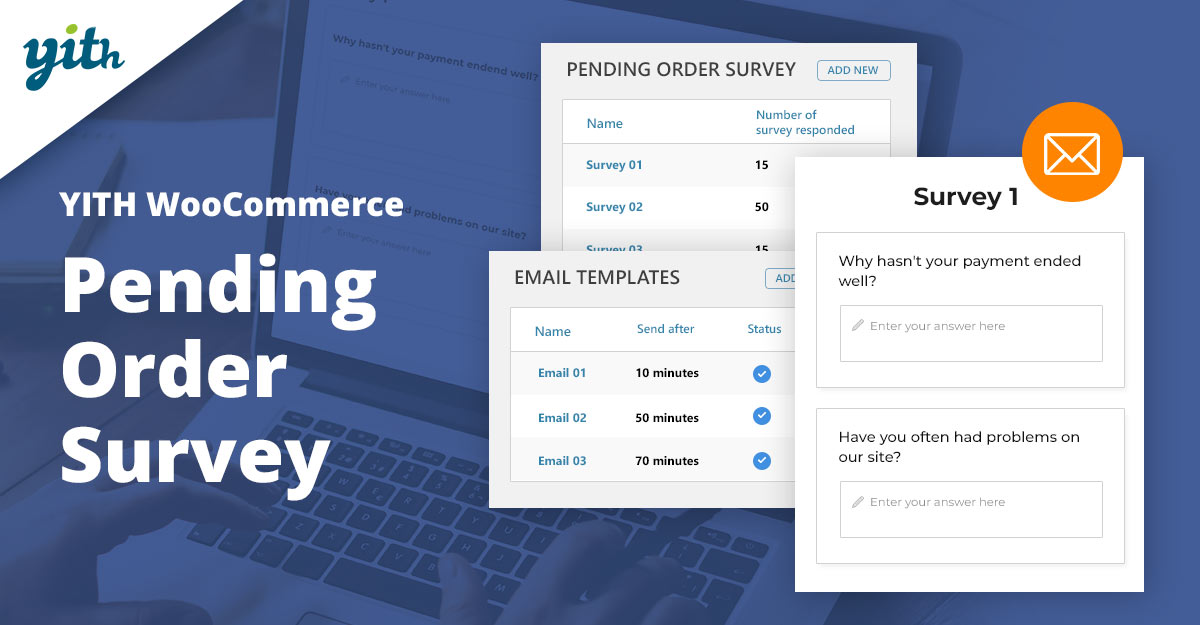
This plugin targets a frequent blind spot: pending orders. It automatically contacts shoppers who didn’t complete payment and asks why—payment friction, shipping cost, or second thoughts—so you can fix blockers fast.
Responses arrive in a tidy dashboard. Use them to refine checkout UX, adjust shipping rules, or send tailored nudges. Great for merchants who see many “pending” orders in reports.
Key Features:
- Automatic email survey for pending orders.
- Reason-tagging and reporting for optimization.
- Compatible with major email providers.
Pricing: Paid license from YITH (annual).
3. AutomateWoo (Workflows with Survey)
AutomateWoo is not a survey form builder; it’s a workflow engine for WooCommerce. Use it to trigger emails, coupons, and follow-ups based on events like order completion, status changes, or subscription cancellation.
Pair it with a lightweight survey link (or on-site prompt) to capture reasons, then automate incentives. It’s a flexible backbone for abandoned carts, re-engagement, and churn-save flows.
Key Features:
- Event-based workflows for orders and subscriptions.
- Dynamic coupons and segmentation.
- Pairs with survey tools for closed-loop actions.
Pricing: Paid extension (annual) from WooCommerce.com.
Also Read: Best WooCommerce Plugins Live Chat
4. UserFeedback (MonsterInsights) for WooCommerce Pages
UserFeedback lets stores add targeted, on-site micro-surveys to key WooCommerce pages—product, cart, checkout, and the order confirmation page. It’s simple, fast, and integrates with analytics out of the box.
Use it to ask “How did you hear about us?”, test shipping threshold messaging, or collect post-purchase NPS. Short prompts keep completion rates high and insights fresh.
Key Features:
- Page-level targeting and conditional logic.
- Unlimited questions/surveys (plan-dependent).
- Analytics integrations for attribution.
Pricing: Free version; paid plans from ~$49.50/yr.
5. Fairing Post-Purchase Surveys on the Thank-You Page
Fairing specializes in post-purchase attribution surveys. A small snippet places a one-question survey on the WooCommerce thank-you page so you can capture “What brought you here?” while the purchase is fresh.
The answers close the gap on channel attribution and creative performance. It’s especially effective for brands investing in podcasts, influencers, or offline ads where click-tracking falls short.
Key Features:
- Native thank-you page placement for WooCommerce.
- Follow-up questions, NPS, and integrations.
- Attribution-ready reporting for media mix modeling.
Pricing: SaaS; tiered monthly plans.
Also Read: Best WooCommerce Plugins PDF Invoices and Packing Slips
6. TotalPoll for WooCommerce Post-Purchase Polls
TotalPoll is a polling plugin that can slot into your WooCommerce flow—especially on the order-received page. Use it for quick “What nearly stopped you from buying?” questions that guide UX tweaks.
It’s lightweight and fast to deploy. For deeper research, pair responses with GA4 events or a CRM to track sentiment over time.
Key Features:
- Flexible poll types and result displays.
- Embeds on WooCommerce pages and posts.
- Export for analysis and dashboards.
Pricing: Premium license; one-time or annual, depending on vendor.
7. Quiz and Survey Master + WooCommerce Integration
QSM is a robust survey/quiz builder with a WooCommerce add-on. Sell access to surveys, recommend products based on answers, or embed outcome-based quizzes that feed directly into carts.
Merchants use it to qualify shoppers and personalize merchandising. The integration hands off results so you can segment and follow up with targeted offers.
Key Features:
- Advanced question types and logic.
- WooCommerce add-on for selling and upselling.
- Email notifications and reporting.
Pricing: Free core; paid add-ons and bundles.
8. ShopMagic for WooCommerce
ShopMagic is a marketing automation plugin with solid WooCommerce support. For stores using Bookings, it can send post-event emails that include short surveys to capture service quality and intent to return.
Use it to schedule reminders, request feedback, or nudge reorders. The automation builder keeps logic straightforward while still offering useful segmentation.
Key Features:
- Automated emails before/after orders or bookings.
- Survey prompts within follow-ups.
- Tags, filters, and basic personalization.
Pricing: Free core; Pro plans available.
Also Read: How Salesforce Integrates with WooCommerce
9. Survey Maker (On-Site Prompts on WC Pages)
Survey Maker is a flexible WordPress survey plugin that embeds easily on WooCommerce pages. It’s useful for micro-surveys on PDPs (e.g., sizing clarity) and post-purchase feedback without heavy scripts.
With multiple question types and a straightforward builder, teams can iterate quickly and view results without leaving WordPress.
Key Features:
- Many question types and templates.
- Embeds on product, cart, and checkout pages.
- Exportable results for analysis.
Pricing: Free version; premium upgrades.
10. Crowdsignal (Order Pages)
Crowdsignal (by Automattic) offers customizable surveys and polls that embed cleanly in WordPress. While not WooCommerce-specific, it integrates neatly on order confirmation pages or inside product tabs.
It’s a good fit for quick product-market checks, PDP feedback, and lightweight NPS campaigns that don’t require complex automation.
Key Features:
- Customizable templates and logic.
- Embeddable blocks and shortcodes.
- Exports and shareable reports.
Pricing: Free tier; paid plans available.
Also Read: Best WooCommerce Plugins Wallet System
At-a-Glance: Key Features & Pricing
| Plugin | Key Features | Pricing |
|---|---|---|
| Cancellation Survey & Offers for Woo Subscriptions | Cancel-flow survey; conditional discounts; churn tags | Free core; premium on marketplace |
| YITH WooCommerce Pending Order Survey | Emails pending buyers; reason tracking; reports | Paid annual license |
| AutomateWoo | Event workflows, coupons, survey follow-ups | Paid extension (annual) |
| UserFeedback (MonsterInsights) | On-site prompts; GA integration; targeting | Free; paid from ~$49.50/yr |
| Fairing Post-Purchase Surveys | Thank-you page survey; attribution; NPS | SaaS tiers (monthly) |
| TotalPoll | Quick polls; embed on WC pages; export | Premium license |
| QSM + WooCommerce | Advanced surveys; sell/upsell via WC | Free core; paid add-ons |
| ShopMagic for WooCommerce | Automated follow-ups; survey requests | Free; Pro available |
| Survey Maker | Many question types; fast embeds | Free; premium upgrades |
| Crowdsignal | Block/shortcode embeds; reports; exports | Free tier; paid plans |

Final Thoughts on WooCommerce Plugins Surveys
Surveys may look simple on the surface, but when integrated into WooCommerce at the right stages, they become powerful levers for growth. From recovering pending orders and reducing subscription churn to refining checkout experiences and sharpening attribution, the right plugin helps transform raw opinions into measurable business improvements.
The best approach is to start small—choose one survey plugin that fits your immediate challenge, whether it’s cancellations, thank-you page attribution, or checkout friction. As you begin to see actionable insights, expand your toolkit with complementary plugins to cover different stages of the funnel. By listening actively and responding strategically, WooCommerce stores can not only capture more sales but also build deeper, long-lasting relationships with customers.
Interesting Reads:
Best WooCommerce Plugins PDF Invoices and Packing Slips




