


The WooCommerce Plugins Added to Cart Popup can lift conversions and improve the buying flow by showing customers instant feedback and optional upsells without leaving the product page. This guide walks through the ten best plugins, explains what these popups are, shows how to use them step-by-step, and compares features and pricing so a store owner can choose quickly.

Table of contents
- Added to Cart Popup for WooCommerce
- YITH WooCommerce Added to Cart Popup
- WooCommerce Added to Cart Popup (Ajax)
- UpsellWP (Added to Cart Popups)
- Popup Maker (with WooCommerce trigger)
- WooCommerce Fast Cart
- Instantio — All-in-One Cart & Popup
- WooCommerce Popup Cart Plugin – Motif Creatives
- WooCommerce Added to Cart Popup – CodeFish
- Popup Notices for WooCommerce
What is an Added to Cart Popup?
An added-to-cart pop-up is a small modal or drawer that appears immediately after a shopper clicks Add to cart. Instead of forcing a redirect to the cart page, the pop-up confirms the addition, shows cart contents or the specific product, and often recommends complementary items or displays CTA buttons (view cart, checkout, continue shopping).
These popups reduce friction — customers stay on the page they were browsing while getting instant clarity that the action succeeded. When used thoughtfully (not intrusive), they can raise average order value by suggesting upsells and cross-sells, or speed the path to checkout with a clear CTA.
How to use an Added to Cart Popup
The steps below are intentionally generic so they apply to most pop-up plugins: install the plugin, choose the pop-up type, and set triggers and appearance. Each plugin has slightly different settings, but the flow is similar across solutions.
- Install & activate the plugin from WordPress or upload the premium zip.
- Open plugin settings and choose the popup type: Added to cart” or a WooCommerce trigger.
- Decide content: show product only, whole cart, and whether to include upsells/cross-sells.
- Customize appearance: size, colors, button text, and animation (keep it brand-consistent).
- Set behavior: autopopup on add, delay, mobile visibility, and whether to suppress browser notices.
- Test: add products, test variations, mobile, and conflict-check with theme/plugins.
Which plugins to consider
Below are 10 well-regarded options — a mix of lightweight add-to-cart popups, full popup builders, and cart/checkout tools that include an add-to-cart trigger. The first two are the ones requested specifically, followed by eight solid alternatives.
1. Added to Cart Popup for WooCommerce

This plugin (often marketed as “Added to Cart Popup for WooCommerce”) provides an Ajax-driven modal that appears when a product is added, with options to show the last-added product or the full cart. It focuses on a balance of lightweight performance and useful upsell areas — ideal for stores that want a purpose-built pop-up without a full pop-up builder overhead.
The interface typically includes template choices, style adjustments (colors, overlay), and the option to display cross-sells or related products directly inside the pop-up. Reports from provider pages indicate a one-year license model with yearly renewals and a modest price point.
Key features
- Ajax add-to-cart — no reload required.
- Show product only or full cart contents.
- Custom templates, upsell block, mobile controls.
Pricing: From ~$29/year.
2. YITH WooCommerce Added to Cart Popup
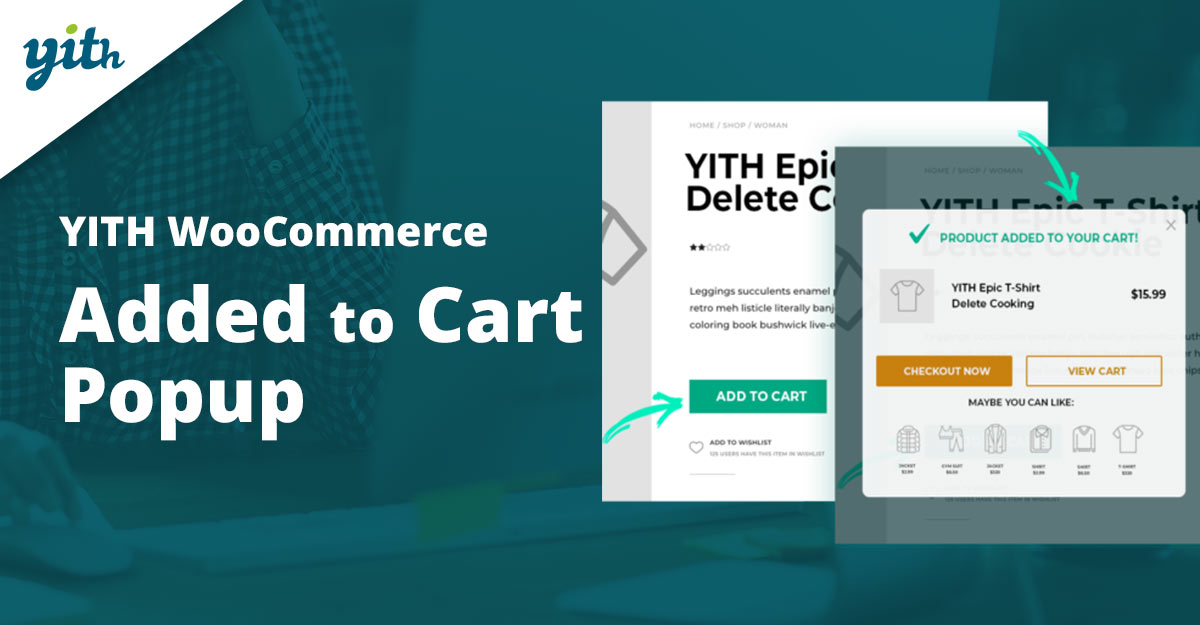
From a widely used plugin house, YITH’s Added to Cart Popup is feature-rich — choose where popups show, whether to display the last-added product or the whole cart, and add a dedicated upsells area. The plugin is built to play nicely with other YITH products, such as Frequently Bought Together and Dynamic Pricing.
YITH highlights granular control: show or exclude the pop-up on specific products or pages, customize the message/icon, and tweak totals (tax/shipping). The product page also confirms mobile-friendly behavior and a floating mini-cart option tied to the pop-up.
Key features
- Advanced display rules (exclusion lists, page targeting).
- Customizable product table and totals section in the modal.
- Mini floating cart, upsell/cross-sell area, and integrations with the YITH suite.
Pricing: Premium yearly license (check the YITH site).
3. WooCommerce Added to Cart Popup
Available from the WordPress plugin directory, the “Added to Cart Popup (Ajax)” solution provides a no-frills modal that opens on add-to-cart, using AJAX to avoid page reloads. It’s a practical, free starting point for stores that need confirmation + a small upsell area without paying for premium features.
The free plugin focuses on reliability: translation-ready strings, basic customization, and simple product display. For many stores, the free version plus a light custom CSS tweak is enough to improve UX quickly.
Key features
- AJAX add-to-cart with modal confirmation.
- Translation-ready and lightweight.
- Basic styling and display options in settings.
Pricing: Free.
Also Read: Best WooCommerce Customer Reviews Plugins
4. UpsellWP (Added-to-cart upsell popups)
UpsellWP is primarily an upsell and order bump plugin, but it offers added-to-cart popups that propose targeted upsells immediately after a product is added. This plugin is a good choice when the objective is to increase AOV through contextual one-click upsells shown at the exact moment of purchase intent.
The real strength is the rules engine: display upsells based on the product added, cart total, or customer attributes. Combine that targeting with well-designed CTA buttons, and the pop-up becomes a powerful revenue lever.
Key features
- Targeted added-to-cart upsell popups and order bumps.
- Conditional display rules and A/B testing (premium).
- One-click add-to-cart for upsell items.
Pricing: Free Lite; paid tiers available.
5. Popup Maker (with WooCommerce trigger)
Popup Maker is a general-purpose pop-up builder with a WooCommerce integration that lets a store trigger a pop-up when a product is added to the cart. It’s a flexible option when a custom design or behaviour is required (e.g., email capture in the add-to-cart modal, complex targeting).
Because Popup Maker is a full builder, it offers more design control than narrow add-to-cart plugins — but that comes with slightly more setup. For stores that want modal creativity (forms, countdowns, or multi-step CTAs inside the add-to-cart popup), it’s a top pick.
Key features
- Full popup builder with WooCommerce triggers and conditions.
- Unlimited popups, targeting rules, and extensions.
- Integrates with forms and email platforms.
Pricing: Free core; Pro from ~$99/yr.
Also Read:How to Customize WooCommerce Checkout Fields to Boost Conversions
6. WooCommerce Fast Cart
WooCommerce Fast Cart focuses on a fast side-cart / popup cart experience: it’s a mini-cart that opens as a drawer or modal and supports direct editing and checkout. This is ideal for stores that want a slightly more permanent cart drawer rather than a transient add-to-cart modal.
Fast Cart typically includes features like quick-edit, quantity controls, and a one-page checkout entry. The product is marketed toward conversion optimization with a clean UX and mobile-first behavior.
Key features
- Mini side cart or pop-up drawer with quick checkout.
- Edit quantities and proceed directly to checkout.
- Mobile responsive and performance-tuned.
Pricing: ~$20–$45.
7. Instantio — All-in-One Cart & Popup
Instantio (also marketed as a quick checkout plugin) bundles a side cart, a pop-up cart, a floating cart, and a one-page checkout. It’s a feature-packed option for stores that want multiple cart presentation options and a fast checkout experience in one plugin.
Instantio’s flexibility (pop-up cart + side cart + streamlined checkout) makes it efficient for stores that need a multipurpose tool — the same interface can be switched between drawer and modal behaviors depending on preference.
Key features
- Popup cart, side cart, floating cart, and instant checkout.
- Fast checkout flows and compatibility with many themes.
- Customization of layout and CTA buttons.
Pricing: From ~$49.
8. WooCommerce Popup Cart Plugin — Motif Creatives
Motif Creatives’ Popup Cart plugin creates a modal cart that opens on add-to-cart and supports a clean product table, quick buttons, and some cross-sell placements. It’s an accessible premium plugin for merchants who want a straight pop-up cart with styling controls.
The plugin emphasizes easy styling and usability so stores can get a polished pop-up with minimal setup. It tends to be lighter than full popup builders — suitable for store owners who want focused functionality.
Key features
- Clean added-to-cart modal with product table and totals.
- Style controls and button customization.
- Lightweight code for better performance.
Pricing: Under $60.
9. WooCommerce Added to Cart Popup — CodeFish
CodeFish and several other authors produce small but powerful added-to-cart pop-up plugins. These variations often mirror the same core functionality — AJAX add-to-cart plus a quick modal and upsell area — and are useful when a lightweight paid or free option is desired.
Look for CodeFish versions when a developer-friendly plugin is needed; they commonly include shortcodes and hooks that developers can extend. This makes them a pragmatic choice for stores with custom integration needs.
Key features
- Ajax modal with hooks for developers.
- Convertible templates and customization points.
- Often lightweight and performance-conscious.
Pricing: $20–$40 or free with/ Pro.
10. Popup Notices for WooCommerce
This plugin converts WooCommerce’s native notices into popups and can be configured to show a friendly modal when an item is added to the cart. It’s useful for stores that want to replace the default notice bar with a modal without rebuilding the entire cart UI.
Instead of a full cart modal, the plugin turns notices into an interactive pop-up — a simple improvement that keeps the store lightweight and avoids duplicating cart functionality. Great for clean, minimalistic sites.
Key features
- Transforms WooCommerce notices into popups.
- Simple toggle for replacing default notice output.
- Lightweight and translation-ready.
Pricing: Free.
Also Read: Best WooCommerce Shipping Costs Plugins
Quick comparison — features & pricing
| Plugin | Key features | Typical pricing |
|---|---|---|
| Added to Cart Popup for WooCommerce | AJAX modal, show product or full cart, customizable templates, and upsells. | ~$29/year (vendor listing). |
| YITH Added to Cart Popup | Granular targeting, mini floating cart, upsell area, and integrations with the YITH suite. | Premium yearly license — check YITH for current price. |
| Added to Cart Popup (Ajax) — WP | Free plugin, AJAX add-to-cart, translation-ready. | Free (WordPress.org). |
| UpsellWP | Targeted added-to-cart upsells, order bumps, and conditional rules. | Free Lite; paid tiers for advanced features. |
| Popup Maker | Full popup builder with WooCommerce trigger, forms, and rules. | Core free; pro plans ~ $99+/yr for WooCommerce features. |
| WooCommerce Fast Cart | Mini side cart/drawer, quick checkout, mobile-first. | Varies by vendor; often $18–$45 single-site. |
| Instantio | Popup cart, side cart, one-page instant checkout. | Starter licenses shown ≈ $49; promos vary. |
| Popup Cart — Motif Creatives | Simple add-to-cart modal, product table, style controls. | Usually under $60 (vendor dependent). |
| Added to Cart Popup — CodeFish | Developer hooks, lightweight modal, template-friendly. | Often low-cost $20–$40 or free with paid pro. |
| Popup Notices for WooCommerce | Turns WooCommerce notices into popups; light and simple. | Free (WordPress.org). |

Choosing the right plugin for your store
Pick an add-to-cart pop-up based on goals. If the objective is pure confirmation and speed, the lightweight AJAX plugins or the free WordPress option are great. If the aim is to increase AOV through tailored upsells, choose UpsellWP, YITH, or a pop-up builder with strong targeting. For stores that want both — instant popup plus a fast checkout flow — multi-tool options like Instantio or Fast Cart make sense.
Interesting Reads:
Best WooCommerce Plugins: Dynamic Pricing and Discounts




