


Starting an online business no longer requires you to purchase inventory upfront, manage warehouses, or worry about complex logistics. Thanks to dropshipping, you can sell products directly from suppliers to customers without handling physical stock. And when combined with WooCommerce—the most popular WordPress eCommerce plugin—you get a flexible, scalable, and budget-friendly platform to bring your vision to life.
In this detailed guide, you’ll discover how to launch a Dropshipping Store with WooCommerce step by step. We’ll explore what dropshipping is, why WooCommerce is an excellent choice, and how to configure the official WooCommerce Dropshipping plugin. By the end, you’ll have a clear roadmap for building, running, and scaling your dropshipping empire.

What is Dropshipping with WooCommerce?
Dropshipping is a retail fulfillment method where you, as the store owner, don’t keep products in stock. Instead, you partner with suppliers who handle inventory and shipping on your behalf. When a customer places an order, you forward it to your supplier, who then ships it directly to the customer.
When you launch a Dropshipping Store with WooCommerce, you integrate this model into your WordPress site. With the right plugin, like the WooCommerce Dropshipping extension, the process becomes seamless. Your store automatically sends order notifications to suppliers, manages stock updates, and ensures your customers receive their orders without delays.
Why Choose WooCommerce for Your Dropshipping Business?
WooCommerce stands out because of its flexibility, affordability, and community support. Unlike other e-commerce platforms, WooCommerce is free to install, easy to customize, and supported by thousands of extensions. This makes it the perfect foundation for a dropshipping business.
Moreover, when you launch a Dropshipping Store with WooCommerce, you maintain full control over branding, pricing strategies, and website design. You aren’t locked into predefined layouts or high monthly fees like many closed platforms. Instead, you can build a store that reflects your brand identity while keeping operating costs low.
How the WooCommerce Dropshipping Plugin Works
The WooCommerce Dropshipping plugin is a powerful tool designed to automate and simplify the dropshipping process. It integrates seamlessly with WooCommerce and ensures that orders flow smoothly from your store to your suppliers.
With this plugin, you can:
- Automatically send order notifications to suppliers.
- Assign different products to specific suppliers.
- Generate PDF packing slips branded with your logo.
- Manage stock levels with supplier updates.
When you launch a Dropshipping Store with WooCommerce, this plugin becomes the backbone of your operations. It eliminates manual tasks and lets you focus on marketing and scaling your business instead of drowning in logistics.
Step-by-Step Guide: How to Launch a Dropshipping Store with WooCommerce
Step 1: Purchase and Install the WooCommerce Dropshipping Plugin
Next, you’ll need the official plugin from WooCommerce to enable dropshipping features.
- Go to the WooCommerce marketplace and purchase the WooCommerce Dropshipping plugin.
- Download the plugin’s ZIP file.
- In your WordPress dashboard, navigate to Plugins > Add New > Upload Plugin.
- Upload the file, install, and activate it.

Once activated, the plugin will integrate directly with your WooCommerce setup, unlocking automation tools that make dropshipping easier.
Step 2: Add Suppliers and Assign Products
Suppliers are the backbone of your dropshipping business. The plugin allows you to assign products to specific suppliers so orders are sent automatically.
- Go to Products > Suppliers in your WordPress dashboard.
- Click Add New Supplier and fill in details such as:
-
Supplier name.
-
Email address.
-
Contact information.
-
-
Assign products to each supplier.
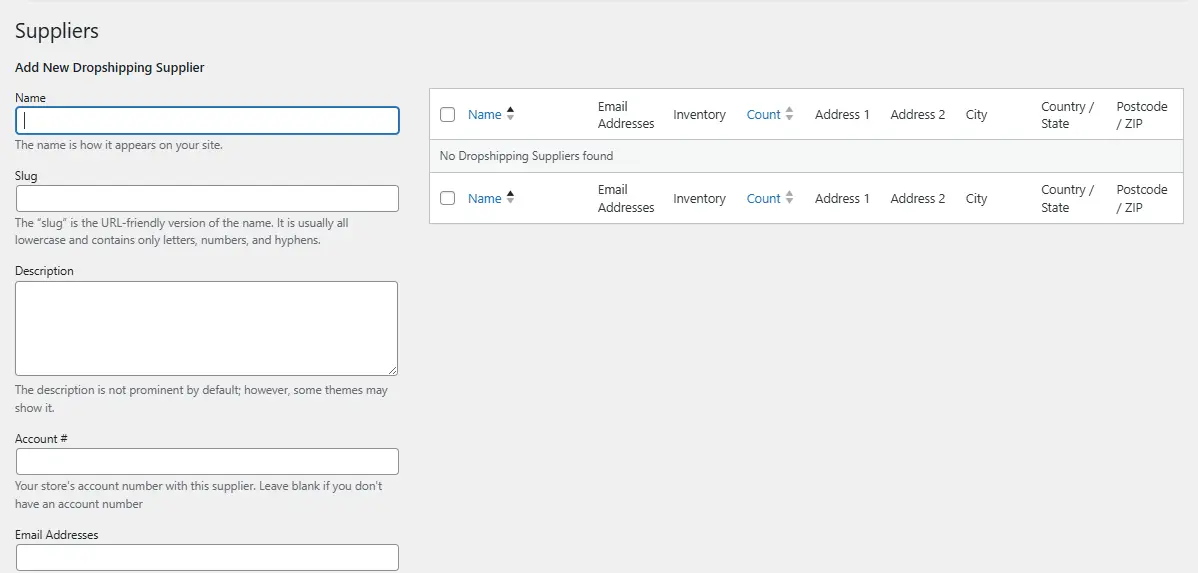
This ensures that when orders are placed, the system knows exactly which supplier should fulfill them. It’s a crucial step to launch a Dropshipping Store with WooCommerce successfully.
Step 3: Automate Order Notifications
The WooCommerce Dropshipping plugin automatically notifies suppliers when a customer places an order.
- Configure automated email notifications in WooCommerce > Settings > Dropshipping.
- Customize emails to include:
-
Order details (product, quantity, customer info).
-
Branded PDF packing slips with your store logo.
-
-
Test by placing a sample order and ensuring the supplier receives all necessary details.
This automation reduces manual work and keeps your dropshipping workflow efficient.
Step 4: Manage Stock and Inventory Updates
Even though you don’t physically handle products, you must keep your store’s inventory accurate.
- Enable inventory sync with your suppliers through the plugin.
- Regularly update product availability to avoid overselling.
- Monitor low-stock alerts to adjust product offerings as needed.
When you launch a Dropshipping Store with WooCommerce, managing inventory carefully ensures a trustworthy and reliable customer experience.
Best Practices for Running a WooCommerce Dropshipping Store
Simply setting up the plugin is not enough. You must follow best practices to stand out in a competitive market.
- Choose Reliable Suppliers: Work with suppliers known for consistent quality and fast shipping.
- Brand Your Store: Use custom themes, logos, and professional product descriptions.
- Test the Customer Experience: Place test orders to evaluate shipping speed and packaging.
- Focus on Customer Support: Quick responses and proactive communication build trust.
When you launch a Dropshipping Store with WooCommerce, these practices elevate your store from average to exceptional.
Common Pitfalls to Avoid
Many beginners make mistakes that hinder success. One common error is relying on too many suppliers without verifying their reliability. Another is neglecting to customize product descriptions, leading to duplicate content across multiple stores.
Also, don’t forget about shipping times. Customers expect transparency. If your supplier takes three weeks to deliver, communicate that clearly or choose faster alternatives. Avoiding these pitfalls ensures your WooCommerce dropshipping store builds credibility from day one.
Advanced Tips for Scaling Your Store
Once your store is live and stable, focus on growth strategies. For example, you can implement upselling and cross-selling tactics within WooCommerce to increase your average order value.
Consider integrating marketing tools such as email automation, retargeting ads, or loyalty programs. The flexibility of WooCommerce allows you to layer these strategies on top of your dropshipping operations. When you Launch a Dropshipping Store with WooCommerce, scaling becomes a natural next step with the right strategies in place.
Real-World Scenarios for WooCommerce Dropshipping
Dropshipping isn’t limited to one niche. Many entrepreneurs use WooCommerce to sell:
- Fashion and Accessories: Lightweight, high-margin items.
- Tech Gadgets: Popular, trendy products with wide appeal.
- Home Decor: Easy-to-ship products with creative customization.
- Health and Wellness: Supplements, fitness tools, or self-care products.
By choosing a profitable niche and reliable suppliers, you can build a store that resonates with your target audience. When you launch a Dropshipping Store with WooCommerce, the possibilities are vast.
Measuring Success and Optimizing Performance
Tracking your store’s performance is essential for long-term success. Monitor metrics like conversion rates, cart abandonment, and repeat purchases using tools such as Google Analytics or WooCommerce’s reporting system.
Continuous optimization allows you to adapt to market changes and improve customer satisfaction. The more data you collect, the better you can refine your store’s design, pricing, and marketing strategies. This is how you ensure your WooCommerce dropshipping store remains competitive and profitable.

Final Thoughts
Dropshipping is one of the most accessible business models for aspiring entrepreneurs, and WooCommerce makes it even easier. By combining WordPress’s flexibility with the power of the WooCommerce Dropshipping plugin, you can build a professional store without handling physical stock.
When you launch a Dropshipping Store with WooCommerce, you open the door to endless possibilities. With careful planning, reliable suppliers, and strategic marketing, your store can grow into a thriving online business. Success comes from balancing automation with customer care, ensuring each order leaves a lasting impression.
Interesting Reads:
How to Add Order Tracking in WooCommerce




