
Running a global website? Want to reach audiences across borders? Translation plugins for WordPress can bridge the gap between you and your readers, ensuring your content resonates in every language. Let’s dive into the 10 best WordPress plugin for translation and help you pick the one that suits your needs.

Why You Need a WordPress Translation Plugin
Before jumping into the list, let’s discuss why translation plugins are game-changers.
A WordPress translation plugin allows you to:
- Expand your website’s reach.
- Cater to diverse audiences.
- Improve SEO in multiple languages.
Whether you’re running an online store, blog, or corporate website, speaking your audience’s language is key to global success. Ready to discover the top tools? Let’s get started!
1. Weglot: Simplicity Meets Efficiency
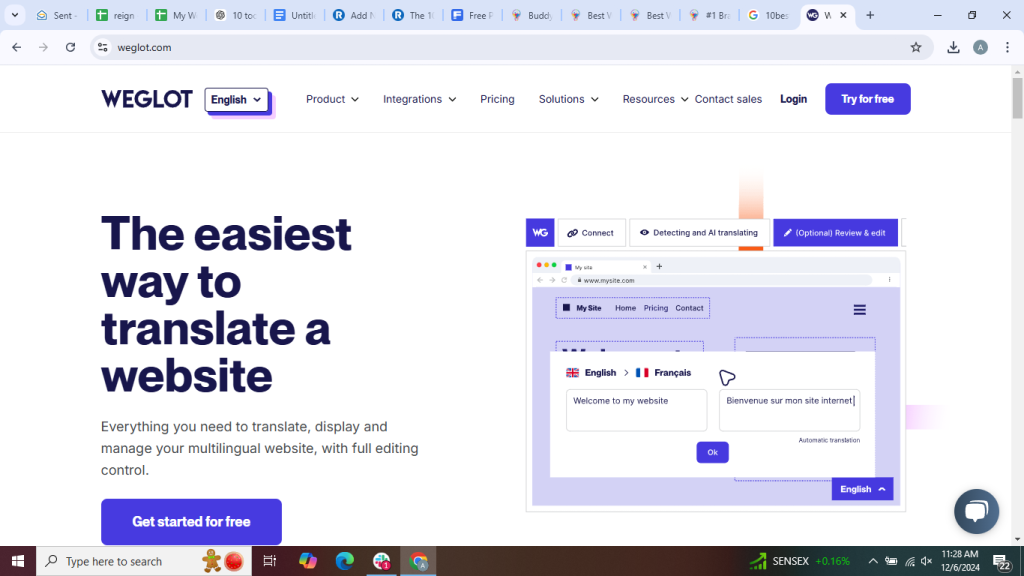
Weglot is a favorite for many WordPress users due to its seamless integration, user-friendly interface, and powerful automatic translation capabilities. It’s an excellent choice for both beginners and advanced users, offering real-time translations, an intuitive dashboard for managing multilingual content, and compatibility with various themes and plugins. With support for over 100 languages, SEO-friendly translations, and the ability to fine-tune translations manually, Weglot makes creating a multilingual website effortless and efficient. Whether you’re running a small blog or a large e-commerce store, Weglot ensures a smooth and professional multilingual experience.
Key Features:
- Automatic translation with manual editing options.
- SEO-friendly translations with unique URLs.
- Supports over 100 languages.
Pros:
- Quick and easy setup.
- Compatible with most WordPress themes.
Cons:
- Subscription-based pricing can be expensive.
2. TranslatePress: Translate Directly on the Frontend
TranslatePress stands out with its intuitive visual translation interface, allowing you to translate your entire website directly from the front end. This seamless process eliminates the need for switching between different screens or dealing with complex backend settings. With real-time previews, you can see your translations as they appear on your site, ensuring accuracy and efficiency. Whether you’re translating a few key pages or your entire website, TranslatePress makes the process smooth, user-friendly, and accessible to both beginners and experienced users.
Key Features:
- Supports both manual and automatic translation.
- Compatible with WooCommerce.
- SEO-friendly URLs.
Pros:
- Intuitive and easy to use.
- Supports custom post types.
Cons:
- Some features require the premium version.
3. GTranslate: Harness the Power of Google Translate
GTranslate is powered by Google Translate, offering automatic translations for your WordPress site. It’s a great option for those seeking a cost-effective and user-friendly solution to make their website accessible to a global audience. With support for multiple languages, seamless integration, and customizable settings, GTranslate helps improve user experience and engagement by breaking language barriers effortlessly.
Key Features:
- Over 100 language translations.
- Free and paid versions.
- Easy integration with widgets.
Pros:
- Free version available.
- Quick setup.
Cons:
- Automatic translations may need manual tweaking.
4. Polylang: Perfect for Manual Translations
Polylang is one of the most popular WordPress translation plugins, trusted by website owners worldwide. It’s perfect if you prefer manual translations over automatic ones, allowing you to maintain full control over language accuracy and content quality. With Polylang, you can easily create a multilingual website by assigning different languages to posts, pages, categories, and even media. It seamlessly integrates with WordPress, ensuring a smooth user experience without slowing down your site. Additionally, it supports RTL languages, custom taxonomies, and compatibility with major SEO plugins, making it an excellent choice for businesses, bloggers, and eCommerce stores looking to expand their global reach.
Key Features:
- Supports multiple languages.
- SEO-optimized.
- Integrates with most themes and plugins.
Pros:
- Free version available.
- Offers excellent control over translations.
Cons:
- No automatic translation in the free version.
5. WPML (WordPress Multilingual Plugin): Feature-Rich and Reliable
WPML is a robust and widely used plugin for creating a fully multilingual WordPress site. It’s known for its comprehensive features, seamless integration with popular themes and plugins, and excellent support for translating content, menus, widgets, and even URLs. With WPML, users can efficiently manage multiple languages, improve their site’s accessibility for global audiences, and enhance their SEO performance by ensuring proper language-specific indexing. Its user-friendly interface and extensive documentation make it a preferred choice for website owners, developers, and businesses looking to expand their reach internationally.
Key Features:
- Supports custom fields, widgets, and themes.
- Compatible with WooCommerce.
- Professional translation services are available.
Pros:
- Reliable and versatile.
- Excellent customer support.
Cons:
- Complex for beginners.
6. Lingotek Translation: Integrating Technology and Professional Services
Lingotek offers a unique blend of machine translation, community translation, and professional translation services, providing businesses with a seamless, efficient, and scalable solution for multilingual content management. By integrating cutting-edge AI-driven technology with expert human translation, Lingotek ensures accuracy, cultural relevance, and consistency across various languages and industries.
Key Features:
- Translation memory for efficiency.
- Integrates with Polylang.
- Cloud-based translation.
Pros:
- Offers multiple translation options.
- Streamlines workflow with translation memory.
Cons:
- Requires integration with Polylang.
7. Google Language Translator: A Lightweight Option
If simplicity is your top priority, Google Language Translator is a fantastic choice. It’s a lightweight, user-friendly plugin that seamlessly integrates into your website, making multilingual communication effortless. With its easy setup and automatic translation capabilities, it ensures a smooth experience for both website owners and visitors, eliminating language barriers with just a few clicks.
Key Features:
- Powered by Google Translate.
- Supports over 100 languages.
- Customizable widget.
Pros:
- Minimal setup required.
- Free to use.
Cons:
- Limited customization options.
8. Bablic: Seamless Visual Translation
Bablic is a powerful cloud-based solution that allows you to manage website translations visually, making the process seamless and efficient. It’s an excellent choice for users who prioritize design, simplicity, and ease of use. With Bablic, you can translate and localize your website effortlessly without any coding knowledge, ensuring a smooth user experience across different languages and regions. Its intuitive interface and real-time editing capabilities make it a go-to tool for businesses looking to expand their global reach while maintaining a professional and polished design.
Key Features:
- Visual editor for translations.
- Automatic and manual translation options.
- Supports multiple domains.
Pros:
- No coding is required.
- Fast implementation.
Cons:
- Pricing can be high for advanced features.
9. MultilingualPress: Focus on Performance
MultilingualPress creates separate sites for each language, ensuring optimal performance and seamless multilingual management without compromising speed. Keeping content isolated per language prevents database bloat and enhances user experience, making it the ideal solution for scalable and efficient multilingual websites.
Key Features:
- SEO-friendly structure.
- Independent language sites.
- Automatic redirection based on browser language.
Pros:
- No performance issues.
- Easy to manage translations.
Cons:
- Requires a multisite setup.
10. ConveyThis: One-Stop Translation Solution

ConveyThis combines simplicity with powerful features, making it a versatile and efficient translation tool for WordPress users. With its seamless integration, automatic language detection, and support for multiple languages, it enables website owners to effortlessly reach a global audience while maintaining accuracy and quality in translations.
Key Features:
- Automatic translation with manual editing options.
- Supports over 90 languages.
- SEO-friendly translations.
Pros:
- Easy to install and use.
- Scalable for different site sizes.
Cons:
- The free tier has limitations.
Comparison Table: Top 10 WordPress Translation Plugin
| Plugin | Key Features | Pros | Cons |
| Weglot | Automatic/manual, SEO-friendly | Quick setup | High subscription cost |
| TranslatePress | Visual editing, WooCommerce | Intuitive interface | Premium features needed |
| GTranslate | Google-powered, widgets | Free version available | Needs manual tweaking |
| Polylang | Manual translation, SEO-ready | Free version | No auto-translation free |
| WPML | WooCommerce, pro services | Comprehensive features | Complex for beginners |
| Lingotek | Cloud-based, translation memory | Streamlined workflow | Polylang required |
| Google Translator | Google-powered, lightweight | Simple setup | Limited customization |
| Bablic | Visual editor, cloud-based | Fast, no coding needed | High cost for advanced users |
| MultilingualPress | Separate language sites | No performance loss | Needs multisite setup |
| ConveyThis | Auto/manual, SEO-friendly | Scalable, simple | Free tier limitations |

Closing Remarks: Pick the Perfect Plugin for Your Needs
The 10 best WordPress plugin for translation offer solutions for every kind of user. Whether you’re looking for automatic translation, manual control, or a mix of both, these tools have you covered. Consider factors like ease of use, SEO capabilities, and pricing before making your choice.
Ready to make your website multilingual? Start with one of these plugins and watch your global reach soar!
Interesting Reads: