


Running a successful online store isn’t just about offering great products — it’s about creating a seamless and engaging shopping experience that keeps customers coming back. In today’s fast-paced digital world, customers expect more than just browsing; they want quick answers, personalized guidance, and the reassurance that help is available the moment they need it. If those needs aren’t met, shoppers are far more likely to abandon their carts and switch to a competitor. This is exactly where WooCommerce Plugins Live Chat proves its value.
By integrating a live chat solution into your WooCommerce store, you give visitors a direct line to your team. Whether it’s a question about product sizing, delivery times, payment methods, or returns, customers no longer have to wait hours for an email response or navigate a complicated FAQ page.

What is a WooCommerce Live Chat Plugin?
A WooCommerce live chat plugin is a tool that integrates directly with your WooCommerce store, allowing you to communicate with customers in real time. Instead of waiting for email replies or navigating through complicated support forms, customers can instantly chat with your support team while shopping. This creates a more human, interactive shopping experience, which is crucial in today’s competitive eCommerce landscape.
Beyond simple text-based communication, many of these plugins offer features like chatbots, canned responses, CRM integration, file sharing, and even multilingual support. Ultimately, live chat is about meeting customers where they are and offering help right when they need it.
Also Read: Best WooCommerce Plugins PDF Invoices and Packing Slips
How to Use a WooCommerce Live Chat Plugin
Installing and using a live chat plugin in WooCommerce is simple and doesn’t require advanced technical knowledge. Here’s a quick step-by-step guide:
- Choose Your Plugin: Select the best WooCommerce live chat plugin for your store’s needs and budget.
- Install & Activate: From your WordPress dashboard, upload the plugin or search for it in the plugin repository.
- Connect the Service: Most plugins require connecting to a live chat platform or creating an account.
- Customize Settings: Configure chat availability, design, greetings, and automated responses.
- Test Before Launch: Run test chats to ensure everything is working smoothly before making it live on your store.
- Monitor & Optimize: Use analytics and chat history to improve support quality and response times.
Once integrated, live chat becomes a seamless part of your customer experience strategy, creating trust and enhancing conversion rates.
List of 10 Best WooCommerce Plugins Live Chat
The following plugins stand out for their reliability, features, and ability to enhance customer support. Each has unique strengths, making it easier to find the right fit for your business.
- LiveChat for WooCommerce
- YITH WooCommerce Questions and Answers
- Tawk. to Live Chat
- Tidio Live Chat
- Zendesk Chat
- Olark Live Chat
- JivoChat
- Smartsupp
- Crisp Chat
- WSChat – ELEX WordPress Live Chat
1. LiveChat for WooCommerce
LiveChat for WooCommerce is a premium solution designed to deliver real-time communication between customers and support agents. Known for its clean interface and professional-grade features, it’s trusted by many growing and enterprise-level stores.
This plugin not only enhances customer service but also provides sales-oriented tools, like tracking visitor behavior and enabling proactive chat invitations. It integrates seamlessly with WooCommerce, ensuring you have valuable context about the customer’s cart and browsing activity.
Key Features:
- Chat transcripts
- Visitor tracking
- Custom chat buttons
- CRM integration
- Mobile support
Pricing: From $20/mo.
2. YITH WooCommerce Questions and Answers
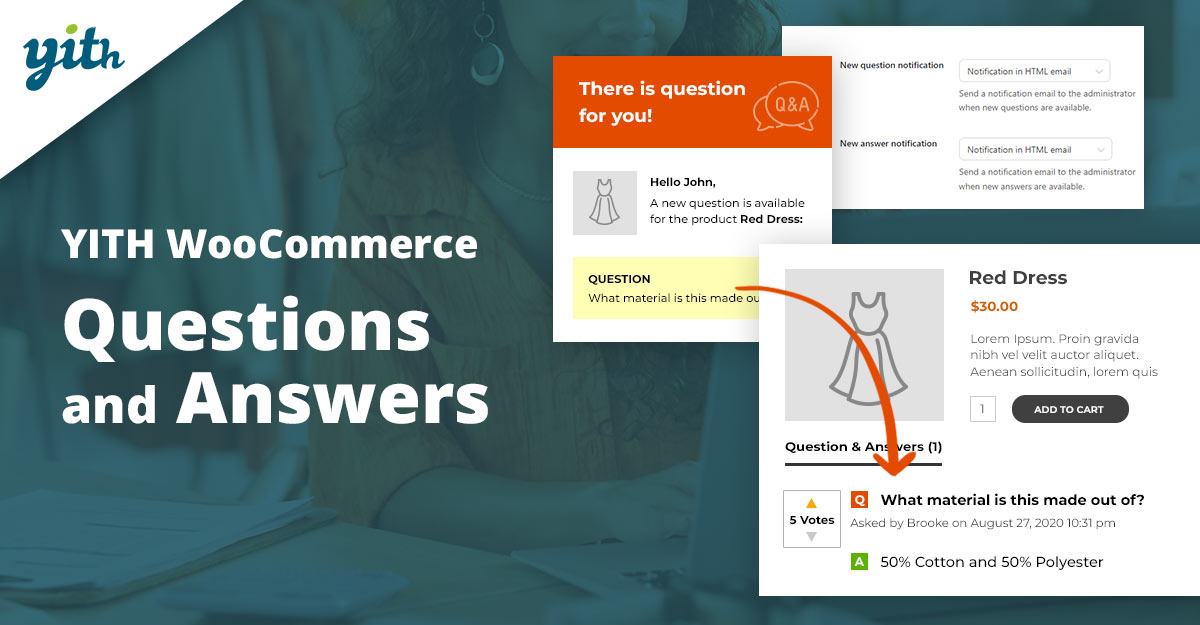
While not a live chat tool in the traditional sense, YITH WooCommerce Questions and Answers acts as a hybrid system where customers can ask questions directly on product pages. This reduces hesitation and builds trust as queries are answered quickly and often publicly.
By combining FAQs with interactive responses it helps convert hesitant shoppers into buyers. Store owners benefit from reduced repetitive queries while creating a community-driven knowledge base over time.
Key Features:
- Public & private Q&A
- Moderation options
- Email notifications
- Customizable layouts
Pricing: Free & premium from $69/yr.
3. Tawk.to Live Chat
Tawk. to is a completely free live chat solution widely adopted across eCommerce stores. Its WooCommerce integration allows you to monitor and chat with website visitors in real time without extra cost.
With mobile apps and extensive customization, Tawk. to is ideal for small to medium-sized stores wanting professional live chat without subscription fees.
Key Features:
- Free unlimited agents
- Automated triggers
- Detailed analytics
- Chat history
Pricing: Free (Paid add-ons available).
4. Tidio Live Chat
Tidio combines live chat and chatbot features, making it one of the most versatile WooCommerce plugins. It helps businesses automate repetitive queries while still offering real-time human support.
Its visual chatbot builder and multilingual support make it suitable for international stores looking to scale their support efficiently.
Key Features:
- Live chat + chatbots
- Email & Messenger integration
- Mobile apps
- Analytics
Pricing: Free plan, premium from $19/mo.
Also Read: Best WooCommerce Plugins Google Product Feed
5. Zendesk Chat
Zendesk Chat is a powerhouse tool that integrates with the Zendesk support suite. It’s built for scalability, making it a go-to choice for larger businesses needing centralized support across multiple channels.
For WooCommerce users, it delivers professional chat experiences backed by powerful reporting, automation, and customer support workflows.
Key Features:
- Multi-channel integration
- Advanced triggers
- AI chatbots
- Detailed analytics
Pricing: From $49/mo.
6. Olark Live Chat
Olark stands out for its simplicity and effectiveness. It’s designed to keep customer interactions smooth while offering useful backend insights for businesses.
With features like searchable transcripts and automation, Olark is perfect for stores that want straightforward yet powerful live chat capabilities.
Key Features:
- Customizable chat box
- Real-time reporting
- Automation
- CRM integration
Pricing: From $29/mo.
7. JivoChat
JivoChat provides a multichannel communication system, allowing support teams to handle chats, emails, calls, and social messages in one place.
Its WooCommerce integration ensures agents have context about shoppers, making conversations more personalized and effective.
Key Features:
- Multi-channel inbox
- Callback requests
- CRM tools
- Proactive chats
Pricing: Free plan, premium from $19/mo.
Also Read: How Salesforce Integrates with WooCommerce
8. Smartsupp
Smartsupp is a live chat plugin that focuses on personalization. It offers video recordings of visitor activity alongside real-time chat, helping store owners understand customer behavior better.
Its automation and chatbot features reduce manual workloads, making it an efficient choice for small and mid-sized stores.
Key Features:
- Video visitor recordings
- Chatbots
- Analytics
- Mobile apps
Pricing: Free plan, premium from $19.50/mo.
9. Crisp Chat
Crisp is an all-in-one messaging platform designed for modern businesses. It integrates live chat, chatbots, knowledge base, and even real-time translation to support global audiences.
For WooCommerce, Crisp enhances customer experiences by providing seamless and interactive conversations that drive sales.
Key Features:
- Shared inbox
- Chatbot automation
- Video calls
- Translation tools
Pricing: Free plan, premium from $25/mo.
10. WSChat – ELEX WordPress Live Chat
WSChat is a WordPress-native live chat plugin designed specifically for WooCommerce users. It offers a lightweight yet powerful solution with full control over data and customization.
Its integration with Google Dialogflow allows AI-driven responses, making it a future-proof choice for WooCommerce stores.
Key Features:
- AI chatbot support
- File sharing
- Agent monitoring
- Chat history
Pricing: From $69 one-time.
Also Read: Best WooCommerce Plugins Wallet System
Comparison Table of WooCommerce Live Chat Plugins
| Plugin | Key Features | Pricing |
|---|---|---|
| LiveChat for WooCommerce | Visitor tracking, transcripts, CRM integration | From $20/mo |
| YITH WooCommerce Q&A | Public/private Q&A, notifications, moderation | From $69/yr |
| Tawk. to Live Chat | Unlimited agents, automation, analytics | Free |
| Tidio Live Chat | Chatbots, Messenger integration, analytics | From $19/mo |
| Zendesk Chat | Multi-channel, AI bots, reporting | From $49/mo |
| Olark Live Chat | Reporting, automation, CRM sync | From $29/mo |
| JivoChat | Multi-channel inbox, callbacks, CRM tools | From $19/mo |
| Smartsupp | Visitor recordings, chatbots, analytics | From $19.50/mo |
| Crisp Chat | Chatbots, video calls, translation | From $25/mo |
| WSChat – ELEX | AI chatbot, file sharing, full control | From $69 one-time |

Final Thoughts on WooCommerce Live Chat Plugins
Choosing the right WooCommerce Plugins Live Chat can transform how customers interact with your online store. Each plugin on this list offers unique advantages — from AI-driven responses and multichannel communication to simple, free tools that get the job done. Whether the goal is boosting sales, reducing cart abandonment, or improving overall customer satisfaction, there’s a solution tailored to fit every budget and business size.
As eCommerce continues to evolve, live chat remains one of the most powerful ways to connect with customers in real time. The key is to match the right plugin with your store’s needs and growth goals. By implementing one of these top-rated live chat solutions, WooCommerce store owners can build stronger relationships, streamline support, and drive lasting success.
Interesting Reads:
Best WooCommerce Plugins Account Funds




