


Running an online store often means tailoring products and services to unique customer needs. Every customer may want something slightly different, whether it’s a personalized T-shirt, a custom-designed mug, or printed business materials. In these cases, communication between buyers and store owners can become tricky if there’s no direct way to share files during the order process. That’s where WooCommerce Customer Upload Plugins come in.
These plugins allow shoppers to upload files directly while placing orders—whether it’s images for custom T-shirts, documents for print shops, design templates for marketing materials, or artwork for personalized products. By integrating file uploads into the purchasing journey, store owners can avoid endless email exchanges, reduce order errors, and make the buying experience faster and smoother. This guide explores the top plugins that streamline file uploads for WooCommerce, helping businesses not only improve customer experience but also save valuable time and boost operational efficiency.

What Are WooCommerce Customer Upload Plugins?
WooCommerce Customer Upload Plugins are tools that allow customers to upload files directly on product pages, cart pages, or checkout. These files can be images, documents, or any supported formats that store owners need to fulfill orders. Such plugins are essential for businesses offering customized or print-on-demand products, as they save time and ensure accuracy.
For example, a printing company can request design files, a custom jewelry store can ask for photos, and a marketing agency can let clients upload project documents. Without these plugins, customers would have to send files separately through email, which is often inconvenient and inefficient.
Also Read: Best WooCommerce Multiple Shipping Addresses
How to Use WooCommerce Customer Upload Plugins
Setting up and using these plugins is simple. Here’s a quick step-by-step process:
- Install & Activate: Download the plugin and install it from the WordPress admin dashboard.
- Configure Settings: Decide where the upload option should appear—product page, cart, or checkout.
- Set File Types: Define allowed file formats (JPEG, PNG, PDF, etc.) and size limits.
- Customize Visibility: Choose whether uploads are required or optional based on product types.
- Review Uploads: Once customers upload files, you can access them from the order details in WooCommerce.
This setup ensures that your customers can conveniently submit files, while you maintain control over file size, types, and where uploads appear in the shopping journey.
List of the Best WooCommerce Customer Upload Plugins
Here are the top 10 WooCommerce Customer Upload Plugins that combine ease of use, flexibility, and reliability.
- Customer Upload Files for WooCommerce
- YITH WooCommerce Uploads
- WooCommerce Upload Files
- Upload Files at Checkout
- WooCommerce Cart Upload Files
- Drag & Drop Uploader for WooCommerce
- WooCommerce Upload Files and Fields
- Checkout Manager with Upload Field
- Product Addons Upload for WooCommerce
- WooCommerce Multistep Upload
1. Customer Upload Files for WooCommerce
Customer Upload Files for WooCommerce is a powerful plugin designed for businesses that need customers to submit files during the shopping process. It integrates seamlessly with product pages and checkout forms, making it highly versatile for customized orders.
The plugin ensures smoother communication by attaching uploaded files directly to orders, helping store owners avoid mistakes. It also includes control features like file size limits and format restrictions.
Key Features:
- Upload on product, cart, or checkout pages
- Multiple file support
- File size and type restrictions
- Preview before submission
- Secure file storage linked to orders
Pricing: Starts from $39/year.
2. YITH WooCommerce Uploads
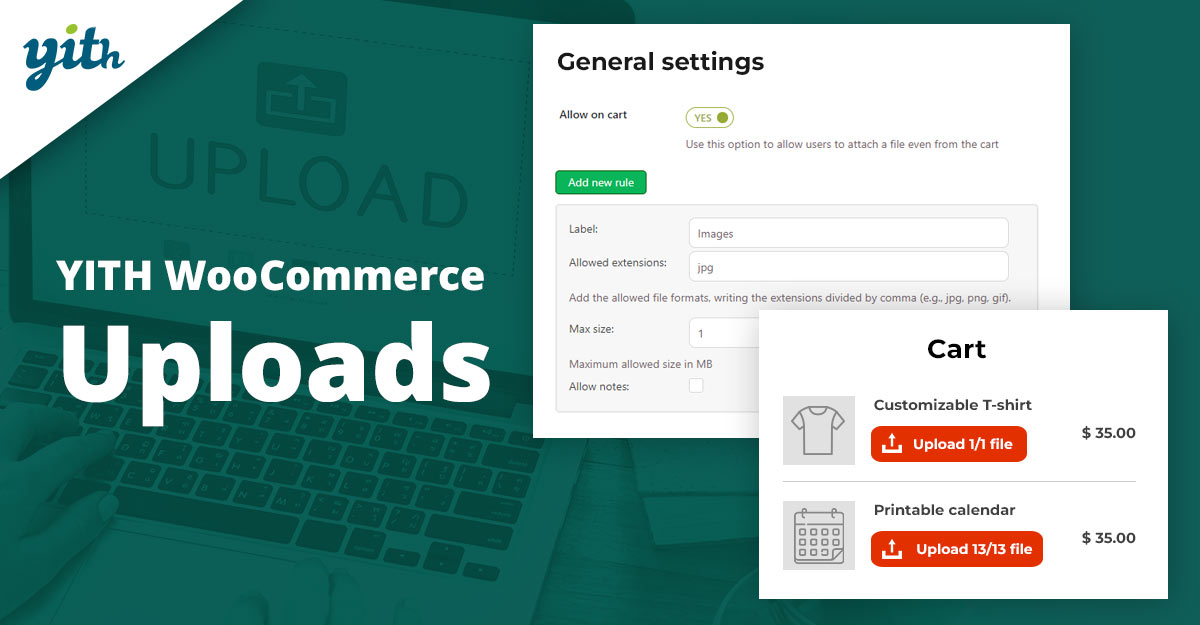
YITH WooCommerce Uploads is one of the most popular choices for enabling file uploads. It is user-friendly and comes with a polished interface, making it ideal for beginners and advanced users alike. Customers can upload files at different stages of checkout, ensuring flexibility.
The plugin also includes administrative tools for approving or rejecting uploaded files, giving businesses complete control over submissions. This feature is especially useful for businesses with strict file requirements.
Key Features:
- Upload files to the product, cart, or checkout
- Admin approval/rejection system
- Multi-file uploads supported
- Email notifications for uploads
- Integration with major WooCommerce themes
Pricing: Starts from $59/year.
3. WooCommerce Upload Files
This plugin offers advanced upload capabilities that allow customers to attach files directly to product pages or at checkout. It is highly customizable, making it suitable for both small shops and large businesses.
Its intuitive dashboard helps store owners manage uploads efficiently and provides built-in security for file handling.
Key Features:
- Upload buttons for multiple pages
- Customizable file validation
- Admin panel for managing files
- Drag-and-drop upload support
- Integration with order management
Pricing: From $49/year.
4. Upload Files at Checkout
This plugin focuses specifically on checkout uploads. It’s perfect for stores that require final confirmation of files only at checkout.
It helps streamline the process by ensuring all necessary documents or images are received before order submission.
Key Features:
- Upload option on the checkout page only
- File validation rules
- Secure upload system
- Supports multiple file types
- Easy setup and management
Pricing: From $29/year.
Also Read: Best WooCommerce Gift Card Plugins
5. WooCommerce Cart Upload Files
This plugin lets customers upload files directly in the cart, making it convenient for last-minute additions. It’s useful for businesses where customers finalize designs after product selection.
Admins can review files before processing, ensuring smooth order management.
Key Features:
- File uploads in the cart page
- Preview functionality
- Simple admin interface
- Supports major file formats
- Lightweight and responsive
Pricing: From $35/year.
6. Drag & Drop Uploader for WooCommerce
As the name suggests, this plugin introduces a drag-and-drop feature that enhances user experience. It simplifies the upload process and reduces errors.
Businesses benefit from a modern interface and reliable file management tools that come with it.
Key Features:
- Drag-and-drop upload option
- Supports multiple file uploads
- Mobile-friendly interface
- Configurable file restrictions
- Fast and secure uploads
Pricing: From $45/year.
Also Read: How to Speed Up Checkout with Wallet-Style Payments in WooCommerce
7. WooCommerce Upload Files and Fields
This plugin extends file uploads with additional fields, making it great for businesses that need both files and form inputs. Customers can provide extra details alongside uploads.
It adds flexibility for complex orders, particularly in printing and custom services.
Key Features:
- File uploads + custom fields
- Multi-step file management
- Flexible validation rules
- Customizable field placements
- Order-linked uploads
Pricing: From $39/year.
8. Checkout Manager with Upload Field
This is a checkout customization plugin that includes an upload field feature. It’s ideal for store owners looking to enhance checkout without extra complexity.
The plugin supports conditional logic, so file uploads can be tied to specific products or conditions.
Key Features:
- Upload field in checkout forms
- Conditional logic support
- Easy-to-manage uploads
- Multiple file handling
- Compatible with most themes
Pricing: From $29/year.
9. Product Addons Upload for WooCommerce
This plugin combines product add-ons with file upload functionality, making it versatile for personalized items. Customers can add text instructions and upload files in one step.
It’s well-suited for product customization businesses and simplifies the order management process.
Key Features:
- Product add-ons + file uploads
- Customizable fields
- Supports multiple file types
- Simple UI for customers
- Integration with add-on pricing
Pricing: From $49/year.
Also Read: Best WooCommerce Plugins Name Your Price
10. WooCommerce Multistep Upload
This plugin provides a multi-step upload process, ideal for businesses requiring multiple files across different stages. It ensures better organization for complex orders.
Customers can submit files in sequence, making it a structured and user-friendly approach.
Key Features:
- Multi-step upload system
- Supports bulk uploads
- Customizable workflow
- Secure and fast processing
- Compatible with WooCommerce orders
Pricing: From $59/year.
Pricing Comparison Table
| Plugin | Key Features | Pricing |
|---|---|---|
| Customer Upload Files | Multi-page uploads, restrictions, and preview | $39/yr |
| YITH WooCommerce Uploads | Admin approval, notifications | $59/yr |
| WooCommerce Upload Files | Drag-drop, customizable validation | $49/yr |
| Upload Files at Checkout | Checkout-only uploads | $29/yr |
| Cart Upload Files | Cart uploads, preview | $35/yr |
| Drag & Drop Uploader | Mobile-friendly drag-drop | $45/yr |
| Upload Files and Fields | Uploads with form fields | $39/yr |
| Checkout Manager Upload | Conditional upload fields | $29/yr |
| Product Addons Upload | Addons + file uploads | $49/yr |
| Multistep Upload | Multi-step file process | $59/yr |

Final Thoughts on WooCommerce Customer Upload Plugins
Choosing the right WooCommerce Customer Upload Plugins can make a huge difference in how smoothly your store handles custom orders. From simple checkout upload options to advanced multi-step systems, these plugins help streamline communication, reduce errors, and enhance the overall customer experience.
Each plugin on this list has its own strengths—some are lightweight and budget-friendly, while others provide advanced workflows and approvals. The best choice depends on the type of products you sell and the level of customization you need. By investing in the right plugin, you not only improve your store’s efficiency but also build stronger trust with your customers.
Whether you’re running a print shop, selling personalized gifts, or managing a service-based business, enabling file uploads ensures you capture exactly what your customers want—making your WooCommerce store more reliable, professional, and customer-focused.
Interesting Reads:
How to Build a Shopify-Style Multi-Step Checkout in WooCommerce
Best WooCommerce Plugins: Delivery Date
How to Translate Products, Categories, and Checkout with WooCommerce Multilingual



