
If you want clearer product pages, faster purchase decisions, and fewer customer questions, adding the right WooCommerce Tab Manager Plugins is one of the simplest and most effective fixes. This guide walks through 10 top tab managers (free and premium), explains what they are, shows a step-by-step install + setup, and compares features and pricing so you can choose with confidence.

Top 10 Plugins for WooCommerce Multiple Sales Channels
Contents
Plugins:
- Tab Manager for WooCommerce
- YITH WooCommerce Tab Manager
- WooCommerce Product Tabs (Barn2)
- Custom Product Tabs for WooCommerce (YIKES)
- WB Custom Product Tabs for WooCommerce
- Product Tabs Manager (BeRocket)
- Product Tabs for WooCommerce (WPFactory)
- Product Tabs Manager for WooCommerce (WP repo)
- Flexible Product Tabs for WooCommerce
- JetTabs / Tabs for Elementor (Crocoblock)
What is a WooCommerce Tab Manager?
A WooCommerce tab manager plugin gives you control over the tabbed content area on single product pages. By default, WooCommerce shows Description, Additional Information, and Reviews — tab managers let you add, remove, rename, reorder, and target extra tabs (think FAQs, size charts, video demos, downloadable specs, warranty details, and more).
Good tab managers also offer global tabs you can assign to many products at once, conditional display rules (show only for a category or product), and flexible content editors (WYSIWYG, shortcodes, embeds). That means you can keep pages tidy while still surfacing all the details a buyer might need.
Also Read: Best WordPress LearnDash Themes
How to use a WooCommerce Tab Manager
The exact UI differs, but these steps apply to most plugins. Follow them and you’ll be live in minutes:
- Install & activate the plugin — either via Plugins → Add New (search) or upload a premium ZIP and activate.
- Go to the plugin’s tab manager area — often under WooCommerce → Tabs or a plugin menu. Create a new tab (give it a title) and add content with the WYSIWYG or block editor (text, images, videos, shortcodes).
- Decide scope — set the tab to appear on a single product, a category, or globally across the store. Use conditional rules if the plugin supports them.
- Order & priority — drag-and-drop or set priority numbers so the most important tabs show first (e.g., Size Chart before FAQs).
- Test on product pages — view live products, check mobile, and use browser dev tools to confirm content and accessibility. Adjust icon, label text, or visibility where needed.
Bonus tip: if your theme uses a custom product layout (page builder), check compatibility or use a block/Elementor widget offered by the plugin to make tabs appear correctly.
List of plugins
Below are 10 solid choices — a mixture of official WooCommerce extensions, long-standing WordPress.org plugins, and premium vendors. I ordered them to start with classical tab managers and include lighter/Elementor-friendly options toward the end.
Each plugin entry includes a short overview (two paragraphs), key features, and typical pricing so you can compare at a glance.
1. Tab Manager for WooCommerce
Tab Manager (also marketed on WooCommerce.com, historically built by SkyVerge) is designed specifically for WooCommerce stores and focuses on making tab creation and ordering effortless. It offers both product-level and global tabs, plus drag-and-drop ordering that works with default and third-party tabs already added by other plugins or the theme.
This extension is a good fit when you want direct integration with WooCommerce support and predictable updates. It’s straightforward, reliable, and keeps the product-page layout clean while adding unlimited tab content types.
Key features:
- Create global and product-specific tabs
- Drag & drop ordering; detection of third-party tabs
- Visual editor support and tab sharing between products
Pricing: typically sold via WooCommerce (example listed at ~$99/year for a single site at time of writing; check vendor page for current plans).
2. YITH WooCommerce Tab Manager
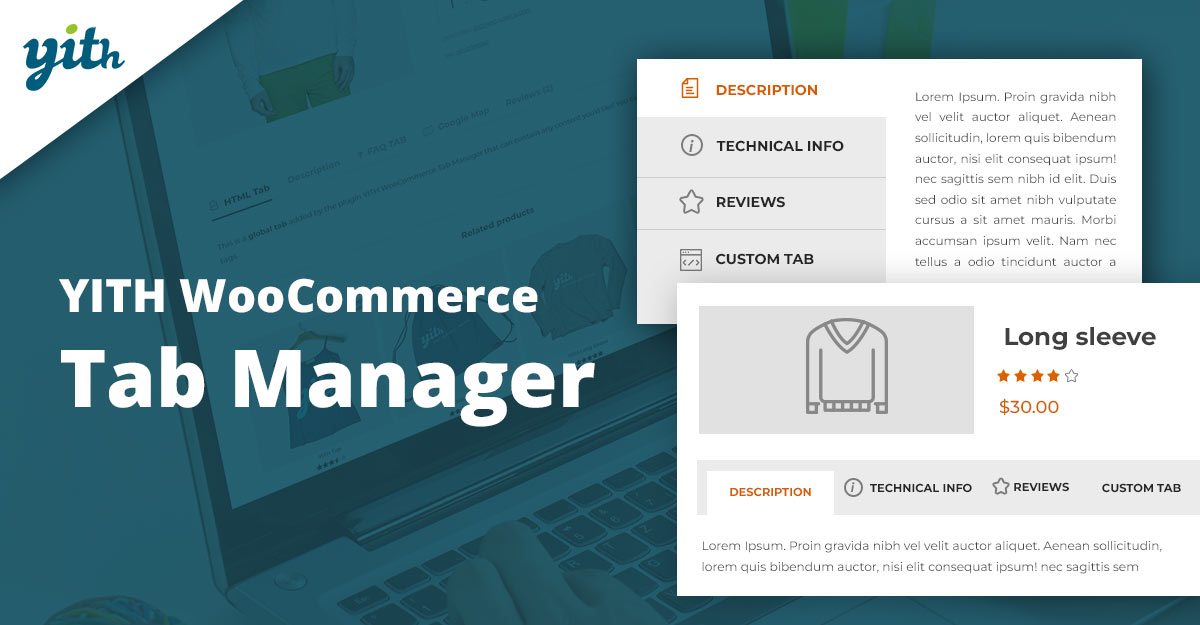
YITH’s Tab Manager is a popular choice with a free WordPress.org version and a feature-rich premium tier. It supports a variety of tab types (FAQs, galleries, downloads) and provides options to show/hide tabs, set priorities, and use templates for repeatable tab content.
The plugin targets store owners who want multiple prebuilt tab layouts and easy global assignment. It’s often paired with YITH’s other WooCommerce utilities for a consistent admin experience.
Key features:
- Multiple layout types (video, gallery, FAQs), show/hide controls
- Global or category-level tabs, tab priority
- Free core version available for basic needs
Pricing: free core plugin on WordPress.org; premium tier adds layouts and advanced controls (see YITH site for current pricing).
3. WooCommerce Product Tabs (Barn2)
Barn2’s WooCommerce Product Tabs is aimed at stores that need enterprise-grade options: conditional rules, unlimited tabs, rich content (videos, maps), and good documentation. It integrates well with other Barn2 plugins and includes quick-view support for shop pages.
If you run many SKUs and want tight control over where and when tabs appear — plus professional support — this is a strong contender. Barn2 provides annual and lifetime license choices depending on your budget and scale.
Key features:
- Unlimited tabs, conditional display rules, drag & drop ordering
- Quick view lightbox, advanced content options
- Robust support & documentation
Pricing: paid — typical entry price around $79/year for a single site (lifetime options also available).
4. Custom Product Tabs for WooCommerce (YIKES Inc.)
This widely used free plugin (with a pro upgrade) adds custom tabs at the product level and supports saved tabs you can reuse across products. It’s lightweight and ideal for stores that want a free, reliable solution to add HTML, shortcodes, or simple content to product pages.
Because of its high active install base and long maintenance history, it’s a safe choice when you need quick tab support without heavy customization or recurring costs.
Key features:
- Saved tabs, per-product tabs, WYSIWYG editor
- Shortcode and HTML support, WPML compatibility
- Free core plugin with Pro upgrade available
Pricing: free on WordPress.org; Pro costs vary (check the plugin page).
Also Read: How to Add Delivery Date Selection in WooCommerce
5. WB Custom Product Tabs for WooCommerce
WB’s plugin focuses on unlimited custom tabs, assignable by category, tag, brand, or product. It often advertises easy YouTube embed support and global tab assignment options, making it convenient for brand-heavy or category-driven stores.
It’s a practical option if you need fine-grained assignment rules (e.g., show a uniform “Size Chart” for a whole category) and prefer an active feature set without heavy costs.
Key features:
- Unlimited tabs, category/tag/brand-level assignment
- YouTube embed support and shortcodes
- Drag & drop ordering and global tab rules
Pricing: free core plugin on WordPress.org; premium addons available (see plugin page).
6. Product Tabs Manager (BeRocket)
BeRocket’s Product Tabs Manager is a budget-friendly, long-standing plugin that supports global tabs, per-product tabs, and priority ordering. It’s often used by developers and shops that want granular behavior without a big price tag.
The plugin includes a set of small but useful features for conditional visibility and WYSIWYG content, and it’s sold as a lifetime license in several tiers (single-site up to multi-site packs).
Key features:
- Unlimited tabs, global vs product-specific tabs
- Drag & drop sort, shortcodes, and HTML in tabs
- Multiple pricing tiers and lifetime license options
Pricing: commonly listed from ~$34 for a single-site lifetime license up to larger bundles — confirm current pricing on BeRocket’s site.
7. Product Tabs for WooCommerce (WPFactory)
WPFactory’s commercial plugin adds global tabs, variation-specific tabs, and shortcodes. It’s a premium ThemeForest/codecanyon-style offering (or sold via WPFactory), aimed at shops that want a well-documented paid plugin with specific features like variable product tabbing.
Ideal for stores using premium themes or page builders that expect a regular support channel and a predictable premium license model.
Key features:
- Global custom tabs, variation-level tab support
- Shortcodes and integrated editor
- Theme & page-builder friendly
Pricing: premium single-purchase license (see WPFactory for exact current price and license terms).
Also Read: Best WooCommerce Quick Checkout for Digital Goods
8. Product Tabs Manager for WooCommerce (WordPress.org plugin)
Another plugin available in the WordPress.org repository that focuses on simplicity and core features: infinite tabs, global assignment, and WYSIWYG content. This plugin is useful if you prefer repository-sourced code with automatic updates via the WP admin.
The free nature and direct updates from WordPress.org make it attractive for stores that avoid premium extensions and still need essential tab capabilities.
Key features:
- Infinite tabs, global tabs, drag & drop
- Shortcode and HTML support
- Free in WP repo; premium add-ons sometimes available
Pricing: free (with possible paid add-ons depending on the author).
9. Flexible Product Tabs for WooCommerce (Power Plugins)
Flexible Product Tabs is a modern approach that uses the native WordPress Block Editor to create tab content, useful if you prefer blocks over classic editors. It supports many block designs and helps keep content consistent with the rest of your site using blocks.
This plugin is especially good when your theme and workflow are block-driven and you want visual control without learning a new UI.
Key features:
- Block editor-based tabs, reusable block patterns
- Supports multimedia and nested block layouts
- Good for Gutenberg-first stores
Pricing: often available as a paid plugin from the developer (check their site for current pricing or free core version options).
Also Read: Best WooCommerce Express Checkout Process Plugins
10. JetTabs / Tabs for Elementor (Crocoblock)
JetTabs (part of Crocoblock) is targeted at stores using Elementor. It adds powerful tab/accordion toggles and nested layouts, letting you build tabbed content with Elementor widgets (great for product pages built with Elementor templates).
If your product pages are built with Elementor, using an Elementor-aware tab plugin usually yields the best visual control and compatibility.
Key features:
- Elementor widgets for tabs, toggles, and nested structures
- Styling controls inside Elementor work with dynamic content
- Often sold via Crocoblock bundles or single-plugin licenses
Pricing: typically part of Crocoblock subscription or sold as an add-on (~$15–$23/yr or within bundle pricing; check the vendor for current deals).
Comparison table — features & pricing
| Plugin | Key features | Typical pricing |
|---|---|---|
| Tab Manager for WooCommerce (SkyVerge / WooCommerce) | Global & product tabs, drag & drop, compatibility with 3rd-party tabs | ~$99/yr (single site) — check vendor for latest. |
| YITH WooCommerce Tab Manager | Layouts (FAQ, gallery), show/hide, global tabs, free core version | Free core; premium tier on YITH site (varies). |
| WooCommerce Product Tabs (Barn2) | Unlimited tabs, conditional display, and quick view support | From ~$79/yr (single site) or lifetime options. |
| Custom Product Tabs (YIKES) | Saved tabs, per-product tabs, and shortcode support | Free + Pro upgrade (see plugin page). |
| WB Custom Product Tabs | Unlimited tabs, category/tag/brand assignment | Free + premium addons. |
| Product Tabs Manager (BeRocket) | Global tabs, drag & drop, shortcodes | From ~$34 (lifetime single-site) — tiered licensing. |
| Product Tabs (WPFactory) | Global tabs, variation-specific tabs, and shortcodes | Premium one-time license (vendor page). |
| Product Tabs Manager (WP repo) | Infinite tabs, global assignment, WP editor | Free (with possible paid add-ons). |
| Flexible Product Tabs (Power Plugins) | Gutenberg/block-editor native tabs, reusable patterns | Free/paid versions depending on the developer. |
| JetTabs / Crocoblock | Elementor tab widgets, toggles, nested tabs | Part of Crocoblock bundles or single add-on pricing. |

Final thoughts
Choosing a tab manager comes down to workflow and scale. If you prefer official WooCommerce extensions and predictable updates, Tab Manager (SkyVerge/WooCommerce) is a safe pick. If you want strong free options, YIKES or WordPress.org repo plugins are excellent. For enterprise features and conditional logic, Barn2 is a go-to. And if your product pages are built with Elementor or Gutenberg, consider JetTabs or a block-native plugin, respectively.
Whatever you pick, test on a staging site first, ensure mobile readability, and avoid overloading product pages — use tabs to surface useful, purchase-helping details, not to hide essential information.
Interesting Reads:
Top WordPress Photography Themes