
Looking to streamline checkout, reduce cart friction, and boost bookings for digital services, consults, or retainers? You’re not alone. Many service-based businesses face challenges like abandoned carts, confusing payment flows, or gateways that don’t support recurring billing and international clients. These issues can cost both revenue and customer trust.
The good news is that the right payment gateway can completely transform your WooCommerce store. With features like instant payouts, strong fraud protection, and support for popular wallets such as Apple Pay or Google Pay, you can make payments faster, safer, and far more convenient. The right setup not only gives clients confidence but also frees you from worrying about missed invoices or failed transactions.

What is a WooCommerce Payment Gateway?
A WooCommerce payment gateway securely authorizes and processes customer payments on your store. It connects your checkout to card networks, banks, and wallets (think Apple Pay, Google Pay, UPI, PayPal, BNPL, and more) while handling encryption, tokenization, and compliance.
When selling services—coaching sessions, audits, maintenance retainers, or on-demand work—the “right” gateway supports instant payouts or short settlement windows, strong fraud protection, flexible methods for local buyers, and compatibility with subscriptions or deposits.
Also Read: Best WooCommerce Navigation Tools Plugins
How to Use a Payment Gateway in WooCommerce
Setting up a gateway is straightforward. Most official plugins are free, with pay-as-you-go processing fees. Follow these steps once you’ve chosen a gateway from the list below.
These steps also apply when selling services online (e.g., booking calls, selling packages, or taking deposits). For recurring services, ensure your gateway supports subscriptions and saved payment methods (vaulting).
- In WordPress, go to Plugins > Add New and search for your gateway (e.g., “WooPayments”, “WooCommerce PayPal Payments”). Install and activate.
- Create or connect a gateway account (merchant account). Complete verification (KYC), add business details, and set your payout bank account.
- Open WooCommerce > Settings > Payments. Enable the gateway and click Manage to configure live API keys, webhooks, and test mode.
- Turn on express wallets (Apple Pay / Google Pay) if available. Confirm your domain verification and display buttons on Product, Cart, and Checkout pages.
- Set currency, capture behavior (authorize vs capture), and statement descriptors. If selling retainers, enable Subscriptions support or tokenization (vaulting).
- Run at least one test transaction in Sandbox/Test mode. Confirm order status updates to Processing/Completed, and emails are sent.
- Enable Fraud/3DS tools. Configure risk rules or 3D Secure for high-risk orders to reduce chargebacks.
- Go live. Monitor payouts, disputes, and abandoned checkouts. Add local methods popular with your audience to lift conversions.
Table of contents
- WooPayments (Official)
- YITH WooCommerce Authorize.net Payment Gateway
- WooCommerce PayPal Payments
- Square for WooCommerce
- Braintree for WooCommerce
- Mollie Payments for WooCommerce
- Razorpay for WooCommerce
- PayU for WooCommerce
- 2Checkout (Verifone) for WooCommerce
- PayFast for WooCommerce
1. WooPayments
WooPayments is the official gateway for WooCommerce and a strong starting point for WooCommerce Payment Gateways to Sell Services Online. It brings native setup, unified payouts, built-in dispute tools, and fast-checkout wallets like Apple Pay and Google Pay in one experience.
For service businesses, WooPayments simplifies recurring billing (with WooCommerce Subscriptions), tokenizes cards for re-use, and reduces friction with express payment buttons on product, cart, and checkout pages. The admin experience is integrated—no juggling multiple dashboards.
Key Features
- Native WooCommerce integration; one dashboard for payments, deposits, and disputes
- Apple Pay & Google Pay express checkout; card vaulting & subscriptions support
- Pay-as-you-go pricing; no setup/monthly fees (rates vary by country)
- Supports local methods in many regions; strong fraud & 3DS controls
Pricing: Pay-as-you-go; no monthly fee. Per-transaction rates vary by country/region.
2. YITH WooCommerce Authorize.net Payment Gateway
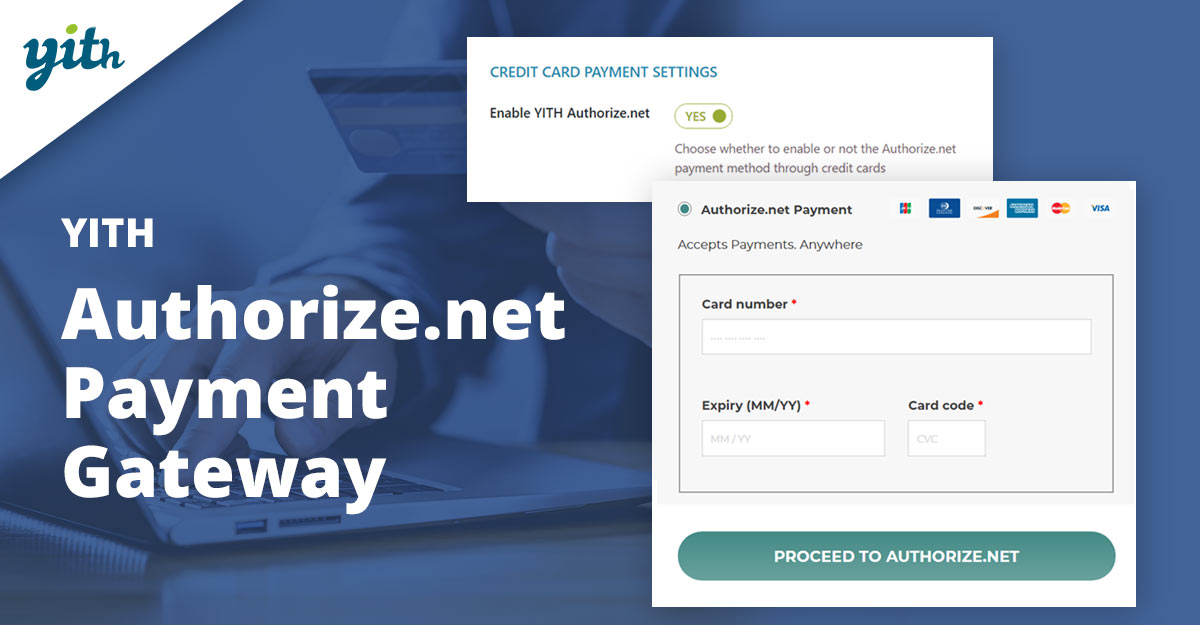
Prefer Authorize.net for reliability or existing merchant relationships? The YITH gateway integrates Authorize.net directly into WooCommerce, helping service sellers collect card payments with robust security and a familiar brand name that clients trust.
It’s built to reduce friction at checkout, with features like tokenization and recurring billing support (when paired with subscription solutions). Solid documentation and a mature ecosystem round things out for agencies and established service providers.
Key Features
- Authorize.net integration with card tokenization and secure processing
- Supports recurring payments with subscription add-ons
- Detailed transaction logs; customizable checkout messaging
- Backed by YITH support and documentation
Pricing: Premium license (annual) from YITH; Authorize.net gateway fees apply separately.
3. WooCommerce PayPal Payments
PayPal remains a must-offer method globally. The official plugin adds PayPal, Pay Later, Venmo (US), and advanced card processing in one install—ideal for service businesses whose clients prefer wallet login over entering card details.
You’ll also get vaulting, subscriptions support, and localized payment methods where eligible. It’s a quick way to unlock trust and conversion, especially for international sales or one-off service invoices.
Key Features
- PayPal, Venmo (US), Pay Later, and credit/debit cards in one plugin
- Vaulting and subscriptions compatibility
- Localized methods in supported countries
- Express checkout buttons to reduce friction
Pricing: Plugin is free; PayPal processing fees vary by country and payment type.
4. Square for WooCommerce
If services are sold both online and in-person, Square is compelling. It syncs WooCommerce with Square POS so you can manage customers, items, and payments across channels—handy for consultants, clinics, salons, or workshops that bill on-site and online.
The plugin supports secure card payments and can show Apple Pay where supported. For service packages or deposits, the integration with WooCommerce Subscriptions and Pre-Orders is a plus.
Key Features
- Two-way sync with Square POS (inventory/customer data)
- Secure online card payments; Apple Pay support in eligible regions
- Works with WooCommerce Subscriptions & Pre-Orders
- No monthly fees; transparent processing rates by region
Pricing: Plugin-free; Square pay-as-you-go processing (regional rates).
Also Read: Best WooCommerce Plugins Name Your Price
5. Braintree for WooCommerce
Braintree (a PayPal company) offers flexible card processing, PayPal, and vaulting with strong developer tooling. For service sellers who need robust recurring billing and smooth saved-card experiences, Braintree is a proven option.
The WooCommerce ecosystem includes multiple Braintree plugins; choose a well-maintained one that supports tokens, 3DS, and subscriptions to keep renewals painless and secure.
Key Features
- Cards, PayPal, and vaulting in one platform
- Strong 3D Secure and fraud tools
- Subscriptions/recurring support via WooCommerce add-ons
- Developer-friendly APIs and webhooks
Pricing: Pay-as-you-go; standard card rates by region; no plugin fee.
6. Mollie Payments for WooCommerce
Serving EU clients? Mollie shines with broad European coverage and local methods (iDEAL, Bancontact, SEPA, SOFORT, and more). That’s perfect for agencies and freelancers billing across the EU who want higher conversion from familiar local options.
The official plugin integrates quickly, supports subscriptions, and provides a streamlined checkout flow. Method-based pricing helps you optimize cost-to-convert by market.
Key Features
- Wide European local methods (iDEAL, Bancontact, SEPA, SOFORT, etc.)
- Subscriptions and tokenization support
- Fast onboarding; multilingual support
- Transparent, method-based pricing
Pricing: Plugin-free; per-method fees (vary by country and method).
Also Read: Best WooCommerce Administration Plugins
7. Razorpay for WooCommerce
For India-focused service businesses, Razorpay offers excellent local coverage—UPI, cards, netbanking, wallets—and strong settlement reliability. It’s a go-to for coaches, agencies, and SaaS selling in INR.
The official WooCommerce plugin is straightforward, with options for subscriptions and popular pay-later methods. Clear domestic pricing helps forecasting for retainers or fixed-fee services.
Key Features
- UPI, cards, wallets, and netbanking support
- Subscriptions/recurring billing compatibility
- Fraud prevention and 2FA (as per India regulations)
- Fast onboarding; INR-first experience
Pricing: India domestic plan commonly ~2% per transaction (method-specific variations apply).
8. PayU for WooCommerce
PayU serves multiple regions (notably India and parts of Europe), bringing localized methods and compliance. If clients are used to paying with regional methods or bank redirection, PayU can reduce failed payments and help renewals stick.
The WooCommerce plugins from PayU (by region) connect quickly and support standard Woo order flows—useful for service packages, milestone payments, and deposits.
Key Features
- Regional coverage with local payment methods
- Works with subscriptions and saved methods (regional support varies)
- Good fit for cross-border EU/India sales
- Transparent dashboards and settlement reporting
Pricing: Plugin-free; PayU processing fees vary by region and method.
9. Checkout (Verifone) for WooCommerce
Need a broad international reach fast? Checkout (now Verifone) focuses on global coverage, currencies, and tax handling—helpful for service providers selling worldwide packages, audits, or downloadable deliverables.
The WooCommerce integration supports standard flows and can be paired with subscription tools for recurring services. It’s a solid option when entering multiple new markets.
Key Features
- Global payments coverage; multiple currencies & languages
- Hosted and on-site checkout options (plugin dependent)
- Recurring billing support via add-ons
- Risk & compliance tooling for cross-border sales
Pricing: Plan-based, per-transaction fees; varies by country/volume.
Also Read: How to Speed Up Checkout with Wallet-Style Payments in WooCommerce
10. PayFast for WooCommerce
Selling services in South Africa? PayFast is a popular local gateway with ZAR-first support and compatibility with Subscriptions and Pre-Orders—ideal for retainers, deposits, and recurring maintenance contracts.
The official extension is simple to configure and supports widely used local methods, improving checkout trust and completion rates for domestic clients.
Key Features
- ZAR-first gateway; popular in South Africa
- Compatible with WooCommerce Subscriptions & Pre-Orders
- Local methods and secure processing
- Well-documented setup steps
Pricing: Plugin-free; per-transaction processing in ZAR (no monthly fee; rates vary by method).
Quick Compare: Key Features & Pricing
A glanceable summary to speed up your shortlist. Scroll horizontally on mobile.
| Plugin | Key Features | Pricing (Short) |
|---|---|---|
| WooPayments | Native integration, Apple/Google Pay, subscriptions, dispute tools | Pay-as-you-go; no monthly fees; rates vary by country |
| YITH Authorize.net | Authorize.net cards, tokenization, logs, and subscriptions support | Premium license (annual) + Authorize.net processing |
| WooCommerce PayPal Payments | PayPal, Pay Later, Venmo (US), cards, vaulting | Plugin-free; PayPal merchant fees by region/method |
| Square for WooCommerce | POS sync, online cards, Apple Pay, subscriptions/pre-orders | Plugin-free; Square per-transaction rates |
| Braintree | Cards + PayPal, vaulting, 3DS, recurring | Pay-as-you-go; standard card rates |
| Mollie | EU local methods (iDEAL, Bancontact, SEPA), subscriptions | Method-based fees; plugin-free |
| Razorpay | UPI, cards, wallets, netbanking, subscriptions | India: often ~2% domestic (method-specific) |
| PayU | Regional methods (India/EU), recurring support varies | Processing varies by region/method |
| 2Checkout (Verifone) | Global reach, multi-currency, hosted/on-site checkout | Plan-based; per-transaction fees vary |
| PayFast | ZAR-first, subscriptions & pre-orders, local methods | No monthly fee; per-transaction (ZAR) |

Your Payment Gateway Roadmap
Choosing the right WooCommerce Payment Gateways to Sell Services Online can directly impact conversion rates, cash flow, and client trust. From official solutions like WooPayments to region-specific leaders like Razorpay or PayFast, each plugin solves unique needs. The best choice depends on where clients are based, how they prefer to pay, and whether you require recurring billing or one-off transactions.
Start with one reliable gateway and test your checkout experience end-to-end. Then, expand by adding local methods or wallets to reduce friction for more clients. With the right mix, your WooCommerce service store can run smoothly, securely, and scalably—helping you focus on delivering value while payments take care of themselves.
Interesting Reads:
Best WooCommerce Multiple Shipping Addresses