


Running a WooCommerce store means you have the potential to reach customers across the globe. But selling to an international audience requires more than just shipping worldwide—it demands communication in the customer’s preferred language. If your store content is limited to one language, you risk losing a significant portion of potential buyers.
That’s where the WooCommerce Multilingual plugin comes in. This powerful tool helps you Translate Products, Categories, and Checkout with WooCommerce Multilingual, ensuring that customers feel at home no matter where they are shopping from. In this article, we’ll explore what this plugin does, why it’s essential for global growth, and how to set it up successfully.

What Is WooCommerce Multilingual?
WooCommerce Multilingual is an extension of the popular WPML (WordPress Multilingual) plugin, built specifically to handle WooCommerce stores. Its core function is to make sure your store runs smoothly in multiple languages without breaking the shopping experience.
With this plugin, you can Translate Products, Categories, and Checkout with WooCommerce Multilingual seamlessly. It goes beyond basic text translations by ensuring product variations, attributes, and even customer emails are presented in the user’s chosen language. The result is a store that feels natural and accessible, regardless of where your visitors come from.
Why Translate Your WooCommerce Store?
There’s no denying that e-commerce thrives on accessibility. Shoppers are more likely to purchase from a store that speaks their language. If your website is only in English, you might miss out on customers in Spanish, French, German, or any other language your target audience prefers.
When you Translate Products, Categories, and Checkout with WooCommerce Multilingual, you make your store globally competitive. Offering translations reduces confusion, builds trust, and helps your brand appear professional. More importantly, customers are far less likely to abandon their carts when they fully understand product descriptions, checkout instructions, and pricing details.
Additionally, multilingual stores benefit from improved SEO. By making content available in multiple languages, you increase your chances of ranking in local search engines, bringing more international traffic to your site.
The Role of WooCommerce Multilingual in Your Store
The WooCommerce Multilingual plugin is designed to integrate seamlessly with WooCommerce. Unlike generic translation tools, it addresses the complexities of e-commerce—such as product variations, currency handling, and checkout processes.
By using this plugin, you can:
- Translate product names, descriptions, and attributes
- Localize product categories and tags
- Ensure checkout pages are clear and understandable
- Send order emails in the customer’s language
- Display prices in multiple currencies
This makes it much easier to Translate Products, Categories, and Checkout with WooCommerce Multilingual without compromising functionality or creating a confusing shopping journey.
How to Translate Products, Categories, and Checkout with WooCommerce Multilingual
Setting up WooCommerce Multilingual is simpler than it sounds. Once you install and activate the plugin, you’ll find an intuitive interface for managing translations across your store.
Here’s a step-by-step guide:
1. Install the Plugin
- Navigate to Plugins > Add New in your WordPress dashboard.
- Search for “WooCommerce Multilingual.”
- Install and activate the plugin.

2. Configure WPML
- Since WooCommerce Multilingual works alongside WPML, make sure you have WPML installed.
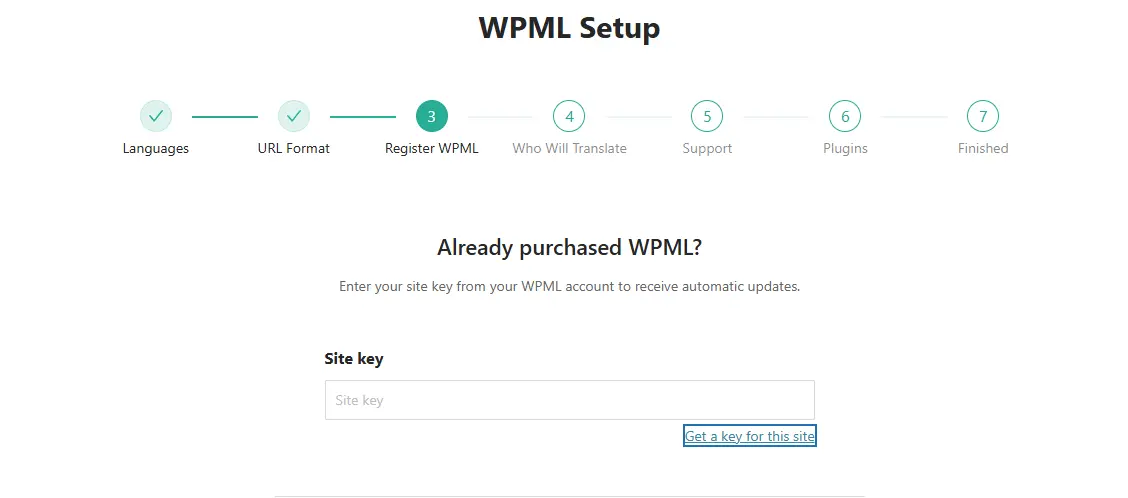
- Choose your site’s default language and add secondary languages.
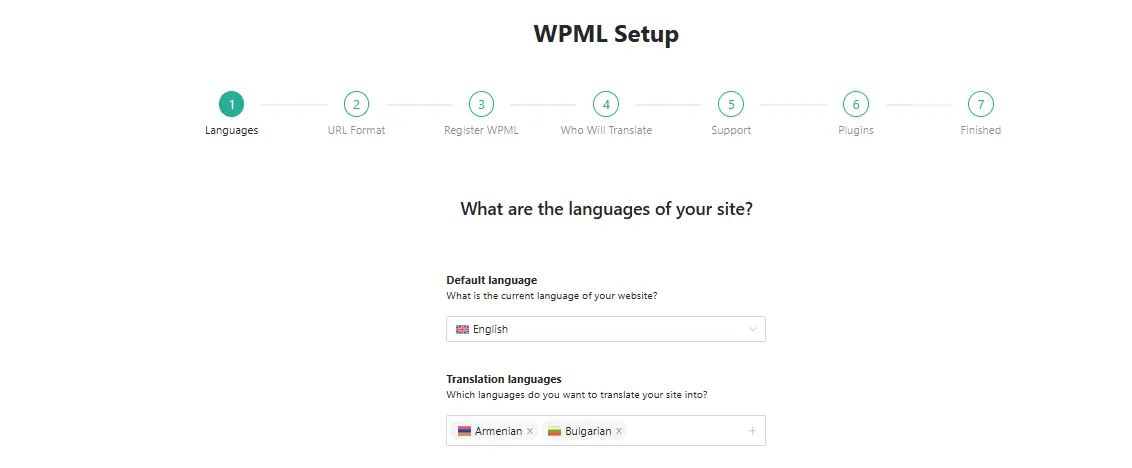
3. Translate Products
- Go to WooCommerce > WooCommerce Multilingual.
- Select the product you want to translate.
- Enter translations for the product title, description, and attributes.
4. Translate Categories and Tags
- In the plugin dashboard, switch to the categories tab.
- Add translations for each category and ensure consistency across languages.
5. Translate Checkout and System Pages
- Navigate to checkout and cart pages under the WPML settings.
- Translate all labels, instructions, and system messages.
By following these steps, you’ll be able to Translate Products, Categories, and Checkout with WooCommerce Multilingual efficiently and without technical headaches.
Features That Enhance Multilingual Shopping
One of the plugin’s strongest benefits is its deep integration with WooCommerce. It isn’t just about translating words—it’s about creating a cohesive multilingual shopping environment.
Some standout features include:
- Multi-Currency Support: Display prices in multiple currencies, automatically adjusted for language or region.
- Stock Synchronization: Manage product stock levels across translations without duplication.
- SEO-Friendly URLs: Generate unique, language-specific product URLs for better search rankings.
- Localized Emails: Send order confirmation and status emails in the customer’s language.
With these features, you not only Translate Products, Categories, and Checkout with WooCommerce Multilingual but also improve customer satisfaction and retention.
Challenges of Running a Multilingual Store
While the benefits are clear, managing a multilingual store can be challenging if not handled properly. Common issues include inconsistent translations, confusing category structures, or untranslated checkout labels that cause customer frustration.
To avoid these pitfalls, always test your translations thoroughly. Double-check that your Translate Products, Categories, and Checkout with WooCommerce Multilingual settings are applied consistently across your site. Additionally, consider working with professional translators for critical content to ensure accuracy and clarity.
Best Practices for Using WooCommerce Multilingual
To maximize the plugin’s potential, consider the following best practices:
- Plan Your Languages Carefully: Focus on the most relevant languages for your audience instead of overwhelming your site with too many.
- Keep Content Consistent: Ensure that product descriptions and categories carry the same meaning across all translations.
- Use SEO Tools Together: Combine WooCommerce Multilingual with multilingual SEO plugins to rank globally.
- Prioritize Checkout Clarity: Always test translated checkout flows to avoid abandoned carts.
By applying these practices, you’ll make it easier to Translate Products, Categories, and Checkout with WooCommerce Multilingual while keeping your store user-friendly.
Customer Experience Benefits
From a customer’s perspective, shopping in their language removes uncertainty. They can read product descriptions, follow checkout instructions without hesitation, and feel reassured about their purchase.
For store owners, this means fewer support requests, reduced cart abandonment, and higher conversion rates. When you Translate Products, Categories, and Checkout with WooCommerce Multilingual, you create a customer journey that feels natural and trustworthy. This simple step can dramatically expand your global reach.
Common Use Cases for Multilingual Stores
Multilingual functionality is essential in various industries. Consider these examples:
- Fashion Stores: Translate size guides and product categories to cater to international shoppers.
- Digital Downloads: Offer product descriptions and checkout in multiple languages for global reach.
- Food & Beverage: Translate menus, categories, and checkout processes to serve diverse regions.
- Luxury Goods: Provide translated descriptions to build trust with high-value buyers.
These scenarios highlight the importance of being able to Translate Products, Categories, and Checkout with WooCommerce Multilingual effectively.
Tips for Scaling Your Multilingual Store
As your store grows, translations will become more complex. Use these tips to stay ahead:
- Automate Where Possible: Use translation management tools integrated with WPML.
- Regularly Audit Translations: Ensure accuracy as product lines expand.
- Optimize Performance: Multilingual stores can be heavy—use caching and performance plugins.
With these strategies, scaling your multilingual store will be smoother and more manageable.

Final Thoughts
Expanding your WooCommerce store to global markets doesn’t have to be complicated. By using the WooCommerce Multilingual plugin, you can easily Translate Products, Categories, and Checkout with WooCommerce Multilingual while keeping your site consistent and professional.
A multilingual store not only opens your business to a wider audience but also builds trust, increases conversions, and strengthens your brand internationally. With proper planning, testing, and implementation, you can create an online store that speaks to every customer—no matter where they are in the world.
Interesting Reads:
How to Customize Coupon Design with Smart Coupons in WooCommerce
10 Best WooCommerce Plugins Zoom Magnifier 2025
How to Automatically Show Product Prices in Local Currency with WooCommerce




