E-commerce platforms thrive when they operate seamlessly with customer relationship management (CRM) systems. WooCommerce, one of the most popular WordPress e-commerce plugins, empowers businesses to sell online with ease. Meanwhile, Salesforce stands as the world’s leading CRM platform, helping companies manage customer data, streamline workflows, and boost sales efficiency.
When Salesforce integrates with WooCommerce, the results are powerful. Businesses can unify customer data, automate sales processes, and gain actionable insights that drive growth. In this post, we will explore exactly how Salesforce integrates with WooCommerce, why it matters, and how you can set it up step by step using the WooCommerce Salesforce CRM Perks plugin.

What Does Salesforce Integration with WooCommerce Mean?
Salesforce integration with WooCommerce refers to the process of connecting your online store with Salesforce CRM. By doing so, all your WooCommerce orders, customers, and product data can be synchronized with Salesforce. This allows your sales and marketing teams to work with accurate, real-time information.
When Salesforce integrates with WooCommerce, data silos disappear. Instead of having fragmented systems where WooCommerce manages transactions and Salesforce manages leads, integration bridges the gap. For example, if a customer purchases a product on WooCommerce, their order information, payment details, and contact record can automatically update in Salesforce. This eliminates the need for manual data entry and reduces human error.
Furthermore, integration doesn’t just help with sales—it also strengthens marketing campaigns. WooCommerce purchase history can inform Salesforce-powered email automation. Businesses can segment customers based on buying behavior, enabling highly targeted campaigns that increase engagement and repeat purchases.
Why Should Businesses Care About Salesforce Integration with WooCommerce?
The primary reason businesses should care is efficiency. Every manual task—whether entering customer details, exporting spreadsheets, or syncing invoices—consumes valuable time. By automating these workflows, your team can focus on growth rather than administrative chores.
Another important reason is customer experience. When Salesforce integrates with WooCommerce, your sales team gets a complete view of customer interactions. They can track purchase patterns, respond to inquiries quickly, and upsell intelligently. The result? Higher satisfaction and stronger customer loyalty.
Additionally, data accuracy is a key benefit. Without integration, customer information may become inconsistent across platforms. For example, a customer may update their shipping address on WooCommerce, but if Salesforce doesn’t receive this update, communication gaps arise. Integration ensures both systems stay in sync, building a reliable single source of truth.
How Salesforce Integrates with WooCommerce
The process of integration involves using tools or plugins designed specifically for syncing the two platforms. The Woo Salesforce Plugin CRM Perks is one of the most effective solutions for this. This plugin enables real-time syncing of WooCommerce data with Salesforce CRM, offering flexible customization options to match your business needs.
When Salesforce integrates with WooCommerce through this plugin, several automation opportunities open up:
- Sync WooCommerce orders, products, and customers directly into Salesforce.
- Create leads, contacts, or opportunities automatically.
- Apply conditional logic to control which data flows into Salesforce.
- Map WooCommerce fields to Salesforce fields for precise record-keeping.
In short, this integration ensures a smooth flow of information, giving your business a competitive edge by enabling smarter decisions and faster actions.
Key Benefits of Salesforce WooCommerce Integration
When businesses consider adopting new tools, the first question is always: what’s in it for us? Let’s examine the specific benefits that occur when Salesforce integrates with WooCommerce.
Streamlined Data Flow
Data from WooCommerce—including customer details, orders, and transactions—automatically transfers into Salesforce. This streamlined data flow ensures that everyone in your organization works with the most accurate and up-to-date information. No more spreadsheets, no more double entries.
Improved Customer Insights
Salesforce collects WooCommerce purchase data, turning it into actionable insights. Your sales team can analyze buying behavior, identify high-value customers, and create customized offers. For example, a customer who frequently purchases accessories might be targeted with a bundled promotion.
Enhanced Marketing Campaigns
Integration allows your marketing team to use WooCommerce order data to fuel Salesforce-powered campaigns. You can set up personalized email journeys, loyalty programs, and remarketing strategies based on customer activity.
Time and Cost Savings
When processes are automated, the need for manual intervention decreases. This saves countless hours of administrative work and reduces the risk of mistakes that could cost your business money.
Step-by-Step Guide: Setting Up the Woo Salesforce Plugin CRM Perks
To achieve seamless integration, let’s walk through how to set up the Woo Salesforce Plugin CRM Perks step by step.
1: Install and Activate the Plugin
- Log into your WordPress admin dashboard.
- Navigate to Plugins > Add New.
- Search for “Woo Salesforce Plugin CRM Perks.”
- Click Install Now, then select Activate.

2: Connect WooCommerce to Salesforce
- Go to CRM Perks > Settings in your WordPress dashboard.
- Click on Salesforce as your CRM of choice.
- Enter your Salesforce login credentials and authorize the plugin.
- Once authenticated, the plugin will establish a secure connection.

3: Configure Field Mapping
- In the plugin settings, navigate to Field Mapping.
- Choose which WooCommerce fields (like customer name, email, phone, order ID) should correspond to Salesforce fields.
- Use drag-and-drop or dropdown selectors to map fields accurately.
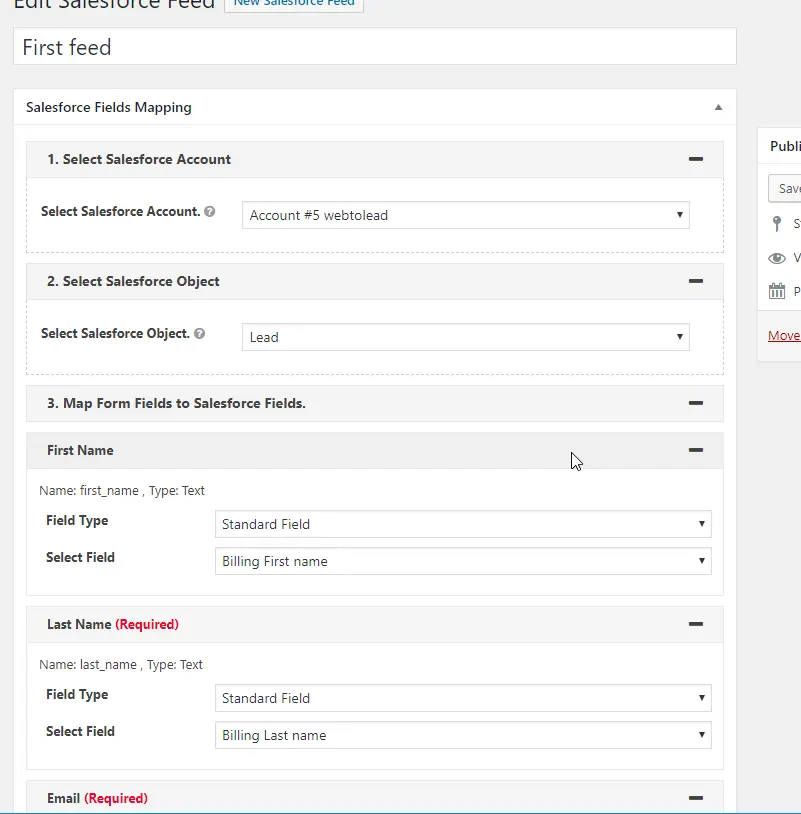
4: Set Up Data Sync Rules
-
Go to Feed Settings in the plugin dashboard.
-
Create “Feeds” that define how WooCommerce data is sent to Salesforce.
-
Example: “Send New Order Data to Salesforce Opportunities.”
-
-
Apply conditional logic. For instance, sync only orders above a certain value or from specific regions.
5: Test the Integration
- Place a test order on your WooCommerce store.
- Verify whether the order, customer, and payment data appear in Salesforce.
- Adjust field mappings and feed settings if necessary.
6: Enable Real-Time Syncing
- In plugin settings, turn on Real-Time Sync.
- Ensure that any new WooCommerce activity automatically reflects in Salesforce.
Challenges Businesses Face Without Integration
Operating WooCommerce without Salesforce integration often leads to several issues:
- Manual Workload: Teams spend hours manually exporting/importing data.
- Data Silos: Sales, support, and marketing teams operate with inconsistent information.
- Customer Frustration: Without up-to-date records, customer interactions lack personalization.
- Missed Sales Opportunities: Incomplete data prevents effective cross-selling or upselling.
These challenges highlight why it’s so valuable that Salesforce integrates with WooCommerce through tools like CRM Perks.
Real-World Use Cases of Salesforce WooCommerce Integration
Integration isn’t just theoretical—it solves tangible problems for real businesses.
- Retail Stores: Syncing online purchases with Salesforce allows retail chains to track stock levels and forecast demand.
- B2B Sellers: For wholesalers using WooCommerce, integration helps sales teams manage bulk orders and create targeted offers in Salesforce.
- Subscription Businesses: Companies selling recurring products can use Salesforce to monitor renewals, cancellations, and customer engagement.
Each of these examples demonstrates how Salesforce integrates with WooCommerce to enhance efficiency and profitability.
Future of Salesforce and WooCommerce Integration
As e-commerce and CRM technologies evolve, integration will only grow more powerful. Features like AI-driven insights, predictive analytics, and automated customer journeys are becoming the norm.
When Salesforce integrates with WooCommerce in the future, we can expect even deeper personalization, smarter inventory management, and stronger predictive capabilities. Businesses that embrace integration now position themselves to thrive in the rapidly evolving digital marketplace.

Closing Remarks
Bringing Salesforce and WooCommerce together creates a powerful synergy that can transform any business. From automating workflows to enhancing customer engagement, integration ensures that your sales, marketing, and support teams always work with the most accurate and actionable data.
By using the Woo Salesforce Plugin CRM Perks, businesses can set up integration quickly, customize it to their needs, and unlock the full potential of their data. If you want to future-proof your e-commerce operations, the time to integrate is now.
Interesting Reads:
How to Create a Product Table in WooCommerce