Every online business that relies on eCommerce must provide its customers with a payment experience that is both seamless and secure. Shoppers are quick to abandon carts if they feel uncertain about the safety of their financial information. That’s why integrating a trusted payment gateway into your WooCommerce store is a non-negotiable step toward building customer confidence.
One of the most reliable solutions available is Authorize.Net, a gateway designed to support merchants by ensuring safe transactions and compliance with industry standards. By choosing to Enable Safe On-Site Payments with Authorize.Net in WooCommerce, you can give your customers peace of mind while also keeping transactions under your control. This integration not only improves checkout efficiency but also positions your brand as trustworthy and professional.

What Is Authorize.Net and How Does It Work?
Authorize.Net is a payment gateway that has been around for decades, supporting thousands of merchants across different industries. It acts as the digital bridge between your WooCommerce store and your customer’s bank, making sure that funds are transferred securely and without interruption. Unlike some third-party gateways that redirect customers away from your site, Authorize.Net allows you to process payments directly on your store’s checkout page.
This on-site feature is critical for businesses aiming to maintain a consistent user experience. Customers won’t feel the disruption of being sent to an unfamiliar payment page, which can sometimes trigger security concerns. When you Enable Safe On-Site Payments with Authorize.Net in WooCommerce, you are essentially safeguarding sensitive data with advanced encryption while keeping the shopping journey smooth and uninterrupted.
Why Choose Authorize.Net for Your WooCommerce Store?
When it comes to payment gateways, trust and reliability should guide your decision. Authorize.Net is built on a foundation of strong fraud detection tools, PCI DSS compliance, and robust transaction processing systems. These elements work together to provide a safer environment for both merchants and shoppers.
Moreover, Authorize.Net offers versatility. It supports credit cards, debit cards, and even digital wallets. By offering multiple payment methods under a secure umbrella, you broaden your customer base and encourage repeat purchases. More importantly, using Authorize.Net with WooCommerce ensures that your business can grow without compromising security. By choosing to Enable Safe On-Site Payments with Authorize.Net in WooCommerce, you’re making an investment in customer trust and long-term stability.
Step-by-Step Guide: How to Enable Safe On-Site Payments with Authorize.Net in WooCommerce
Setting up Authorize.Net with WooCommerce doesn’t need to be complicated. Below, you’ll find a clear, step-by-step walkthrough that ensures your payment gateway is running securely and efficiently. By following these instructions, you’ll successfully Enable Safe On-Site Payments with Authorize.Net in WooCommerce and provide your customers with a smooth checkout experience.
Step 1: Purchase and Download the Authorize.Net WooCommerce Plugin
- Visit the WooCommerce Authorize.Net plugin page.
- Add the plugin to your cart and complete the purchase.
- Once purchased, download the plugin .zip file from your WooCommerce account.

This is the official plugin provided by WooCommerce, so you can trust its reliability and compatibility with your store.
Step 2: Install and Activate the Plugin
- Go to your WordPress dashboard.
- Navigate to Plugins > Add New > Upload Plugin.
- Upload the .zip file you just downloaded.
- Click Install Now and then Activate.

After activation, the Authorize.Net payment gateway will be available in your WooCommerce settings.
Step 3: Access the Authorize.Net Settings in WooCommerce
- From your dashboard, navigate to WooCommerce > Settings.
- Click on the Payments tab.
- Locate Authorize.Net in the list of payment gateways and toggle the switch to enable it.
- Click Manage to configure the gateway.
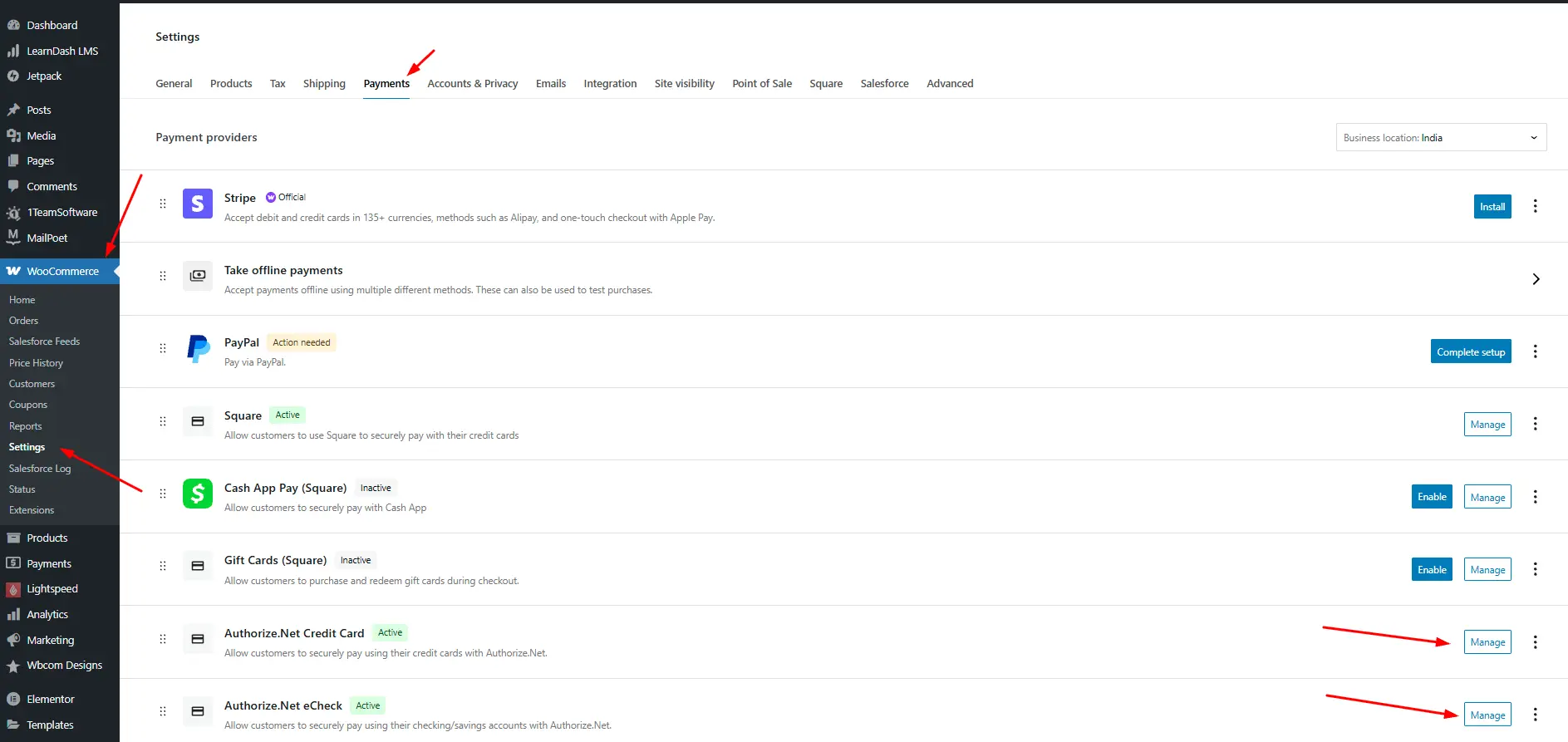
This section is where you’ll connect your WooCommerce store to your Authorize.Net merchant account.
Step 4: Configure Your API Credentials
- Log in to your Authorize.Net merchant account.
- Under Account > API Credentials & Keys, generate your API Login ID and Transaction Key.
- Copy and paste these credentials into the WooCommerce Authorize.Net settings page.
- Choose whether to run in Sandbox Mode (for testing) or Live Mode (for real transactions).

Be sure to keep your credentials secure and never share them publicly. Without these, your WooCommerce site cannot communicate with Authorize.Net.
Benefits of Enabling On-Site Payments for Your Customers
Customers crave simplicity, and nothing simplifies their shopping experience more than a smooth, on-site checkout. By keeping users on your WooCommerce store during payment, you minimize distractions and reduce cart abandonment rates. The trust that comes from seeing a familiar interface directly correlates with higher conversions.
Additionally, Authorize.Net includes features like card tokenization, which stores customer details securely for future purchases. This feature not only boosts convenience but also enhances loyalty by encouraging repeat shopping. When you Enable Safe On-Site Payments with Authorize.Net in WooCommerce, you effectively turn your checkout page into a customer retention tool.
Key Features of the Authorize.Net WooCommerce Plugin
The WooCommerce Authorize.Net plugin comes with powerful features that set it apart from other gateways:
- On-Site Payment Processing – Customers complete transactions without leaving your site.
- Secure Card Storage – Tokenization ensures payment details are safe.
- Advanced Fraud Protection Suite – Real-time monitoring to block suspicious activities.
- Recurring Billing Options – Ideal for subscription-based businesses.
- Refund and Void Capabilities – Manage transactions directly from your WooCommerce dashboard.
By leveraging these features, you don’t just Enable Safe On-Site Payments with Authorize.Net in WooCommerce, you also empower your store with tools that streamline operations and foster customer trust.
Common Mistakes to Avoid During Setup
Even though the setup process is relatively simple, many store owners fall into traps that can compromise security or usability. One frequent mistake is failing to use the correct API credentials. Using sandbox keys instead of live keys, for example, can lead to failed transactions and frustrated customers.
Another common issue is overlooking SSL certification. To properly Enable Safe On-Site Payments with Authorize.Net in WooCommerce, your site must have SSL encryption active. This not only secures sensitive customer data but also reassures visitors that your store takes their safety seriously. Ensuring these details are correct from the start saves you from customer complaints and technical headaches later.
Enhancing Security Beyond the Gateway
While Authorize.Net provides robust protection, your WooCommerce store should have multiple layers of defense. Start by keeping your WordPress and WooCommerce installations up to date. Outdated plugins and themes can create vulnerabilities that hackers exploit.
Additionally, implement strong password policies for both administrators and customers. You can also consider two-factor authentication for backend logins. When combined with Authorize.Net’s fraud detection and PCI compliance, these extra steps make your store nearly impenetrable. So, while you Enable Safe On-Site Payments with Authorize.Net in WooCommerce, don’t overlook the broader aspects of cybersecurity.
Real-World Applications of Authorize.Net in WooCommerce
Different industries benefit from Authorize.Net in unique ways. Subscription-based businesses, for example, take advantage of the recurring billing feature to provide uninterrupted services. Retailers can use stored card details to speed up checkout for repeat customers.
Meanwhile, service-based businesses such as coaching or consulting firms can rely on invoice payments through the same gateway. The flexibility of Authorize.Net ensures that when you Enable Safe On-Site Payments with Authorize.Net in WooCommerce, you’re not just ticking a security box—you’re enhancing your entire business model.
Optimizing the Customer Experience with Authorize.Net
A secure gateway is only part of the equation. To maximize results, ensure that your checkout page is intuitive and mobile-friendly. More than half of online purchases today happen on mobile devices, so a clunky checkout process can be detrimental.
Authorize.Net’s seamless integration ensures your WooCommerce checkout adapts to different screen sizes without compromising performance. By combining this with personalized checkout options—like saving preferred payment methods—you not only Enable Safe On-Site Payments with Authorize.Net in WooCommerce but also create a checkout experience that feels modern, reliable, and user-centered.
Troubleshooting Common Issues
Even after successful setup, occasional issues may arise. Declined payments, for instance, can stem from incorrect customer details, fraud filters, or mismatched billing addresses. Understanding these common triggers allows you to respond quickly and prevent lost sales.
Another issue is plugin conflicts. WooCommerce sites often rely on multiple extensions, and sometimes these can interfere with Authorize.Net functionality. Regularly updating your plugins and conducting test transactions ensures smooth operations. When you encounter these challenges, remember that the support community around Authorize.Net and WooCommerce is robust and responsive, providing solutions to keep your Enable Safe On-Site Payments with Authorize.Net in WooCommerce process running smoothly.
Future-Proofing Your WooCommerce Store
Technology continues to evolve, and so do customer expectations. Staying ahead means adopting gateways that are both reliable today and adaptable tomorrow. Authorize.Net consistently updates its services to meet industry standards and emerging security threats.
By choosing to Enable Safe On-Site Payments with Authorize.Net in WooCommerce, you ensure your store is ready for innovations like biometric authentication, enhanced fraud prevention, and even cryptocurrency integrations in the future. Preparing now means less disruption later and greater peace of mind for your customers.

Closing Remarks: Building Trust Through Secure Payments
A WooCommerce store’s success depends not only on the products it sells but also on the trust it builds with customers. Safe, seamless, and reliable payment options are at the heart of this trust. By integrating Authorize.Net, you gain access to a proven solution that offers strong protection, versatility, and customer-centric features.
When you Enable Safe On-Site Payments with Authorize.Net in WooCommerce, you don’t just secure transactions—you secure your reputation. In a world where online fraud is an ever-present threat, choosing Authorize.Net gives your business a competitive advantage while keeping your customers coming back with confidence.
Interesting Reads:
How to Automate Inventory Sync Between WooCommerce and Lightspeed POS