Running an online store is both exciting and challenging. While acquiring sales is the ultimate goal, managing those sales efficiently is just as important. One of the essential aspects of managing orders is ensuring that invoices and packing slips are generated and delivered without any hassle. In WooCommerce, this task is made simple through specialized plugins. With the right tools, you can automate your billing, provide customers with professional invoices, and streamline your shipping process.
In this guide, we will dive into how to create and send PDF Invoices & Packing Slips in WooCommerce using the WooCommerce PDF Invoices & Packing Slips plugin. You will learn what invoices and packing slips are, why they matter, and exactly how to set them up. This post covers everything from understanding the basics to step-by-step instructions and practical tips to make your online store operations more efficient.

What Are PDF Invoices and Packing Slips in WooCommerce?
PDF invoices and packing slips serve as official documents that reflect the details of a customer’s order. A PDF invoice is a digital version of a sales invoice that records purchased products, pricing, billing address, and taxes. On the other hand, a packing slip includes shipping details such as the products inside the package, the customer’s address, and any special notes for fulfillment.
In WooCommerce, these documents not only serve as records but also act as communication tools between your store and your customers. When you create and send PDF Invoices & Packing Slips in WooCommerce, you offer clarity and professionalism. Your customers can reference their invoice for order details, while your fulfillment team can rely on packing slips for accurate shipping.
The WooCommerce PDF Invoices & Packing Slips plugin makes this entire process easy and automatic. Instead of manually generating invoices, you can automate document creation with just a few clicks. This saves valuable time and minimizes human error.
Why Should You Use PDF Invoices & Packing Slips?
The importance of professional documentation cannot be overstated in e-commerce. Customers want to feel confident in their purchases, and invoices play a huge role in building that trust. When you create and send PDF Invoices & Packing Slips in WooCommerce, you add credibility to your store and ensure compliance with business regulations.
Another major benefit is efficiency. Imagine processing hundreds of orders manually—typing details, double-checking shipments, and printing invoices. It would take hours. With automated PDF generation, invoices and packing slips are prepared instantly after purchase. This not only speeds up order processing but also reduces costly mistakes.
From a business standpoint, proper documentation makes it easier to handle refunds, exchanges, or disputes. Customers can easily access their order history, while store owners have a digital record to support every transaction.
The WooCommerce PDF Invoices & Packing Slips Plugin at a Glance
The WooCommerce PDF Invoices & Packing Slips plugin is one of the most widely used solutions for automating invoices in WooCommerce. It integrates seamlessly into your WooCommerce store, allowing you to generate PDF documents directly from your WordPress dashboard.
Some of the key features of this plugin include:
- Automatic email attachments of PDF invoices to customers.
- Easy printing of packing slips for shipments.
- Customizable templates for branding and personalization.
- Bulk printing options for multiple orders at once.
- Compatibility with WooCommerce core features and other extensions.
The plugin is free to use, but a premium version exists for advanced needs, such as custom numbering formats, additional templates, and more extensive customization. For most store owners, the free version is more than enough to create and send PDF Invoices & Packing Slips in WooCommerce effectively.
Step-by-Step Guide: How to Create and Send PDF Invoices & Packing Slips in WooCommerce
1: Install and Activate the Plugin
- Log in to your WordPress Dashboard.
- Go to Plugins > Add New.
- Search for WooCommerce PDF Invoices & Packing Slips.
- Click Install Now, then Activate.
- Once activated, a new Invoices/Packing Slips settings area will appear in your WooCommerce configuration panel.

2: Enable Automatic PDF Invoices
- Go to WooCommerce > Settings > Invoices/Packing Slips.
- Check the option to attach invoices automatically to customer order emails.
- Choose the order statuses (e.g., Processing, Completed) where invoices should be sent.
- Save your settings to activate the feature.

3: Customize Your Templates
- Open the Documents tab inside the plugin settings.
- Select the Invoice or Packing Slip template you want to customize.
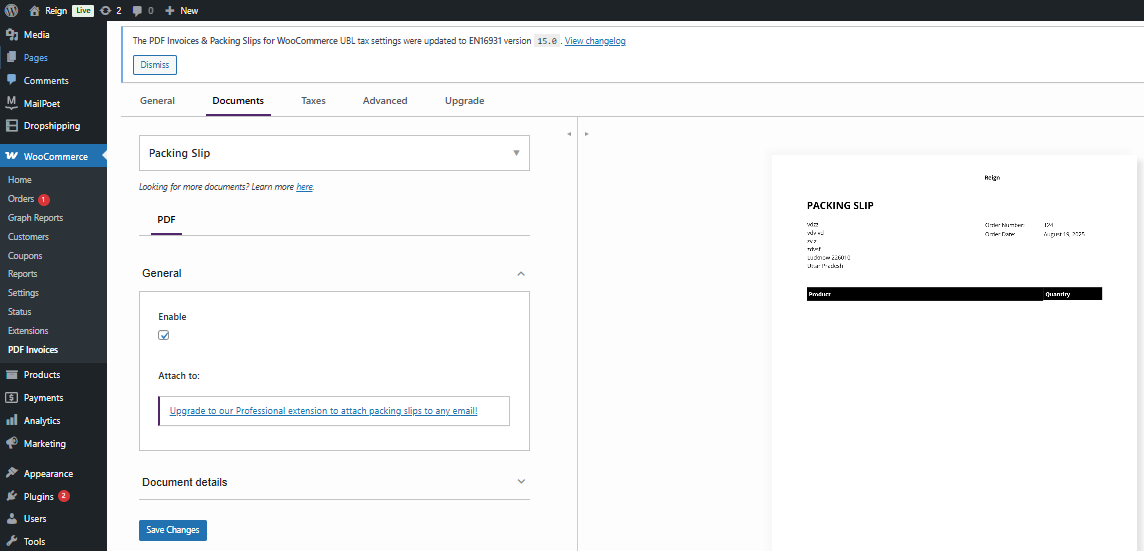
- Upload your store’s logo for consistent branding.
- Add or edit footer text (like return policies or thank-you notes).
- Preview the document to confirm changes.
4: Print Packing Slips Easily
- Go to WooCommerce > Orders in your WordPress dashboard.
- Select the order you want to process.
- Click the Print Packing Slip button in the order actions panel.
- For multiple orders, tick several checkboxes and use the bulk print option.
5: Test Your Setup
- Place a test order on your store.
- Confirm that the invoice is generated and attached to the order email.
- Print the corresponding packing slip to check formatting.
- Adjust any template or email settings if necessary.
By following these steps, you can successfully create and send PDF Invoices & Packing Slips in WooCommerce while ensuring accuracy and professionalism.
Benefits of Automating with This Plugin
Automation is one of the key advantages of using this plugin. Once configured, the plugin handles everything in the background. Customers receive their invoices immediately, while your fulfillment team gets accurate packing slips for every order.
This also leads to better customer satisfaction. Buyers love receiving instant, professional invoices. It shows that your store is reliable and organized. Additionally, the plugin reduces administrative workload, allowing you to focus more on marketing and scaling your business.
Another hidden benefit is compliance. Invoices often need to meet certain tax or regulatory requirements. By using a tested plugin like this one, you ensure that your invoices are accurate and meet professional standards.
Extra Features Worth Exploring
Apart from its core functionalities, the WooCommerce PDF Invoices & Packing Slips plugin offers advanced features that are worth exploring. For example, you can generate documents in bulk, which is perfect for processing large sales periods like Black Friday or holiday promotions.
You can also add extra information to invoices, such as custom fields, return policies, or promotional codes. This makes your invoices more than just financial documents—they become marketing tools as well. Customers will appreciate additional value when they see offers or important notes right on their invoices.
Practical Tips for Better Use
While the plugin works out of the box, here are some tips to get the most out of it:
- Brand consistency: Always add your logo and store details. A branded invoice strengthens your identity.
- Clarity matters: Keep layouts clean and avoid unnecessary clutter.
- Regular testing: After updates, run a test order to ensure your setup still works correctly.
- Customer communication: Add helpful messages such as return policies or thank-you notes in your invoices.
By following these practices, you not only create and send PDF Invoices & Packing Slips in WooCommerce, but you also elevate your store’s professionalism.
Common Mistakes to Avoid
Even with an easy-to-use plugin, some store owners make mistakes. One common issue is forgetting to test the setup. Without testing, you might send incomplete invoices to customers. Another mistake is ignoring customization. Using generic templates without your store’s branding may make your business look less credible.
Additionally, avoid overwhelming your invoices with too much information. Keep them simple, clear, and useful. Remember, invoices are for clarity, not for clutter. Striking the right balance makes your documents more effective and user-friendly.
Future of Invoicing in WooCommerce
As e-commerce continues to grow, invoicing will become even more digitized and automated. Features such as QR codes, blockchain-based receipts, and AI-driven analytics may soon be integrated into invoices. The ability to create and send PDF Invoices & Packing Slips in WooCommerce will remain essential, but innovations will make the process smarter and more interactive.
Staying ahead of these trends ensures that your store remains competitive. By adopting tools like WooCommerce PDF Invoices & Packing Slips now, you lay a strong foundation for future growth.

Closing Remarks
Professional documentation is no longer optional in eCommerce—it is a necessity. By using the WooCommerce PDF Invoices & Packing Slips plugin, you can streamline operations, improve customer trust, and ensure every order is properly documented. Learning to Create and Send PDF Invoices & Packing Slips in WooCommerce is one of the smartest steps you can take to grow your store’s credibility and efficiency.
From installation to customization and automation, the process is simple but powerful. By investing a few minutes in setup, you save hours of administrative work, boost customer satisfaction, and set your business up for long-term success.
Interesting Read:
How to Launch a Dropshipping Store with WooCommerce