
If you’re running a WooCommerce store, choosing the right WooCommerce Payment by Card plugins matters — it affects conversion, security, and your long-term costs. This guide walks through the 10 best card payment plugins available today, shows key features, pricing, and practical setup steps so you can pick confidently.

What is “Payment by Card” for WooCommerce?
“Payment by Card” refers to the ability for customers to pay directly with debit or credit cards (Visa, MasterCard, AmEx, and more) on your WooCommerce checkout. Plugins that provide card payments act as the bridge between your store and a payment processor or gateway — they handle the secure collection of card details, tokenization, and communication with banks while keeping you PCI compliant (when using hosted or tokenized methods).
Depending on the plugin, you may get in-checkout card forms, saved cards for returning customers, local payment methods (Apple Pay / Google Pay), subscriptions support, and fraud tools. Choosing a plugin is about balancing conversion, fees, regional availability, and the technical overhead you’re willing to manage.
Also Read: Best WooCommerce Express Checkout Process Plugins
How to use a WooCommerce Payment by Card plugin
Below is a condensed, practical setup flow that works for most card payment plugins. Each plugin will have slightly different details (API keys, merchant account setup) — check their docs for specifics.
- Create or log in to the payment processor account (Stripe, PayPal, Square, Mollie, Braintree, etc.).
- Install the plugin in WordPress: Plugins → Add New → Upload plugin (or search and install), then Activate.
- In WooCommerce → Settings → Payments, enable the new gateway and open its settings.
- Add API keys/merchant credentials (test keys first). Many plugins provide separate test and live modes — always test checkout flows before going live.
- Configure card options: saved cards, 3D Secure, refunds, webhooks, supported currencies, and checkout styling.
- Test thoroughly: place test orders (card authorizations, refunds, cancellations, subscription renewals) and verify webhooks and reconciliation.
- Go live: switch to production keys and monitor the first real transactions closely (check dashboards and settlement schedules).
Tip: Use test mode and a staging site for initial checks. If you use subscriptions, check long-term renewals and saved payment methods.
Top picks at a glance
There are many ways to accept cards in WooCommerce — direct gateways, hosted checkouts, or third-party plugins. Below are 10 solid, widely used options that balance reliability, features, and support.
Each plugin entry includes a short overview, key features, and typical pricing so you can compare quickly.
1. WooPayments

WooPayments is the native payments product built by WooCommerce. It aims to be a one-stop, tightly integrated card processor for stores running WooCommerce, with an admin-side transactions dashboard and simplified payout flow. It supports major cards and modern methods (Apple Pay / Google Pay) and is designed to work seamlessly with the rest of the WooCommerce experience.
Because it’s native, the setup is streamlined inside WooCommerce, and store owners get transaction visibility without leaving their dashboard. It’s a good choice if you prefer an integrated experience and are primarily selling in markets WooPayments supports.
Key features:
- Native WooCommerce integration and in-dashboard transaction view.
- Card payments, Apple/Google Pay, reporting, and payouts.
- Tokenization and dispute handling tools.
Pricing: No monthly fee for the plugin; pay-as-you-go processing fees (per successful transaction). See WooCommerce docs for country-specific rates.
2. YITH WooCommerce Stripe (and YITH Stripe Connect)
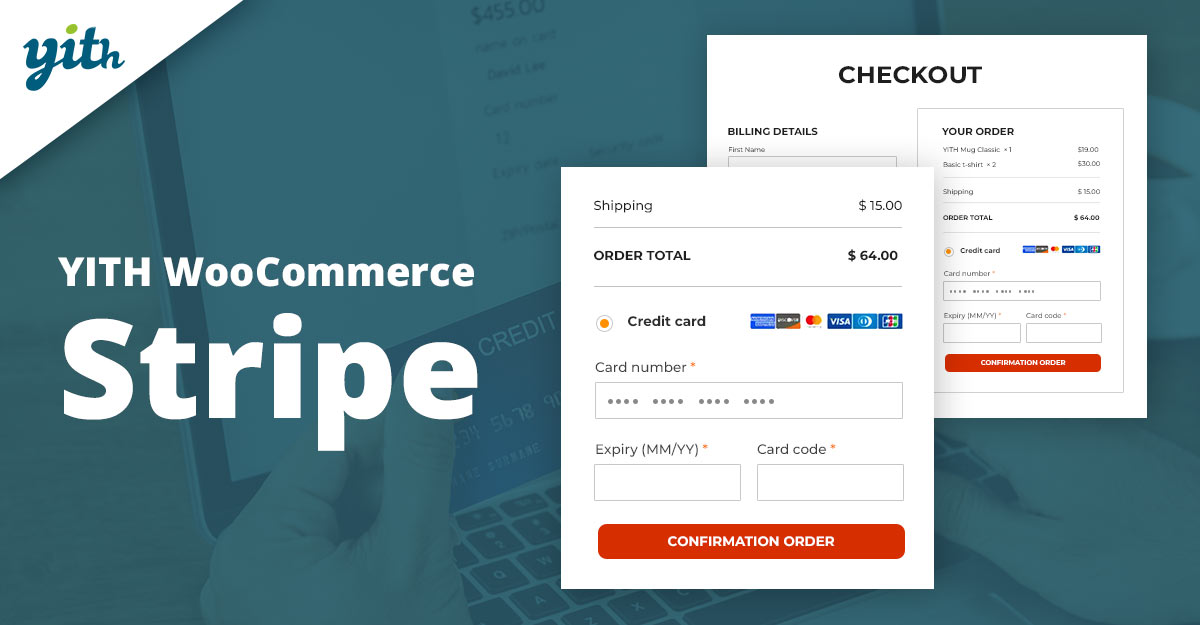
YITH’s Stripe integrations are popular among stores that want Stripe features with YITH’s UX and extra tools (subscriptions, split payments via Stripe Connect, etc.). YITH packages often add vendor/splitting and advanced subscription controls on top of Stripe’s gateway.
Use YITH’s Stripe modules if you need marketplace-style splitting, commission management, or a combined YITH-powered flow. The plugin layer handles integration while Stripe remains your processor. Always pair with test mode checks for webhooks and subscription flows.
Key features:
- Stripe card payments, subscriptions support, and Connect (split payouts).
- Cart and checkout payment options, subscription management.
- Integration hooks for other YITH plugins and marketplace setups.
Pricing: YITH plugins are typically premium (annual licences). Stripe processing fees are charged by Stripe separately. Check YITH’s product pages for current license costs.
3. WooCommerce Stripe Payment Gateway (official)
This is the official Stripe integration maintained for WooCommerce. It offers optimized checkout, saved cards, Apple Pay / Google Pay, and a wide range of payment methods surfaced by Stripe. Many stores choose this for performance and feature parity with Stripe’s platform.
The plugin emphasizes conversion improvements (Link, Payment Request buttons) and is ideal if you want first-class Stripe support and ongoing updates from the Stripe/WooCommerce partnership. It’s typically the most up-to-date for Stripe features.
Key features:
- Full Stripe checkout integration, saved cards, Payment Request (Apple/Google Pay).
- Support for many global payment methods via Stripe.
- 3D Secure, tokenization, and webhook management.
Pricing: The plugin is free; Stripe charges transaction processing fees (see Stripe for current rates).
4. WooCommerce PayPal Payments
PayPal Payments offers card acceptance alongside PayPal, Venmo (US), and Pay Later options — all via one integration. For stores that want both card processing and PayPal’s wallet features, this extension simplifies offering multiple checkout options.
It’s widely used and maintained by the PayPal/WooCommerce teams, and supports local checkout experiences. Consider it when your audience uses PayPal frequently or you require PayPal-based buyer protections.
Key features:
- Accept card payments via PayPal, plus PayPal wallet and Pay Later options.
- Hosted / in-context checkout flow for buyer trust.
- Integration with the PayPal dashboard for settlements and disputes.
Pricing: Plugin is free; PayPal charges per-transaction fees and optional cross-border fees.
5. Square for WooCommerce
Square’s WooCommerce plugin is a solid pick if you operate both in person and online — it syncs inventory and supports card payments via Square’s processing. Square also supports recurring payments with extensions.
If you use Square POS in-store and want unified inventory and payments, Square for WooCommerce reduces reconciliation friction between channels. It’s a practical choice for brick-and-mortar stores expanding online.
Key features:
- Unified inventory between Square POS and WooCommerce.
- Card acceptance, refunds, and settlement via the Square dashboard.
- Support for subscriptions with compatible add-ons.
Pricing: The Plugin is available without monthly fees from WooCommerce; Square charges processing fees. Check Square for locale-specific rates.
6. Mollie Payments for WooCommerce
Mollie focuses on straightforward pricing and wide European payment method support, including card acceptance. Their WooCommerce integration supports many local methods and makes settlement predictable with per-transaction pricing.
Mollie is a common choice for EU stores that need local options (iDEAL, SEPA, etc.) plus reliable card processing and developer-friendly APIs.
Key features:
- Support for many European/local payment methods, plus card payments.
- Compatible with WooCommerce Subscriptions for recurring charges.
- Transparent per-transaction pricing; no monthly gateway fees.
Pricing: No monthly fees; pay per successful transaction (Mollie’s per-method rates apply).
7. Braintree for WooCommerce
Braintree (a PayPal company) offers a gateway that supports cards, PayPal, and digital wallets. The WooCommerce Braintree extension focuses on reducing checkout friction and supporting tokenized cards, vaulting, and recurring payments.
Choose Braintree if you want multi-method support (cards + PayPal) under a single processor and the flexibility to vault cards for subscriptions.
Key features:
- Credit card and PayPal acceptance, saved card vaulting, and recurring payments.
- Support for digital wallets like Apple Pay / Google Pay.
- Hosted fields/tokenization for PCI scope reduction.
Pricing: Plugin costs vary; Braintree/PayPal charge processing fees per transaction. Check Braintree’s pricing for region specifics.
9. Adyen (via third-party WooCommerce integrations)
Adyen is a global payments platform used by large enterprises and supports complex card routing, global acquiring, and many local payment methods. While Adyen doesn’t always provide a first-party WooCommerce plugin, reputable third-party connectors integrate Adyen’s card processing into WooCommerce for merchants that need global scale. (Third-party connector specifics vary.)
Choose Adyen if you operate globally, process high volumes, and need advanced acquiring and routing features. Work with a certified connector or developer to ensure proper PCI and webhook handling.
Key features:
- Global acquiring, multi-currency, and advanced routing.
- Enterprise fraud management and reconciliation tools.
- Support through certified third-party WooCommerce plugins or bespoke integrations.
Pricing: Enterprise pricing — typically custom volume-based fees through Adyen (contact Adyen or certified partners for quotes).
Also Read: WooCommerce Multiple Sales Channels to Grow Your Business
10. Stripe Payments / Alternate Stripe plugins
Beyond the official Stripe gateway, there are lightweight Stripe plugins (e.g., Stripe Payments or other premium add-ons) that offer a simpler setup, button-based checkouts, or extra admin features. These are useful for stores that want a minimal UI or a specific feature set not covered by the official plugin.
Always prefer well-maintained, regularly updated Stripe integrations and verify support for saved cards, webhooks, and the specific Stripe features you need (3D Secure, Link, etc.). Using unofficial plugins may require more testing and security checks.
Key features:
- Simplified Stripe checkout options or specialized features (product page checkout, one-click buys).
- Often smaller footprint, but check for regular updates and WooCommerce compatibility.
- May offer premium extensions for subscriptions or marketplace flows.
Pricing: Many are free with premium add-ons; Stripe processing fees apply. Always review the plugin’s changelog and support history before committing.
Comparison table
| Plugin | Primary Strengths | Pricing Overview | Best for |
|---|---|---|---|
| WooPayments | Native integration; in-dashboard transactions | Pay-as-you-go processing; no monthly plugin fee. :contentReference[oaicite:17]{index=17} | Stores wanting tight WooCommerce experience |
| YITH WooCommerce Stripe | Marketplace/split payments features | Premium YITH license; Stripe fees apply. :contentReference[oaicite:18]{index=18} | Marketplaces / multi-vendor stores |
| WooCommerce Stripe (official) | Feature parity with Stripe; frequent updates | Free plugin; Stripe processing fees. :contentReference[oaicite:19]{index=19} | Stores wanting the official Stripe integration |
| WooCommerce PayPal Payments | PayPal + card + wallet options | Free plugin; PayPal per-transaction fees. :contentReference[oaicite:20]{index=20} | Stores with heavy PayPal usage |
| Square for WooCommerce | In-person + online inventory sync | Plugin-free; Square processing fees. :contentReference[oaicite:21]{index=21} | Brick-and-mortar + online sellers |
| Mollie | Local EU methods + card support | Per-transaction pricing, no monthly gateway fee. :contentReference[oaicite:22]{index=22} | European stores need local methods |
| Braintree | Cards + PayPal in one processor | Braintree/PayPal transaction fees apply. :contentReference[oaicite:23]{index=23} | Merchants wanting PayPal + card vaulting |
| Authorize.Net | Enterprise-grade gateway, eCheck support | Gateway fees + per-transaction merchant rates. :contentReference[oaicite:24]{index=24} | US merchants with merchant accounts |
| Adyen (connectors) | Global acquiring and routing | Custom / volume-based pricing (enterprises) | High-volume global merchants |

Conclusion & recommendations
If you want the simplest, most integrated option and you primarily serve markets supported by WooPayments, it’s an excellent starting point because it minimizes admin friction and keeps everything inside WooCommerce.
For global flexibility and advanced payment types, the official Stripe gateway or a full gateway like Adyen/Braintree gives you the most options, while PayPal and Square remain pragmatic choices for stores tied to those ecosystems. Match your plugin choice to your customer base, reconciliation needs, and whether you require subscriptions or marketplace splits.
Interesting Reads:
Best WooCommerce Search & Filters Plugins