Managing orders efficiently is critical for any online store owner, and using the right WooCommerce Order Management Plugins can transform your entire workflow. From keeping track of incoming purchases to updating customers about their order status, a well‑optimized order management system ensures smoother operations and happier customers.
In this post, you’ll discover what order management really means for a WooCommerce store, why it’s essential for growth, and how to set it up step by step. Then, we’ll explore our carefully curated list of the 10 best WooCommerce Order Management Plugins, covering their features, pricing, and how they can make your business more efficient. Let’s dive in.

Table of Contents
- What is WooCommerce Order Management?
- How to Use WooCommerce Order Management Plugins
- Top Plugins
1. Order Tracking for WooCommerce
2. YITH WooCommerce Order & Shipment Tracking
3. WooCommerce Order Status Manager
4. WooCommerce After The Order
5. Autocomplete WooCommerce Orders
6. Order and Inventory Manager for WooCommerce
7. ATUM Inventory Management for WooCommerce
8. YITH WooCommerce Custom Order Status
9. Orders Tracking for WooCommerce (WP plugin)
10. Advanced Shipment Tracking for WooCommerce
What is WooCommerce Order Management?
Order management refers to the end‑to‑end process from order placement to delivery. It includes tracking status, shipping info, inventory adjustment, status updates, customer notifications—essentially orchestrating every step so nothing falls through the cracks. Using WooCommerce Order Management Plugins helps automate repetitive tasks, reduce errors, and improve customer trust. A robust system ensures your customers know exactly when and how their orders will arrive.
In 2025, customer expectations are higher—they want real‑time tracking, clear status updates, and seamless fulfillment. Good plugins deliver these while freeing up your time to focus on growth. That’s why choosing the right set of WooCommerce order management plugins matters.
Also Read: Best WooCommerce Extensions to Supercharge Your Online Store
How to Use WooCommerce Order Management Plugins
Ready to implement? Here’s a simple step‑by‑step guide:
- Install & Activate: From WordPress > Plugins > Add New, search for the plugin or upload its zip file. Activate it.
- Configure settings: Enter default carriers, tracking codes, order status automation rules, and email templates, depending on the plugin.
- Add tracking info: For shipping plugins, enter tracking code, carrier, and delivery date per order or bulk import.
- Customize customer view: Ensure customers can see the status or tracking link on the My Account page and in emails.
- Test and refine: Place test orders, complete checkout, input tracking, and ensure notifications and display work as expected.
- Monitor and optimize: Track order flow, customer queries, error rates—adjust settings or add plugins as needed.
By following these steps, you set up a reliable and transparent order workflow for your customers, using the power of WooCommerce Order Management Plugins to automate and scale efficiently.
Top Plugins-WooCommerce Order Management Plugins
Here are the 10 best WooCommerce Order Management Plugins** that integrate tracking, shipping, order statuses, and fulfillment.
Each entry includes an overview, key features, and pricing.
1. Order Tracking for WooCommerce
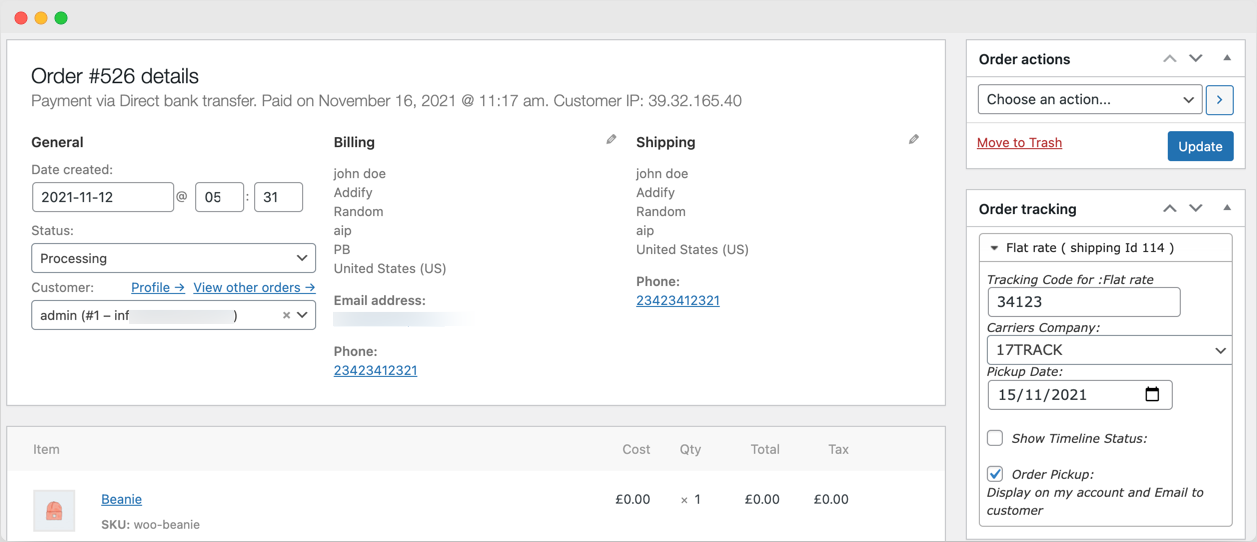
Order Tracking for WooCommerce is a paid plugin (about $49/year with support and a 30‑day refund) that focuses on a clean, visually appealing tracking timeline and simple setup.
This plugin is designed for both store owners and customers—it lets admins input tracking numbers and carriers, and customers see a polished, modern tracking interface. Its design aesthetic sets it apart from basic tracking tools.
Key Features:
- Custom timeline design for order tracking
- Easy to use setup and tracking entry
- Attractive customer-facing tracking page
Pricing: ~ US$49/year, includes one year of support and a 30‑day money‑back guarantee
2. YITH WooCommerce Order & Shipment Tracking

YITH WooCommerce Order & Shipment Tracking (free + premium) allows adding shipping info to each order and displaying it on account dashboards and emails.
The free version offers basic entry of carrier, tracking code, date, and display in My Account and order emails. Premium adds support for 480+ carriers, CSV import, delivery date estimates, automatic email triggers, and integration with YITH statuses and packing slip tools.
Key Features:
- Support for 480+ carriers
- Import tracking from CSV
- Display tracking info on My Account and emails
- Estimated delivery date, auto‑complete order, email integration
Pricing: Free tier; premium starts around US$79.99 for one‑time or subscription pricing, depending on vendor.
3. WooCommerce Order Status Manager
This plugin by WooCommerce allows creating, editing, deleting custom order statuses, and associating email alerts with them. It’s seamlessly integrated into WooCommerce core.
You can design statuses like “Packing,” “Quality Check,” or “Ready for Pickup,” and trigger emails or internal workflows when orders hit those. It’s ideal for complex operations needing custom workflows.
Key Features:
- Create and manage unlimited custom statuses
- Automate emails based on status transitions
- Native, lightweight integration
Pricing: Typically ~$50‑60/year via the WooCommerce official site.
4. WooCommerce After The Order-WooCommerce Order Management Plugins
This plugin focuses beyond shipping—it automates follow‑up emails after order completion, supports upsells, cross‑sells, and builds customer retention workflows.
It’s ideal if you want smarter post‑purchase engagement: send thank‑you messages, suggest complementary products, or collect feedback automatically.
Key Features:
- Automated post‑order email campaigns
- Cross‑sell and upsell opportunities
- Customizable templates and integration with email tools
Pricing: Varies—often around US$79/year or bundled higher-tier WooCommerce packages.
5. Autocomplete WooCommerce Orders
Aimed at streamlining the final step, this plugin marks orders as “Completed” automatically after payment or other trigger conditions, reducing manual workload.
If your operation doesn’t need manual processing before completion, this plugin can save time and speed up fulfillment notifications.
Key Features:
- Auto‑complete orders upon payment or custom triggers
- Conditional logic by product type, payment method
- Saves manual administrative efforts
Pricing: Typically around US$29‑49 one‑time or per year, depending on vendor.
6. Order and Inventory Manager for WooCommerce
This plugin combines order and inventory control—real‑time stock tracking, custom order statuses, bulk filtering, and bulk actions for large stores.
It’s ideal for larger stores or those handling many SKUs and orders daily. You can filter by product, date, status, and update orders in bulk.
Key Features:
- Inventory alerts and real‑time tracking
- Bulk order actions and filtering
- Custom statuses and simplified fulfillment workflows
Pricing: Usually US$79‑99/year, depending on plugin provider.
Also Read:Building a Multi-Vendor Marketplace with Reign and WooCommerce
7. ATUM Inventory Management for WooCommerce
While more focused on inventory, ATUM integrates order data and multi‑location stock management. It supports batch editing, logs, and advanced controls.
Good choice when inventory accuracy matters, especially across warehouses and complex fulfillment channels.
Key Features:
- Multi‑location inventory tracking
- Stock logs, batch editing
- Integration with WooCommerce orders
Pricing: Free core plugin; add-ons from US $99+/year.
8. YITH WooCommerce Custom Order Status
From YITH again, this plugin enables creating statuses with labels, colors, icons, and triggers for emails or actions, giving visual clarity both to admins and customers.
Useful if you want branded, visual workflow statuses appearing in your backend and even in emails.
Key Features:
- Create visual, custom statuses (color, label, icon)
- Email triggers when the status changes
- Integrates with other YITH tools
Pricing: Typically US$69/year.
Also Read:Best User Registration & Login Enhancement Plugins for Your WordPress Website
9. Orders Tracking for WooCommerce (WP plugin)
This plugin allows adding, editing, importing/exporting tracking numbers, sending tracking via emails/SMS, and adding info to PayPal transactions.
It’s suitable for store owners needing flexible communication: SMS, PayPal integration, CSV import/export, and per‑item tracking management.
Key Features:
- Import and export tracking info
- Email and SMS notifications
- PayPal tracking integration
Pricing: Free version; pro features may start at ~$49‑99/year.
10. Advanced Shipment Tracking for WooCommerce
A free plugin that supports 300+ carriers like FedEx, USPS, and lets you add tracking numbers to account pages and order emails—commonly recommended in 2025 lists.
It’s highly used due to its simple setup, broad carrier support, and no immediate cost. Upgrading to premium or extensions adds extra automation.
Key Features:
- Integration with 300+ global carriers
- Tracking links in emails and the My Account section
- Simple, free setup
Pricing: Free; premium extensions may cost extra.

Wrapping Up-WooCommerce Order Management Plugins
All of these plugins serve different needs, but each improves your WooCommerce order management in 2025. Whether you’re focused on elegant tracking displays, inventory control, custom workflows, or automation of status transitions, there’s a plugin to match.
Begin with a solid tracking solution—Order Tracking for WooCommerce or YITH WooCommerce Order & Shipment Tracking—then layer on status management, automation, or inventory tools as your store grows. Together, these WooCommerce Order Management Plugins help deliver a better experience for customers and smoother fulfillment behind the scenes.
Interesting Reads:
Plugins Too Much for Your WordPress eShop
Best WooCommerce Multi-Vendor / Marketplace Plugins
Best WooCommerce SMS Plugins