If you’re looking to speed up checkout, encourage repeat purchases, or offer store credit and cashback incentives, WooCommerce Payment By Wallet Plugins are one of the smartest moves you can make. In this post, I’ll walk you through what a wallet plugin is, how to use one step-by-step, and then list the 10 best wallet plugins for WooCommerce (with short overviews, key features, and pricing).

What is a Wallet for WooCommerce?
A WooCommerce wallet plugin adds a digital “wallet” or store-credit system to your online store. Customers can top up their wallet, receive refunds or cashback into it, and then pay with wallet balances at checkout. This speeds up future purchases, improves conversions, and gives you a flexible way to run promotions and loyalty programs.
Wallets vary in scope — some plugins focus on partial payments (allowing customers to split an order between wallet balance and another gateway), others add vendor payouts, transfers between users, or marketplace integrations. When choosing one, consider refunds, security, and how it integrates with your existing payment gateways and multi-vendor tools.
Also Read: Best WooCommerce Combinations & Product Customization Plugins
How to Use a Wallet Plugin
The exact screens differ between plugins, but the core workflow is almost the same. Here’s a generic step-by-step guide to get a wallet running on a WooCommerce store:
- Install & activate the plugin from the WordPress plugin directory or upload the premium ZIP; then activate the license (if applicable).
- Configure global settings: enable wallet as a payment method, set minimum/maximum top-up amounts, enable partial payments, and enable refund-to-wallet if desired.
- Set up top-up/payment options: allow customers to add funds with your existing gateways (PayPal, Stripe, etc.) or provide manual top-up workflows.
- Decide policies: cashback percent, expiry, transfer rules (if you allow transfers), and vendor payout behavior (for marketplaces).
- Test the flow: add funds as a customer, place an order using wallet funds, and request a refund to confirm it returns to the wallet balance.
- Train support staff and publish short help docs for customers (how to top up, check transactions, or request transfers).
Always test on a staging site first. Wallets interact with payments and refunds — misconfiguration can affect refunds, tax calculations, and accounting. A staging run confirms the plugin plays well with your theme and other payment extensions.
Ready for the list?
Below are 10 strong options for adding wallet payments to WooCommerce. I’ve ordered them to highlight a mix of official marketplace plugins, popular free options, and premium vendors that add marketplace and payout features.
Each entry includes a brief overview, two short paragraphs with practical notes, key features, and typical pricing so you can compare quickly.
1. Wallet for WooCommerce

Wallet for WooCommerce is a purpose-built wallet extension available on the official WooCommerce marketplace that lets customers add funds, use partial or full wallet payments at checkout, and receive refunds directly into their wallet balance. This plugin is geared to store owners who want a polished, WooCommerce-supported extension with marketplace compatibility.
It supports top-ups, manual credit, and integrates with standard payment gateways so funds can be added using a card or PayPal — ideal for stores that want a WooCommerce-native wallet without heavy custom development. The plugin is regularly updated through the WooCommerce marketplace.
Key features: top-ups, partial payments, refunds to wallet, cashback settings, WooCommerce marketplace compatibility.
Pricing: Typically sold via the WooCommerce marketplace with an annual license (example listing shows around $79/year at time of writing).
2. YITH PayPal Payouts for WooCommerce
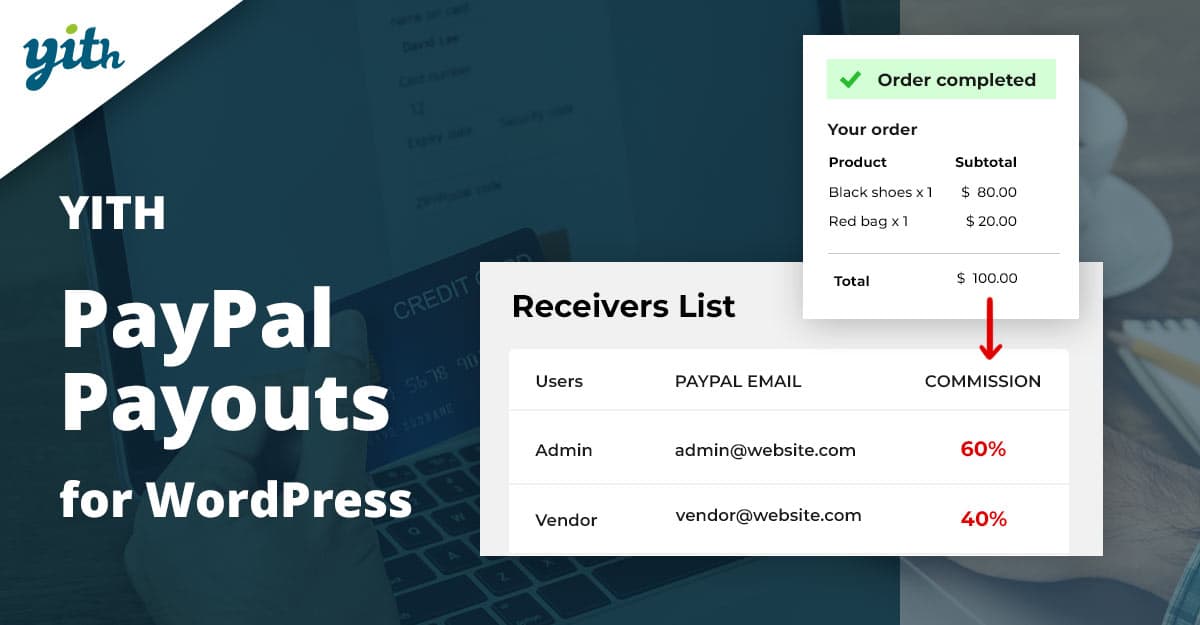
YITH PayPal Payouts is a specialized tool from YITH focused on payouts rather than a customer-facing top-up wallet. It’s most useful for marketplace owners who need to automate payouts to multiple receivers (vendors or affiliates) using PayPal, allowing swift, programmatic PayPal payouts per order or schedule.
While not a classic “customer wallet,” it complements wallet systems in multi-vendor setups by handling vendor/affiliate distribution reliably. If your commerce model needs automated PayPal disbursements, this plugin reduces manual accounting and integrates with YITH marketplace products.
Key features:
- Automatic PayPal payouts,
- Commission calculation,
- Vendor integration and schedule payouts.
Pricing: YITH offers premium licensing on their site (check YITH for current pricing and bundled discounts).
3. TeraWallet (Woo Wallet)
TeraWallet (often marketed as “Wallet for WooCommerce” or “Woo Wallet”) is a widely used wallet plugin that offers top-ups, partial payments, transfers, cashback, and refund-to-wallet features. It’s popular because it comes in a free core version with useful features and premium add-ons for the marketplace or advanced loyalty functionality.
It’s a good choice for stores that want a familiar wallet UX and a mature feature set without building a custom solution. Many stores use TeraWallet along with multivendor or loyalty extensions for a full commerce ecosystem.
Key features:
- Top-up, partial payments
- Transfer between users
- Cashback
- Refund-to-wallet
- Add-ons for the marketplace
Pricing: free core plugin; premium add-ons and bundles vary (check the vendor/store for current prices).
4. Wallet System for WooCommerce (WP Swings)
WP Swings offers a Wallet System for WooCommerce Pro that targets stores wanting a secure wallet with cashback, QR code top-ups, partial payments, and RMA/refund compatibility. This plugin is aimed at store owners who need more advanced refund and reward workflows.
It integrates with common workflows and provides merchant controls to migrate refund values into wallets and to set cashback rules. WP Swings markets it as a turnkey wallet solution for stores and marketplaces.
Key features:
- RMA/refund-to-wallet integration
- QR top-ups
- Cashback rules
- Partial payments
Pricing: premium product — check WP Swings site for current license tiers and annual costs.
Also Read: Best WooCommerce Sizes & Units Plugins
5. WooCommerce Wallet (Webkul)
Webkul’s WooCommerce Wallet plugin is another mature option that adds wallet payments, refunds, and transfers. Webkul often bundles marketplace integrations and supports partial payments, making it useful for stores that need wallet features in a larger ecosystem (including vendor commissions and refunds).
Webkul’s extensions are known for marketplace features, so if you run a multi-vendor site, you may find their wallet plugin pairs well with their broader marketplace stack.
Key features:
- Add funds
- Wallet transactions
- Refunds
- Partial payments
- Marketplace compatibility
Pricing: sold via Webkul store — pricing depends on license type and add-ons.
6. YITH WooCommerce Account Funds
YITH’s Account Funds is a wallet-style plugin that lets customers deposit funds into their account and then use those funds at checkout. It’s simple, reliable, and integrates smoothly with other YITH plugins (useful if you already use YITH’s ecosystem).
This plugin is a straightforward way to add a store-credit style wallet without adding complexity — great for stores that only need top-up and pay functionality rather than advanced cashback or transfers.
Key features:
- Deposit funds
- Pay with account balance
- Refunds to balance
- Integration with YITH plugins
Pricing: premium YITH product — check the YITH website for the latest license details.
7. Store Credit for WooCommerce (StoreApps)
StoreApps’ Store Credit solution is an alternative take that focuses on store credit and refunds — a practical wallet-like system for merchants who want credits instead of a traditional top-up wallet. It’s often used for refunds, gift credits, and loyalty incentives.
This approach is handy when your accounting or business logic treats wallet balances as credits rather than customer-prepaid funds. It integrates tightly with refunds and store credit workflows.
Key features:
- Store credit issuance
- Refund-to-credit
- Credit usage rules
- Customer credit management
Pricing: commercial plugin — consult StoreApps for current pricing and tiers.
8. WooWallet (weDevs and similar implementations)
Several vendors (including weDevs and independent authors) distribute “WooWallet” branded plugins — these typically cover top-ups, cashback, partial payments, and Dokan or other marketplace integrations. If you already use a vendor’s ecosystem (Dokan, Dokan Pro, weDevs tools), look for a wallet plugin from the same vendor for best compatibility.
These implementations vary by vendor — some are free with paid add-ons, others are premium standalone solutions — so evaluate features, support, and update frequency before committing.
Key features:
- Top-ups
- Cashback
- Dokan/multivendor support
- Partial payments
Pricing: depends heavily on vendor and add-ons; check vendor marketplaces (weDevs, ThemeForest, plugin stores).
Also Read: Best WooCommerce Third‑party Data Integration Plugins
9. Wallet System variants from smaller vendors
A number of smaller plugin authors sell Wallet System for WooCommerce variants — they provide the core wallet functionality with varying levels of support, add-ons, and integration. These can be budget-friendly but require due diligence on updates and compatibility.
If you go this route, check the plugin’s update history, support policy, and whether it’s compatible with your theme, caching, and payment flow. Many shops find the free core plugins adequate and add premium features later.
Key features:
- Top-up
- Transactions
- Refund-to-wallet
- Partial payments (vendor dependent)
Pricing: ranges from free to modest one-time fees or annual licenses — confirm on the plugin page.
10. WooCommerce Store Credit & Wallet options on marketplaces
Marketplaces like CodeCanyon, the WooCommerce marketplace, and vendor sites often host wallet/store-credit plugins that suit niche needs (QR top-ups, manual admin crediting, advanced cashback rules). They’re useful when your store requires a specific workflow not covered by mainstream plugins.
These plugins are ideal for stores with edge cases: non-standard refund flows, custom loyalty point conversions, or integration with a local payment provider. Again, pick a seller with good support and regular updates.
Key features:
- Check each marketplace listing for details
- Support and version history
Pricing: varies widely by marketplace, from free to $100+ for a premium license or yearly subscription.
Comparison: Key features & pricing
Glance — responsive table (horizontally scrollable), you can paste into the WordPress block editor.
| Plugin | Key Features | Ideal For | Typical Pricing |
|---|---|---|---|
| Wallet for WooCommerce | Top-ups, partial payments, refunds to the wallet, and marketplace compatibility. | WooCommerce-native stores | ~$79/year (marketplace listing example). |
| YITH PayPal Payouts for WooCommerce | Automated PayPal vendor payouts, commission calc, schedule payouts. | Multi-vendor marketplaces | Premium YITH pricing (check site). |
| TeraWallet (Woo Wallet) | Free core, partial payments, transfers, cashback, and add-ons. | Stores wanting a free-to-start wallet | Free core; paid add-ons/bundles vary. |
| Wallet System (WP Swings) | Cashback, QR top-ups, refund integration, and partial payments. | Stores needing advanced refund workflows | Premium plugin — check WP Swings. |
| WooCommerce Wallet (Webkul) | Wallet balances, refunds, partial payments, and multivendor support. | Marketplaces & stores integrated with Webkul | Premium (Webkul store pricing). |
| YITH Account Funds | Deposit funds, pay by account balance, and receive refunds to balance. | Stores already using the YITH ecosystem | Premium YITH license. |
| Store Credit (StoreApps) | Store credits, refund-to-credit, loyalty credit workflows. | Merchants prioritizing store-credit workflows | Commercial licensing (StoreApps). |
| WooWallet (vendor variants) | Top-ups, cashback, Dokan/multivendor support (vendor dependent). | Dokan/multivendor users | Varies by vendor — free to premium. |
| Wallet System (smaller vendors) | Basic wallet features, transaction logs, and partial payments. | Budget setups & custom workflows | Free to small fee; check vendor support history. |
| Marketplace wallet/store-credit plugins | Niche features: QR top-up, manual credit, conversion rules. | Stores with non-standard requirements | Varies widely — check marketplace listing. |

How to pick the right WooCommerce Payment By Wallet Plugin
Start by listing your must-haves: Do you need refunds to your wallet? Partial payments? Vendor payouts? If you run a marketplace, prioritize vendor payout compatibility (for instance, YITH PayPal Payouts or marketplace-ready wallet plugins). For a simple store, TeraWallet or YITH Account Funds are easy starts.
Always test on staging, confirm the plugin supports your payment gateways for top-ups (Stripe/PayPal), and check the update history and support responsiveness. Wallets touch money flows — prefer reputable vendors with active maintenance.
Interesting Reads:
Best WooCommerce Payment by Card plugins