


Choosing the right WooCommerce Plugins Compare solution can transform product pages into decision-making machines. The right compare tool does more than line up specs and prices — it reduces friction, highlights meaningful differences, and helps shoppers choose faster, which often lifts conversions and lowers returns.
This guide explains how comparison plugins work (from attribute mapping and shortcodes to AJAX-powered pop-ups), walks through a clear step-by-step setup to avoid common pitfalls, and outlines the selection criteria that matter most: performance, mobile responsiveness, theme compatibility, attribute management, and integration with wishlists, filters, and analytics. Ten carefully chosen plugins are profiled below — ranging from lightweight free options to full-featured premium suites — with key features, concise pricing, and practical notes on which stores each one fits best.

What is a WooCommerce product comparison plugin?
A comparison plugin lets shoppers select multiple products and view them side by side, typically in a table. Attributes like price, specs, ratings, stock status, and key features line up neatly, so differences are obvious at a glance.
Used well, these tools lower friction, reduce tab-hopping, and increase confidence. For stores with similar SKUs—think electronics, apparel, furniture, supplements, or software licenses—comparison is a small UX improvement that can have an outsized impact on conversions.
Also Read: How to Automatically Show Product Prices in Local Currency with WooCommerce
How to use a comparison plugin
Most solutions follow a similar setup. The exact screens differ, but the flow below covers the essentials without locking you into one vendor’s UI.
- Install & activate: Add your chosen comparison plugin via Plugins → Add New (or upload the ZIP if it’s premium), then activate it.
- Pick attributes to compare: In WooCommerce, go to Products → Attributes and confirm the attributes you want visible (e.g., size, color, material, screen size).
- Enable compare buttons: Turn on the “Compare” button in archives and single product pages. Adjust its label, icon, and position.
- Design the comparison table: Choose columns, default sorting, and visibility rules. Many plugins let you control mobile stacking and which attributes show first.
- Set rules per category: For different product types, vary the attributes. Example: laptops show CPU/RAM/SSD; apparel shows fabric/fit/size guide.
- Test the UX: Add 2–4 products to the list and open the table. Check load time, clarity, and mobile experience. Trim any noisy attributes.
- Measure impact: Track clicks on compare buttons and table opens in analytics. Tie improvements to add-to-cart and conversion rate.
Table of contents
- Kestrel Products Compare for WooCommerce
- YITH WooCommerce Compare
- BeRocket Products Compare
- WPC Smart Compare for WooCommerce
- Products Compare for WooCommerce (WP.org)
- WooBeWoo WooCommerce Product Comparison
- ShopEngine Product Comparison Module
- JetCompare&Wishlist (Crocoblock)
- Compare Products for WooCommerce (WP.org)
- WooCommerce Better Compare (weLaunch)
The 10 best tools for WooCommerce Plugins Compare
1. Kestrel Products Compare for WooCommerce

Kestrel’s official comparison extension focuses on clarity and speed. It adds compare buttons to product cards and single pages, then assembles a clean, structured table with the attributes shoppers care about most. The implementation is intentionally minimal—ideal for stores that want a native-feeling experience without kitchen-sink bloat.
Configuration is straightforward: pick attributes, decide where buttons appear, and tune the table layout. Because it leans on standard WooCommerce attributes, maintenance stays simple even as the catalog grows.
Key features
- Native WooCommerce attribute mapping
- Clean, responsive comparison table
- Add compare buttons to archives and single product pages
- Lightweight footprint focused on performance
Pricing: Paid (annual).
2. YITH WooCommerce Compare
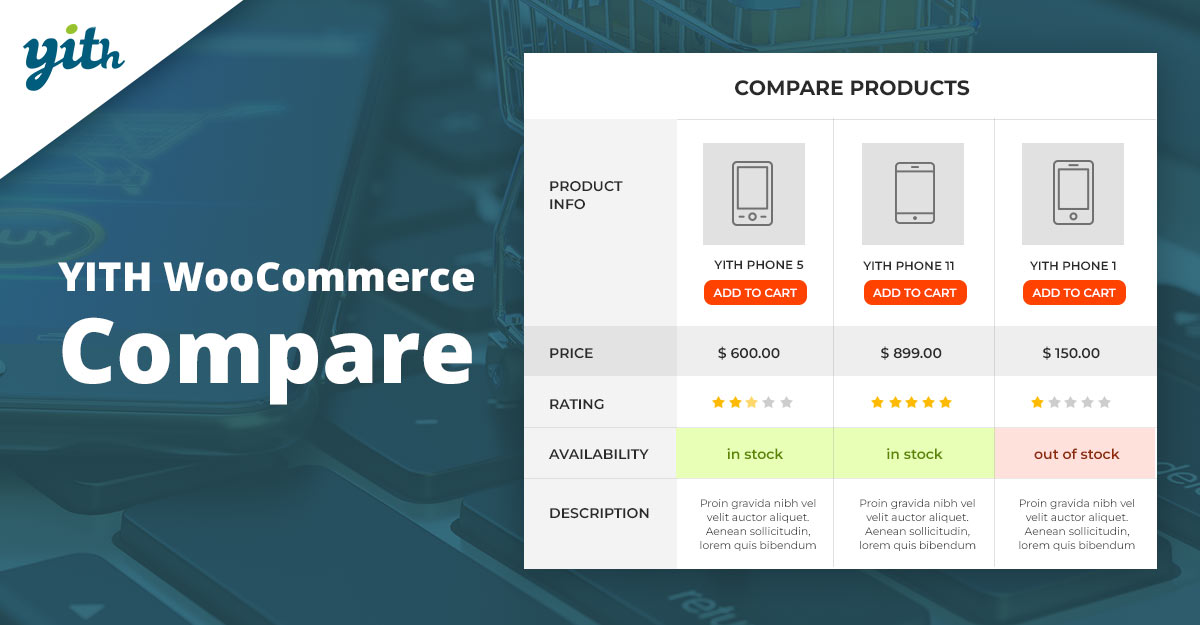
YITH’s popular solution brings a familiar UI and wide theme compatibility. Shoppers can add products from grids or single pages and open a comparison table that highlights differences by attribute. It ships with a handy widget to display the current list, plus plenty of style controls.
For teams already using the YITH ecosystem (wishlists, badges, quick-view), Compare integrates smoothly, offering a cohesive UX across the store.
Key features
- Table built from WooCommerce attributes
- Widget/shortcode support for compare lists
- Flexible button placement and labels
- Works nicely alongside YITH Wishlist/Quick View
Pricing: Freemium.
3. BeRocket Products Compare
BeRocket offers a free compare plugin that emphasizes attribute-based comparisons and straightforward styling. It’s a solid pick for stores seeking a no-cost start without compromising the essential UX patterns shoppers expect.
The developer maintains a larger suite of WooCommerce add-ons, so you can extend the experience with related tools if needed.
Key features
- Free core plugin with compare button + table
- Attribute and price comparisons
- Theme-friendly templates
- Hooks/filters for deeper customization
Pricing: Free (with paid BeRocket add-ons available).
Also Read: Best WooCommerce Plugins Product Countdown
4. WPC Smart Compare for WooCommerce
WPClever’s Smart Compare focuses on speed and modern UX. AJAX powers almost every interaction, which means adding/removing items and opening the table feels instant. Handy touches—like drag-and-drop reordering and mobile-aware layouts—make it feel more like an app than a static table.
It plays well with WPC’s Wishlist/Quick View, giving you a lightweight, modular toolkit to craft a cohesive browsing flow.
Key features
- AJAX-first interactions; minimal page reloads
- Drag-and-drop product order in the compare bar
- Flexible table layout and visibility rules
- Category-based button visibility
Pricing: Freemium.
5. Products Compare for WooCommerce (WP.org)
This community plugin adds the fundamentals: a compare button, a list manager, and a comparison table that pulls from your product attributes. If you want to validate whether WooCommerce Plugins Compare will help your store before upgrading to premium, this is a pragmatic starting point.
Its simplicity is a strength. There’s less to configure, so you can go live quickly and gather real behavior data from shoppers.
Key features
- One-click add/remove to a compare list
- Attribute-driven comparison table
- Shortcodes/widgets for flexible placement
- Good starter option for MVP testing
Pricing: Free.
6. WooBeWoo WooCommerce Product Comparison
WooBeWoo’s plugin opens a polished pop-up table so shoppers never lose their place while browsing. The table can be styled extensively—great for brands that want tighter visual control without heavy custom code.
Beyond design, it offers practical options like attribute management, image toggles, and calls-to-action inside the table to keep momentum toward add-to-cart.
Key features
- On-page pop-up comparison table
- Fine-grained control over displayed attributes
- Add to cart from the table (when supported)
- Styling options to match brand guidelines
Pricing: Freemium/Paid.
Also Read: Best WooCommerce Plugins SMS Notifications
7. ShopEngine Product Comparison Module
If the store uses Elementor, ShopEngine’s comparison module is compelling. Drop a comparison widget anywhere, tweak it visually, and ship a head-to-head table that feels native to your layout. It’s part of a broader WooCommerce builder, so you can pair it with badges, quick checkout, and more.
For teams that iterate with page builders, this module saves development time while keeping flexibility high.
Key features
- Elementor widget for drag-and-drop placement
- Customizable compare table with builder controls
- Plays nicely with other ShopEngine modules
- Good documentation and examples
Pricing: Freemium/Paid (as part of ShopEngine).
8. JetCompare&Wishlist (Crocoblock)
JetCompare&Wishlist adds both comparison and wishlist functionality for Elementor sites. You get compare buttons, a counter, and a table component—all designable within the builder. That makes it ideal for highly branded stores that prototype and ship directly from Elementor.
The plugin exposes granular controls so you can decide exactly which fields appear and how they stack on mobile, without touching PHP templates.
Key features
- Compare & wishlist in one package
- Elementor widgets (buttons, list, count, table)
- Choose any data/attributes to compare
- Fast setup with visual design workflow
Pricing: Paid (annual or suite bundle).
Also Read: Best WooCommerce Plugins Affiliates
9. Compare Products for WooCommerce (WP.org)
This plugin provides a compare widget “basket” and an on-page table that highlights differences across attributes and price—delivering the core experience shoppers expect from comparison tools.
It’s a sensible option for lean builds or as a stepping stone before graduating to a premium, design-heavy solution.
Key features
- Compare widget + detailed table
- Attribute-based fields with sorting
- Lightweight and theme-agnostic
- Open-source flexibility
Pricing: Free.
10. WooCommerce Better Compare (weLaunch)
WeLaunch’s premium plugin centers on robust comparison tables with lots of toggles for data selection, filtering, and design. If you need fine-tuned control and enterprise-ready options out of the box, this one belongs on your shortlist.
The result is a polished, performant UI that can scale across large catalogs while keeping the interaction smooth on mobile.
Key features
- Highly customizable comparison table
- Rich data selection and attribute controls
- Attention to performance and UX polish
- Premium support and ongoing updates
Pricing: Paid (one-time via marketplace).
Also Read: Best WooCommerce Plugins Badge Management
Quick comparison table
| Plugin | Why choose it | Pricing |
|---|---|---|
| Kestrel Products Compare | Native, clean, dependable | Paid (annual) |
| YITH WooCommerce Compare | Popular, integrates with the YITH suite | Freemium |
| BeRocket Products Compare | Solid free starter | Free |
| WPC Smart Compare | Fast AJAX UX, mobile-friendly | Freemium |
| Products Compare (WP.org) | MVP-ready, attribute-driven | Free |
| WooBeWoo Comparison | Stylish pop-up table, CTA-friendly | Freemium/Paid |
| ShopEngine Comparison | Elementor widget flexibility | Freemium/Paid |
| JetCompare&Wishlist | Compare + wishlist combo | Paid |
| Compare Products (WP.org) | Widget + table, open-source | Free |
| WeLaunch Better Compare | Enterprise-grade controls | Paid (one-time) |

Which plugin is right for your store?
If the goal is a clean, native experience with minimal setup, Kestrel and YITH stand out. Teams building with Elementor often prefer ShopEngine or JetCompare&Wishlist for visual control. For a quick free pilot, start with BeRocket or the WP.org options, then graduate to a premium tool once analytics confirm impact.
Whichever route you choose, keep comparison tables focused. Highlight 6–10 attributes that truly move decisions, and test the order on mobile screens first—where most shoppers will use WooCommerce Plugins Compare features.
Interesting Reads:
Best WooCommerce Plugins Customize My Account Page




