Customer subscriptions are one of the most powerful revenue models in eCommerce. However, every subscription cycle has one major challenge: renewals. Keeping customers engaged long enough to renew their subscription is vital for long-term profitability. That’s where Personalized Subscription Renewal Reminder Emails in WooCommerce come in.
By creating reminder emails that feel personal, helpful, and relevant, you can significantly reduce churn rates while improving customer satisfaction. WooCommerce makes it possible to set up these reminders, but the real magic happens when you tailor them to the customer’s journey. In this guide, we’ll explore why personalized renewal reminders matter, how to craft them effectively, and how to use the Subscriptions Renewal Reminders plugin to automate the process step by step.

What Are Personalized Subscription Renewal Reminder Emails in WooCommerce?
At its core, a subscription renewal reminder email is a message sent to subscribers before their subscription is set to renew. Instead of sending a generic note, Personalized Subscription Renewal Reminder Emails in WooCommerce take the experience a step further by addressing each customer individually, referencing their purchase history, preferences, or behaviors.
For example, instead of saying “Your subscription is renewing soon,” you could say “Hi Sarah, your monthly coffee beans subscription will renew next week. We’ve selected your favorite blend again!” This small change makes the customer feel valued and understood.
Personalized renewal reminders also play an educational role. They remind customers what benefits they’re about to continue enjoying, highlight any new perks, and provide an easy way to manage their subscription. WooCommerce gives businesses the flexibility to automate these reminders, but personalization ensures they don’t get lost in a crowded inbox.
Why Personalization Matters for Renewal Reminders
Generic emails are easy to ignore. Customers receive dozens of notifications daily, so sending the same plain reminder as everyone else lowers your chances of engagement. On the other hand, Personalized Subscription Renewal Reminder Emails in WooCommerce grab attention because they speak directly to the individual.
Personalization can also reduce churn. Many cancellations happen because customers forget why they signed up or don’t feel connected to the service. When your emails remind them of the value they’ve received and the convenience of staying subscribed, they’re more likely to let the renewal go through.
Moreover, personalized reminders show that your brand understands its customers. This builds trust and loyalty, which are crucial for recurring revenue businesses. Over time, these small touches can turn one-time subscribers into long-term advocates.
The Key Ingredients of a Strong Renewal Reminder
Crafting effective Personalized Subscription Renewal Reminder Emails in WooCommerce requires more than just adding a customer’s first name. A successful reminder has several important elements that encourage renewals:
- Timing: Send the reminder well before the renewal date (e.g., 7 days, 3 days, and 1 day before).
- Clear Messaging: Clearly state when the subscription will renew and how much it will cost.
- Value Highlight: Remind subscribers what they’re gaining by continuing.
- Call to Action (CTA): Provide easy links to manage, upgrade, or continue the subscription.
- Support Access: Include contact details if they have questions.
When all of these elements work together, your reminders transform from simple alerts into customer-focused experiences that drive action.
How to Send Personalized Subscription Renewal Reminder Emails in WooCommerce
WooCommerce provides the foundation, but to fully unlock the potential of personalized reminders, you can use the Subscriptions Renewal Reminders plugin. This tool automates reminder scheduling, message customization, and delivery. Let’s walk through the process step by step.
Step-by-Step Setup Guide
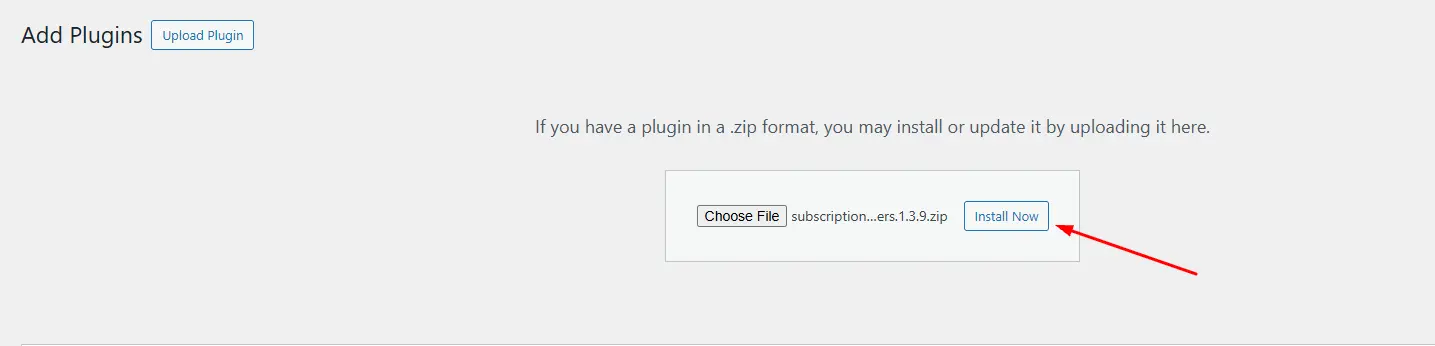
Step 1: Install the Plugin
- Navigate to your WordPress dashboard.
- Go to Plugins > Add New.
- Search for Subscriptions Renewal Reminders.
- Click Install Now and then Activate.
Step 2: Configure General Settings
- Once activated, go to WooCommerce > Settings > Subscriptions Renewal Reminders.
- Set the default timing for reminders (e.g., 7 days before renewal).

Step 3: Customize Email Content
- Write personalized subject lines such as “[First Name], your subscription is about to renew!”
- Add placeholders for dynamic data like subscription name, renewal date, and payment amount.

Step 4: Test Your Emails
- Use test accounts to make sure the emails appear correctly.
- Check personalization tags and CTA links.

This workflow ensures that your Personalized Subscription Renewal Reminder Emails in WooCommerce are delivered reliably and in a way that resonates with your audience.
Crafting the Perfect Message: Best Practices
Even with automation in place, the effectiveness of your reminder depends on how you craft the message. Start with a subject line that feels urgent but not pushy. Examples include: “We’re saving your spot, [First Name]” or “Your subscription is almost ready to renew.”
In the body, focus on clarity and reassurance. Instead of only stating the renewal date, highlight the benefits of staying subscribed. If you offer exclusive content, discounts, or premium support, now is the time to remind them. Always include a clear and visible button for managing their subscription.
Consistency in tone and branding also matters. Your reminder emails should sound like your brand’s voice—friendly, professional, or playful—depending on your customer base. The right tone makes the reminder feel natural rather than transactional.
Personalization Tactics That Drive Renewals
Personalization doesn’t stop at adding a customer’s name. Here are several creative ways to make your Personalized Subscription Renewal Reminder Emails in WooCommerce stand out:
- Purchase History References: Mention the exact products or services they’ve enjoyed.
- Usage-Based Reminders: Highlight how many times they’ve accessed their subscription.
- Loyalty Rewards: Offer a discount code or bonus item for long-term subscribers.
- Upselling Opportunities: Suggest an upgrade if their usage indicates they need more features.
By combining these tactics, you can create renewal reminders that not only encourage renewals but also increase customer lifetime value.
Common Mistakes to Avoid
While setting up Personalized Subscription Renewal Reminder Emails in WooCommerce, businesses often fall into common traps. The first is overloading customers with too many reminders. Too many messages may feel spammy and lead to cancellations.
Another mistake is failing to test emails. A broken personalization tag or incorrect renewal date can confuse customers and damage trust. Always double-check details before sending.
Measuring the Success of Renewal Reminders
Sending reminders is only half the battle. To know if your strategy is working, track key performance indicators (KPIs). Look at open rates, click-through rates, and, most importantly, renewal conversion rates.
Over time, you’ll see patterns. For example, you may notice that customers are more responsive to reminders sent three days before renewal than seven days before. Use this data to fine-tune your schedule and messaging.
Additionally, collect customer feedback. If some customers reply saying the reminders were helpful, you’re on the right track. If others complain about frequency, adjust accordingly. Measurement ensures your Personalized Subscription Renewal Reminder Emails in WooCommerce evolve with your audience.
Future-Proofing Your Renewal Strategy
Technology and customer behavior continue to change. That’s why it’s important to keep refining your reminder strategy. Consider integrating SMS or push notifications alongside emails. Offering multiple channels increases the chances of reaching customers effectively.
Artificial intelligence can also play a role in the future. Predictive analytics can help determine the best time to send reminders based on each customer’s habits. Combining AI insights with WooCommerce tools ensures your reminders remain relevant and effective.

Closing Remarks: Elevating the Renewal Experience
Subscription renewals are not just about preventing churn—they’re about reinforcing value and building stronger customer relationships. By sending Personalized Subscription Renewal Reminder Emails in WooCommerce, you’re not only reminding customers of an upcoming charge but also reassuring them about the benefits they receive.
Using the Subscriptions Renewal Reminders plugin, you can automate the process, customize messaging, and measure results with ease. The key lies in combining automation with personalization. When done correctly, renewal reminders can transform from simple alerts into strategic touchpoints that strengthen loyalty and boost revenue.
Interesting Reads:
How to Set Up Wholesale Order Forms and Custom Registration for B2B Customers in WooCommerce