Offering free shipping after a threshold is one of the simplest — and most effective — incentives you can give customers. Studies repeatedly show that shipping costs are a top reason for cart abandonment, and stores that offer free shipping over a certain amount often see higher average order values. If you want to make shipping free after a minimum order amount in WooCommerce, you don’t need custom code or expensive add-ons: WooCommerce includes built-in settings that let you configure a free-shipping threshold tied to cart totals or coupons.
In this guide, you’ll learn why a free shipping threshold works, how to set it up using WooCommerce’s shipping zones and methods, how to test and present the offer on your store, plus best practices and common mistakes to avoid. By the end, you’ll be able to create a clear, measurable free shipping strategy that boosts conversions and increases your average order value.

Why Offer Free Shipping After a Minimum Order Amount?
This strategy is widely used because it effectively encourages customers to spend more while enhancing their shopping experience.
- Free shipping acts as a powerful psychological trigger. When customers see a clear, attainable goal—like “Spend $50 more to get free shipping”—they’re motivated to add extra items to their cart to hit that target.
- It also boosts your average order value (AOV). Many shoppers who might have abandoned their carts decide to purchase a small additional item just to qualify for free shipping, increasing overall revenue without drastically reducing margins.
- Moreover, it reduces friction at checkout. Transparent messaging about free shipping eliminates unexpected costs that commonly lead to cart abandonment.
For ecommerce businesses, setting a well-thought-out free shipping threshold balances encouraging larger orders with maintaining profitability. Choosing the right minimum order amount and factoring in actual shipping expenses ensures this tactic works to your advantage.
Key Terms You Should Know
Before diving into the WooCommerce settings, it helps to understand a few important terms and concepts you’ll encounter throughout this guide:
- Free shipping threshold / Free shipping over amount: The minimum cart total a customer must reach to qualify for free shipping.
- Minimum order for free shipping: Another way to describe the free shipping threshold.
- Shipping zone: A geographic region defined in WooCommerce where specific shipping rules and methods apply.
- Shipping method: The type of delivery option offered to customers, such as Flat Rate, Free Shipping, or Local Pickup.
- Cart total: The total value of items in a shopper’s cart. Depending on your store’s settings, this may include or exclude taxes and fees.
Understanding these terms will help you set up and manage free shipping effectively in WooCommerce.
How WooCommerce Calculates Free Shipping (Overview)
WooCommerce includes a built-in Free Shipping method that you can add to any shipping zone. This method can be configured with three types of requirements:
- A valid free shipping coupon — Free shipping is granted only if the customer applies a specific coupon that enables free shipping.
- A minimum order amount — Free shipping is activated automatically when the cart subtotal reaches or exceeds a predefined amount.
- Both coupon and minimum order amount — Free shipping requires the customer to meet both conditions: applying the coupon and reaching the minimum order total (this option is less commonly used).
In this guide, we’ll focus on the second option — setting a minimum order amount — and use WooCommerce’s native settings to automatically offer free shipping once customers meet that cart total.
Step-by-Step: Make Shipping Free After a Minimum Order Amount in WooCommerce
Follow these steps in your WooCommerce dashboard to set up free shipping based on a minimum order amount. You can capture screenshots during each step for easy reference and test your settings afterward.
Step 1. Confirm Your Currency, Units, and Tax Settings
Before configuring free shipping, verify the basic settings to ensure your free shipping threshold calculates correctly:
-
Navigate to WooCommerce → Settings → General and confirm your Currency and Currency Position are set properly.

-
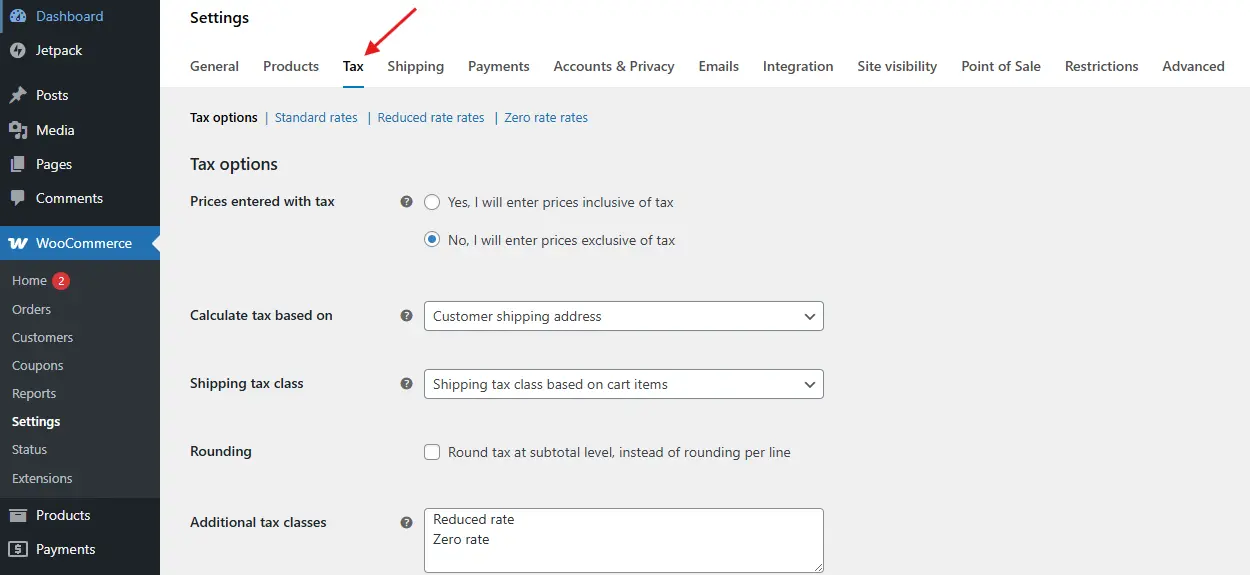
Decide if your free shipping threshold should include taxes and/or shipping fees. If you have taxes enabled, go to WooCommerce → Settings → Tax and review how cart totals are displayed.
-
Make sure your product prices and shipping costs use consistent units (e.g., dollars, centimeters).
Why this matters: If your threshold is $50 but WooCommerce calculates the subtotal including taxes differently than your messaging, customers might get confused by inconsistent free shipping availability.
Step 2. Set Up (or Edit) a Shipping Zone
Free shipping is applied within specific geographic regions known as shipping zones.
-
Go to WooCommerce → Settings → Shipping → Shipping Zones.
-
Select an existing zone for your target region (e.g., “United States” or “Local Delivery”), or click Add shipping zone to create a new one.

-
Name the zone (for example, US – Continental).
-
Select the applicable regions, such as countries, states, or postal codes.
-
Click Save changes.
Tip: Many stores create separate zones for domestic, national, and international shipping. Set free shipping only in zones where it makes financial sense.
Step 3. Add the Built-in Free Shipping Method to the Zone
-
Within your chosen shipping zone, click Add shipping method.
-
From the dropdown, select Free shipping and click Add shipping method.

-
You will now see Free shipping listed among the zone’s shipping methods. Click Edit to configure it.
Step 4. Configure the Free Shipping Requirement: Minimum Order Amount
Inside the Free shipping settings, find the option labeled Free shipping requires. You will see several options:

-
N/A (no requirements): Free shipping is always available (rarely used).
-
A valid free shipping coupon: Free shipping applies only with a coupon.
-
A minimum order amount: Free shipping activates automatically at a set cart subtotal.
-
A minimum order amount OR a coupon: Free shipping applies if either condition is met.
-
A minimum order amount AND a coupon: Requires both conditions to be true (less common).
Choose A minimum order amount, then enter your threshold amount — for example, 50 for $50. Save your changes.
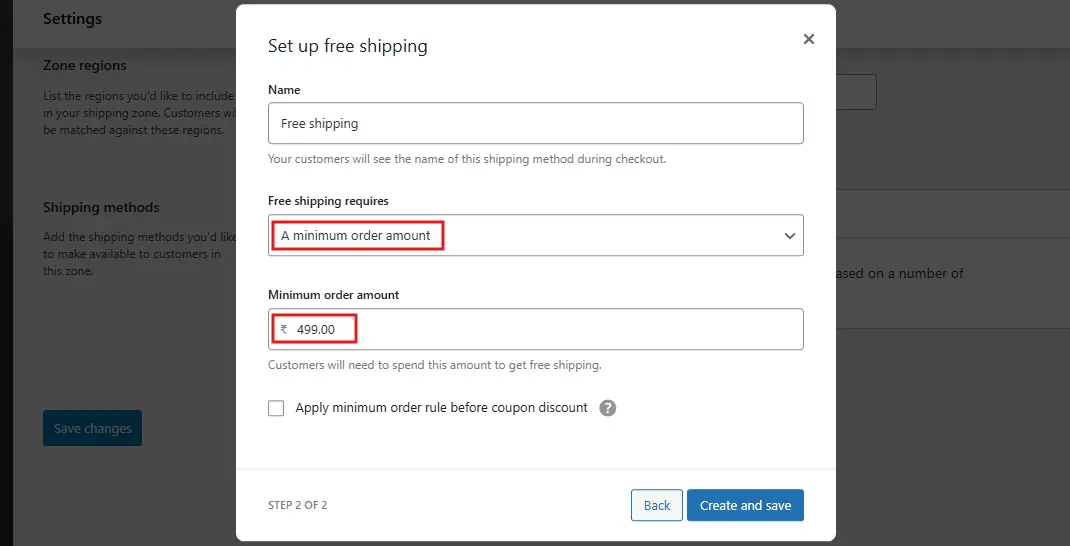
Important: Confirm if WooCommerce measures the minimum using the cart subtotal, excluding or including taxes, as your store’s tax settings may affect this.
Step 5. (Optional) Offer Free Shipping via Coupon Too
If you want to offer free shipping as a special promotion or for VIP customers, you can create a coupon that enables free shipping regardless of cart total:
-
Go to WooCommerce → Marketing → Coupons (or WooCommerce → Coupons in some versions).
-
Click Add coupon and enter a coupon code (e.g.,
FREESHIPVIP). -
Under Coupon data → General, check the box for Allow free shipping.
-
Set usage limits or expiry dates under Usage restrictions and Usage limits if needed.
-
Publish the coupon.
If your free shipping method is set to require a Minimum order amount OR a coupon, customers can use this coupon to unlock free shipping even if they don’t meet the minimum order threshold.
Step 6. (Optional) Combine Free Shipping with Flat Rate or Local Pickup
You can offer multiple shipping methods within the same zone:
-
Keep Flat Rate or Local Pickup as the default paid options.
-
Add Free shipping with your minimum order amount condition.
During checkout, WooCommerce will display all available shipping methods, but free shipping will only be selectable once the customer’s cart total reaches the threshold. This gives customers an incentive to increase their order size to unlock free shipping.
Best Practices: Choosing the Right Minimum Order Amount
The success of your free shipping offer largely depends on setting the right minimum order amount.
Start by calculating your store’s average order value (AOV). Set your free shipping threshold slightly above this number to encourage customers to add extra items. For example, if your AOV is $42, a $50 threshold can motivate buyers to increase their cart size just enough to qualify for free shipping.
Next, consider your shipping costs and profit margins. If your average shipping cost is $8, ensure that customers adding low-margin or inexpensive products to reach the threshold won’t eat into your profits. You might exclude certain low-margin items or set higher thresholds for specific product categories.
Additionally, use tiered free shipping strategies for different regions. For instance, offer free shipping at $50 for domestic orders but raise the threshold to $150 for international shipments to account for higher costs.
Common Mistakes and How to Avoid Them
When setting up free shipping after a minimum order amount, be mindful of these common pitfalls:
-
Setting the threshold too low: While a low threshold can increase orders, it may erode your profit margins.
Fix: Base your threshold on your average order value (AOV) plus a buffer to cover shipping costs. -
Not testing zone boundaries: Free shipping might appear for customers outside your intended shipping zones.
Fix: Test checkout from different IP addresses or use shipping addresses inside and outside your zones to ensure accuracy. -
Confusing messaging: Vague or unclear rules can frustrate shoppers and cause cart abandonment.
Fix: Communicate terms like “Free shipping on orders over $50. Bulky items excluded.” -
Ignoring taxes and fees: Misalignment between how the subtotal is calculated and displayed can confuse customers.
Fix: Verify if taxes are included in your subtotal calculations and reflect this in your messaging. -
Assuming one-size-fits-all: International shipping costs vary widely and require separate thresholds or policies.

Unlock Growth with Smart Free Shipping Thresholds
Offering free shipping after a minimum order amount is a powerful strategy to boost your average order value, reduce cart abandonment, and enhance customer satisfaction. By carefully setting the right threshold in WooCommerce and aligning it with your business costs and customer expectations, you can turn shipping into a sales driver rather than a cost burden.
Using WooCommerce’s built-in free shipping settings makes it easy to implement this tactic without extra plugins. Remember to test your zones, communicate clear messaging, and adjust thresholds based on data and feedback.
Ultimately, a well-planned free shipping policy creates a win-win: customers enjoy savings, and your store benefits from higher revenue and loyalty.
Interesting Reads:
How to Restrict Shipping and Payment Options in WooCommerce