


Online learning has taken the world by storm. Whether you’re an educator, entrepreneur, or expert in your field, selling online courses is one of the best ways to share knowledge while generating a steady income. But the real challenge lies in setting up the right platform that offers flexibility, customization, and an excellent user experience. That’s where WordPress comes in! If you’re wondering how to sell online courses on WordPress, you’re in the right place. In this blog, we’ll discuss why you need to choose WordPress for selling online courses and how to sell online courses on WordPress.

Why Choose WordPress for Selling Online Courses?
WordPress is undoubtedly one of the most powerful platforms for selling courses online. Unlike hosted LMS platforms, it gives you complete control over your content, branding, and monetization strategies. Plus, with the right plugins, you can create an engaging and interactive learning experience for your students.
If you’re looking for a seamless solution, Wbcom Designs offers everything you need to transform your WordPress website into a full-fledged e-learning platform. With their expertly designed themes and LMS plugins, you can build, market, and sell courses without any technical hassle.
How to Sell Online Courses on WordPress?
1. Setting Up Your Online Course Website on WordPress
The first step to selling online courses on WordPress is setting up your website. You’ll need a domain, hosting, and of course, WordPress installed. Once that’s done, you can choose an LMS (Learning Management System) plugin to manage your courses effectively.
For hosting, you could use our personal preferences as they are beginner-friendly, have great community around them and the customer support is really impressive.
As for themes, we offer ready-made solutions that integrate perfectly with leading LMS plugins like LearnDash, Tutor LMS, and LifterLMS. These plugins allow you to create structured courses, add quizzes, track student progress, plan Zoom meetings and even issue certificates upon completion.
Setting LearnDash LMS
Hopefully you have all other prerequisites done you can download LearnDash LMS, a user-friendly dashboard will be added to your backend.

Now you’ll have the option to select an inbuilt design from LearnDash library or customize according to your business needs. Then you can set up payment using stripe and manage your courses from one place. There is a guided setup to help you.

2. Designing an Engaging Learning Experience
A good online course isn’t just about uploading videos and PDFs; it’s about creating an engaging experience that keeps students motivated. With Wbcom Designs’ LMS-friendly themes, you can customize course layouts, create interactive discussion forums, and offer gamification features to boost student engagement.
Additionally, features like course drip-feeding, progress tracking, and live sessions can enhance the learning experience, making your courses more valuable and appealing to students.
Setting up LearnDash Dashboard
So done with the previous steps, we can step up LearnDash Dashboard for better and extended functionalities

3. Monetizing Your Online Courses

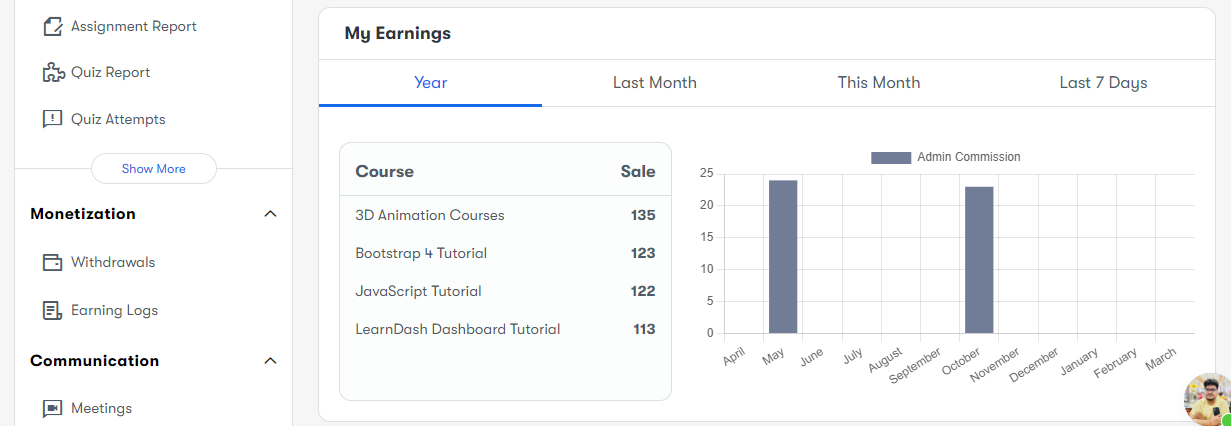
Selling online courses on WordPress is not just about content; it’s also about smart monetization. You can choose different pricing models depending on your target audience and course offerings.
Some of the most effective monetization strategies include:
-
One-time payments – Charge a fixed price for lifetime access.
-
Subscription-based access – Offer courses as part of a monthly or annual membership.
-
Bundled courses – Create package deals to increase sales.
-
Free courses with upsells – Attract students with a free course and upsell premium content.
With WooCommerce integration, you can set up secure payment gateways, offer discounts, and manage transactions effortlessly. Wbcom Designs ensures that all their LMS solutions work seamlessly with WooCommerce, making the entire selling process smooth and hassle-free.
4. Marketing Your Online Courses for Maximum Sales
Once your courses are ready, you need an effective marketing strategy to attract students. SEO plays a crucial role in getting your courses discovered online. By optimizing your website for keywords like “sell online courses on WordPress”, you can improve search rankings and drive organic traffic.
Other marketing strategies include:
-
Content marketing – Start a blog, create YouTube videos, or write guest posts to establish authority.
-
Social media promotion – Leverage platforms like Facebook, Instagram, and LinkedIn to reach potential students.
-
Email marketing – Build an email list and send newsletters to engage and convert leads.
-
Affiliate marketing – Partner with influencers or bloggers to promote your courses.
Wbcom Designs provides SEO-friendly themes and marketing automation tools that can help you execute these strategies effectively, ensuring maximum reach and conversions.
5. Securing Your Online Course Content
One of the biggest concerns for course creators is content security. You don’t want unauthorized users accessing or downloading your premium content for free. WordPress allows you to protect your courses with content restriction and DRM (Digital Rights Management) features.
With Wbcom Designs’ security-focused solutions, you can implement features like login restrictions, watermarked videos, and encrypted content downloads to keep your courses safe from piracy and unauthorized sharing.
To try a demo of all the features and more, visit here.
Take the Next Step
Selling online courses on WordPress doesn’t have to be complicated. With the right tools and strategies, you can create a highly successful e-learning business that attracts students and generates revenue.
Wbcom Designs offers premium WordPress themes and LMS plugins that help you build a professional and fully functional online course platform with ease. Whether you need customization, technical support, or expert guidance, their team is ready to assist you at every step.
So why wait? Start selling your online courses on WordPress today with Wbcom Designs and turn your knowledge into profit!

Interesting Reads
Choosing the Best LMS for Your Reign-Powered Site: LearnDash, LifterLMS & More


