When managing a WordPress community, knowing how to schedule posts ahead in BuddyPress is essential—not optional. Whether you’re running a social network, membership site, or internal team hub, regular activity updates are the heartbeat of engagement. Studies reveal that consistent posting can boost user retention by up to 80%, while irregular updates lead to a 60% drop in members. Hootsuite also emphasizes that consistency builds audience trust across digital platforms. But staying online 24/7 to post manually isn’t realistic.ealistic.
That’s where scheduled posting changes the game. With the right plugin, you can build a content calendar and publish activity updates automatically—even when you’re offline. This keeps your community active while improving team workflows, campaign execution, and engagement strategies.
In this guide, we’ll show you exactly how to use the BuddyPress Schedule Activity plugin to automate your posts, save time, and maintain consistency—without the stress of manual publishing.

Why Scheduling Posts Matters for Online Communities
Consistency is the backbone of any thriving community. Whether you’re nurturing a group of learners, customers, or collaborators, staying visible builds trust and connection over time.
However, relying on real-time posting has its limits:
- You might miss optimal posting windows for your global audience.
- You’re more prone to burnout, mistakes, and last-minute scrambling.
- Community engagement can become inconsistent and reactive.
Scheduling posts allows you to maintain a regular presence, even if your actual work hours don’t align with your community’s most active periods. With tools like BuddyPress Schedule Activity, admins can schedule updates, event announcements, tips, or conversation starters well in advance.
Think of it as social media scheduling—but for your WordPress-powered private community.
What Is the BuddyPress Schedule Activity Plugin?
BuddyPress Schedule Activity is a powerful WordPress plugin designed to extend the functionality of BuddyPress and BuddyBoss Platform by adding one key feature: the ability to schedule activity updates for future posting. Whether you’re managing a busy community, an internal team hub, or a learning platform, this plugin helps you maintain a consistent content flow—even when you’re not online.
Key Features:
- Schedule posts for any future date and time with a built-in calendar interface.
- Compatible with Groups, Member Profiles, and the Global Activity Feed.
- Fully integrates with the core BuddyPress Activity component, with no extra setup.
- Honors user roles and permissions, so only allowed users can schedule posts.
- Runs on the native WordPress cron system to ensure posts are published as scheduled.
For community managers, it reduces the need for constant check-ins and manual updates. For marketers, educators, and content teams, it creates a reliable framework for planning and automating community communication.
How to Install and Set Up BuddyPress Schedule Activity
Getting started with BuddyPress Schedule Activity is quick and easy. This plugin is built to work seamlessly with WordPress, BuddyPress, and BuddyBoss Platform, so you can start scheduling posts in just a few minutes.
Step 1: Download the Plugin
First, purchase and download the plugin from the official Wbcom Designs product page. You’ll receive a .zip file containing the plugin package.
Step 2: Install the Plugin on WordPress

- Go to your WordPress dashboard.
- Navigate to Plugins > Add New > Upload Plugin.
- Click Choose File, select the downloaded .zip file, then click Install Now.
- After installation, click Activate Plugin.
Step 3: Configure Plugin Settings
Once activated:
- Go to Dashboard > BuddyPress > Schedule Activity (or via the BuddyBoss equivalent).
- Choose whether to enable scheduling for members, admins, or both.
- Select where scheduling is allowed—profiles, groups, or both.
- Set default behavior, such as time format or allowed scheduling range.
There’s no need for any coding or template modifications. Everything integrates smoothly with the existing BuddyPress activity post interface.
That’s It!
You’re now ready to schedule posts from your activity feed or group pages with just a few clicks. The plugin works automatically using the WordPress cron system, ensuring your scheduled posts go live at the right time—even if you’re not logged in.
How to Schedule a Post (Step-by-Step Guide)
Once the BuddyPress Schedule Activity plugin is installed and activated, scheduling posts becomes a seamless part of your community workflow. Here’s exactly how to do it—no technical experience required.
Step 1: Navigate to the Activity Feed
Go to the area where you typically post an activity update:
- Your member profile
- A group feed
- The site-wide activity stream
Wherever BuddyPress allows activity updates, the plugin will automatically extend the posting interface.
Step 2: Write Your Post

Just like you would with any standard update:
- Type your message in the activity box.
- Add links, emojis, media, or @mentions—whatever you normally include in your posts.
Step 3: Choose a Date and Time
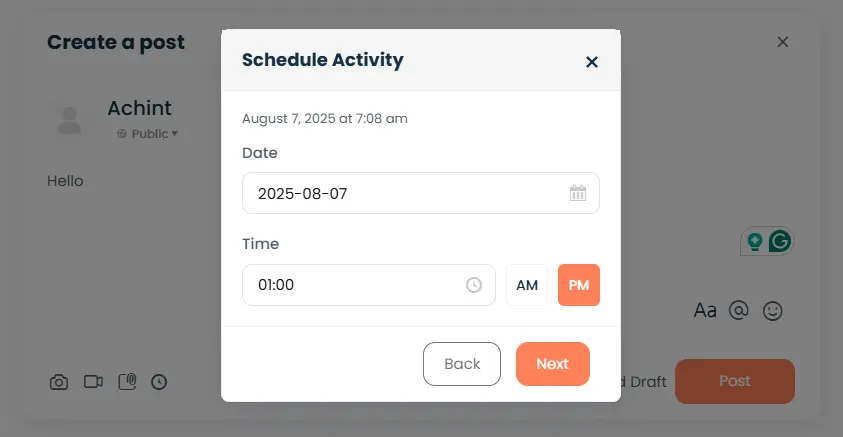
Below the post box, you’ll now see an option to schedule your post:
- Click on the calendar icon or date field.
- Select the desired date and time for the post to go live.
- Make sure your server timezone is properly set under WordPress > Settings > General.
Step 4: Click “Schedule”
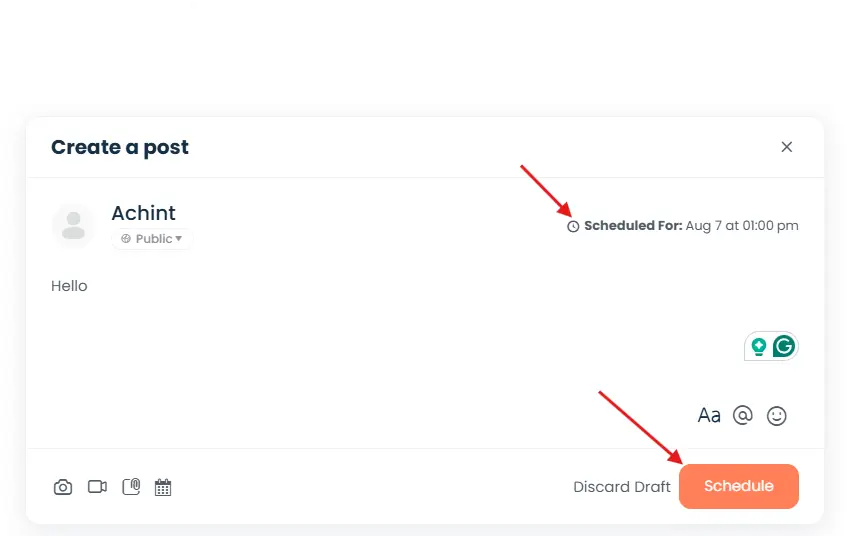
Once your content is ready and the date/time is selected:
- Instead of the usual “Post Update” button, you’ll now see a “Schedule” button.
- Click it—and you’re done!
Your activity update is now queued and will be published automatically at the time you selected.
Bonus: Edit or Cancel Scheduled Posts
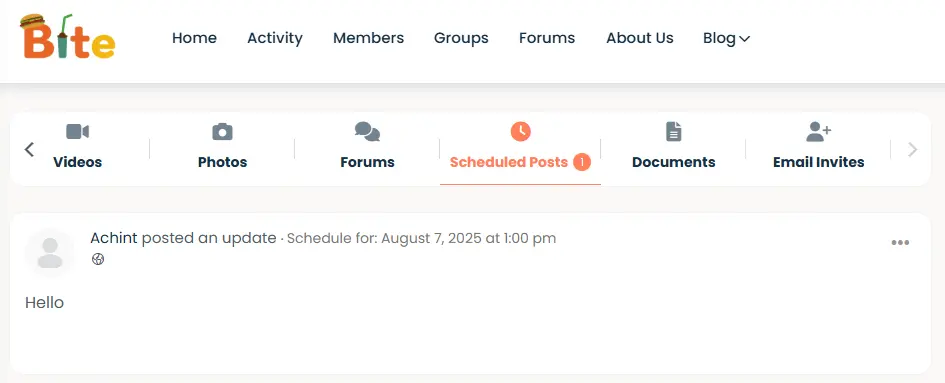
If you change your mind:
- Go to your profile or dashboard.
- Look for the Scheduled Posts section (enabled via settings).
- From here, you can edit, reschedule, or delete any upcoming posts.
This gives you complete control over your content calendar without having to rely on third-party tools.
Benefits of Using BuddyPress Schedule Activity
The BuddyPress Schedule Activity plugin isn’t just about convenience—it’s a tool that enhances your entire content and community strategy. Here’s how it helps WordPress site owners and community managers create a better experience for their users.
1. Consistency Without the Stress
With scheduled posting, your community stays active—even when you’re not. Whether you’re traveling, away for the weekend, or managing multiple projects, your updates will still go live as planned. No more setting reminders to post manually.
2. Improved Engagement
Communities thrive on rhythm. When members know they can expect regular updates—like weekly prompts, announcements, or tips—they’re more likely to return, engage, and contribute. Scheduled posts help you maintain that rhythm effortlessly.
3. Time-Saving Workflow
Instead of logging in every day to post, you can block out time once a week (or month) to create and schedule content in batches. This streamlined approach saves time and reduces daily decision fatigue.
4. Better Planning Across Teams
If you’re working with content creators, moderators, or marketing teams, scheduling makes collaboration smoother. Everyone can contribute content ahead of time, align on messaging, and avoid last-minute scrambles.
5. Increased User Trust
A community that appears well-maintained and frequently updated sends a powerful message: someone is actively managing it, and the platform is alive. Scheduled posts help you build this consistency, which in turn builds member trust and retention.
Real Use Cases: When Scheduled Posting Helps Most
Scheduled activity posts aren’t just a nice-to-have—they’re a game-changer for communities that thrive on structure, rhythm, and engagement. Whether you’re managing a niche group or a large membership platform, here are some practical ways this feature can streamline your efforts:
Weekly Community Challenges: Kick off each week with a fresh prompt, challenge, or discussion topic. By scheduling these ahead of time, you build anticipation and give your members a reason to return regularly—without needing to be online every Monday.
Event Reminders: Hosting a Webinar, Q&A, or Virtual Meetup? You can schedule multiple announcements leading up to the event—such as one week before, one day before, and one hour before—to maximize attendance and engagement.
Course Drip Content: If your WordPress community includes eLearning or training, scheduled posts can support your curriculum. Pre-schedule lessons, tips, and reminders to roll out on specific dates that match your course timeline.
Team Collaboration: Using BuddyPress for internal communication? Scheduled updates can be used to share progress reports, task reminders, or meeting notes—ensuring important messages are delivered consistently, even outside of business hours.
Thought Leadership: Establish authority and maintain value by automating your best content—quotes, industry insights, or blog shares—at regular intervals. Scheduled thought leadership posts keep your feed fresh, especially when your team is offline or on holiday.

Consistency Is a Community Superpower
Growth in any WordPress-powered community isn’t just about features—it’s about showing up. Regular, timely updates foster connection, drive engagement, and build trust. But staying consistent doesn’t mean being glued to your screen.
With the BuddyPress Schedule Activity plugin, you gain the flexibility to plan ahead, automate your posts, and stay active—even when you’re offline. It’s the tool every community manager, educator, or site owner needs to simplify operations while keeping the community pulse strong.
Instead of scrambling to post updates in real time, you can focus on strategy, content quality, and user experience. Whether you’re launching a new community or maintaining a platform with thousands of members, scheduled activity posts help you stay organized, consistent, and impactful.
So go ahead—plan smarter, post with purpose, and let your WordPress community thrive on its rhythm.
→ Ready to take control of your posting schedule?
Download the BuddyPress Schedule Activity plugin and start automating your community today.
Interesting Reads:
How Web Hosting Impacts Website Speed, Security, and Uptime
10 Best WordPress Plugins for Security in 2025
Why Outdated Plugins Can Harm Your WordPress Site (And How Regular Maintenance Helps)