When it comes to online shopping, coupons are more than just codes. They’re powerful tools that influence purchasing behavior, boost customer loyalty, and improve overall sales. However, generic coupon codes often fail to make an impact. This is where the Smart Coupons plugin for WooCommerce steps in, giving businesses the power to customize coupon designs that align with their brand identity. By creating visually appealing and highly personalized coupons, businesses can not only attract attention but also provide an enhanced shopping experience.
What customizing coupon design in WooCommerce with Smart Coupons means, why it’s important, and how you can do it step by step. By the end, you’ll know how to turn your basic discounts into powerful branding assets.

What Does It Mean to Customize Coupon Design with Smart Coupons in WooCommerce?
Customizing coupon design goes beyond just adding a discount value. It’s about designing an offer that visually represents your store’s brand identity and creates a seamless customer experience. With Smart Coupons for WooCommerce, you gain the flexibility to personalize coupons in terms of look, feel, and functionality.
For instance, you can design coupons that appear as gift cards, promotional vouchers, or store credits. Instead of a bland discount code, shoppers see a professional, branded coupon that makes them feel like they’re receiving something special. These tailored coupon designs enhance trust and credibility while keeping your store’s branding consistent.
The Smart Coupons plugin also supports features like:
- Dynamic coupon styling with custom text, colors, and layouts.
- Printable coupon templates for offline promotions.
- Automatic coupon generation for bulk offers.
- Integration with email campaigns, ensuring your coupons look polished when delivered directly to inboxes.
Why Should You Customize Coupon Design with Smart Coupons in WooCommerce?
The importance of coupon customization lies in perception. A coupon is not just a price cut; it’s a branding opportunity. When customers receive a thoughtfully designed coupon, they view it as a value-added incentive instead of just a discount.
Here are key reasons why customization matters:
- Enhanced Customer Experience: A well-designed coupon feels exclusive, encouraging customers to use it immediately.
- Brand Consistency: Coupons that reflect your brand colors, fonts, and styles strengthen brand recognition.
- Higher Conversion Rates: Attractive coupons grab attention in emails, on websites, or in print, leading to increased redemption.
- Stronger Emotional Connection: Customers associate appealing designs with value and quality, fostering loyalty.
In short, customizing coupon design is not just about aesthetics; it’s a marketing strategy. By using Smart Coupons, WooCommerce store owners can elevate promotions into brand experiences that leave a lasting impression.
How to Customize Coupon Design with Smart Coupons in WooCommerce
The Smart Coupons plugin for WooCommerce makes customization user-friendly. Here’s how you can get started:
1: Install and Activate the Plugin
- Download the free Smart Coupons for WooCommerce plugin from WordPress.org.
- Install and activate it in your WooCommerce store.
- Navigate to the WooCommerce settings panel to configure initial options.

2: Create a New Coupon
- Go to WooCommerce > Coupons > Add New.
- Enter the coupon details such as name, code, and discount type (percentage, fixed, or free shipping).
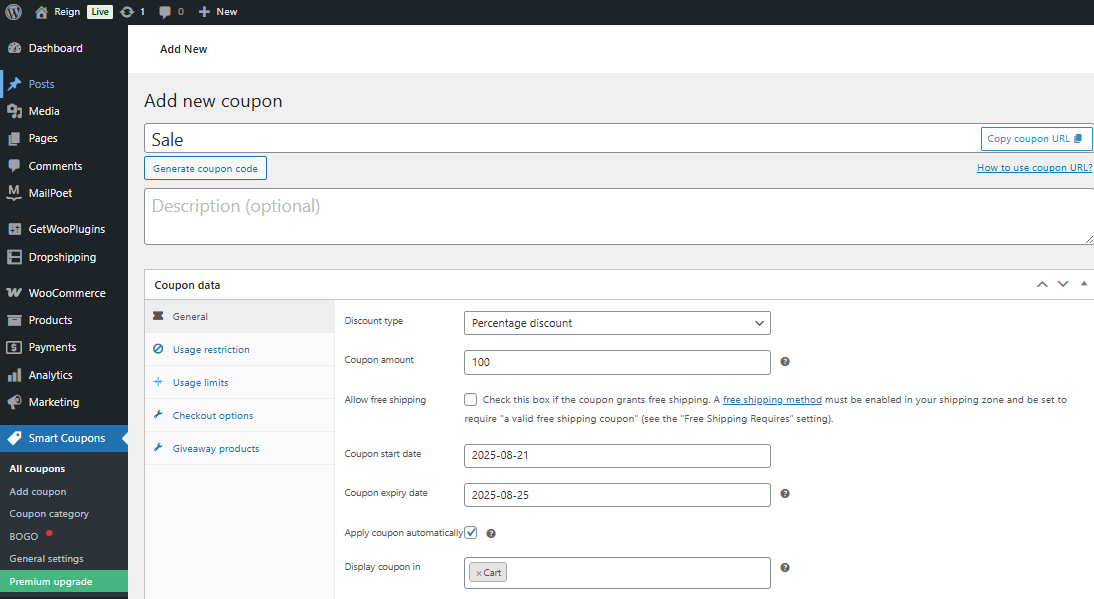
3: Customize the Coupon Appearance
This is where the magic happens. With Smart Coupons, you can:
- Add custom colors, backgrounds, and logos to align coupons with your brand.
- Personalize coupon messages with engaging text like “Exclusive Offer Just for You!” instead of plain discount terms.
- Format coupons to look like gift cards or vouchers, adding value perception.
- Enable printable versions so customers can use them offline.
4: Automate Coupon Distribution
- Set conditions for automatic coupon generation (e.g., after a purchase, during special campaigns, or via newsletters).
- Customize how the coupon looks in customer emails to ensure consistency across communication channels.
5: Test and Preview Your Coupons
- Preview your coupon designs before going live.
- Test them across different devices to ensure they look professional on both desktop and mobile.

By following these steps, you can fully leverage the plugin to design coupons that are both functional and visually appealing.
Key Features of Smart Coupons for WooCommerce That Support Custom Design
The plugin is loaded with features that make customization easier and more impactful. Some highlights include:
- Ready-to-use templates for different types of coupons.
- Personalization options for store credit, gift cards, and discounts.
- Shortcodes to display coupons on specific pages.
- Bulk generation and management of coupons for large campaigns.
- Email customization for a branded coupon delivery experience.
By combining these features with WooCommerce’s native capabilities, businesses can design coupons that stand out and convert.
Creative Ideas to Use Custom Coupon Designs
If you want your coupons to do more than offer discounts, think creatively about their design and distribution. Here are a few ideas:
- Holiday-Themed Coupons: Use festive designs to connect with seasonal shoppers.
- Loyalty Rewards: Create branded coupons as part of loyalty programs to retain customers.
- Exclusive Membership Coupons: Make premium members feel valued with elegant, personalized coupons.
- Event-Specific Coupons: Design coupons tailored to product launches, anniversaries, or special store events.
- Gift Card Style Coupons: Encourage gifting by creating professional coupon cards that customers can share with friends or family.
With Smart Coupons, your creativity is the only limit.
The Business Impact of Well-Designed Coupons
When you Customize Coupon Design with Smart Coupons in WooCommerce, you create more than just discounts—you shape customer perception and influence buying behavior. Well-crafted coupons offer several business advantages:
- Higher Redemption Rates
Attractive, easy-to-read coupons encourage more customers to use them. A clear design with strong visuals reduces confusion and motivates quick action. - Reduced Cart Abandonment
Coupons presented at the right time—such as during checkout—give shoppers the extra push to finalize their purchase. This helps reduce lost sales. - Increased Customer Loyalty
Personalized coupons make customers feel valued. When shoppers receive tailored offers, they are more likely to return, fostering long-term loyalty. - Brand Consistency and Recognition
Coupons designed with your brand’s colors, logo, and messaging reinforce identity. Over time, this consistency builds trust and recognition. - Coupons as Mini Advertisements
Well-designed coupons often get shared on social media or gifted to friends. This extends your reach and spreads awareness without extra marketing spend. - Boost in Overall Sales
By combining discounts with compelling designs, coupons not only drive immediate conversions but also encourage repeat purchases, leading to steady revenue growth.
Ultimately, the business impact of customized coupons can be seen in both short-term wins—like more sales today—and long-term results, such as stronger customer relationships and sustainable brand growth. With Smart Coupons, every coupon becomes a powerful marketing asset.
Best Practices for Designing Effective Coupons
When you Customize Coupon Design with Smart Coupons in WooCommerce, the right approach can make your offers stand out and drive higher conversions. Here are some best practices to follow:
- Keep Codes Short and Simple
Use concise and easy-to-remember codes like SAVE20 or WELCOME10. Short codes reduce friction at checkout and make sharing easier. - Highlight with Contrasting Colors
Use bold colors to emphasize the discount value and expiration date. Contrasting designs grab attention while Smart Coupons helps you match the style with your brand identity. - Display Clear Expiration Dates
Add urgency by showing deadlines such as “Valid for 48 hours only” or “Offer ends Sunday.” Time-sensitive coupons encourage immediate action. - Optimize for Mobile Users
Most customers shop from their phones, so your coupons must be responsive and easy to read. Smart Coupons ensures your designs adapt to all devices. - Personalize Coupon Messages
Go beyond generic discounts. Use friendly and engaging text like “Thanks for shopping with us—enjoy 15% off today.” Personalization makes customers feel valued. - Focus on Value, Not Just Discounts
Combine savings with perks like free shipping or bonus gifts. This enhances customer perception and increases coupon usage. - Keep Designs Clean and Branded
Use your logo, brand colors, and clear layouts to maintain consistency. Avoid clutter and keep the message straightforward.
By applying these points, you’ll design coupons that are visually appealing, highly functional, and effective at boosting customer engagement.

Wrapping It Up
Coupons are no longer just numbers and percentages—they’re marketing assets that reflect your brand’s personality. With the Smart Coupons for WooCommerce plugin, customizing coupon design is simple, powerful, and effective. By aligning coupons with your branding, personalizing offers, and automating distribution, you can elevate your promotions into experiences that customers truly appreciate.
So, if you’re ready to Customize Coupon Design with Smart Coupons in WooCommerce, start experimenting with creative layouts, brand colors, and personalized messaging today. The result will be higher engagement, increased conversions, and a loyal customer base that values your brand beyond discounts.
Interesting Reads:
How to Add Custom Product Options with Advanced Product Fields for WooCommerce
How to Automatically Show Product Prices in Local Currency with WooCommerce