
Online businesses are rapidly embracing membership models because they provide a consistent stream of revenue, build stronger customer relationships, and create communities around shared interests. WooCommerce, one of the most popular eCommerce platforms, makes this possible with its WooCommerce Memberships plugin. This powerful tool lets you Build a WooCommerce Membership Site with Content Drips and Perks, giving you an effective way to keep members engaged while offering them exclusive access to valuable resources.
Instead of overwhelming your members with everything at once, content drips let you strategically release lessons, guides, or resources over time. Meanwhile, perks—such as discounts, special content, or early access—keep members invested. When combined, these strategies enhance loyalty, reduce churn, and transform your website into a long-term revenue machine. Let’s explore what makes this model work and how you can implement it.

What Is a WooCommerce Membership Site?
A WooCommerce membership site is more than just an online shop. It’s a digital space where you control access to certain areas of your site, giving paid members exclusive privileges. Using the WooCommerce Memberships plugin, you can set up tiers, determine what content to lock, and build an environment where members feel valued.
At its core, a membership site revolves around offering something beyond standard products. Whether it’s a private library of courses, a community forum, or special deals, a membership gives your audience a reason to keep coming back. When you Build a WooCommerce Membership Site with Content Drips and Perks, you design an experience that grows in value over time, reinforcing the bond between you and your audience.
Why Membership Sites With Content Drips Matter
Membership models work best when they’re not static. Imagine joining a site that immediately hands over everything—it feels overwhelming, and the excitement fades quickly. Content drips solve this by pacing delivery. This method keeps members eager for the next release, much like tuning in weekly for a favorite show.
Adding perks amplifies this dynamic. For instance, offering member-only discounts, special downloads, or even early product access creates a feeling of exclusivity. The combination of dripped content and perks increases retention rates. People are less likely to cancel because they anticipate new content or don’t want to lose valuable benefits. By strategically choosing to Build a WooCommerce Membership Site with Content Drips and Perks, you tap into the psychology of anticipation and exclusivity.
Benefits of Using WooCommerce Memberships Plugin
The WooCommerce Memberships plugin simplifies the process of building a fully functional membership site. Unlike cobbled-together solutions, this plugin integrates seamlessly with WooCommerce, making it easier to manage both your store and your membership system in one place.
Some of the key benefits include:
- Seamless Integration: It works perfectly with WooCommerce and other extensions.
- Content Restriction: Control who sees what content.
- Dripped Content: Deliver material gradually to sustain engagement.
- Member Perks: Offer discounts, free shipping, or exclusive product access.
- Membership Plans: Create multiple levels to cater to different audience segments.
When you Build a WooCommerce Membership Site with Content Drips and Perks using this plugin, you don’t just sell products—you nurture an ecosystem that promotes customer loyalty and satisfaction.
How to Plan Your Membership Strategy
Before diving into the technical setup, you need a clear strategy. Start by defining your audience. Who are they? What problems do they face? What kind of content or perks would they truly value? A membership site without direction often struggles to retain members.
Next, outline your content delivery plan. Decide which materials should be dripped weekly, monthly, or quarterly. Think of it like structuring a course—start with foundational lessons, then build toward advanced material. At the same time, consider perks such as member-only webinars, exclusive discounts, or access to beta features. When you Build a WooCommerce Membership Site with Content Drips and Perks, alignment between audience needs and your offerings is the key to long-term growth.
Step-by-Step Guide: How to Build a WooCommerce Membership Site with Content Drips and Perks
Now that you understand the “why” and the “what,” let’s move into the “how.” Below is a detailed step-by-step walkthrough of setting up your membership site using the WooCommerce Memberships plugin.
Step 1: Install WooCommerce and the Memberships Plugin
Before anything else, make sure you have WooCommerce installed and configured on your WordPress site. This will serve as the foundation for your membership system.
- Log into your WordPress admin dashboard.
- Navigate to Plugins → Add New and install WooCommerce (if not already installed).
- Next, purchase and download the WooCommerce Memberships plugin from WooCommerce.com.
- Upload and activate the plugin under Plugins → Add New → Upload Plugin.

Once active, you’ll see a new “Memberships” option in your WooCommerce dashboard.
Step 2: Create Membership Plans
The backbone of your site is its membership plans. Plans determine what content, products, or perks members can access.
- Go to WooCommerce → Memberships → Membership Plans.
- Click Add Membership Plan.
- Name your plan (e.g., Silver, Gold, Platinum).
- Set the membership length (e.g., ongoing, monthly, or yearly).
- Define how members will gain access—by purchasing a product, manual assignment, or user signup.
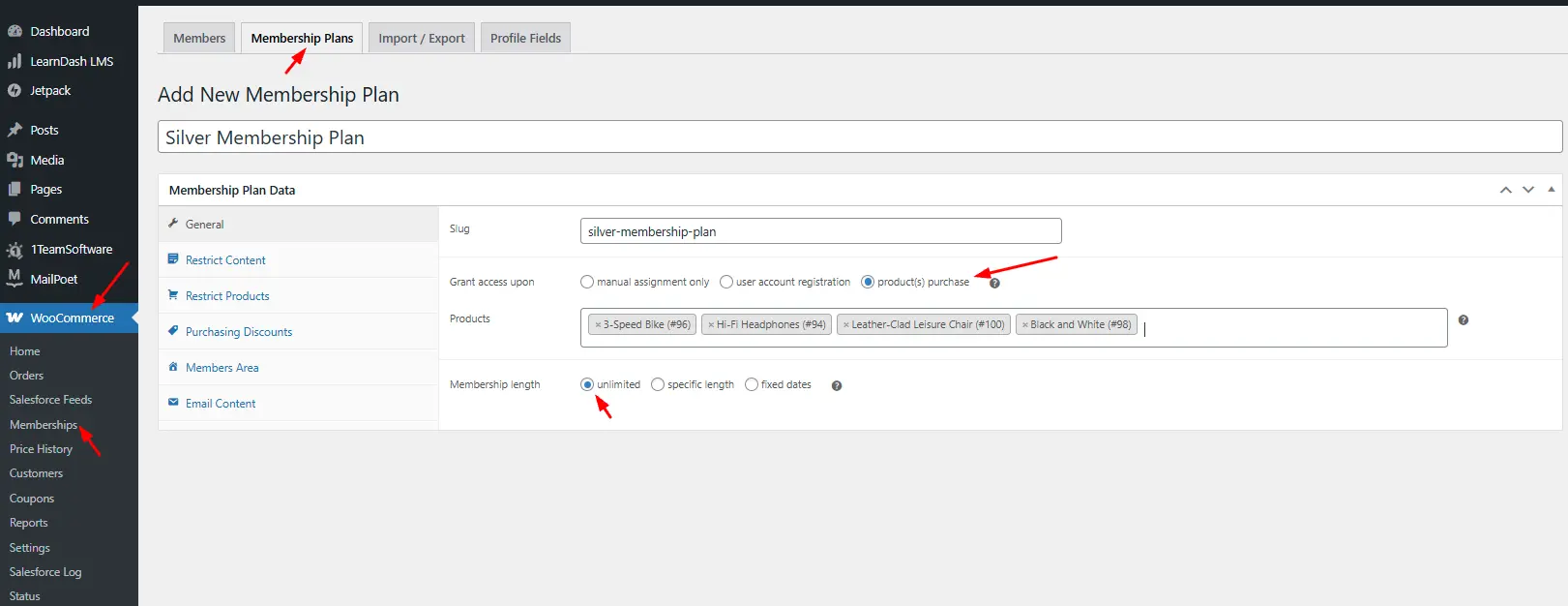
Creating multiple plans allows you to serve different audience segments while maintaining clear value tiers.
Step 3: Restrict Content Access
Restricting content is what transforms your website from a standard shop into a gated membership platform.
- Within your membership plan, scroll to the Restrict Content section.
- Choose the posts, pages, or custom post types (like courses or videos) you want to restrict.
- Decide whether to fully restrict content or only restrict parts (e.g., hide downloads but show teaser text).

By carefully restricting content, you encourage non-members to upgrade while rewarding paying members.
Step 4: Set Up Content Dripping
This is where engagement magic happens—dripping content over time keeps members eager to log in.
- Inside your membership plan, go to the Content Dripping tab.
- Select the content (like lessons, eBooks, or videos) to be dripped.
- Schedule when members can access it (e.g., “7 days after sign-up” or “every Monday”).
This feature ensures a steady flow of new material, preventing overwhelm and boosting retention. A great way to Build a WooCommerce Membership Site with Content Drips and Perks is to map out your content calendar in advance.
Step 5: Add Member Perks
Next, let’s create perks that reward loyalty and make membership irresistible.
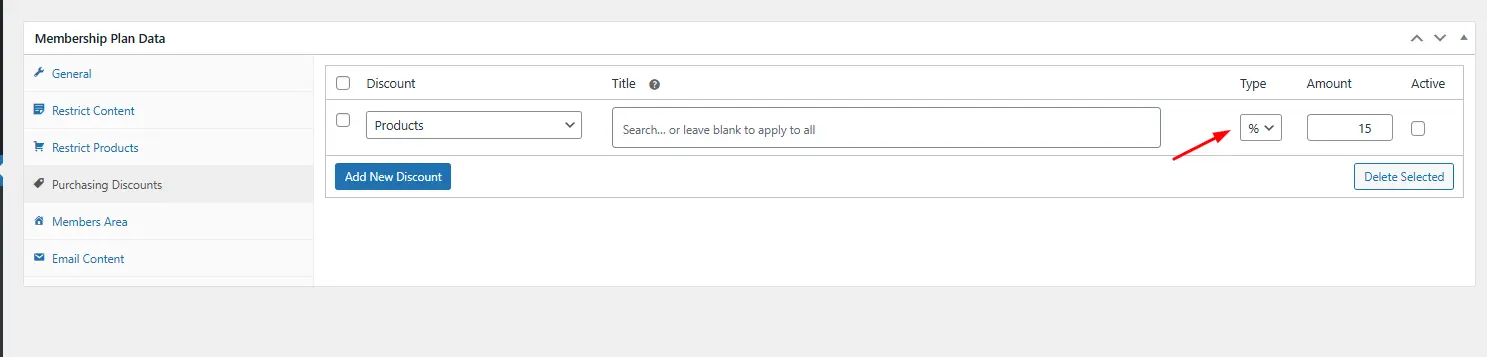
- Within your membership plan, locate the Member Perks section.
- Add benefits like:
-
-
Storewide discounts (e.g., 15% off all products).
-
-
Free shipping.
-
Access to members-only products.
-
Early access to new product launches.
-
Combining perks with dripped content ensures your members always feel they’re getting ongoing, unique value.
Step 6: Customize Member Emails
Communication is vital for retention. Setting up personalized membership emails keeps members informed and excited.
- Go to WooCommerce → Settings → Emails.
- Locate the membership-related notifications (like welcome emails, renewal reminders, and expiration alerts).
- Customize each email with friendly language, brand colors, and clear next steps.

When members receive tailored updates about their upcoming dripped content or expiring perks, they’re more likely to stay engaged.
Step 7: Design the Member Dashboard
Your members need an easy way to see what’s available to them. That’s where the dashboard comes in.
- Use your theme builder or page builder (like Elementor or Gutenberg) to create a My Account page for members.
- Showcase:
-
-
Current membership plan details.
-
Upcoming dripped content.
-
Available perks and coupons.
-
Links to restricted resources.
-
A well-designed dashboard improves user experience and reduces confusion, making your membership site feel professional and welcoming.
By following these steps, you can confidently Build a WooCommerce Membership Site with Content Drips and Perks that not only attracts members but keeps them coming back month after month.
Designing Content Drips for Engagement
Dripping content isn’t just about pacing—it’s about storytelling. Each new release should build upon the last, creating a logical flow. This approach not only keeps members engaged but also increases the perceived value of your membership.
Consider using dripped modules such as:
- Weekly training videos.
- Step-by-step tutorials released monthly.
- Progressive challenges or assignments.
- Seasonal exclusive guides or eBooks.
When you Build a WooCommerce Membership Site with Content Drips and Perks, design your drips with milestones in mind. Encourage members to celebrate their progress. By the time they reach the end of one cycle, they should feel accomplished and eager for the next.
Creating Irresistible Member Perks
Perks are the secret sauce of a thriving membership site. They go beyond content and tap into the emotional side of customer loyalty. Discounts, free products, or exclusive access make members feel like part of an inner circle.
Some powerful perk ideas include:
- Exclusive coupon codes for members only.
- Early access to product launches.
- Free downloadable resources.
- Invitations to private events or webinars.
- Free shipping or premium support.
When you Build a WooCommerce Membership Site with Content Drips and Perks, strike a balance between tangible benefits (like discounts) and intangible ones (like belonging). This dual approach fosters long-term commitment.
Marketing Your Membership Site
Even the best membership site won’t thrive without promotion. Your marketing should highlight the unique value of joining. Stress the benefits of both the content drips and the perks. Create compelling landing pages that tell your story and explain exactly why your membership is worth it.
Use strategies like:
- Email campaigns to nurture leads.
- Social media teasers showing snippets of upcoming dripped content.
- Testimonials from existing members.
- Limited-time offers to encourage quick sign-ups.
When you Build a WooCommerce Membership Site with Content Drips and Perks, marketing becomes a cycle of showcasing benefits, delivering value, and reinforcing the decision to stay subscribed.
Scaling and Optimizing Your Membership Site
Once your membership site is up and running, the real work begins. Pay attention to analytics. Track engagement with dripped content, monitor perk usage, and measure churn rates. This data tells you what’s working and where improvements are needed.
Over time, consider introducing new membership tiers, additional perks, or enhanced content drips. Keeping your site fresh is essential. Members stay longer when they feel the value consistently increases. By continuously refining your approach, you ensure your decision to Build a WooCommerce Membership Site with Content Drips and Perks leads to sustained success.
Best Practices for Member Retention
Retention is often more important than acquisition. Once someone joins, your goal is to keep them for the long haul. Some best practices include:
- Regularly surveying members to understand needs.
- Providing excellent customer support.
- Offering sneak peeks of future content drips.
- Rewarding long-term members with loyalty perks.
When your community feels appreciated, they’re less likely to leave. Remember, the longer someone stays, the more profitable your membership site becomes.

Closing Remarks: Building a Thriving Membership Ecosystem
To Build a WooCommerce Membership Site with Content Drips and Perks is to design a business that thrives on relationships and sustained value. By blending strategic content delivery with enticing perks, you create a system where members not only join but stay engaged.
The WooCommerce Memberships plugin gives you all the tools to make this vision a reality. With careful planning, ongoing optimization, and a focus on the member experience, you can transform your website into a dynamic, profitable community. Start small, refine as you go, and watch your membership site become a cornerstone of your business.
Interesting Reads:
How to Enable Safe On-Site Payments with Authorize.Net in WooCommerce
How to Automate Inventory Sync Between WooCommerce and Lightspeed POS