Online communities are no longer optional—they’re a driving force behind brand loyalty, customer retention, and learning engagement. Studies show that 77% of businesses believe communities improve customer experiences, while over 65% of members say they feel more connected to a brand through community spaces. For WordPress site owners, the challenge is finding a solution that combines flexibility, affordability, and long-term scalability.
That’s where BuddyPress comes in. As one of the most trusted WordPress community plugins, it offers everything from member profiles and activity feeds to groups, messaging, and notifications—all within your existing site. But is it still the best choice in 2025, given the rise of polished alternatives and SaaS platforms?
In this BuddyPress Review, we’ll dive deep into its features, benefits, integrations, and real-world use cases so you can decide if it’s the right tool to build and grow your community this year.

What is BuddyPress?
BuddyPress is a free, open-source WordPress community plugin that transforms your site into a social platform. It introduces member profiles, activity streams, groups, private messaging, and notifications—the core building blocks of a social network. Because it’s native to WordPress, you can integrate with themes, plugins, custom post types, and block-based design tools you already use.
Key concepts at a glance
- Extended Profiles: Custom fields, cover images, profile avatars.
- Activity Streams: Site-wide and group-level feeds with likes and comments.
- Groups: Public, private, or hidden spaces with their own activity.
- Messaging & Notifications: Private DMs and alerts for new mentions, replies, and invites.
- Friend Connections (optional): Opt-in social graph for users.
- Multisite aware: Works across a network when configured.
Because BuddyPress is modular, you can enable only what you need. That keeps your footprint lean and your user experience focused.
Why Choose BuddyPress in 2025
Even with newer entrants in the market, BuddyPress remains compelling. Here’s why.
- Ownership & Flexibility: You own your data and your stack. Unlike closed SaaS community platforms, BuddyPress keeps you in WordPress—no monthly per-member fees, no vendor lock-in.
- Cost-Effective: The plugin is free. You can allocate your budget to hosting, design, and targeted add-ons rather than platform subscriptions.
- Ecosystem & Extensibility: Pair BuddyPress with bbPress for forums, WooCommerce for shops, LearnDash or LifterLMS for courses, MemberPress for memberships, and GamiPress for gamification. This ecosystem lets you compose exactly the features your audience needs.
- Theme Compatibility: Modern community-friendly themes such as Reign, BuddyX, and other block-ready themes provide polished UI out of the box.
- Performance-Minded Setup: With smart caching, image optimization, and object caching, BuddyPress can power communities from hundreds to tens of thousands of members.
Core Features (and How They Help Engagement)
1: Member Profiles
Create rich member directories with custom fields (skills, location, interests). Add cover photos and avatars for a familiar social feel. This personalization boosts recognition and drives participation.
2: Activity Streams
The activity feed is your community’s heartbeat. Members can post updates, share media, comment, and mention others. Because activity is chronological and interactive, it encourages frequent return visits.
3: Groups
Groups provide focused spaces for teams, cohorts, or interest clusters. You can make them public, private, or hidden, and each group can have its own activity stream and members.
4: Private Messaging
Direct messages let conversations deepen. You can enable member-to-member DMs or limit who can message whom to reduce spam.
5: Notifications
Real-time alerts (on-site and via email) keep users in the loop—mentions, replies, group invites, and more. Timely nudges increase daily active users.
6: Optional Friend Connections
If your use case benefits from a social graph, turn on friend requests and connections. If not, leave it off and run a clean, group-centric community.
What’s New in BuddyPress 2025?
BuddyPress continues to evolve with WordPress, and in 2025 it brings several improvements that make building communities easier, faster, and more secure. These updates ensure the plugin stays relevant for both small groups and large-scale networks.
Compatibility with Full-Site Editing: With WordPress now centered on Full-Site Editing (FSE), BuddyPress fully supports block-based design. You can customize member directories, activity feeds, and group pages using blocks and global styles. This eliminates reliance on shortcodes and gives site owners more creative control. For example, an e-learning site can design a course group page with a feed, a “Join Group” button, and a resources section—all without code.
REST API and Headless Possibilities: BuddyPress 2025 also strengthens its REST API, making it ideal for modern builds. Developers can power mobile apps, progressive web apps (PWAs), or custom dashboards using BuddyPress as the backend. Nonprofits, for instance, can create mobile-first apps where members join groups and receive notifications outside of WordPress.
Performance and Security Enhancements: Communities demand speed, and BuddyPress now runs smoother with optimized database queries, Redis/Memcached support, and PHP 8.3 compatibility. Security has also improved with stricter sanitization and spam protection, ensuring safe interactions even at scale.
Privacy and GDPR-Friendly Tools: Finally, privacy tools have been refined. Site owners can manage data export/erase requests, profile visibility, and user consent for notifications. This not only ensures GDPR compliance but also boosts trust—an essential factor in retaining community members.
How to Use BuddyPress with WordPress (Step-by-Step Setup)
Setting up BuddyPress is simple, and each step helps lay the foundation for a strong online community. Follow these steps to quickly turn your WordPress site into a social hub.
Step 1: Install and Activate BuddyPress
The first step is to install the BuddyPress plugin.
- Log in to your WordPress dashboard.
- Go to Plugins > Add New.
- Search for BuddyPress.
- Click Install Now and then Activate.
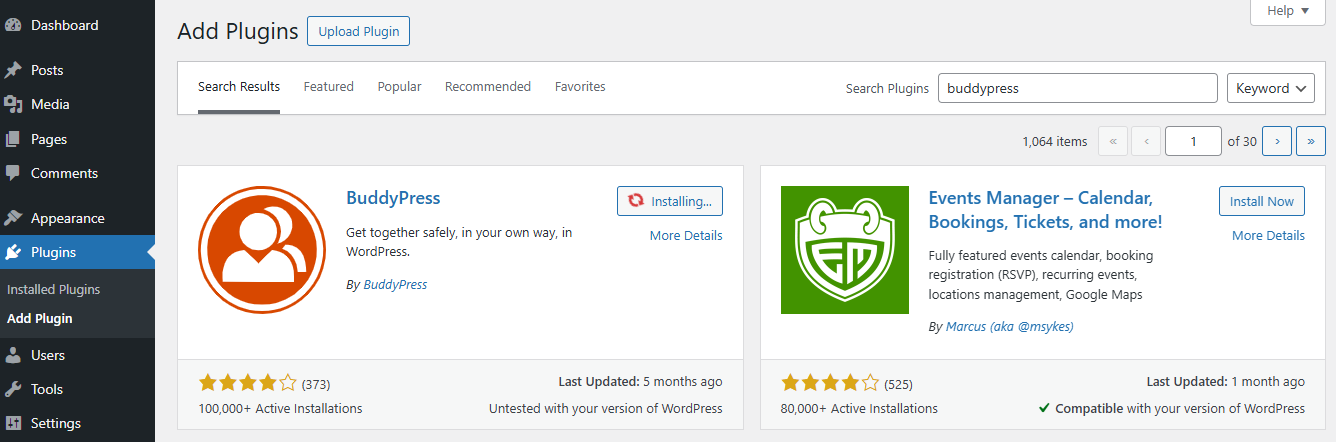
Once activated, BuddyPress unlocks core community features such as profiles, groups, and activity feeds.
Step 2: Installing and Activation (Manual)
If you prefer to install BuddyPress manually, or if the automatic method doesn’t work, you can do it in just a few steps.
- Download the BuddyPress plugin from the official website.
- Use an FTP program to upload the plugin file to the
wp-content/pluginsfolder on your server. - Alternatively, log in to your WordPress dashboard, go to Plugins > Add New, and click Upload Plugin.
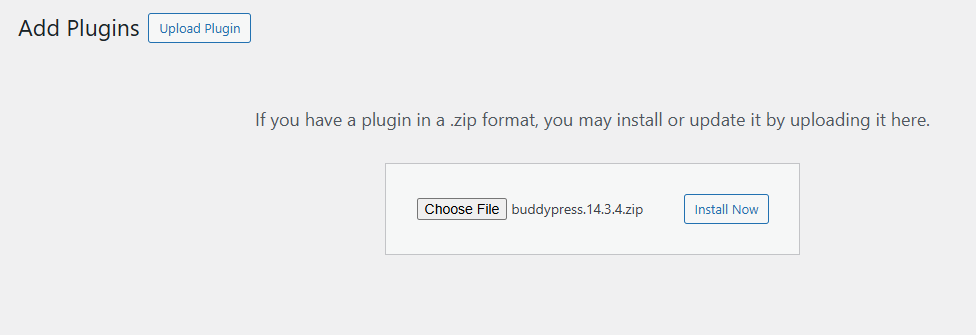
- Select the BuddyPress file you downloaded and click Install Now.
- Once installed, click Activate Plugin.
That’s it—BuddyPress is now active on your site.
Step 3: Enable BuddyPress Components
BuddyPress is modular, so you only enable the tools you need. Under the Components tab, you’ll find options like:
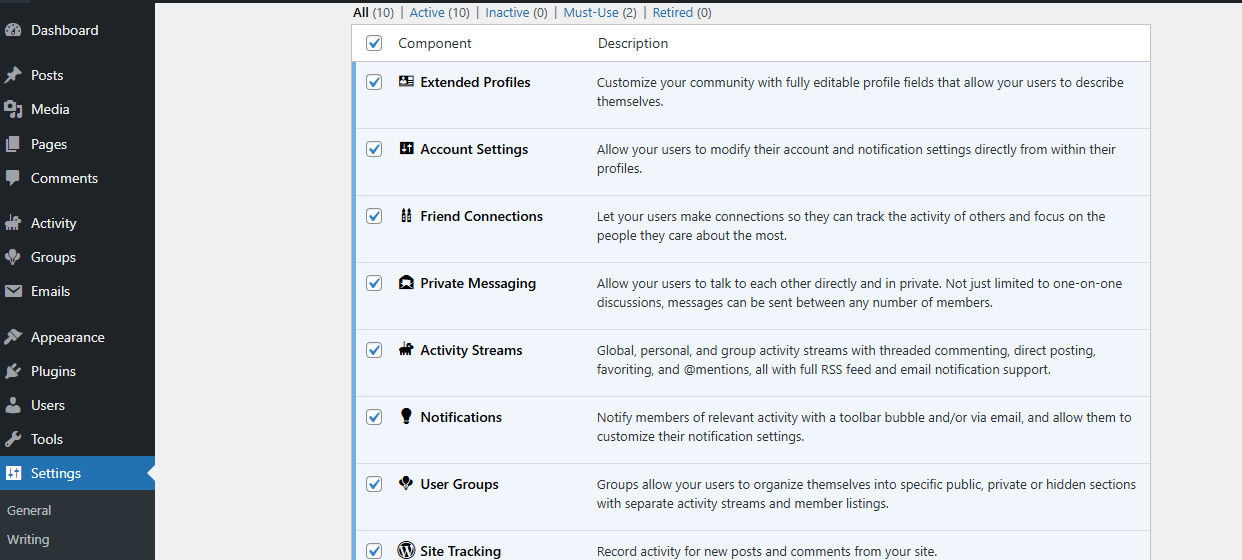
- Extended Profiles – Add custom profile fields.
- Activity Streams – Create a newsfeed-style hub.
- Friend Connections – Let members connect and follow each other.
- Private Messaging – Enable one-to-one conversations.
- Groups – Build public, private, or hidden spaces for discussion.
Activating the right mix of components helps you shape the community experience you want.
Step 4: Configuring the BuddyPress Plugin
Once you’ve enabled the right components, it’s time to configure BuddyPress according to your community’s needs.
- Navigate to Settings > BuddyPress.
- Open the Options tab to access all configuration options.
- Here, you’ll find settings for Account Management, User Groups, Extended Profiles, Notifications, and Activity Streams.
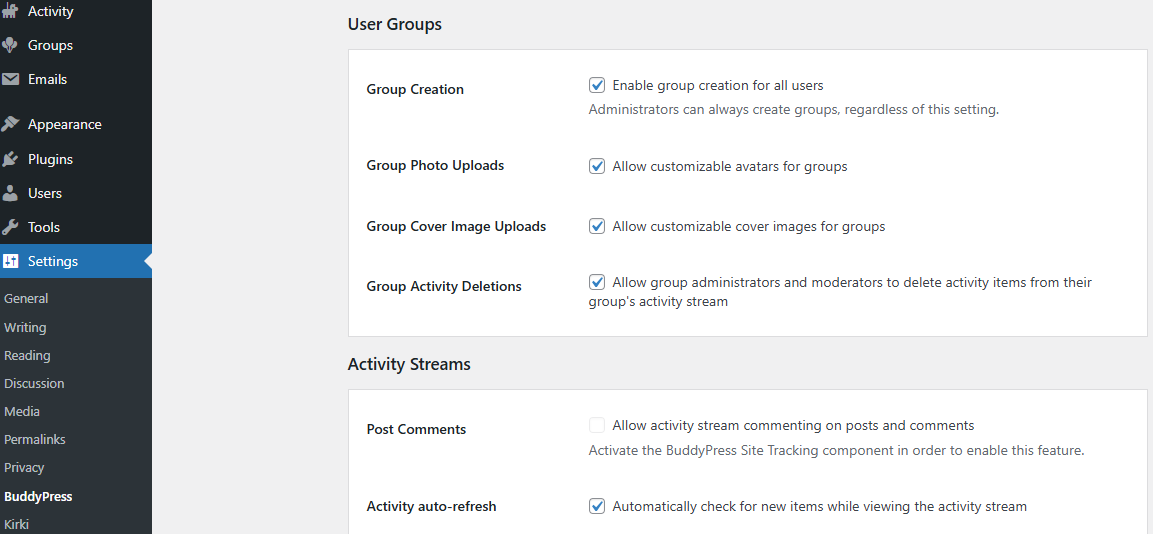
- Enable or disable features based on how you want members to interact.
- Finally, click Save Settings.
With these configurations in place, your BuddyPress-powered community is ready to go. By activating the right features and fine-tuning settings, you can create a user-friendly, engaging space that encourages interaction.
Step 5: Choose a BuddyPress-Friendly Theme
Finally, to give your community a polished, user-friendly design, select a theme that works seamlessly with BuddyPress. Popular options include Reign and BuddyX, which come with ready-to-use layouts for groups, activity feeds, and profiles. A BuddyPress-optimized theme ensures:
- Mobile-friendly design for members on the go.
- Clean navigation for groups, activity, and messaging.
- Built-in styling that saves you from custom coding.
The right theme not only improves the look of your site but also enhances usability, which directly impacts community engagement.
How the Right Theme Enhances the BuddyPress Experience
While BuddyPress provides the core functionality for building communities, the overall look, feel, and usability depend heavily on your WordPress theme. The right theme not only makes your site visually appealing but also ensures that community features like profiles, groups, activity feeds, and messaging are easy to use. A poorly optimized theme, on the other hand, can make even the most powerful features feel clunky.
Community-focused themes are designed to work seamlessly with BuddyPress. They provide pre-built layouts for member directories, group pages, and activity streams, saving you the time and hassle of customizing everything from scratch. More importantly, they’re built with mobile-first design in mind—critical in 2025, when the majority of users access online communities from their smartphones.
Two of the most popular BuddyPress-friendly themes are Reign and BuddyX. Both are tailored specifically for community websites and come packed with features such as:
- Ready-to-use templates for activity streams, profiles, and groups.
- Integration with bbPress forums, WooCommerce stores, and LMS plugins.
- Customization options for colors, typography, and layouts without touching code.
- Optimized performance to handle active, growing communities smoothly.
Choosing a dedicated BuddyPress theme also means you can tap into community engagement tools such as gamification, member badges, and event integrations more effectively. For site owners, it reduces setup time and ensures a polished, professional design from day one.
In short, the right theme acts as the bridge between functionality and user experience, turning your BuddyPress site into a space where members enjoy participating and keep coming back.

Your Next Step with BuddyPress
Building an engaged online community can be one of the most valuable steps for any brand, educator, or organization in 2025. As this BuddyPress Review shows, the plugin remains one of the most reliable, flexible, and cost-effective ways to bring people together on WordPress. With its modular components, seamless integrations, and compatibility with tools like WooCommerce, LMS platforms, and membership plugins, BuddyPress can adapt to almost any use case—from small private groups to large-scale social networks.
Of course, success doesn’t just come from installing a plugin. Choosing the right theme, activating only the features you need, and nurturing member engagement are all key to creating a thriving digital space. That’s where themes like Reign and BuddyX, along with add-ons for gamification or media sharing, help transform a basic community into an interactive hub.
If you’re looking for ownership, scalability, and freedom from high SaaS costs, BuddyPress is a standout choice. Whether you want to support students, customers, employees, or hobbyists, it gives you the foundation to build communities that grow and evolve with your vision.
Interesting Reads:
How to Add a Tip Option to WooCommerce Checkout
20 Best Platforms to Build an Online Community
How to Schedule Posts Ahead and Stay Consistent Online with BuddyPress