When you’re planning to build an online community, one of the best ways to see your ideas in action is through a BuddyBoss demo. It gives you a hands-on preview of how your community will look and feel, showing everything from member profiles to activity feeds, groups, and directories. Seeing a demo first makes it easier to plan your community layout and understand how users will interact with your platform.
In my experience, the Reign theme takes the BuddyBoss demo experience to the next level. Reign is a flexible, visually polished theme built specifically to enhance BuddyBoss communities, making every page look professional and user-friendly. By exploring them together, you can see exactly how your community could function in real life.
In this guide, I’ll show you what the BuddyBoss demo looks like with the Reign theme, why it’s such a perfect combination, and how to explore it step by step to make informed decisions for your community.

What Is BuddyBoss and Why Demos Matter
BuddyBoss is one of the most powerful platforms for building online communities, membership sites, eLearning platforms, and social networks on WordPress. It provides a sleek, modern interface paired with robust community features like activity feeds, private messaging, groups, member profiles, forums, and seamless integrations with LearnDash and LifterLMS.
But before you start building your platform, experiencing a BuddyBoss demo is essential. A demo gives you a real feel of how your community can look, work, and grow. You can explore layouts, test community features, and understand how the design behaves with different plugins and extensions. It also helps you make informed decisions on themes, community structure, monetization methods, and feature enhancements.
For creators, educators, startups, and brands looking to build a private social network or learning community, a BuddyBoss demo serves as a blueprint—showing exactly what’s possible before you commit time and resources to development.
What Is the Reign Theme?
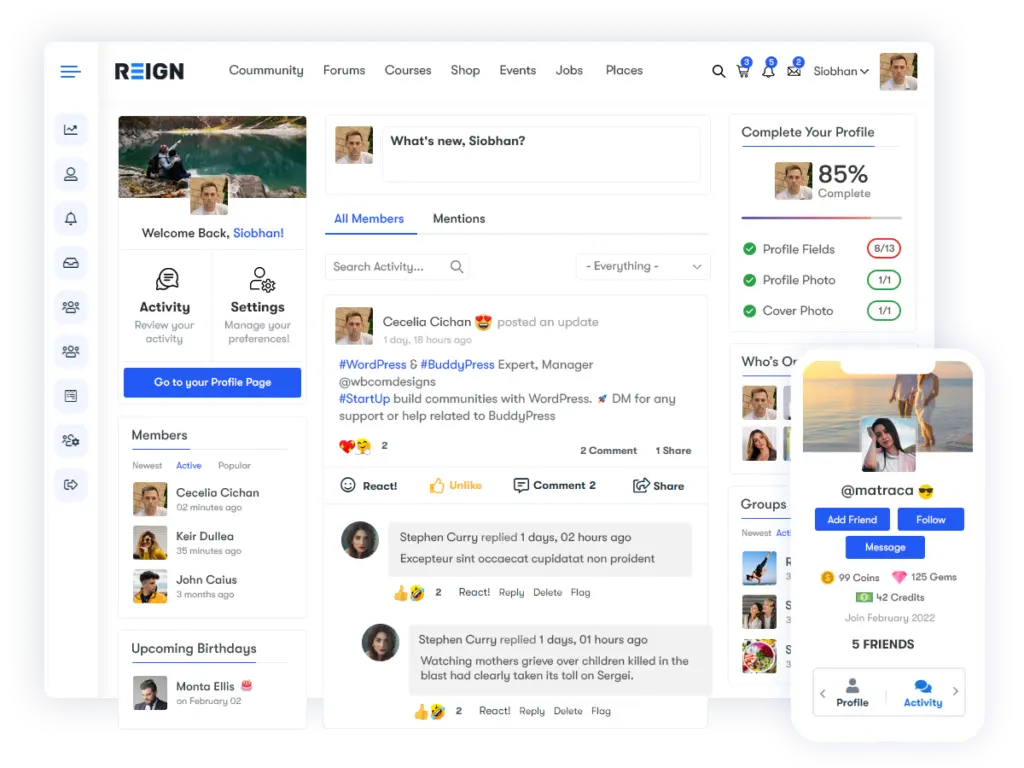
Reign is a versatile, feature-rich WordPress community theme built specifically to enhance platforms powered by BuddyBoss, BuddyPress, and membership or eLearning plugins. Designed by Wbcom Designs, Reign focuses on delivering a visually appealing, performance-optimized experience for social networks, online communities, coaching sites, and learning platforms.
What sets the Reign theme apart is its seamless integration with BuddyBoss. It not only supports BuddyBoss platform features but amplifies them with beautifully crafted layouts, customizable member and group pages, flexible header styles, and a range of design controls—all accessible without any coding.
Whether you’re building a niche community, a professional network, or a full-scale learning portal, Reign provides a polished, modern interface with deep customization options. Paired with BuddyBoss, it ensures your platform looks professional, loads fast, and delivers a smooth, user-friendly experience.
Exploring the BuddyBoss Demo with the Reign Theme
A BuddyBoss demo paired with the Reign theme gives users a clear view of how a modern, feature-rich community will look and feel once live. This combination enhances functionality, sharpens design, and elevates the user experience. Below is a breakdown of what users typically experience in this demo environment:
1. Modern Member Profiles
Reign enhances BuddyBoss profiles with clean layouts and flexible styling options.
Users get to experience:
- Smooth profile navigation with clearly organized tabs
- Eye-catching cover images and profile avatars
- Custom tabs for personalized features
- Support for achievements like badges, ranks, or custom indicators
Member profiles feel more polished, professional, and visually engaging compared to default BuddyBoss styling.
2. Interactive Activity Streams
The BuddyBoss–Reign combination gives activity feeds a modern, distraction-free feel. The demo highlights:
- Clean and spacious activity layouts
- Multiple post types including text, photos, videos, documents, and embeds
- Simple media uploads
- Reactions and engagement tools for better interaction
The result is an activity stream that feels social, lively, and easy to use—similar to mainstream social networks.
3. Groups & Forums Experience
Community groups play a major role in BuddyBoss, and Reign makes them even more appealing. The demo showcases:
- Public, private, and hidden group types
- Organized group activity pages
- Group cover and member management options
- Smooth forum layouts if bbPress is enabled
- Enhanced forum styling and readability through Reign
Groups become visually consistent and much easier to navigate.
4. Member & Group Directories
Directories get a stylish makeover in Reign. During the demo, users will notice:
- Searchable member and group lists
- Filterable views for quick navigation
- Multiple layout variations (grid, card, classic)
- Clean typography and spacing for better readability
Directories feel more intuitive and visually balanced—making community discovery easier.
5. Community UX & Navigation
Reign is packed with design options that elevate the BuddyBoss UX. The demo highlights:
- Multiple header styles, including minimalist and mega-menu versions
- Mobile-responsive layouts across all pages
- Sidebar controls for specific community pages
- Color and typography schemes that sync with BuddyBoss seamlessly
It’s a polished, user-friendly browsing experience whether on desktop or mobile.
6. Seamless Integration with BuddyBoss Platform Features
Reign works flawlessly with every core BuddyBoss feature. The demo shows how smoothly everything blends:
- Private messaging between members
- Notifications for likes, mentions, messages, and activity updates
- Friend and connection requests
- Private community options, restricting content to logged-in users
This integration ensures your platform feels unified—nothing looks out of place.
Step-by-Step Guide: How to Explore the Reign Theme Demo with BuddyBoss
If you want to see how BuddyBoss truly looks when paired with a beautifully optimized theme, the Reign demo is the perfect place to start. Here’s a simple, beginner-friendly walkthrough to help you explore every important feature:
Step 1: Visit the Reign Theme Demo Page
Start by opening the official Reign demo link: Reign demos
This page showcases all available demo layouts and theme variations.

Step 2: Choose a Demo Layout
Reign offers multiple ready-to-import demos built for different types of communities. Select the one that best matches your project, such as:
- Community Demo
- eLearning Demo
- Membership Site Demo
- Social Network Demo
Each demo presents a unique layout and design approach.
Step 3: Navigate Member Profiles
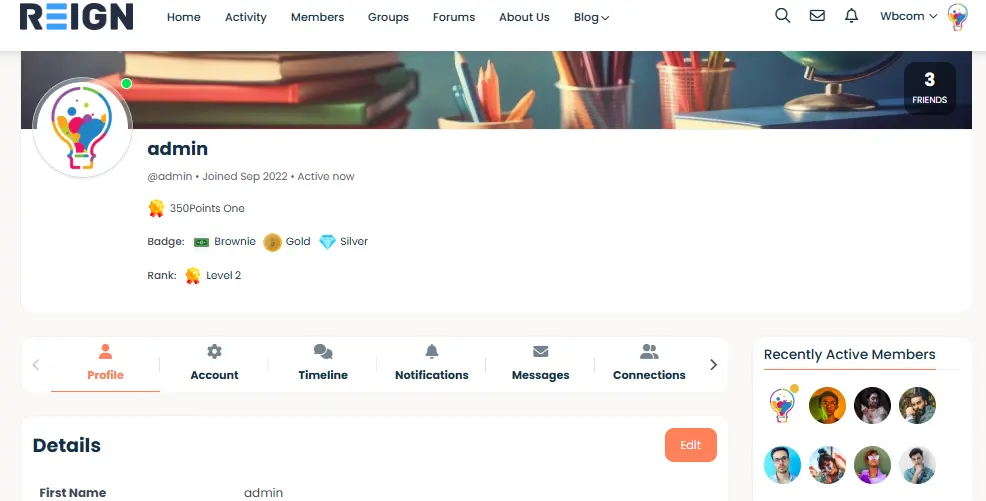
Click on a sample member profile and explore:
- Profile tabs (Timeline, About, Connections, Groups, Forums, etc.)
- Cover photos and avatar placement
- Custom tabs added by Reign
- Layout and spacing options
This helps you visualize how your own members will appear.
Step 4: Check the Activity Feed
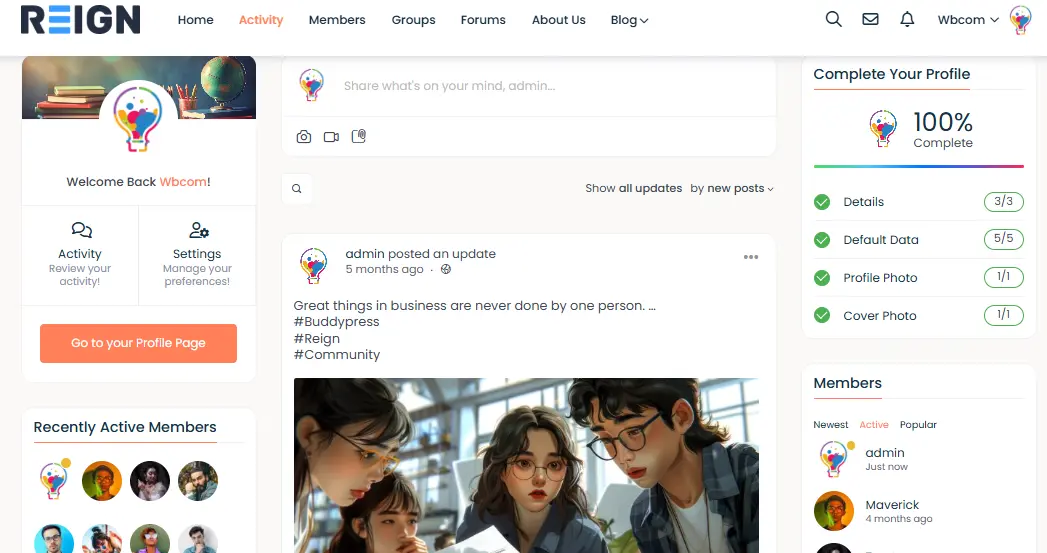
The activity stream is the heart of any BuddyBoss community. Look at:
- Post layouts
- Images, videos, and attachment support
- Post filters and sorting
- Reactions and interactions
Observe how clean and social-friendly the interface feels.
Step 5: Explore Group Pages
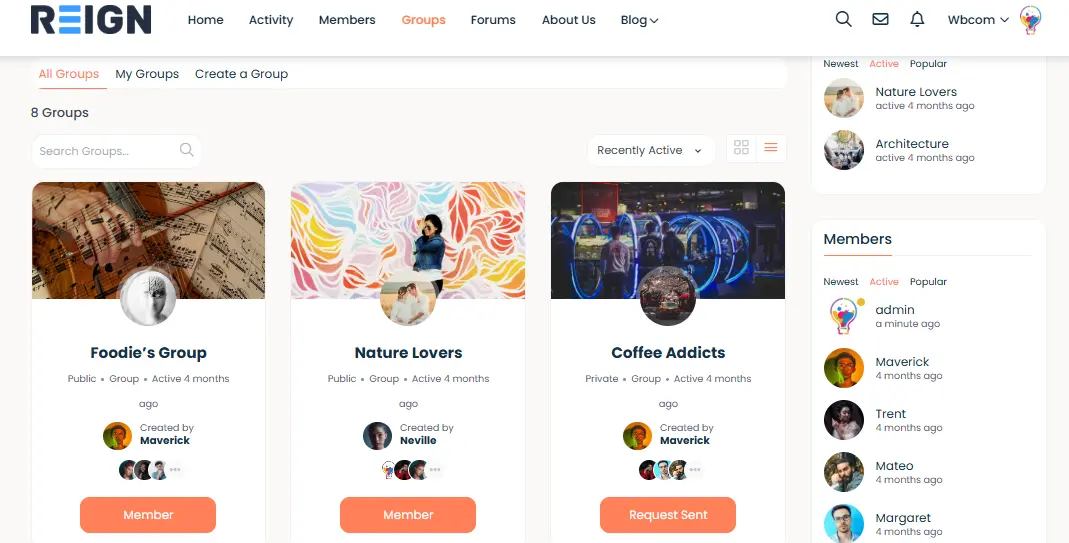
Open a public or private group demo to review:
- Group navigation (Feed, Members, Forums, Media, Settings)

- Group cover image and description
- Forum layout if bbPress is active
- Group activity styling
Reign makes groups structured and visually appealing.
Step 6: Visit Directories

Browse through:
- Members Directory
- Groups Directory
- Activity Directory
Check filters, search functions, and layout variations. These pages help users discover people and content easily.
Step 7: Test Mobile Responsiveness
Preview the demo on:
- Mobile
- Tablet
- Desktop
Reign is fully responsive, so the community adjusts cleanly on every screen size.
Step 8: Review Theme Customization Options
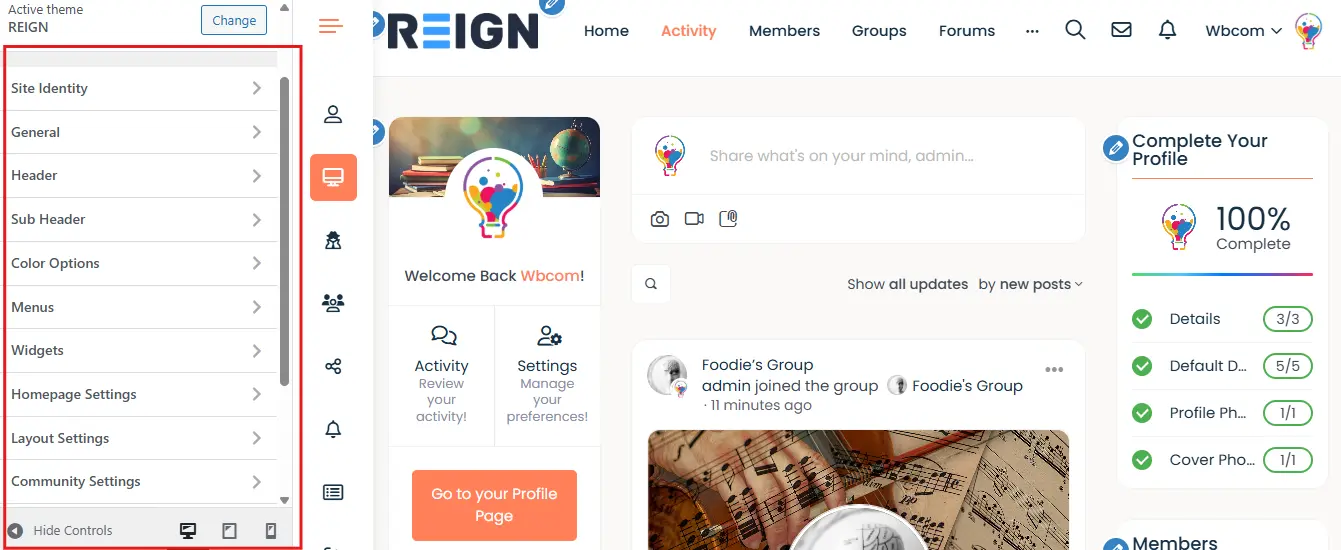
Look for settings that matter most to community creators:
- Header variations
- Color palette options
- Typography choices
- Layout styles
- Sidebar and widget controls
- Global design settings
This shows how flexible Reign is for branding and custom designs.
Step 9: Compare Multiple Demos
Jump between different Reign demos to see:
- Which layout fits your community’s purpose
- Which design offers the best user experience
- Unique features suited for learning, membership, or social interactions
This makes choosing your final layout much easier.
Why Reign Works So Well with BuddyBoss: Key Theme Features
Reign has become one of the most reliable and visually polished themes for BuddyBoss communities—and there’s a good reason for that. It’s designed with community platforms in mind, so everything feels smoother, more organized, and far more customizable than the default setup. Here’s a closer look at what makes Reign such a strong fit for BuddyBoss:
1. Pre-Built Demo Import
Reign lets you import a complete BuddyBoss-powered community design within minutes.
No complex setup, no manual page building—just choose a demo, click import, and you’re ready to explore or customize. This is especially helpful if you’re starting from scratch and want a polished, professional layout instantly.
2. Custom Elementor Widgets
If you like visual page building, this is where Reign really shines.
The theme comes with custom Elementor widgets made specifically for community websites. You can create:
- Member directories
- Group listings
- Activity sections
- Custom landing pages
—all without touching a single line of code.
3. Advanced Styling & Customization
Reign gives you full control over your community’s look and feel. You can easily customize:
- Colors and brand palettes
- Typography and font styles
- Header and footer layouts
- Spacing, icons, and visual elements
These flexible design options make your BuddyBoss site feel more premium and more aligned with your brand.
4. Enhanced Directory & Profile Styling
One of the first things you’ll notice is how beautifully polished the directories and member profiles look. Reign adds:
- Cleaner layouts
- Improved spacing
- Better visual hierarchy
- Modern profile designs
Everything feels more social, more engaging, and much more user-friendly compared to the default BuddyBoss theme.
5. Fast Loading & SEO-Friendly
Community websites can get heavy quickly, especially with hundreds or thousands of users. Reign keeps things lightweight and optimized with:
- Clean coding standards
- Fast loading times
- SEO-ready structure
- Compatibility with caching plugins
This ensures your BuddyBoss community stays fast, even as it grows.
Premium BuddyPress Plugins That Enhance BuddyBoss + Reign
One of the biggest advantages of using the Reign theme with BuddyBoss is its full compatibility with Wbcom Designs’ premium BuddyPress add-ons. These plugins are designed to enhance engagement, improve moderation, and make community management much easier. You can explore the full collection here: Premium BuddyBoss Compatible Plugins
Here are some top picks that work beautifully with this setup:
- BuddyPress Moderation Pro – Keep your community safe by allowing members to report content and giving admins powerful moderation tools.
- BuddyPress Private Community Pro – Restrict access to members-only areas and create secure, private communities.
- BuddyPress Polls – Add polls to activity streams to collect opinions and increase member participation.
- BuddyPress Auto Friends – Automatically connect new members with specific users to foster early engagement.
- BuddyPress Hashtags – Boost post discoverability and organize discussions using hashtags across activities and comments.
- BuddyPress Status – Allow members to post quick updates and reactions, making the community feel more active.
- BuddyPress Profile Pro – Add custom fields and groups to member profiles, collecting richer information and improving personalization.
- BuddyPress WP Stories – Introduce Instagram-style stories to boost engagement with photos and videos.
Who Should Use BuddyBoss with the Reign Theme?
BuddyBoss paired with the Reign theme is a powerful combo—but it’s especially valuable for certain types of communities. If you’re wondering whether this setup is right for you, here’s a quick look at who benefits the most:
1. Community Builders & Social Networks: If you’re creating a social platform where members connect, share updates, and engage daily, Reign enhances BuddyBoss with cleaner layouts, better profile designs, and smoother navigation.
2. eLearning Communities (LMS): Running LearnDash or LifterLMS with BuddyBoss? Reign provides polished course layouts, student profiles, and community-driven learning spaces that boost interaction and course completion.
3. Membership Sites: For creators, coaches, clubs, and organizations offering gated content, Reign adds flexibility in styling, member dashboards, and access controls—perfect for recurring revenue communities.
4. Professional Networks: Whether it’s a corporate hub, alumni network, or industry association, the Reign + BuddyBoss setup creates a clean, professional experience with robust profile fields and member directories.
5. Hobby & Interest Groups: Fan clubs, gaming communities, fitness groups, or book clubs can all benefit from Reign’s aesthetic designs and easy engagement tools.
6. Nonprofits & Local Organizations: If your goal is to bring people together for causes, events, or discussions, the combination offers a user-friendly, mobile-ready platform for collaboration.
7. Entrepreneurs & Brand Communities: Brands wanting to build customer communities get a flexible layout, modern UI, and a strong ecosystem of plugins to grow engagement and retention.

Bringing Your Community Vision to Life with BuddyBoss + Reign
When you combine the BuddyBoss platform with the Reign theme, you’re not just building a website—you’re creating a complete community experience. This setup gives you all the tools you need to support engagement, collaboration, and meaningful interactions. From beautiful profile designs to interactive activity feeds, from streamlined navigation to powerful add-ons by Wbcom Designs, everything works together to help your community grow naturally.
Whether you’re running a membership space, an eLearning hub, a professional network, or a social community, the Reign + BuddyBoss pairing delivers a polished, modern, and incredibly user-friendly environment. It’s flexible enough for beginners, powerful enough for advanced creators, and scalable for communities of all sizes.
If you want to build a community that feels active, aligned with your brand, and enjoyable for members to use every day, this combination is one of the best places to start. With the right theme, the right tools, and the right vision, your community can become something truly exceptional.
Interesting Reads:
How Reign Future-Proofs Your WordPress Site with Next-Level Plugin Compatibility
Why BuddyPress and BuddyBoss Are Perfect for Your Membership Site