If you own a Mac, you know it’s one of the most powerful and user-friendly machines out there. But even the best hardware needs the right software to truly shine. Whether you’re a creative professional, a student, or a business mogul, the right apps can elevate your Mac experience to new heights. That’s why we’ve curated a list of the 10 best software for Mac. These apps will help you boost your productivity, unleash your creativity, and make your life easier.
From professional video editors to productivity tools, there’s something on this list for everyone. So, let’s dive right into it!

1. Notion: All-in-One Workspace for Organizing Life and Work

Why Notion is a Must-Have on Your Mac
Notion has earned its place as one of the 10 best software for Mac for its versatility and power in organizing everything from daily tasks to long-term projects. Whether you’re managing a personal to-do list, creating a detailed project plan, or collaborating with a team, Notion’s all-in-one workspace does it all.
With its customizable templates, databases, and note-taking features, you can easily stay organized and boost your productivity. And if you’re someone who loves a personalized experience, Notion’s flexibility to adjust to your workflow is a game-changer.
Key Features:
- Customizable templates for notes, databases, and tasks.
- Collaboration features for team projects.
- Real-time syncing across devices.
- Integration with Google Calendar, Slack, and more.
Pros:
- Highly flexible and customizable.
- Great for both personal and team use.
- Intuitive user interface.
Cons:
- Takes some time to fully master.
- Limited offline functionality.
2. Adobe Creative Cloud: The Gold Standard for Creatives
Creative Professionals Will Love Adobe Creative Cloud
If you’re into photography, video editing, or graphic design, Adobe Creative Cloud should already be a staple in your software toolbox. With apps like Photoshop, Illustrator, Premiere Pro, and After Effects, Creative Cloud is an absolute powerhouse for creatives. Whether you’re a seasoned pro or a hobbyist, these tools can help you turn your vision into reality.
The best part? Creative Cloud works seamlessly on macOS, ensuring that your creative process is uninterrupted. From photo editing to 3D animation, Creative Cloud offers everything you need to create, innovate, and share your work.
Key Features:
- Access to popular Adobe apps like Photoshop, Illustrator, and Premiere Pro.
- Cloud storage for seamless collaboration and access.
- Regular software updates and new features.
- Integration with Adobe Stock for high-quality assets.
Pros:
- Industry-standard tools for creatives.
- Wide range of apps for various creative needs.
- Regular updates and support.
Cons:
- Expensive subscription model.
- Can be resource-intensive, especially for video editing.
3. 1Password: The Best Password Manager for Mac
Keep Your Passwords Safe with 1Password
In today’s digital world, password security is more important than ever. That’s where 1Password comes in. This app is one of the best password managers available, making it easier to manage and secure your passwords. With 1Password, you only need to remember one master password, and the app will handle the rest.
Whether you’re using Safari, Chrome, or another browser, 1Password integrates seamlessly to auto-fill your passwords. Plus, with features like biometric login and encrypted storage, your passwords and sensitive information are safe and sound.
Key Features:
- Secure password storage and management.
- Browser extensions for easy autofill.
- Two-factor authentication support.
- Cross-device syncing for seamless access.
Pros:
- Easy to use and set up.
- Strong encryption for enhanced security.
- Multiple device sync options.
Cons:
- Subscription model can be pricey.
- Some features are complex for new users.
4. Final Cut Pro: The Ultimate Video Editing Tool
Craft Your Next Masterpiece with Final Cut Pro
If you’re serious about video editing, Final Cut Pro is one of the best software for Mac, hands down. Developed by Apple, Final Cut Pro takes full advantage of macOS’s power, offering a smooth, responsive editing experience. Whether you’re editing a YouTube video or working on a feature film, Final Cut Pro has the tools to get the job done.
It’s packed with pro-level features like multi-cam editing, 360-degree video support, and advanced color grading. Plus, its intuitive interface makes it easy to dive into even for beginners. If you want to take your video editing to the next level, Final Cut Pro is a must-have.
Key Features:
- Advanced editing tools for professional video production.
- Multi-cam and 360-degree video editing.
- High-performance rendering, optimized for Macs.
- Comprehensive color grading and effects tools.
Pros:
- Optimized for macOS for better performance.
- Industry-standard software for video editors.
- Supports a wide range of formats.
Cons:
- Expensive one-time purchase.
- Steep learning curve for beginners.
5. Microsoft Office 365: The Essential Productivity Suite
Get Things Done with Microsoft Office 365
Whether you’re working from home or in the office, Microsoft Office 365 is a productivity suite that’s hard to beat. With apps like Word, Excel, PowerPoint, and Outlook, Office 365 covers all your business and personal productivity needs. Plus, it’s designed to sync with OneDrive, so your documents are always accessible across devices.
Thanks to regular updates, Office 365 is constantly improving and adding new features. If you’re using macOS for work, this software is indispensable.
Key Features:
- Full access to Word, Excel, PowerPoint, and Outlook.
- Cloud storage via OneDrive for easy access to your files.
- Cross-platform syncing for seamless work.
- Collaborative features for team projects.
Pros:
- Industry-standard office tools.
- Cloud-based for easy access across devices.
- Great for collaboration and productivity.
Cons:
- Subscription-based pricing can add up.
- Limited features in the mobile version.
6. CleanMyMac X: Keep Your Mac Running Smoothly
Maintain Your Mac’s Performance with CleanMyMac X
Over time, your Mac can slow down as you accumulate files and apps. That’s where CleanMyMac X comes in. This powerful tool helps you declutter your system, remove junk files, and optimize your Mac’s performance. From clearing caches to managing startup items, CleanMyMac X ensures your device runs like new.
It’s more than just a cleanup tool – CleanMyMac X also includes features like malware removal, privacy protection, and even large file detection. If you want to keep your Mac in top shape, this software is essential.
Key Features:
- System cleanup and optimization.
- Malware removal and privacy protection.
- Uninstall apps completely.
- Large file detection to free up space.
Pros:
- Easy-to-use interface.
- Boosts system performance.
- Comprehensive cleanup and protection tools.
Cons:
- Can be expensive for a one-time purchase.
- Some advanced features require more technical knowledge.
7. Alfred: Supercharge Your Workflow
Boost Productivity with Alfred
If you’re looking for an app to boost your productivity, Alfred is one of the best options for Mac. It’s a powerful productivity app that lets you search your Mac, launch apps, and perform tasks faster than ever before. With features like custom hotkeys, clipboard history, and file search, Alfred helps you get things done in record time.
What makes Alfred stand out is its extensibility. You can integrate workflows, automate tasks, and even connect it with services like Spotify and Evernote for more efficiency.
Key Features:
- Keyboard shortcuts and hotkeys for fast access.
- File search and app launching.
- Workflow automation and customization.
- Integration with other apps like Spotify and Evernote.
Pros:
- Incredibly customizable.
- Great for power users who love shortcuts.
- Boosts productivity and efficiency.
Cons:
- Can be overwhelming for beginners.
- Requires time to set up custom workflows.
8. Dropbox: Store and Share Files Seamlessly
Collaborate and Store with Dropbox
When it comes to cloud storage, Dropbox is one of the most reliable options available. With its easy-to-use interface, Dropbox allows you to store and share files securely. Whether you’re backing up important documents or collaborating with a team, Dropbox makes file sharing effortless.
The service integrates seamlessly with macOS, offering desktop syncing, file previews, and offline access. If you’re working on the go or with a team, Dropbox is a must-have.
Key Features:
- Cloud storage for file backup and sharing.
- Real-time syncing and collaboration features.
- Integration with Microsoft Office and other tools.
- File version history for easy recovery.
Pros:
- Easy file sharing and syncing.
- Reliable and secure cloud storage.
- Cross-platform support.
Cons:
- Limited storage on free plans.
- Syncing can sometimes be slow with large files.
9. Pixelmator Pro: Affordable Alternative to Photoshop
Edit Photos Like a Pro with Pixelmator Pro
For those who want a more affordable alternative to Photoshop, Pixelmator Pro is a fantastic option. It’s a powerful image editing tool that combines many of the features found in Adobe Photoshop, without the hefty price tag. From advanced retouching to digital painting, Pixelmator Pro offers everything you need for professional-quality image editing.
The app is optimized for macOS, ensuring fast performance and smooth workflows. Whether you’re editing photos or creating graphics, Pixelmator Pro has you covered.
Key Features:
- Full range of image editing tools (retouching, painting, etc.).
- Seamless integration with macOS and iCloud.
- Support for PSD, PNG, TIFF, and other popular file formats.
- AI-powered tools for smart editing.
Pros:
- Affordable compared to Photoshop.
- Optimized for macOS.
- Powerful editing features.
Cons:
- Lacks some advanced features of Photoshop.
- Steep learning curve for beginners.
10. Safari: The Best Browser for Mac Users
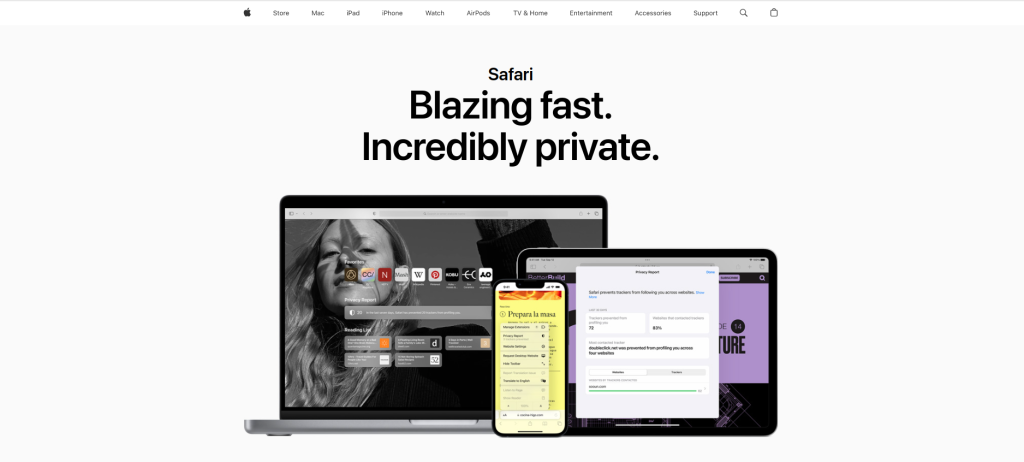
Enjoy Fast, Secure Browsing with Safari
No list of the 10 best software for Mac would be complete without including Safari. As the default browser on macOS, Safari is designed to provide fast, secure, and energy-efficient browsing. With its integration into the Apple ecosystem, you can easily sync bookmarks, passwords, and browsing history across all your Apple devices.
Safari also includes privacy-focused features like Intelligent Tracking Prevention and built-in ad-blocking, making it a top choice for users who value security.
Key Features:
- Fast and energy-efficient browsing.
- Privacy-focused features, including ad-blocking.
- Seamless syncing across Apple devices.
- Built-in Apple Pay support for easy payments.
Pros:
- Fast and responsive.
- Strong privacy features.
- Integrated with the Apple ecosystem.
Cons:
- Limited extensions compared to Chrome.
- Not as customizable as some other browsers.
Comparison Table: The 10 Best Software for Mac
| Software | Key Features | Pros | Cons |
|---|---|---|---|
| Notion | Task management, collaboration, databases | Customizable, great for teams | Learning curve, limited offline mode |
| Adobe Creative Cloud | Photoshop, Illustrator, Premiere Pro, After Effects | Industry-standard, frequent updates | Expensive, resource-intensive |
| 1Password | Password manager, biometric login, encryption | Easy-to-use, strong security features | Subscription cost, complex for new users |
| Final Cut Pro | Video editing, color grading, multi-cam editing | Optimized for Mac, powerful tools | Expensive, steep learning curve |
| Microsoft Office 365 | Word, Excel, PowerPoint, OneDrive, Outlook | Standard for business, cloud access | Subscription cost, limited mobile features |
| CleanMyMac X | System cleanup, malware removal, optimization | Improves performance, comprehensive tools | Expensive, requires technical knowledge |
| Alfred | App launcher, workflow automation, file search | Customizable, boosts productivity | Complex for beginners, requires setup |
| Dropbox | Cloud storage, file sharing, sync, version history | Secure, reliable, cross-platform | Limited free storage, sync issues |
| Pixelmator Pro | Image editing, retouching, painting | Affordable, macOS optimized | Limited features compared to Photoshop |
| Safari | Fast browsing, privacy features, Apple integration | Energy-efficient, secure | Limited extensions, customization issues |

Wrapping Up: Which One is Right for You?
Choosing the 10 best software for Mac depends on your needs. Whether you’re a creative professional in need of Adobe Creative Cloud, a productivity-focused user relying on Microsoft Office 365, or someone who needs a solid password manager like 1Password, there’s an app for everyone. These software tools will help you get the most out of your Mac, making your life easier and more productive.
Interesting Reads:
The Differences Between HTML, CSS, and PHP