Managing projects can feel like juggling too many balls at once—deadlines, resources, and tasks can all quickly spiral out of control. That’s where Gantt chart software comes in. These tools provide a visual roadmap to keep your projects on track, whether you’re managing a small team or a multinational enterprise. Here, we’ll explore the 10 best software for Gantt chart, so you can find the one that fits your needs like a glove.

Why Gantt Charts Are Essential for Modern Project Management
A Bird’s-Eye View of Your Project
Gantt charts provide a clear timeline of tasks, deadlines, and dependencies. They help you see how different parts of a project interconnect, ensuring nothing falls through the cracks.
Simplified Team Collaboration
Many Gantt chart tools allow you to assign tasks, track progress, and collaborate with your team in real-time. This makes them invaluable for ensuring accountability and smooth communication.
1. Microsoft Project: The Classic Choice
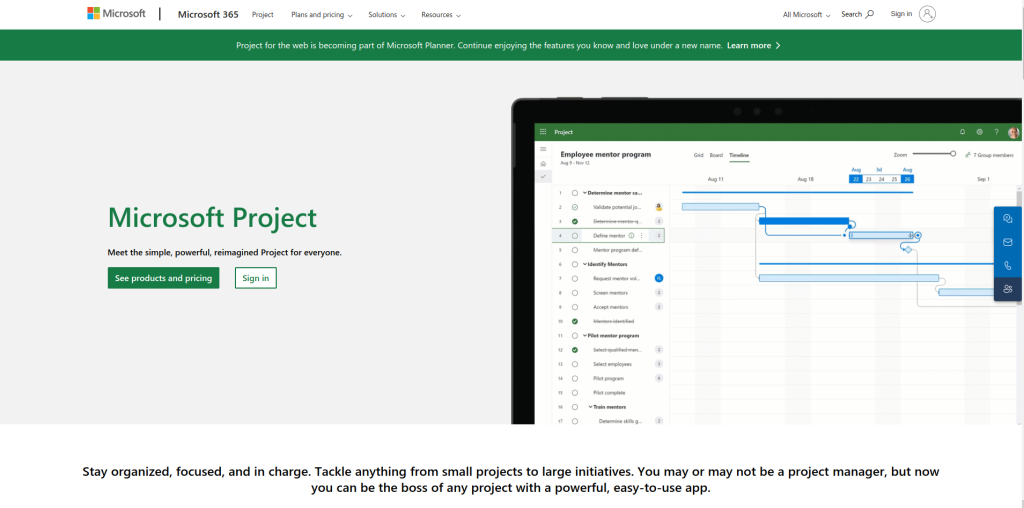
Microsoft Project has been a go-to for project managers for years. With its robust features and seamless integration with Microsoft’s ecosystem, it remains a top contender.
Key Features:
- Extensive customization for Gantt charts
- Integration with Microsoft Teams and Office Suite
Pros:
- Reliable and feature-rich
- Scalable for large organizations
Cons:
- Steep learning curve
- Expensive for small teams
2. Smartsheet: Versatile and User-Friendly
Smartsheet combines spreadsheet-like simplicity with powerful Gantt chart capabilities, making it ideal for teams of all sizes.
Key Features:
- Drag-and-drop interface for task scheduling
- Automation tools to streamline workflows
Pros:
- Easy to use
- Great for collaborative projects
Cons:
- Limited advanced features
- Pricier than some competitors
3. Monday.com: Perfect for Collaboration
Monday.com’s intuitive interface and robust Gantt chart features make it an excellent choice for collaborative teams.
Key Features:
- Real-time progress tracking
- Customizable Gantt chart templates
Pros:
- Highly visual and user-friendly
- Excellent for team communication
Cons:
- Limited offline functionality
- Add-ons can increase costs
4. Asana: Task Management Meets Gantt Charts
Asana’s Timeline feature makes it a strong contender for teams already using the platform for task management.
Key Features:
- Drag-and-drop scheduling
- Seamless task and timeline integration
Pros:
- Simple and intuitive interface
- Great for small to medium teams
Cons:
- Limited advanced Gantt chart features
- Premium pricing for advanced tools
5. TeamGantt: Built Specifically for Gantt Charts
As its name suggests, TeamGantt focuses exclusively on creating intuitive Gantt charts for project management.
Key Features:
- Pre-built templates for faster setup
- Real-time collaboration tools
Pros:
- User-friendly interface
- Ideal for beginners
Cons:
- Limited integrations
- Lacks advanced reporting features
6. Wrike: For Complex Projects
Wrike offers dynamic Gantt chart tools alongside robust project management features, perfect for tackling complex workflows.
Key Features:
- Interactive Gantt charts with drag-and-drop functionality
- Task dependencies and milestone tracking
Pros:
- Great for enterprise-level projects
- Integration with various third-party apps
Cons:
- Can be overwhelming for smaller teams
- Higher cost for advanced features
7. ClickUp: All-in-One Solution
ClickUp is an all-in-one project management tool with Gantt chart capabilities that can fit teams of any size or industry.
Key Features:
- Customizable Gantt views
- Task prioritization and time tracking
Pros:
- Affordable pricing
- Extensive customization options
Cons:
- Learning curve for new users
- Occasional performance issues
8. Zoho Projects: Affordable Yet Powerful
Zoho Projects is a budget-friendly option that doesn’t skimp on essential Gantt chart features.
Key Features:
- Task dependencies and critical path analysis
- Integration with other Zoho tools
Pros:
- Cost-effective for small businesses
- Comprehensive features for the price
Cons:
- Limited advanced customization
- Mobile app could be improved
9. GanttPRO: Made for Simplicity
GanttPRO is designed to make Gantt chart creation as simple as possible without sacrificing functionality.
Key Features:
- Pre-built templates for various industries
- Easy task dependency setup
Pros:
- Intuitive design
- Affordable pricing tiers
Cons:
- Limited integrations
- Best suited for smaller projects
10. Airtable: Creativity Meets Gantt Charts

Airtable’s Gantt chart block offers a fresh take on project management, combining its database-style interface with visual timelines.
Key Features:
- Customizable Gantt chart blocks
- Drag-and-drop task organization
Pros:
- Highly flexible and creative
- Great for unconventional projects
Cons:
- Requires a paid plan for Gantt features
- Steeper learning curve for advanced users
Comparison Table: 10 Best Software for Gantt Chart
| Tool | Key Features | Pros | Cons |
| Microsoft Project | Customizable charts, MS integration | Feature-rich, scalable | Expensive, steep learning curve |
| Smartsheet | Drag-and-drop, automation | Easy to use, collaborative | Limited advanced features |
| Monday.com | Real-time tracking, templates | Visual, team-friendly | Limited offline features |
| Asana | Task-timeline integration | Intuitive, ideal for small teams | Limited Gantt features |
| TeamGantt | Pre-built templates, collaboration | Beginner-friendly, intuitive | Few integrations |
| Wrike | Interactive charts, milestone tracking | Great for complex projects | Overwhelming for smaller teams |
| ClickUp | Customizable views, prioritization | Affordable, versatile | Learning curve |
| Zoho Projects | Critical path analysis, Zoho integration | Affordable, comprehensive | Limited customization |
| GanttPRO | Templates, dependency setup | Simple, affordable | Limited integrations |
| Airtable | Database-style, Gantt blocks | Flexible, creative | Paid Gantt features |
How to Choose the Right Gantt Chart Software
Define Your Needs
Think about the complexity of your projects and the size of your team. Tools like Wrike and Microsoft Project are great for larger, more complex projects, while TeamGantt and GanttPRO are perfect for smaller teams or simpler needs.
Consider Your Budget
If you’re just starting out, affordable tools like Zoho Projects or ClickUp offer excellent value without breaking the bank.

Last Remarks: Finding Your Perfect Gantt Chart Tool
With so many incredible options available, choosing the right software for your Gantt charts can be overwhelming. Whether you need something simple like GanttPRO or a robust enterprise solution like Microsoft Project, there’s a tool on this list to suit your needs. The key is to assess your priorities, try out free trials, and dive in.
Interesting Reads:
The Differences Between HTML, CSS, and PHP