Communities are more than just groups of people with shared interests—they are thriving ecosystems where ideas, support, and engagement flourish. Whether you’re building a space for loyal customers, passionate enthusiasts, or exclusive members, having a private community website ensures a secure and dedicated platform for meaningful interactions. But how to create a private community website? Let’s dive in! In this blog, we will cover the need for private community websites and the steps required for setting one up.

Understanding the Need for a Private Community Website
A private community website is like your own corner of the internet, a place where like-minded individuals can connect without the distractions and limitations of mainstream social platforms. Unlike public forums or social media groups, a private community offers more control over memberships, discussions, and engagement. Plus, it fosters exclusivity—something that many brands and creators leverage to build stronger, more engaged communities.
Key Features of a Private Community Website
For a thriving private community, you need essential features that promote user engagement and usability of the platform. These include:
-
Member Profiles – Allow users to create personalized profiles.
-
Discussion Forums – Enable structured conversations on various topics.
-
Private Messaging – Let members communicate securely.
-
Content Restriction – Limit access to exclusive content.
-
Event Calendars – Keep members informed about upcoming activities.
How to create a private community website?
Step 1: Choosing the Right Platform for Your Community

When it comes to building a private community website, selecting the right platform is crucial. WordPress stands out as an excellent choice due to its flexibility, ease of use, and vast range of plugins that enhance functionality. By integrating BuddyPress or BuddyBoss, you can create a full-fledged social network right within your website. And if you’re looking for an even smoother experience, BuddyX theme is designed to work seamlessly with these plugins, ensuring that your community feels intuitive and engaging from the start.
Step 2: Setting Up Your Private Community

To make your community website truly private, you need the right combination of plugins and features. With Wbcom Designs, you get access to member-only content, restricted discussions, private messaging, and advanced user roles. Their solutions integrate perfectly with BuddyPress and other social networking plugins, giving you full control over who can join and interact within your community.
One of the standout offerings from Wbcom Designs is ProfilePress, which allows you to set up custom registration forms, manage memberships, and even monetize your private community. Whether you want to create a paid membership site or a VIP social hub, these tools make the process seamless and hassle-free.
ProfilePress at a Glance
When you download the ProfilePress you’ll have a user-friendly backend interface added to your dashboard.
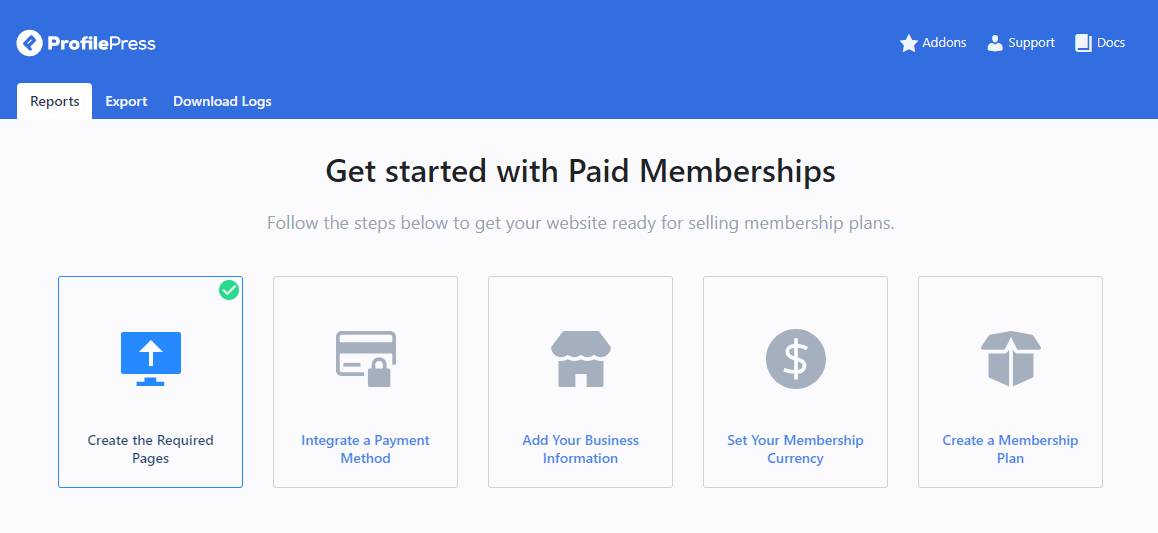
ProfilePress
Scrolling down, you’ll have inbuilt analytics related to your Community. This will help you summarize your community in a glance, pinpoint your selling point, what can be improved, and take measured actions.

Also Read: BuddyPress vs BuddyBoss: Which One Should You Choose for Your Site?
Step 3: Enhancing User Engagement in Your Private Community
Building a private community isn’t just about restricting access—it’s about creating an environment where members feel valued and engaged. Features like gamification, discussion forums, live chat, and exclusive content help keep your audience actively involved. Wbcom Designs offers a range of plugins that can help you incorporate these elements effortlessly.
Some features to keep your community active and engaged
-
Hosting live Q&A sessions to encourage real-time interaction.
-
Rewarding top contributors with badges, shout-outs, or exclusive access.
-
Sending personalized email updates to keep members informed and engaged.
-
Creating interactive challenges to boost participation.
Step 4: Securing Your Private Community Website
Security and privacy are top concerns when running a closed community. You need to ensure that member data is protected, unauthorized access is restricted, and the platform remains safe from spam and breaches. Wbcom Designs ensures that their themes and plugins are optimized for security, allowing you to build a safe and trustworthy space for your users.
With features like two-factor authentication, content restriction, and user verification, you can create a gated community where members feel confident sharing their thoughts and ideas without worrying about privacy issues.
Also Read: 10 Best Security Plugins
Step 5: Monetizing Your Private Community

Additionally, integrating WooCommerce allows you to offer exclusive products, courses, or memberships, making your private community even more valuable. Imagine having a dedicated space where only premium members can access content, interact with experts, and engage in meaningful discussions—this is the power of a well-built private community website. If you want to generate revenue from your private community, there are several ways to do so:
-
Paid Membership Plans – Charge users for access to premium content or forums.
-
Exclusive Content – Offer special articles, videos, or courses only to subscribed members.
-
Online Store Integration – Sell digital products, merchandise, or services.
-
Affiliate Partnerships – Partner with brands to offer exclusive deals to members.
By integrating WooCommerce with your private community, Wbcom Designs makes it easy to set up and manage a monetized membership site.
Also read: From Zero to Revenue: Transforming Your Hobby into a Business with Reign
SEO Strategies for Growing Your Private Community
SEO plays a crucial role in making your private community discoverable, so make sure to incorporate these strategies to optimize your website:
-
Use the focus keyword naturally in your content.
-
Optimize meta titles and descriptions for higher search engine rankings.
-
Create valuable, shareable content that encourages backlinks.
-
Improve site speed and mobile responsiveness to enhance user experience.
-
Leverage social media and guest blogging to drive organic traffic.
Wbcom Designs ensures that its themes and plugins are SEO-friendly, helping you rank higher and attract the right audience.
Take the Next Step
Creating a private community website is more than just setting up a few pages—it’s about fostering engagement, ensuring exclusivity, and providing value to your members. With the right tools and support, you can build a thriving online space where your audience feels connected and appreciated.
If you’re ready to build your private community website, Wbcom Designs has everything you need—from expertly crafted themes like BuddyX to powerful community-building plugins. Their team of experts can help you customize and launch your community platform with ease.
So why wait? Get started with Wbcom Designs today and create a private community website that stands out!

Interesting Reads
10 Best WordPress Themes for Startups
How to Build an Online Community with WordPress
Reign vs Other Community Themes: Why Reign is the Best Choice