
Affiliate marketing has become one of the most powerful ways to build a passive income stream. By promoting products or services and earning commissions from each sale, entrepreneurs, bloggers, and even small business owners can create an additional revenue source. WooCommerce, the most popular eCommerce plugin for WordPress, provides an ideal foundation for building and managing affiliate marketing programs. Its flexibility, wide range of plugins, and seamless WordPress integration make it the go-to choice for affiliate marketers.
If you have been considering diving into affiliate marketing, WooCommerce offers all the tools you need. With the right setup, you can create a professional-looking affiliate store, track referrals, and maximize earnings. This guide will show you how to use WooCommerce for affiliate marketing, why it’s effective, and how to implement a step-by-step strategy using plugins such as YITH WooCommerce Affiliates.

What Is WooCommerce Affiliate Marketing?
Affiliate marketing through WooCommerce involves creating an online store where you promote third-party products instead of selling your own. Instead of handling inventory, shipping, or product creation, you link to products from affiliate partners. Each time a visitor clicks your link and makes a purchase, you earn a commission.
By setting up WooCommerce correctly, your website can look just like a fully functional eCommerce store. Visitors won’t immediately realize that the products are affiliate links. Instead, they experience a professional shopping journey while you benefit from commissions. This model is popular with niche bloggers, review sites, and digital entrepreneurs who want to monetize without the complexities of traditional retail.
When you use WooCommerce for affiliate marketing, you also gain the advantage of WordPress’s flexibility. You can integrate SEO plugins, analytics tools, and design customizations to optimize for traffic and conversions. This makes your affiliate store look more authentic while delivering a better user experience.
Why Use WooCommerce for Affiliate Marketing?
The first and most obvious reason is cost-effectiveness. WooCommerce itself is free, and while you may need some premium plugins, it’s still far more affordable than investing in custom-built affiliate systems. This makes it beginner-friendly and scalable for advanced marketers.
Another reason is control. Unlike joining a third-party marketplace where your design and brand presence are limited, WooCommerce lets you fully customize your website. You decide on product layout, colors, navigation, and even checkout experiences. This gives you the power to craft a branded affiliate store that looks trustworthy and professional.
Additionally, WooCommerce integrates smoothly with thousands of WordPress plugins. Whether you need SEO optimization, advanced analytics, or affiliate tracking, you’ll find a solution that plugs right into your store. When you use WooCommerce for affiliate marketing, you’re not limited to a one-size-fits-all approach; you’re building a custom affiliate machine tailored to your goals.
How to Use WooCommerce for Affiliate Marketing
Now that we’ve covered the basics, let’s explore how you can use WooCommerce for affiliate marketing step by step. Setting up your store requires planning, the right tools, and proper execution.
First, you’ll need to install WooCommerce on your WordPress site. Once active, you can create affiliate products directly within the WooCommerce product settings. Instead of adding stock or price, you’ll enter your affiliate link. This ensures that when a customer clicks “Buy Now,” they are redirected to the merchant’s website.
To maximize results, you’ll also want to invest in affiliate plugins that enhance tracking and reporting. A standout choice is the YITH WooCommerce Affiliates plugin. It provides a dedicated system for managing affiliates, tracking clicks, and calculating commissions. Let’s go deeper into how to set it up.
Step-by-Step Guide: Setting Up YITH WooCommerce Affiliates Plugin
The YITH WooCommerce Affiliates plugin makes it simple to transform your WooCommerce site into a fully functional affiliate marketing platform. Here’s a step-by-step breakdown:
1: Install and Activate the Plugin
- Go to your WordPress dashboard.
- Navigate to Plugins > Add New.
- Search for “YITH WooCommerce Affiliates.”
- Install and activate the plugin.

2: Configure General Settings
- Once activated, locate YITH > Affiliates.
- Set your default commission rate.

- Choose cookie duration to track referrals.
- Adjust payment preferences for affiliates.
3: Add Affiliate Products
- Go to Products > Add New.
- Select “External/Affiliate Product.”
- Enter product name, description, and image.
- Insert your affiliate URL in the “Product URL” field.

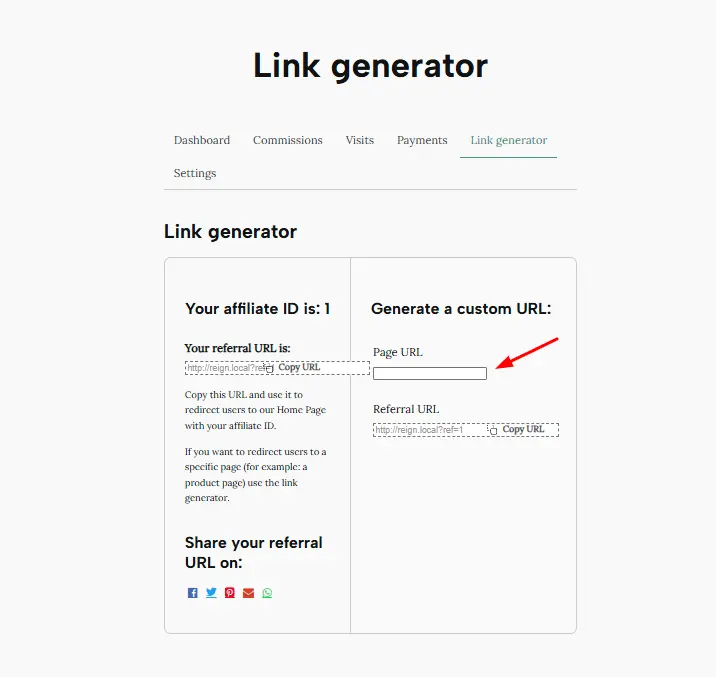
4: Create Affiliate Links for Partners
- Affiliates can register through your website.
- Generate unique tracking links for each affiliate.
- Monitor clicks and conversions inside the plugin dashboard.
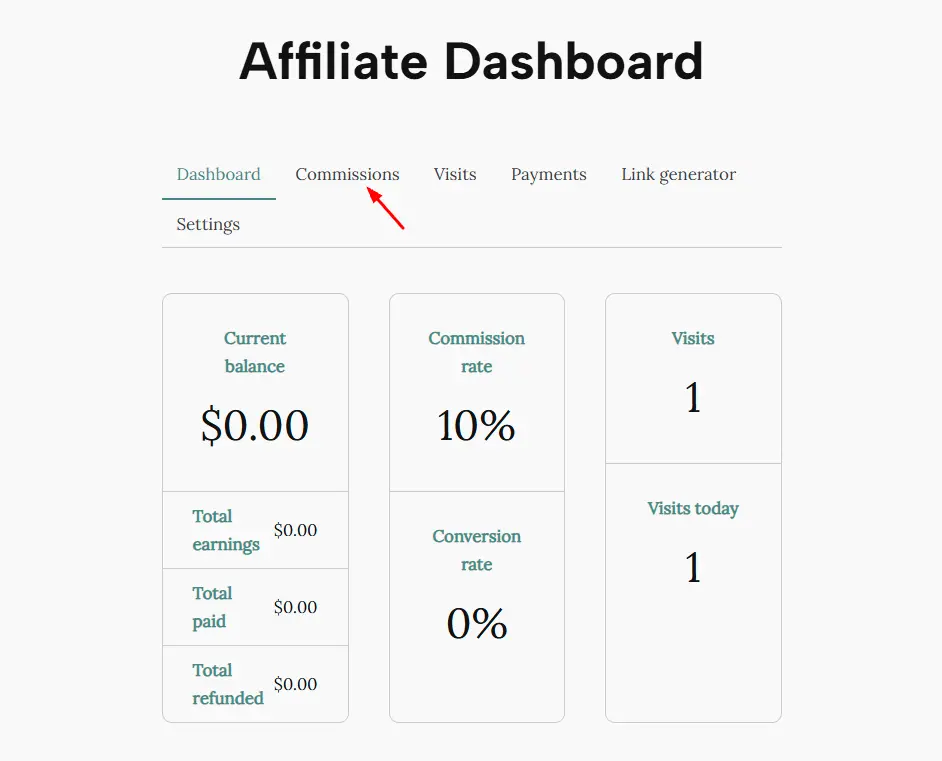
5: Track and Manage Commissions
- Review reports on referrals and commissions.
- Approve or reject commission payments.
- Export data for accounting or future planning.
When you follow this process, your WooCommerce store evolves into a revenue-generating affiliate system. By combining WooCommerce’s eCommerce features with YITH’s affiliate tracking, you have everything needed to build a professional affiliate business.
Building Trust with Your Affiliate Store
One of the biggest challenges in affiliate marketing is trust. Visitors need to feel confident clicking through your links. A poorly designed site or vague product descriptions can discourage users from making purchases.
When you use WooCommerce for affiliate marketing, you have the advantage of creating a store that mirrors a real eCommerce site. Adding detailed descriptions, high-quality images, and honest product reviews boosts credibility. Furthermore, integrating SSL certificates and professional themes builds trust with your audience.
Transparency also plays a key role. Let your visitors know when you use affiliate links, but frame it in a way that highlights the benefits. For example, you can explain that commissions help you keep your site running while offering free content. This honesty fosters loyalty and repeat visitors.
Strategies to Maximize Your WooCommerce Affiliate Store
Simply setting up WooCommerce and YITH Affiliates won’t guarantee success. You’ll need strategies to drive traffic and optimize conversions. Here are a few approaches:
- Content Marketing: Write product reviews, comparisons, and tutorials.
- SEO Optimization: Use keywords strategically in product pages and blogs.
- Email Marketing: Build a list of subscribers and share affiliate offers.
- Social Media Promotion: Showcase your affiliate products on platforms like Instagram and TikTok.
- Analytics Tracking: Monitor which links generate the most revenue and adjust strategies accordingly.
When you use WooCommerce for affiliate marketing in combination with these strategies, your chances of success grow significantly. It’s not just about having a store—it’s about driving traffic, nurturing relationships, and scaling your affiliate income.
Common Mistakes to Avoid in WooCommerce Affiliate Marketing
Even with the right setup, beginners often make mistakes that hurt their earnings. A common error is stuffing a store with too many products. While it might seem like more products equal more chances to earn, an overwhelming store can confuse visitors.
Another mistake is neglecting mobile optimization. A large portion of users shop and browse on smartphones. If your WooCommerce store isn’t mobile-friendly, you risk losing significant commissions.
Additionally, some affiliates focus only on selling without providing value. Instead of bombarding your audience with affiliate links, create helpful content. Tutorials, guides, and honest reviews encourage trust, which directly impacts conversions. Avoiding these pitfalls ensures that your strategy to use WooCommerce for affiliate marketing pays off.
Future-Proofing Your Affiliate Business with WooCommerce
Affiliate marketing is evolving. With AI-driven recommendations, voice search, and shifting consumer habits, staying ahead is essential. WooCommerce gives you the flexibility to adapt. By integrating with new plugins and keeping up with SEO trends, your affiliate store can remain relevant for years to come.
Investing in automation also future-proofs your business. Tools that schedule posts, track performance, and optimize conversions help you save time while maintaining efficiency. When you continuously refine your WooCommerce setup, you can grow your affiliate income sustainably.
Ultimately, the decision to use WooCommerce for affiliate marketing is not just about starting an online store—it’s about building a long-term digital business. With careful planning, regular updates, and a focus on value-driven content, you can transform WooCommerce into a powerful affiliate engine.

Closing Remarks
Affiliate marketing remains one of the most accessible ways to earn income online. With WooCommerce, anyone can create a professional affiliate store that looks like a genuine eCommerce site. By integrating the YITH WooCommerce Affiliates plugin, you gain advanced tracking and management features that make running your affiliate business easier than ever.
Whether you’re just starting or scaling an existing affiliate business, the key lies in consistency, trust-building, and optimization. If you want to maximize commissions and build a reliable revenue stream, there’s no better choice than to use WooCommerce for affiliate marketing.
Interesting Reads:
How to Build a WooCommerce Membership Site with Content Drips and Perks
How to Enable Safe On-Site Payments with Authorize.Net in WooCommerce